ASO keywords
Most repeated terms in the listing. Highlighted ones also appear in the title.
codes6authenticator 2fa5accounts42fa mfa3face touch3totp hotp3authenticator32fa3mfa3add3seconds3service3access3device3backup3generates2offline2face2touch2manually2totp2hotp2code2rfc2
What's new in 1.0.1
Bug fixes and performance improvements
Released Aug 5, 2026. Current version shipped Sep 30, 2026.
Store description
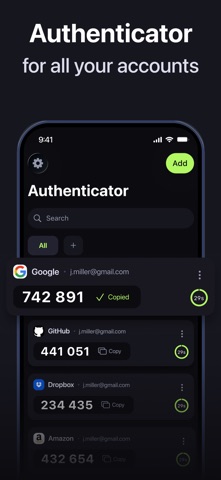
Authenticator App: 2FA, MFA generates secure one-time codes for any account — instantly, offline, and protected by your Face ID or Touch ID.
Add any account manually in seconds and get a fresh 6-digit TOTP or HOTP code every 30 seconds. No SMS. No internet connection required. No third party ever sees your codes.
WHAT THE APP DOES
• Generates TOTP & HOTP codes (RFC 6238 / RFC 4226) for any service that supports two-factor authentication
• Works with Google, Microsoft, Apple ID, Amazon, GitHub, Dropbox, Slack, Facebook, and thousands more
• Add accounts via QR code or manual key entry
• Stores all accounts in one organised list with custom names for easy navigation
• Refreshes codes automatically every 30 seconds with a visible countdown timer
• Locks the app behind Face ID or Touch ID so only you can access your codes
• Runs fully offline — codes are generated on-device, never sent to a server
BACKUP & RESTORE
Encrypted backup saves all your accounts to the cloud. If you switch or lose your phone, restore every account to a new device in one tap. Backup is end-to-end encrypted — your keys never leave your device.
SWITCHING FROM ANOTHER APP
Add your existing accounts manually using the secret keys from each service. Takes a few minutes and keeps access to every account intact.
PRIVACY AND SECURITY
Authenticator: 2FA Auth, MFA complies with stringent privacy standards, ensuring that your data remains safe and confidential. For more information, please review our Privacy Policy at https://authgreen.com/privacy
SUBSCRIPTION AND TERMS
Authenticator App: 2FA, MFA is a subscription-based app with a free trial period. Subscribe for unlimited access with no commitment, and you can cancel anytime. Manage your subscription and disable auto-renewal in iTunes' Account Settings after purchase. Read our Terms of Service at https://authgreen.com/termsofuse
See this store page in another country
Prices, ranks and reviews are per country. Revenue above is already worldwide.