← Back to charts
Qscreen icon
APP STORE

Qscreen

Ricco . · Utilities · Brazil store
NOT IN TOP 100 HERE
View on App Store ↗ Instagram card
Revenue a month, worldwide
Too small to estimate
Not enough chart or ratings data
New ratings
Tracking
Daily counts start building from today
Rating
0.0 of 5
0 ratings in this store
Countries it ranks in
0
was 0 on Oct 20, 2026

Revenue

Estimated from the grossing charts of Oct 26, 2026 in the 53 countries we track, and ratings growth on the App Store.

EST. REVENUE / MONTH · WORLDWIDE
Unranked
Not in any grossing chart, and too few ratings (0) to read its growth. Most apps at this stage earn little or nothing.
EST. LIFETIME DOWNLOADS
n/a
Estimated from ratings count
RATINGS
0
AVG RATING
n/a
PRICE
R$ 19,90
AGE
132d
LAST UPDATE
109d ago
VERSION
1.0.2
SIZE
5 MB
AGE RATING
+4

Last 30 days

From our daily snapshots of every grossing chart.

DAYS IN A GROSSING CHART
0 / 30
COUNTRIES NOW
0 (was 0)
EST. REVENUE FROM CHARTS, DAILY · APP STORE ONLY EST
Show daily values
Sep 28, 2026not in a grossing chart
Sep 29, 2026not in a grossing chart
Sep 30, 2026not in a grossing chart
Oct 1, 2026not in a grossing chart
Oct 2, 2026not in a grossing chart
Oct 3, 2026not in a grossing chart
Oct 4, 2026not in a grossing chart
Oct 5, 2026not in a grossing chart
Oct 6, 2026not in a grossing chart
Oct 7, 2026not in a grossing chart
Oct 8, 2026not in a grossing chart
Oct 9, 2026not in a grossing chart
Oct 10, 2026not in a grossing chart
Oct 11, 2026not in a grossing chart
Oct 12, 2026not in a grossing chart
Oct 13, 2026not in a grossing chart
Oct 14, 2026not in a grossing chart
Oct 15, 2026not in a grossing chart
Oct 16, 2026not in a grossing chart
Oct 17, 2026not in a grossing chart
Oct 18, 2026not in a grossing chart
Oct 19, 2026not in a grossing chart
Oct 20, 2026not in a grossing chart
Oct 21, 2026not in a grossing chart
Oct 22, 2026not in a grossing chart
Oct 23, 2026not in a grossing chart
Oct 24, 2026not in a grossing chart
Oct 25, 2026not in a grossing chart
Oct 26, 2026not in a grossing chart
Oct 27, 2026not in a grossing chart
Best rank Sep 28, 2026: not ranked. Now: not ranked. Days at zero are days outside every grossing chart.

Money and momentum

Measured from the store, not estimated.

WHAT IT CHARGES
No in-app purchases
Earns from its upfront price, ads or payments outside the store.
REVIEW MOMENTUM
Too few reviews
Fewer than 3 recent written reviews in this country.
RELEASE CADENCE
0 updates in 90 days
  • Typical gap between releases22 days
From the last 3 versions listed on the App Store.

Store screenshots

ScreenshotScreenshotScreenshotScreenshotScreenshotScreenshot

App Store ads

Apple Search Ads this app ran in the last 90 days, from Apple's public ad repository.

Apple's ad repository couldn't be reached right now. Try again later.

Growth research

Where this app is buying and earning its users. Each link opens pre filtered.

ASO keywords

Most repeated terms in the listing. Highlighted ones also appear in the title.

vnc8compatible8vnc compatible8remote6control6screen6touch5touch first5compatible server5qscreen4stylus4desktop4first4stylus support3companion required3designed touch3first interaction3including macos3macos screen3screen sharing3remote access3built3support3mobile3

What's new in 1.0.2

Minor bug fixes

Released Jun 17, 2026. Current version shipped Jul 9, 2026.

Store description

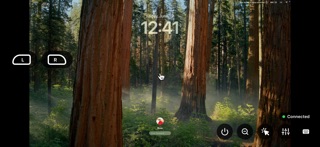
Qscreen is a modern VNC client built around touch, stylus support, and mobile workflows. Whether you’re managing files, controlling applications, or accessing a remote computer, Qscreen makes remote desktop control feel natural and intuitive. No account. No subscriptions. No companion app required. Simply connect to your VNC-compatible device and get to work. NATIVE STYLUS SUPPORT Use a compatible stylus for precise cursor control and navigation. MOBILE AND TABLET OPTIMIZED Designed for touch-first interaction on phones and tablets. AUTOMATIC COMPUTER DISCOVERY Instantly detect compatible devices available on your local network. MULTIPLE CURSOR MODES Choose the control style that fits your workflow. • Trackpad Mode • Direct Touch Mode • Stylus Mode EXTERNAL KEYBOARD SUPPORT Pair your favorite Bluetooth keyboard for a desktop-like experience. QUICK COMMAND CONTROLS Convenient on-screen keys for Command, Option, Control, Arrow Keys, and more. LEFT AND RIGHT MOUSE BUTTONS Dedicated mouse controls for accurate desktop interaction. ADJUSTABLE STREAMING QUALITY Switch between High and Low quality modes based on your network conditions. CONNECTION STATUS INDICATOR Always know when you’re actively connected and in control. INSTANT ZOOM OUT Quickly return to a full-screen view whenever you lose your place while zoomed in. SCREEN SAVER PROTECTION Reduce screen burn-in during long sessions with customizable timers from 30 seconds to 30 minutes. DISCONNECT CONFIRMATION Prevent accidental disconnects with a confirmation prompt before ending a session. NO COMPANION APP REQUIRED Connect directly to any VNC-compatible server, including macOS Screen Sharing and other standard VNC implementations. No additional software, background services, accounts, or cloud setup required. BUILT FOR TOUCH-FIRST REMOTE ACCESS Unlike traditional VNC clients that simply mirror a desktop, Qscreen is designed for touch-first interaction. Every feature is built to make remote access faster, simpler, and more intuitive. PRIVACY FIRST Qscreen never requires an account. Connections are established directly between your device and your VNC-compatible server, giving you complete control over your remote sessions. SUPPORTED DEVICES Connect to computers and devices running VNC-compatible servers, including: • macOS • Windows • Linux • Raspberry Pi • NAS systems • Home servers REQUIREMENTS • A VNC-compatible server • For macOS, Screen Sharing must be enabled • Local or remote network access • A compatible mobile device or tablet

See this store page in another country

Prices, ranks and reviews are per country. Revenue above is already worldwide.

More from Ricco .

U-Bear
Social Networking
0 ratingsAnalyze →
qdeck flash card
Education
0 ratingsAnalyze →
Qvision Camera
Utilities
0 ratingsAnalyze →
Qprint
Business
0 ratingsAnalyze →
GR Studio
Photo & Video
0 ratingsAnalyze →
Qwest - City Quests
Lifestyle
0 ratingsAnalyze →