ASO keywords
Most repeated terms in the listing. Highlighted ones also appear in the title.
pdf9snapdoc pdf6renewal6document5snapdoc4smart4seconds4file4smart document3document scanner3seconds powerful3renewal cost3scanner3scan3edit3automatically3professional3scans3files3manage2pdfs2powered2organize2share2
What's new in 1.3
update new feature, fix bugs
Released Jun 18, 2026. Current version shipped Oct 20, 2026.
Store description
SnapDoc PDF - AI Scanner: Scan, Edit & Manage PDFs Effortlessly
Turn your phone into a smart document scanner, your all-in-one document scanner, powered by AI. SnapDoc PDF helps you capture, edit, organize, and share documents quickly, securely, and professionally: powered by advanced AI technology.
Why Choose SnapDoc PDF:
- Smart AI Scanning: AI technology automatically detects document edges, corrects skewed angles, and removes shadows: delivering sharp, professional scans in seconds.
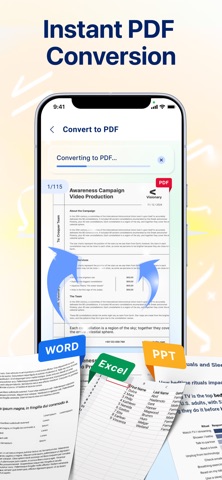
- Powerful PDF Converter: Convert Office files to high-quality PDFs in seconds.
- Perfect Formatting: Maintain 100% of your original layout, fonts, and images. What you see in Office is what you get in PDF.
- One-Tap Conversion: No complex settings: just select your file and get a professional PDF result instantly.
- Smart Document Manager: Your all-in-one hub to organize, find, and control all your files.
- Centralized Library: Automatically scans and categorizes all your PDF into one organized view.
- Instant Search: Locate any file in seconds with a powerful, intuitive search engine. No more scrolling.
- Full File Control: Rename, delete, or share files directly from the app. Keep your digital workspace clean and professional.
- Multi-Page Support: Scan dozens of pages and compile them into a single, neatly ordered PDF in just a few seconds.
- Productivity Booster: Save time with batch scanning, one-tap renaming, and automated file organization. Add password protection to keep sensitive documents secure.
- Image Enhancement: Adjust brightness and contrast, remove shadows, and apply smart filters for the best possible scan quality.
- Instant Sharing & Printing: Send scans via email, messaging apps, or print directly to any Wi-Fi printer.
- User-Friendly Interface: Clean, intuitive design: easy to use for professionals, students, and everyday users alike.
Download SnapDoc PDF today and say goodbye to paperwork hassle.
- Subscription Pricing & Terms:
Account Charge: Your iTunes Account will be charged once you confirm your purchase.
Account Settings: You can manage your subscriptions and disable auto-renewal in your Account Settings after the purchase.
Auto-Renewal: Subscriptions will automatically renew unless auto-renewal is turned off at least 24 hours before the end of the current period.
Renewal Cost: The renewal cost will be charged to your account 24 hours before the end of the current period.
Cancellation Policy: If you choose to cancel a subscription, it will remain active until the end of the period. Auto-renewal will be disabled, but no refunds will be provided for the current subscription.
Free Trial: Any unused portion of a free trial period, if offered, will be forfeited upon purchasing a subscription.
Terms: https://www.apple.com/legal/internet-services/itunes/dev/stdeula/
Privacy Policy: https://docs.google.com/document/d/1FZmafk69SrWpdb1aYAlYFuSiB3qnYMfya0kL5hLLldw/edit?usp=sharing
See this store page in another country
Prices, ranks and reviews are per country. Revenue above is already worldwide.