← Back to charts
FileFlow: Transfer & Convert icon
APP STORE

FileFlow: Transfer & Convert

Sandy Radadiya · Utilities · Brazil store
NOT IN TOP 100 HERE
View on App Store ↗ Instagram card
Revenue a month, worldwide
Too small to estimate
Not enough chart or ratings data
New ratings
Tracking
Daily counts start building from today
Rating
0.0 of 5
0 ratings in this store
Countries it ranks in
0
was 0 on Oct 19, 2026

Revenue

Estimated from the grossing charts of Oct 26, 2026 in the 53 countries we track, and ratings growth on the App Store.

EST. REVENUE / MONTH · WORLDWIDE
Unranked
Not in any grossing chart, and it sells nothing in the store (no in-app purchases, free download). Any revenue comes from ads or payments outside the store, which we can't see.
EST. LIFETIME DOWNLOADS
n/a
Estimated from ratings count
RATINGS
0
AVG RATING
n/a
PRICE
Grátis
AGE
196d
LAST UPDATE
107d ago
VERSION
1.1
SIZE
76 MB
AGE RATING
+4

Last 30 days

From our daily snapshots of every grossing chart.

DAYS IN A GROSSING CHART
0 / 30
COUNTRIES NOW
0 (was 0)
EST. REVENUE FROM CHARTS, DAILY · APP STORE ONLY EST
Show daily values
Sep 27, 2026not in a grossing chart
Sep 28, 2026not in a grossing chart
Sep 29, 2026not in a grossing chart
Sep 30, 2026not in a grossing chart
Oct 1, 2026not in a grossing chart
Oct 2, 2026not in a grossing chart
Oct 3, 2026not in a grossing chart
Oct 4, 2026not in a grossing chart
Oct 5, 2026not in a grossing chart
Oct 6, 2026not in a grossing chart
Oct 7, 2026not in a grossing chart
Oct 8, 2026not in a grossing chart
Oct 9, 2026not in a grossing chart
Oct 10, 2026not in a grossing chart
Oct 11, 2026not in a grossing chart
Oct 12, 2026not in a grossing chart
Oct 13, 2026not in a grossing chart
Oct 14, 2026not in a grossing chart
Oct 15, 2026not in a grossing chart
Oct 16, 2026not in a grossing chart
Oct 17, 2026not in a grossing chart
Oct 18, 2026not in a grossing chart
Oct 19, 2026not in a grossing chart
Oct 20, 2026not in a grossing chart
Oct 21, 2026not in a grossing chart
Oct 22, 2026not in a grossing chart
Oct 23, 2026not in a grossing chart
Oct 24, 2026not in a grossing chart
Oct 25, 2026not in a grossing chart
Oct 26, 2026not in a grossing chart
Best rank Sep 27, 2026: not ranked. Now: not ranked. Days at zero are days outside every grossing chart.

Money and momentum

Measured from the store, not estimated.

WHAT IT CHARGES
No in-app purchases
Earns from its upfront price, ads or payments outside the store.
REVIEW MOMENTUM
Too few reviews
Fewer than 3 recent written reviews in this country.
RELEASE CADENCE
0 updates in 90 days
  • Typical gap between releases87 days
From the last 2 versions listed on the App Store.

Store screenshots

ScreenshotScreenshotScreenshotScreenshotScreenshotScreenshot

App Store ads

Apple Search Ads this app ran in the last 90 days, from Apple's public ad repository.

No App Store ads in the EU
None in the last 90 days.

Apple only publishes ads shown in the EU (EU Digital Services Act), with a 7 day delay. An app that advertises only outside the EU shows nothing here.

Growth research

Where this app is buying and earning its users. Each link opens pre filtered.

ASO keywords

Most repeated terms in the listing. Highlighted ones also appear in the title.

fileflow5transfer5move4quality4fileflow transfer3via web3web browser3high quality3move data3high3speed3data3web3sharing3designed2instant2photos2videos2documents2slow2speeds2choose2hotspot2files2

What's new in 1.1

• Improved transfer speed and reliability. • Better user experience across the app. • Fixed minor issues and improved stability.

Released Apr 14, 2026. Current version shipped Jul 11, 2026.

Store description

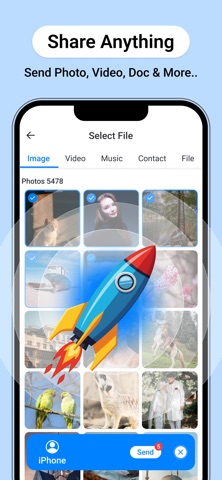
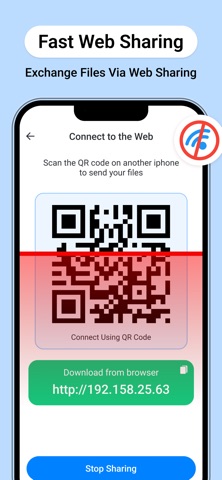
FileFlow: Transfer and Convert is the all-in-one utility designed for high-speed data movement and instant file transformation. Move your photos, videos, and documents without cables, size limits, or slow upload speeds. WHY USERS CHOOSE FILEFLOW: • Ultra-Fast Transfers: Use local WiFi or Hotspot to move heavy 4K videos and large photo libraries at speeds far beyond standard Bluetooth. • Universal Web Sharing: Transfer files from your iPhone to any PC, Mac, or Tablet instantly. Simply scan the QR code displayed in the app to start downloading on the receiving device via a web browser. • Professional Converter: Transform your images into JPEG, HEIC, PNG, BMP, or TIFF format in seconds. • Camera to PDF: Turn your physical documents or gallery photos into high-quality PDFs with the built-in creator. • Precise Quality Selection: Take control of your storage. Choose to send files in Original quality, High Quality, or Compressed to save space. CORE FEATURES: • Cross-Platform Support: Seamlessly connect iPhone to Windows, Linux, or other mobile devices via web browser. • Nearby Discovery: Quickly find and connect to devices around you for instant, secure sharing. • Offline Sharing: Use the Hotspot Transfer mode to move data even when no internet connection is available. • Modern Design: A clean, intuitive interface designed for maximum efficiency and speed. • Transfer History: Keep a detailed log of your sent and received items for easy access. Stop struggling with email attachments and slow cloud uploads. Join the FileFlow community and move your data at the speed of thought. Privacy Policy : https://iosapp2025.blogspot.com/2026/04/privacy-policy-for-fileflow-transfer.html Terms of Condition : https://sites.google.com/view/fileflow-terms/home

See this store page in another country

Prices, ranks and reviews are per country. Revenue above is already worldwide.

More from Sandy Radadiya

Som de arma 2D
Games
0 ratingsAnalyze →
Credit Card : Wallet & NFC
Utilities
0 ratingsAnalyze →
Keybord Themes & Fonts
Utilities
0 ratingsAnalyze →
Secure Folder - Gallery Lock
Utilities
0 ratingsAnalyze →
Simple Alarm Clock-Smart Wake
Lifestyle
0 ratingsAnalyze →
2FA Authenticator App MFA, OTP
Utilities
0 ratingsAnalyze →
Pic Puzz-Image Sliding Puzzle
Games
0 ratingsAnalyze →
Rolling Ball Puzzle Mind
Games
0 ratingsAnalyze →
GPS Navigation - Offline Maps
Navigation
0 ratingsAnalyze →