ASO keywords
Most repeated terms in the listing. Highlighted ones also appear in the title.
plex15jellyfin10watchamp8music7support7plex jellyfin6jellyfin navidrome6navidrome6watch5server5playback5companion5music library5pre caching5personal4playlists4found4personal music3smart pre3personal media3ultrablur backgrounds3playlists albums3plex pin3quick connect3
What's new in 4.3.0
NEW:
- New local cache of full Artist and Album catalog on the watch to improve browsing speed and sorting capabilities. Initial library load may take slightly longer than usual to build the cache.
- Implemented Pinyin-aware A–Z browsing. Han titles are grouped by Mandarin pinyin initial; accented Latin normalizes; numbers, symbols, empty, and other scripts use #
- New Pull to Refresh gesture on Artist and Album letter pages to forcibly refresh album and artist catalog from server.
- New Non-M4B Audiobook Support alongside M4B Audiobook support via "Audiobook" libraries (BETA). This includes MP3, FLAC, and other Audiobook codecs.
- If you have a Plex, Jellyfin, or Navidrome library that is specific for Audiobooks, you can now enable "Audiobook Library" setting in the WatchAmp settings page on the watch. Jellyfin "Book" type libraries, and libraries named as "Book", "Audiobooks", or "Books" from any media server will automatically enable this setting on first use.
- When a Library has the "Audiobook Library" setting is enabled, Library Hub names will change to "Authors" and "Books" instead of "Artists" and "Albums". Also, "albums" with multiple tracks (ie MP3/FLAC multitrack audiobooks) in the library are treated as a single virtual "Book" and will display as a single media file in the library view and in the play queue. Play progress and total content time is based on the full length of the album rather than a track. Audiobook controls for speed and chapter navigation are now displayed on the Now Playing page for these virtual "Books".
- Turning off the "Audiobook Library" setting will revert the library to a Music library and album display and labels will return. Single "Books" will revert to albums with multiple tracks, etc.
- Implemented OverDrive MediaMarker support for virtual non-M4B audiobooks on Jellyfin & Navidrome servers. If the non-M4B files in an audiobook include Overdrive MediaMarker ID3 Tags, these will take precedence as Chapters in WatchAmp. If this ID3 metadata is not present, WatchAmp will fallback to using each "file" or "part" as a chapter for navigation. Unfortunately, Plex often strips these OverDrive ID3 Tags and so this feature is not compatible with Plex Servers. Plex Server users will see the fallback to using each "file" or "part" as a chapter for navigation. Cue chapter files are not supported.
- When Non-M4B Audiobooks are downloaded from a Library that is set to "Audiobook Library", the downloaded local content will be treated as a single "Book" and will display as a single media file.
- When there is locally downloaded content from Music and Audiobook libraries on the watch, WatchAmp will now split the content into "Downloaded Music" and "Downloaded Books" libraries.
- Long press items in the Play Queue to reveal controls for "Play Next" and "Remove". "Play Next" moves the track to the next playable position and "Remove" removes the track from the queue.
- Implemented Navidrome audiobook bookmark support using OpenSubsonic getBookmarks, createBookmark, and deleteBookmark.
- iPhone Duo support.
FIXES:
- Misc M4B Audiobook download fixes.
- Fixed stale Plex Cert refresh issue where cached server credentials could become stale and cause connection issues to Plex servers.
- Improved Plex resolver speed when Plex returns multiple addresses for a user's server (ie Local/Remote/VPN/etc).
- Fixed bug where user wasn't always presented with Library choice if changing media server providers.
- Fixed a bug with MP3 download verification.
Released May 19, 2026. Current version shipped Oct 26, 2026.
Store description
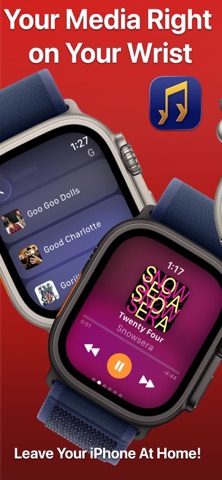
WatchAmp is the fastest way to enjoy your personal music library on Apple Watch — no iPhone required. Stream, transcode, and download your music for truly phone‑free workouts, commutes, and everyday listening. With smart pre‑caching, tracks start quickly and keep playing smoothly wherever you go.
Compatibility
WatchAmp works with Plex, Jellyfin, or Navidrome and requires an existing Plex, Jellyfin, or Navidrome account and access to your personal Media Server. All media remains hosted by the user.
Why You’ll Love It
• Pure watchOS playback: Browse, play, and control your personal music library directly on Apple Watch.
• Beautiful UltraBlur backgrounds with richer artwork-based color treatment
• Audiobook Playback with Chapter and Speed Controls (Beta)
• Offline, on your terms: Download playlists, albums, or an entire artist's catalog for phone‑free listening.
• Smooth and instant: Pre‑caching keeps your next track ready so the music never stops.
• Optimized audio: On‑the‑fly transcoding matches your connection and battery needs.
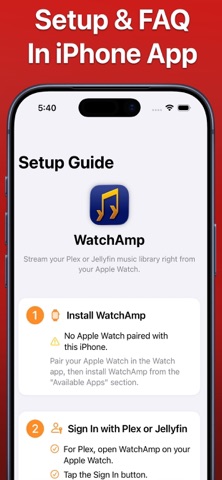
• Simple setup: A companion iPhone app guides you through connecting your Plex or Jellyfin account to your watch.
Key Features
• Plex PIN Login and Music Library access on Apple Watch
• Jellyfin/Navidrome Quick Connect support
• Transcoding for reliable streaming over cellular or Wi‑Fi
• Offline downloads for playlists, albums, and artist catalogs
• Smart pre‑caching to reduce buffering and speed up track starts
• Queue, shuffle, repeat, and Now Playing controls on your wrist
• Search and browse by artists, albums, and playlists
• Support for Music Hubs like "Recently Added", "Recently Played", and "Recently Released"
• Support for UltraBlur backgrounds
• watchOS Complication, Widget, and Smart Stack Support
• Companion iPhone app with step‑by‑step setup and tips
• Server management in the companion app
• Background playback and support for Bluetooth headphones or your Apple Watch's External Speaker
Made for Apple Platforms
• Built natively for watchOS with a responsive, battery‑friendly design
• Companion iPhone app for quick setup, help, and account management
• Works great with AirPods and Bluetooth accessories
No Plex Pass needed!
Plex does not require Plex Pass for remote audio streaming, only video. See https://support.plex.tv/articles/requirements-for-remote-playback-of-personal-media/ for more information.
Pricing
Start free with limited playback to test out the app. Upgrade to WatchAmp Premium to unlock unlimited streaming, offline downloads, and access to Playlists. Simple subscription. No ads. Cancel anytime.
Privacy
Your music is your business. WatchAmp connects securely to your Plex server using Plex's PIN authentication or your Jellyfin/Navidrome server using Quick Connect or user password. Tokens are never sent back to the developer and only live on your device. WatchAmp does not collect or sell your data or include third‑party ad tracking. Our privacy policy can be found at https://watchamp.nerdypup.com/privacy. Plex's privacy policy can be found at https://www.plex.tv/about/privacy-legal/ . Jellyfin's server policy can be found at https://jellyfin.org/docs/general/community-standards/servers . Navidrome's privacy policy can be found at https://www.navidrome.org/docs/usage/admin/insights/#privacy-and-transparency
Support
Need help? Check the in‑app How‑To in the companion app or contact us at help@nerdypup.com.
GitHub Issue Reports & Feature Request: https://github.com/fkick/WatchAmp/issues
Wiki Manual: https://github.com/fkick/WatchAmp/wiki
EULA: https://www.apple.com/legal/internet-services/itunes/dev/stdeula/
Plex is a trademark of Plex, Inc. This app is not affiliated with or endorsed by Plex. Jellyfin is a trademark of the Jellyfin Project. This app is not affiliated with or endorsed by the Jellyfin Project.
See this store page in another country
Prices, ranks and reviews are per country. Revenue above is already worldwide.