← Back to charts
ZapCount icon
APP STORE

ZapCount

NASTASIU HOLDING · Utilities · United States store
NOT IN TOP 100 HERE
View on App Store ↗ Instagram card
Revenue a month, worldwide
Too small to estimate
Not enough chart or ratings data
New ratings
Tracking
Daily counts start building from today
Rating
0.0 of 5
0 ratings in this store
Countries it ranks in
0
was 0 on Oct 19, 2026

Revenue

Estimated from the grossing charts of Oct 25, 2026 in the 53 countries we track, and ratings growth on the App Store.

EST. REVENUE / MONTH · WORLDWIDE
Unranked
Not in any grossing chart, and too few ratings (2) to read its growth. Most apps at this stage earn little or nothing.
EST. LIFETIME DOWNLOADS
n/a
Estimated from ratings count
RATINGS
0
AVG RATING
n/a
PRICE
Free
AGE
202d
LAST UPDATE
66d ago
VERSION
1.5.0
SIZE
53 MB
AGE RATING
4+

Last 30 days

From our daily snapshots of every grossing chart.

DAYS IN A GROSSING CHART
0 / 30
COUNTRIES NOW
0 (was 0)
EST. REVENUE FROM CHARTS, DAILY · APP STORE ONLY EST
Show daily values
Sep 27, 2026not in a grossing chart
Sep 28, 2026not in a grossing chart
Sep 29, 2026not in a grossing chart
Sep 30, 2026not in a grossing chart
Oct 1, 2026not in a grossing chart
Oct 2, 2026not in a grossing chart
Oct 3, 2026not in a grossing chart
Oct 4, 2026not in a grossing chart
Oct 5, 2026not in a grossing chart
Oct 6, 2026not in a grossing chart
Oct 7, 2026not in a grossing chart
Oct 8, 2026not in a grossing chart
Oct 9, 2026not in a grossing chart
Oct 10, 2026not in a grossing chart
Oct 11, 2026not in a grossing chart
Oct 12, 2026not in a grossing chart
Oct 13, 2026not in a grossing chart
Oct 14, 2026not in a grossing chart
Oct 15, 2026not in a grossing chart
Oct 16, 2026not in a grossing chart
Oct 17, 2026not in a grossing chart
Oct 18, 2026not in a grossing chart
Oct 19, 2026not in a grossing chart
Oct 20, 2026not in a grossing chart
Oct 21, 2026not in a grossing chart
Oct 22, 2026not in a grossing chart
Oct 23, 2026not in a grossing chart
Oct 24, 2026not in a grossing chart
Oct 25, 2026not in a grossing chart
Oct 26, 2026not in a grossing chart
Best rank Sep 27, 2026: not ranked. Now: not ranked. Days at zero are days outside every grossing chart.

Money and momentum

Measured from the store, not estimated.

WHAT IT CHARGES
3 purchases listed
  • 50 Counts$3.99
  • 10 Counts$0.99
  • 150 Counts$7.99
Top in-app purchases as listed on the App Store, in local prices.
REVIEW MOMENTUM
Too few reviews
Fewer than 3 recent written reviews in this country.
RELEASE CADENCE
1 update in 90 days
  • Typical gap between releases6 days
From the last 8 versions listed on the App Store.

Store screenshots

ScreenshotScreenshotScreenshotScreenshotScreenshotScreenshotScreenshotScreenshot

App Store ads

Apple Search Ads this app ran in the last 90 days, from Apple's public ad repository.

No App Store ads in the EU
None in the last 90 days.

Apple only publishes ads shown in the EU (EU Digital Services Act), with a 7 day delay. An app that advertises only outside the EU shows nothing here.

Growth research

Where this app is buying and earning its users. Each link opens pre filtered.

ASO keywords

Most repeated terms in the listing. Highlighted ones also appear in the title.

count11counting6zapcount6objects4zapcount automatically3visual overlay3automatically3result3needed3works3review3manual3confidence3boxes3object3human2quickly2adjust2image2visual2overlay2adjustments2seconds2results2

What's new in 1.5.0

Bug fixes and general improvements.

Released Apr 7, 2026. Current version shipped Aug 20, 2026.

Store description

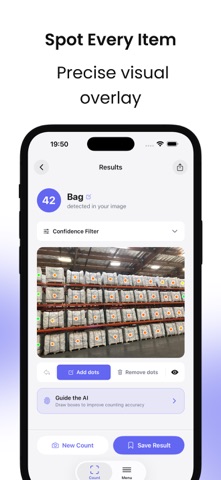
Stop counting by hand. ZapCount combines AI speed with human oversight: the AI performs most of the counting automatically, and you can quickly verify and adjust the result when needed. HOW IT WORKS 1. Take a photo or choose one from your gallery 2. ZapCount's AI automatically detects the main objects in the image 3. Review the visual overlay and make quick adjustments if needed 4. Get your final count in seconds No templates. No training. No manual calibration. It just works. FEATURES - AI-Powered Counting Point, shoot, and get results in seconds. ZapCount uses AI to detect and count objects quickly and reliably. - Human Verification Built In The AI does most of the work, while you stay in control. Review the detected points visually and confirm the result with confidence. - Auto Detection ZapCount automatically identifies what to count in your scene - pipes, boxes, screws, pallets, and many more object types. - Visual Overlay Every counted object is marked so you can clearly see what the AI detected. - Manual Adjustments Add or remove points to fine-tune the result. Use bounding boxes to guide the AI in specific areas when needed. - Confidence Filter Adjust the confidence slider to display only higher-certainty detections. - Counting History All your counts are saved so you can review, compare, and share them later. - 54 Languages ZapCount is available in 54 languages, so you can use it in the language you are most comfortable with. USE CASES - Construction - Count rebar, pipes, bricks, and building materials - Warehousing - Spot-check pallets, boxes, and inventory - Retail - Count products on shelves more efficiently - Manufacturing - Count parts and components on the line - Agriculture - Count livestock, fruit, plants, and crops - Logistics - Count parcels and shipping containers - Science - Count cells, samples, and specimens - Forestry - Count logs, timber, and trees - Events - Estimate crowd size, seating, and attendance GOOD TO KNOW - Works best when counting one type of object at a time - Objects should be clearly visible for best results - Can count up to around 900 objects per image - Requires an internet connection for AI processing - Start with 5 free counts - no account required - Registered users receive 10 free scans every month on the 1st Try ZapCount today and save hours of manual counting.

See this store page in another country

Prices, ranks and reviews are per country. Revenue above is already worldwide.

More from NASTASIU HOLDING

Mobile Inventory: Scan & Track
Business
21 ratingsAnalyze →