ASO keywords
Most repeated terms in the listing. Highlighted ones also appear in the title.
codes8accounts7authenticator6code6backup5authenticator plus5sites view5view auth5time4encrypted4screen4totp hotp3microsoft github3stored encrypted3time left3sha sha3icloud backup3live activity3auth eula3seconds3support3setup3transfer3sha3
What's new in 1.3
Authenticator has been completely renewed!
• A modern interface, redesigned from the ground up
• New features and easier everyday use
• Performance and stability improvements
• A smoother, better overall experience
A faster, more modern and more secure Authenticator.
Released Nov 13, 2025. Current version shipped Oct 19, 2026.
Store description
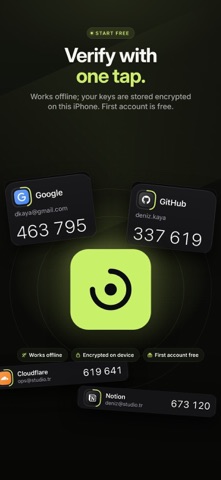
Authenticator brings your two-factor authentication (2FA) codes together in one secure, fast app. It generates 6–8 digit one-time codes (TOTP and HOTP) in seconds for Google, Microsoft, GitHub, Amazon, Binance, Discord, Dropbox and hundreds of other services that support 2FA. No internet connection needed; your setup keys are stored encrypted on this iPhone.
QUICK SETUP
• Scan the QR code on the website with your camera; the account appears in your list instantly.
• Read QR codes from photos, screenshots or files.
• Type or paste the setup key; spaces and dashes are no problem.
• Preview the code before saving to avoid mistakes.
MOVE FROM OTHER APPS
• Scan Google Authenticator transfer QR codes and bring all your accounts over at once.
• Import exports from 2FAS, Aegis, Raivo and andOTP.
• Accounts are listed before they're added, so you choose which ones to bring. Duplicates are skipped.
EVERYDAY USE
• Tap a code to copy it. Copied codes are cleared from the clipboard when they expire.
• See the time left on the countdown ring; the next code is ready in the final seconds.
• Pin the accounts you use most, tag them (Work, Personal, Crypto…) and search.
• Recognize accounts at a glance with brand logos.
• TOTP and HOTP · SHA-1, SHA-256, SHA-512 · 6–8 digits · 30–60 seconds.
SECURITY AND PRIVACY
• Lock with Face ID, Touch ID or an app passcode.
• Auto-lock: immediately when you leave the app or after a time you choose.
• Cooldown after failed attempts.
• Codes are hidden in screen recordings, screen mirroring and the app switcher.
• Data is stored encrypted on your device; no ads, no account required.
BACKUP AND TRANSFER
• Encrypted iCloud backup: automatic with every change.
• Password-protected .authbackup file: save it to Files and keep it wherever you like.
• Restore your backup on a new iPhone with one tap.
• Device-to-device transfer: move your accounts to another iPhone with a QR code.
AUTOFILL
• Verification codes appear above the keyboard in Safari and apps.
• The account matching the website is suggested; Face ID verification before filling.
SECURE NOTES
• Keep recovery codes linked to their account and mark the ones you've used.
• Encrypted notes for Wi-Fi passwords, bank cards, logins and license keys.
TOOLS
• Password generator: random, words or PIN, with a strength meter.
• QR generator: Wi-Fi, links, contacts, email and text.
• Security check: shows weak spots in your accounts and notes.
BUILT FOR iOS
• Home Screen and Lock Screen widgets, StandBy.
• Live Activity: the copied code's time left in the Dynamic Island.
• Control Center controls and Shortcuts (Siri).
• Dark, light or system theme; Reduce Motion and Dynamic Type support.
AUTHENTICATOR PLUS
You can add 1 account in the free version. With Authenticator Plus:
• Unlimited accounts
• Bulk import
• iCloud backup and backup file export
• Widgets, Live Activity and AutoFill
Subscription details:
• Authenticator Plus is offered as weekly and monthly auto-renewing subscriptions. Prices for your country are shown in the app.
• Payment is charged to your Apple Account when you confirm the purchase.
• The subscription renews automatically unless it is turned off at least 24 hours before the end of the current period; renewal is charged within 24 hours before the period ends.
• You can manage and cancel your subscription after purchase in Settings > Apple Account > Subscriptions.
• If a free trial is offered, any unused portion is forfeited when you purchase a subscription.
Privacy Policy: https://sites.google.com/view/auth-app-privacy-policy
Terms of Use (EULA): https://sites.google.com/view/auth-app-eula
Support: https://sites.google.com/view/auth-application-app
Authenticator is not affiliated with Google, Microsoft, GitHub or any other service named here. All trademarks belong to their respective owners.
See this store page in another country
Prices, ranks and reviews are per country. Revenue above is already worldwide.