← Back to charts
Photo to PDF Converter: Image icon
APP STORE

Photo to PDF Converter: Image

Andrii Kulchytskyi · Utilities · Germany store
NOT IN TOP 100 HERE
View on App Store ↗ Instagram card
Revenue a month, worldwide
Too small to estimate
Not enough chart or ratings data
New ratings
Tracking
Daily counts start building from today
Rating
4.9 of 5
7 ratings in this store
Countries it ranks in
0
was 0 on Oct 19, 2026

Revenue

Estimated from the grossing charts of Oct 25, 2026 in the 53 countries we track, and ratings growth on the App Store.

EST. REVENUE / MONTH · WORLDWIDE
Unranked
Not in any grossing chart, and it sells nothing in the store (no in-app purchases, free download). Any revenue comes from ads or payments outside the store, which we can't see.
EST. LIFETIME DOWNLOADS
245 to 700
Estimated from ratings count
RATINGS
7
AVG RATING
4.86
PRICE
Gratis
AGE
358d
LAST UPDATE
128d ago
VERSION
1.0.6
SIZE
49 MB
AGE RATING
4+

Last 30 days

From our daily snapshots of every grossing chart.

DAYS IN A GROSSING CHART
0 / 30
COUNTRIES NOW
0 (was 0)
EST. REVENUE FROM CHARTS, DAILY · APP STORE ONLY EST
Show daily values
Sep 27, 2026not in a grossing chart
Sep 28, 2026not in a grossing chart
Sep 29, 2026not in a grossing chart
Sep 30, 2026not in a grossing chart
Oct 1, 2026not in a grossing chart
Oct 2, 2026not in a grossing chart
Oct 3, 2026not in a grossing chart
Oct 4, 2026not in a grossing chart
Oct 5, 2026not in a grossing chart
Oct 6, 2026not in a grossing chart
Oct 7, 2026not in a grossing chart
Oct 8, 2026not in a grossing chart
Oct 9, 2026not in a grossing chart
Oct 10, 2026not in a grossing chart
Oct 11, 2026not in a grossing chart
Oct 12, 2026not in a grossing chart
Oct 13, 2026not in a grossing chart
Oct 14, 2026not in a grossing chart
Oct 15, 2026not in a grossing chart
Oct 16, 2026not in a grossing chart
Oct 17, 2026not in a grossing chart
Oct 18, 2026not in a grossing chart
Oct 19, 2026not in a grossing chart
Oct 20, 2026not in a grossing chart
Oct 21, 2026not in a grossing chart
Oct 22, 2026not in a grossing chart
Oct 23, 2026not in a grossing chart
Oct 24, 2026not in a grossing chart
Oct 25, 2026not in a grossing chart
Oct 26, 2026not in a grossing chart
Best rank Sep 27, 2026: not ranked. Now: not ranked. Days at zero are days outside every grossing chart.

Money and momentum

Measured from the store, not estimated.

WHAT IT CHARGES
No in-app purchases
Earns from its upfront price, ads or payments outside the store.
REVIEW MOMENTUM
Too few reviews
Fewer than 3 recent written reviews in this country.
RELEASE CADENCE
0 updates in 90 days
  • Typical gap between releases31 days
From the last 7 versions listed on the App Store.
RATING BREAKDOWN
7 ratings
5★86%
4★14%
3★0%
2★0%
1★0%

Store screenshots

ScreenshotScreenshotScreenshotScreenshotScreenshotScreenshotScreenshotScreenshotScreenshotScreenshot

App Store ads

Apple Search Ads this app ran in the last 90 days, from Apple's public ad repository.

No App Store ads in the EU
None in the last 90 days.

Apple only publishes ads shown in the EU (EU Digital Services Act), with a 7 day delay. An app that advertises only outside the EU shows nothing here.

Growth research

Where this app is buying and earning its users. Each link opens pre filtered.

ASO keywords

Most repeated terms in the listing. Highlighted ones also appear in the title.

pdf6share save5photos4share4page size3select photos3page3save3taps2arrange2choose2size2margins2defaults2select2convert2delete2works2quick2photo2

What's new in 1.0.6

1.0.6 - fixed bugs

Released Nov 2, 2025. Current version shipped Jun 20, 2026.

Store description

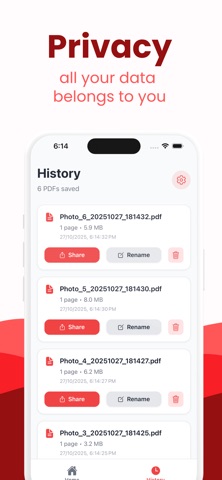
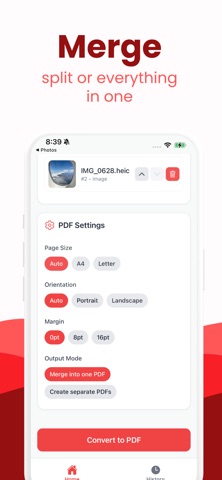
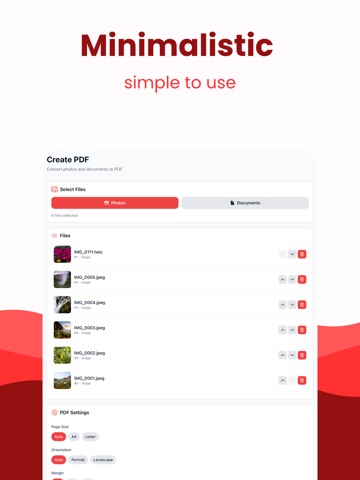
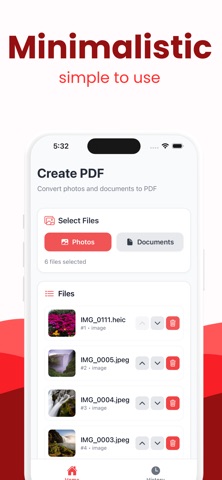
Create a polished PDF from your photos in a few taps. Pick multiple images, arrange the order, choose page size and margins, then export a single PDF you can share or save. Everything runs on your device for speed and privacy. Built for a clean, modern experience with sensible defaults so you get from photos to PDF quickly and reliably. Key Features Multi-select photos and convert to one PDF Reorder pages with simple controls and delete any page Page size presets: Auto, A4, Letter Orientation options: Auto, Portrait, Landscape Margins: None, Small, Medium Share or save to Files, email, and cloud apps Recent history with rename, share, and delete Fast, lightweight, and works fully offline Why It Stands Out Private by design: no accounts, no uploads Optimized for quick conversion and minimal taps Clear defaults that just work for everyday documents How It Works Select photos from your library Arrange, choose settings, and convert Share or save your PDF instantly Ideal For Receipts, forms, notes, homework, travel docs, and photo collections Students, freelancers, and anyone who needs a quick Photo to PDF.

See this store page in another country

Prices, ranks and reviews are per country. Revenue above is already worldwide.

More from Andrii Kulchytskyi

Deep Conversations: Talk&Bond
Games
0 ratingsAnalyze →
Red Flag: Couple Questions
Games
0 ratingsAnalyze →
Word to PDF Converter: Docx
Utilities
0 ratingsAnalyze →
Bluetooth mic: Mic to Speaker
Entertainment
1 ratingsAnalyze →
Looksmaxxing AI: LooksMax Face
Lifestyle
0 ratingsAnalyze →
Write on PDF: Print to PDF
Utilities
0 ratingsAnalyze →
Video to mp3: Media Converter
Music
0 ratingsAnalyze →
MOV to MP4 - Video Converter
Utilities
0 ratingsAnalyze →
Audio Converter - m4a to mp3
Utilities
0 ratingsAnalyze →