ASO keywords
Most repeated terms in the listing. Highlighted ones also appear in the title.
video18capcut10con10per9editing6effetti6funzionalit5clip5editing video5del4chiave4tuoi4sottotitoli4capcut per3per pad3timeline multitraccia3animazione dei3dei fotogrammi3fotogrammi chiave3slow motion3motion fluido3chiave cromatica3tuoi momenti3alta qualit3
What's new in 9.6.0
- Risolti alcuni problemi noti e migliorata l'esperienza di ritaglio.
Ti ringraziamo per aver supportato CapCut e non vediamo l'ora di creare bei momenti insieme.
Released Nov 23, 2025. Current version shipped Oct 12, 2026.
Store description
Prova la versione di CapCut per Pad!
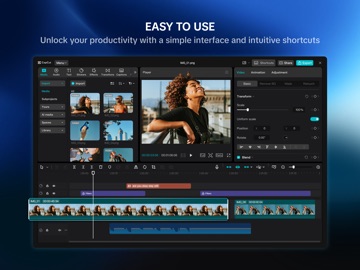
CapCut per Pad offre una potenza di editing pari a quella del desktop a portata di mano. Goditi un editing preciso della timeline multitraccia, prestazioni fluide e un'area di lavoro creativa progettata per il touch.
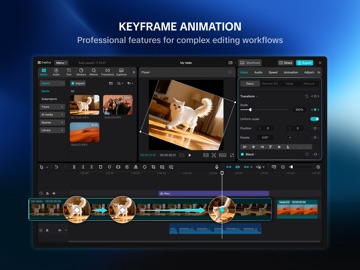
CapCut offre strumenti di editing video e fotografico facili da usare, un'ampia gamma di font ed effetti gratuiti in-app e potenti funzionalità come animazione dei fotogrammi chiave, slow motion fluido, chiave cromatica e stabilizzazione video: tutto ciò che ti serve per catturare e perfezionare i tuoi momenti.
Crea video di alta qualità con altre funzionalità esclusive: sottotitoli automatici, sintesi vocale, tracciamento del movimento e rimozione dello sfondo. Mostra la tua personalità e diventa virale su TikTok, YouTube, Instagram, WhatsApp e Facebook!
FUNZIONALITÀ
Editing video di base
• Taglia e accorcia le clip, dividi o unisci i video.
• Regola la velocità del video da 0,1x a 100x e applica curve di velocità fluide.
• Anima le clip video con effetti di zoom avanti/indietro.
• Evidenzia i tuoi momenti migliori con la funzionalità di fermo immagine.
• Aggiungi transizioni creative tra le clip.
Editing video avanzato
• Animazione dei fotogrammi chiave supportata per tutte le impostazioni.
• Crea uno slow motion fluido con flusso ottico e curve di velocità.
• Usa la chiave cromatica per rimuovere colori specifici.
• Organizza e visualizza in anteprima più clip su una timeline multitraccia.
• Applica la stabilizzazione per rendere più fermi i tuoi filmati.
Funzionalità intelligenti
• Sottotitoli automatici: genera sottotitoli automaticamente usando il riconoscimento vocale.
• Sintesi vocale: converti il testo in voce in diverse lingue e toni.
• Rimozione dello sfondo: rimuovi automaticamente lo sfondo con un solo clic.
Testo e sticker
• Aggiungi testo con diversi font e stili o usa modelli creativi.
• I sottotitoli possono essere regolati direttamente sulla timeline del video.
Effetti e filtri di tendenza
• Esplora i filtri aggiornati settimanalmente che seguono gli stili di tendenza.
• Applica centinaia di effetti visivi, tra cui Glitch, Sfocatura e 3D.
• Regola liberamente luminosità, contrasto e saturazione.
Musica ed effetti sonori
• Aggiungi tracce musicali o effetti sonori ai tuoi video.
• Estrai audio, clip o registrazioni da filmati esistenti.
Facile da condividere
• Esporta video fino a 4K 60 fps con HDR intelligente.
• Personalizza risoluzione e formato, quindi condividili direttamente sulle piattaforme social.
CapCut è un'applicazione completa di video editing e di creazione di video, con tutto il necessario per creare video straordinari e di alta qualità. Chi è alle prime armi può iniziare a usare CapCut in pochi secondi, mentre chi ha più esperienza può usufruire di tutte le funzioni necessarie per modificare i video. Esprimi la tua individualità con le esclusive funzioni di editor video e creatore di video. Dopo aver creato il tuo video, puoi condividerlo sui social media con un solo clic, raccogliendo i Mi piace, i commenti e l'attenzione di tutte le persone.
Termini di servizio —
https://www.capcut.net/clause/user-agreement?region=us
Informativa sulla Privacy —
https://www.capcut.net/clause/privacy?region=us
Contattaci
Hai domande su CapCut? Contattaci all'indirizzo capcut.support@bytedance.com.
Facebook: https://www.facebook.com/capcutapp/
Instagram: https://www.instagram.com/capcutapp/
YouTube: https://www.youtube.com/c/capcutofficial
TikTok: https://www.tiktok.com/@capcut
See this store page in another country
Prices, ranks and reviews are per country. Revenue above is already worldwide.