ASO keywords
Most repeated terms in the listing. Highlighted ones also appear in the title.
ein31video25und20aus einem19aus18oder18das17einem video16einem15video foto13foto grab13grab frame13auf dem13foto12als12auf12einzelbild11die10der10das einzelbild10fotos9bild9grab8frame8
What's new in 1.2.3
Diese Version von Video zu Foto – Grab Frame enthält kleine Korrekturen
Released Apr 2, 2025. Current version shipped Oct 19, 2026.
Store description
Video zu Foto – Grab Frame
Video zu Foto – Grab Frame ist eine iOS-App für das iPhone, die ein Einzelbild aus einem Video holt. Nutze diese App, um ein Standbild aus einem Clip als JPG, PNG oder HEIC in der Auflösung des Videos zu speichern. Für alle mit einem Video in Fotos, die diesen Moment als Bild brauchen, ohne das Video hochzuladen.
Was diese App macht
Diese iOS-App extrahiert Standbilder aus einem Video. Teile ein Video aus Fotos, gehe zum Moment, hole ein Einzelbild oder mehrere und speichere sie wie jedes andere Foto. Das Standbild kommt aus der Datei, nicht aus einem Screenshot des Players.
Das Problem: Der Moment, den du brauchst, steckt in einem Clip. Ein Screenshot eines Videos auf dem iPhone erfasst den Bildschirm — Tasten des Players, schwarze Balken und ein kleineres Bild als das Original.
Die Lösung: Video zu Foto – Grab Frame ist ein Framegrabber auf dem Gerät. Teile ein Video aus Fotos, die App öffnet den Clip. Ziehe am Filmstreifen, hole das Einzelbild und exportiere es. Kein Konto, kein Upload, keine Timeline.
So holst du ein Einzelbild aus einem Video auf dem iPhone
1. Teile ein Video aus Fotos — Öffne den Clip, tippe auf Teilen und wähle Video zu Foto – Grab Frame, oder wähle ein Video in der App.
2. Gehe Bild für Bild — Ziehe am Filmstreifen zum Moment und sieh die Vorschau.
3. Hole ein Standbild oder mehrere — Wiederhole das für jeden Moment und behalte die Bilder, die du brauchst.
4. Exportiere und teile — Wähle JPG, PNG oder HEIC. Speichere als Bilder, eine ZIP oder ein PDF in Fotos, Dateien oder über das Teilen-Menü.
Was Video zu Foto – Grab Frame kann
• Ein Einzelbild aus einem Video extrahieren — Holt das Standbild aus der Datei in der Auflösung des Videos, nicht als Screenshot.
• Den genauen Moment treffen — Ziehe am Filmstreifen und stoppe auf dem Bild, das du willst.
• Ein Einzelbild als Foto speichern — Exportiere ein Standbild nach Fotos oder Dateien. Der Clip bleibt unverändert.
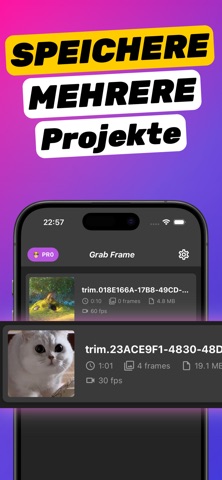
• Mehrere Einzelbilder aus einem Video extrahieren — Hole eine Folge in einem Durchgang und exportiere sie zusammen.
• Einzelbilder in JPG, PNG oder HEIC umwandeln — Wähle ein Format zum Teilen oder Weiterbearbeiten.
• Als Bilder, ZIP oder PDF exportieren — Einzeldateien, ein Archiv oder ein PDF für Storyboards und Notizen.
• Vollständig offline arbeiten — Videos bleiben auf dem iPhone. Öffne ein Projekt erneut, um weitere Einzelbilder zu holen.
Nutze diese App, um auf dem iPhone ein Bild aus einem Video zu holen, ein Standbild in Fotos zu speichern, Bild für Bild durch einen Clip zu gehen, mehrere Einzelbilder zu extrahieren, Einzelbilder als JPG oder PNG zu speichern oder ein Vorschaubild zu machen.
Plattform und Datenschutz
Video zu Foto – Grab Frame ist eine iOS-App in der Kategorie Foto und Video. Sie ist ein Framegrabber und macht aus einem Video ein Foto. Sie ist kein vollständiger Videoeditor, kein Cloud-Dienst und kein Player. Die Verarbeitung bleibt auf dem iPhone.
Preis
Ein tägliches Exportkontingent und ein gespeichertes Projekt sind ohne Kauf enthalten. In-App-Käufe heben diese Grenzen auf. Die Preise stehen auf der Produktseite im App Store.
Häufige Fragen
Wie bekomme ich ein Bild aus einem Video auf dem iPhone?
Extrahiere das Einzelbild aus der Videodatei und speichere es als JPG, PNG oder HEIC.
Wie speichere ich ein Standbild aus einem Video in Fotos?
Hole das Einzelbild, tippe auf Exportieren und speichere in Fotos oder Dateien. Das Originalvideo bleibt unverändert.
Wie hole ich mehrere Einzelbilder aus einem Clip?
Gehe zu jedem Moment, hole das Einzelbild und exportiere die Reihe als Bilder, eine ZIP oder ein PDF.
Hol das Einzelbild, das du brauchst
Wenn du ein Video hast und einen Moment als Standbild brauchst, nutze Video zu Foto – Grab Frame, hole das Einzelbild und speichere es als JPG, PNG oder HEIC. Lade Video zu Foto – Grab Frame im App Store.
Terms of Use: https://extractframeapp.com/terms.html
Privacy Policy: https://extractframeapp.com/privacy.html
See this store page in another country
Prices, ranks and reviews are per country. Revenue above is already worldwide.