← Back to charts
Upscale AI: HD Photo Enhancer icon
APP STORE

Upscale AI: HD Photo Enhancer

Julian Beck · Photo & Video · United States store
NOT IN TOP 100 HERE
View on App Store ↗ Instagram card
Revenue a month, worldwide EST
$414
Likely $138 to $1.2K
New ratings
Tracking
Daily counts start building from today
Rating
4.4 of 5
14 ratings in this store
Countries it ranks in
0
was 0 on Oct 17, 2026

Revenue

Estimated from the grossing charts of Oct 23, 2026 in the 53 countries we track, and ratings growth on the App Store.

EST. REVENUE / YEAR · WORLDWIDE
$5K
2.2 new ratings a month on average since launch
EST. LIFETIME DOWNLOADS
490 to 1.4K
Estimated from ratings count
WHERE ITS USERS ARE · SHARE OF RATINGS
  • United States 14 ratings26%
  • Mexico 13 ratings24%
  • Saudi Arabia 11 ratings20%
  • France 3 ratings6%
  • Canada 2 ratings4%
  • Germany 2 ratings4%
  • Spain 2 ratings4%
  • Brazil 2 ratings4%
HOW SURE ARE WE
Not in any grossing chart, so this comes from ratings growth (2.2 new ratings a month on average since launch): revenue grows with new ratings, more slowly for apps that collect ratings fast. Tested on 418 apps with verified revenue: typically off by about 2 times, and big earners tend to come out low. Countries we don't track (and Google Play in China, which doesn't exist) aren't included, and neither are ads or web payments. Gross revenue before store fees.
RATINGS
14
AVG RATING
4.43
PRICE
Free
AGE
2.0y
LAST UPDATE
6d ago
VERSION
2.0
SIZE
32 MB
AGE RATING
4+

Last 30 days

From our daily snapshots of every grossing chart.

DAYS IN A GROSSING CHART
0 / 30
COUNTRIES NOW
0 (was 0)
EST. REVENUE FROM CHARTS, DAILY · APP STORE ONLY EST
Show daily values
Sep 25, 2026not in a grossing chart
Sep 26, 2026not in a grossing chart
Sep 27, 2026not in a grossing chart
Sep 28, 2026not in a grossing chart
Sep 29, 2026not in a grossing chart
Sep 30, 2026not in a grossing chart
Oct 1, 2026not in a grossing chart
Oct 2, 2026not in a grossing chart
Oct 3, 2026not in a grossing chart
Oct 4, 2026not in a grossing chart
Oct 5, 2026not in a grossing chart
Oct 6, 2026not in a grossing chart
Oct 7, 2026not in a grossing chart
Oct 8, 2026not in a grossing chart
Oct 9, 2026not in a grossing chart
Oct 10, 2026not in a grossing chart
Oct 11, 2026not in a grossing chart
Oct 12, 2026not in a grossing chart
Oct 13, 2026not in a grossing chart
Oct 14, 2026not in a grossing chart
Oct 15, 2026not in a grossing chart
Oct 16, 2026not in a grossing chart
Oct 17, 2026not in a grossing chart
Oct 18, 2026not in a grossing chart
Oct 19, 2026not in a grossing chart
Oct 20, 2026not in a grossing chart
Oct 21, 2026not in a grossing chart
Oct 22, 2026not in a grossing chart
Oct 23, 2026not in a grossing chart
Oct 24, 2026not in a grossing chart
Best rank Sep 25, 2026: not ranked. Now: not ranked. Days at zero are days outside every grossing chart.

Money and momentum

Measured from the store, not estimated.

WHAT IT CHARGES
2 purchases listed
  • Pro$8.99
  • Unlock Pro$22.99
Top in-app purchases as listed on the App Store, in local prices.
REVIEW MOMENTUM
Too few reviews
Fewer than 3 recent written reviews in this country.
RELEASE CADENCE
1 update in 90 days
  • Typical gap between releases172 days
From the last 6 versions listed on the App Store.
RATING BREAKDOWN
14 ratings
5★71%
4★14%
3★7%
2★0%
1★7%

What users say

Latest reviews, United States App Store.

★★★★★Aug 26, 2025
Almost perfect

So this is will be comprehensive review for the developer and also the users who are curious on how the app performs, ultimately I will only knock 1 star because it does deliver in certain areas that is 5 star worthy, but not all. I’ll start with the Pros. Pros - the AI Upscale mode is probably the best I’ve ever used when it to images of nature, animals, and some texts graphics. It essentially it does what Magnific AI does by upscaling the image but changing the image to its own creative input like making a ps2 picture look real. However with Upscaling AI since their isn’t input functionality so it will upscale it but do very little changing, keeping the image maybe 96-98% the same with some tiny tweaks. This is a cool unique hybrid approach because you get the benefits of some added realism and better textures, but keep the image the same. I’m surprised more AI companies haven’t used this approach because some people just want to upscale the image not change it, and it doesn’t give you the “plastic” look, it just makes the image look more real and highly detailed. Cons - starting with the basic upscale mode it’s very generic, their are plenty of apps out right now that can do a better job, it gives you the classic “plastic” look which modern upscale models have drastically improved on, so for me I didn’t use this feature much, Next the AI upscale mode, like I said before when it comes to nature it hits it out of the park, beats or is on par with any top of the line paid AI model available on the market today. But when it comes to humans, people, Anime, electronics, cars and anything other then nature it is a completely misses the mark, With people the AI will completely removes and annihilates any detail like stains, skin texture details, shadows, clothing texture details and replace it with a plastic smooth texture similar to its basic upscale mode, but not as drastic. It does upscale the image with a higher resolution version of the person, but it’s in smooth plastic format so it won’t be appealing. I was surprised how the AI interacts with faces as well, completely butchers the whole face, annihilates all the details in the face and at times makes faces look like it has a make up on with a glow to it. In conclusion I think the AI upscale model can be improved by either tweaking it to perform better with textures that aren’t just natural sources or perhaps implementing anther mode that is more traditional that has those inputs functions to avoid or at the very least manage the plastic, smooth results that it currently produces.

★★★★★Jan 23, 2025
Nice

Keep going and make the App better. Hope you add creativity level to select the amount of details and make the image better.

Store screenshots

ScreenshotScreenshotScreenshotScreenshotScreenshotScreenshotScreenshotScreenshotScreenshotScreenshot

App Store ads

Apple Search Ads this app ran in the last 90 days, from Apple's public ad repository.

No App Store ads in the EU
None in the last 90 days.

Apple only publishes ads shown in the EU (EU Digital Services Act), with a 7 day delay. An app that advertises only outside the EU shows nothing here.

Growth research

Where this app is buying and earning its users. Each link opens pre filtered.

ASO keywords

Most repeated terms in the listing. Highlighted ones also appear in the title.

pro9photos6upscale6upscale pro3julianbeck notion3notion site3resolution3blurry2tool2tools2standard2faces2batch2original2daily2service2julianbeck2notion2site2

What's new in 2.0

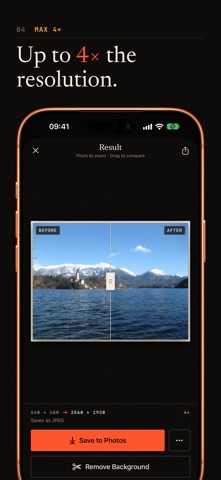
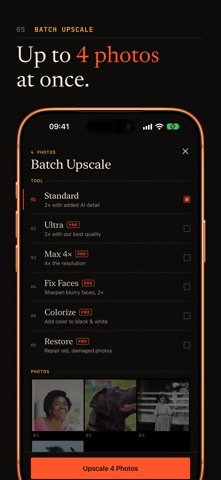
A fresh new look and four big upgrades: • Pinch to zoom: inspect every detail and compare before and after up close • Batch upscale (Pro): enhance up to 4 photos at once • Saved photos keep their original date, location and camera details • Choose JPEG, HEIC or PNG, or replace the original in Photos (undo anytime) • Now available in German, French, Spanish, Italian, Portuguese, Japanese, Korean and Chinese

Released Oct 6, 2024. Current version shipped Oct 18, 2026.

Store description

Make blurry, low-resolution photos sharp and detailed with AI. Pick a photo, choose a tool and compare before and after with a slider and pinch-to-zoom. TOOLS • Standard 2× – doubles the resolution and adds natural detail • Ultra 2× – our highest-quality upscaler (Pro) • Max 4× – four times the resolution (Pro) • Fix Faces – sharpens blurry faces (Pro) • Colorize – brings black-and-white photos to color (Pro) • Restore – repairs scratches and damage on old photos (Pro) MORE • Batch upscale up to 4 photos at once (Pro) • Save as JPEG, HEIC or PNG, keeping the original date and location • Replace the original in Photos – undo anytime with Revert • Remove backgrounds right on your device • Your recent results in History PRIVACY Your photos are processed only to create your result and are not stored on our servers. UPSCALE AI PRO Try one Standard upscale for free. Upscale AI Pro unlocks all tools, batch upscaling and higher daily limits. Each tool has a daily limit. Pro is an auto-renewing subscription. Payment is charged to your Apple ID when you confirm the purchase. If a free trial is offered, it converts to a paid subscription unless cancelled at least 24 hours before it ends. The subscription renews automatically unless auto-renew is turned off at least 24 hours before the end of the current period. Manage or cancel it in your App Store account settings. Prices are shown in the app. Terms of Service: https://julianbeck.notion.site/Terms-of-Service-Upscale-AI-11396d29972e8093b93bc50442398b63 Privacy Policy: https://julianbeck.notion.site/Privacy-Policy-Upscale-AI-11396d29972e80fcb31fc3fd3caa45b7 Apple EULA: https://www.apple.com/legal/internet-services/itunes/dev/stdeula/

See this store page in another country

Prices, ranks and reviews are per country. Revenue above is already worldwide.

More from Julian Beck

Eyevo TCG ‒ Card Scanner
Reference
84 ratingsAnalyze →
WhatStats: Chat Wrapped Recap
Utilities
9 ratingsAnalyze →
Haki: Card Scanner for OP TCG
Reference
18 ratingsAnalyze →
Gym Body Tracker - Camera
Health & Fitness
5 ratingsAnalyze →
VidClean: Delete Large Videos
Photo & Video
9 ratingsAnalyze →
Anime Filter - AniFy AI Art
Photo & Video
5 ratingsAnalyze →
Jewelry Identifier & Scanner
Reference
8 ratingsAnalyze →
Japan Art: Live Wallpapers
Graphics & Design
18 ratingsAnalyze →
YuScan Value Guide for YuGiOh
Reference
8 ratingsAnalyze →