ASO keywords
Most repeated terms in the listing. Highlighted ones also appear in the title.
sync19health18data18health sync11sync data5historical data5data sync5phone4between health3sync health3health coros3coros health3health fitbit3garmin connect3huawei health3polar flow3strava suunto3activity data3gps data3data synced3data health3help center3center menu3time3
What's new in 8.5.13
Fixed an issue where body fat percentage was missing when syncing to HUAWEI Health.
When syncing activity data from Apple Health or HUAWEI Health to Strava, the device model is now added to the Strava activity description. If you prefer not to include this, you can turn it off in the Health Sync Settings menu. Note: Strava does not allow third-party apps to use its official device model field.
Released Jul 11, 2024. Current version shipped Oct 7, 2026.
Store description
Health Sync seamlessly syncs your data between health and fitness platforms.
• SYNC FROM: Apple Health, Coros, Google Health (Fitbit), Garmin Connect, HUAWEI Health, Oura, Polar Flow, Strava, and Suunto.
• SYNC TO: Apple Health, Coros, Google Health (Fitbit), Guava, HUAWEI Health, Intervals.icu, Runalyze, Selfloops, Strava, Suunto, and TrainItAll.
It will sync data from the time you first use the app. Historical data (all data before the day of installation) can be synced after the free trial period. With Garmin Connect you can sync the last five years of activity data, and the last two years of other data (steps, sleep, heart rate etc.). With Polar Flow you can't sync historical data.
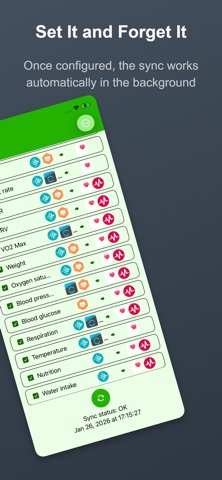
The sync runs automatically in the background a few times per hour (due to iOS restrictions on background processes). Activity GPS data is synced to Apple Health when the phone screen is unlocked. If activity data is synced while the phone is locked, Health Sync will add the GPS data to the Apple Health workout data the next time you open the Health Sync app.
Syncing from Apple Health requires your phone to be unlocked.
Health Sync is very easy to use. It offers a one-week free trial period. After the trial period, you can make a one-time purchase (lifetime license) to continue using the app and access the historical data sync option.
Try the app and see if it fits your needs. The data you can sync depends on the source app from which you sync data and the destination app(s) to which you sync the data.
Health Sync uses a privacy-by-design approach. The sync processes data on your phone, not on cloud servers. Your data won't be used and can't be accessed by others. Read the privacy policy for details.
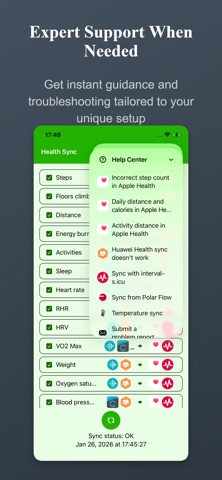
Syncing between health data apps sometimes doesn't work as expected. Don't worry; almost all issues can be solved easily. You can check the Help Center menu in Health Sync. If you can't resolve the issue, you can send a Health Sync problem report (the last option in the Help Center menu) or email info@appyhapps.nl. You will receive support to solve the sync issue.
See this store page in another country
Prices, ranks and reviews are per country. Revenue above is already worldwide.