ASO keywords
Most repeated terms in the listing. Highlighted ones also appear in the title.
filter16photo14filters10photo filter10photos9photo filters6glamup5intensity5filter effects5save share5filters pictures5save4share4look4image4vintage4right4effects photos3fallen love3love particular3particular photo3filter simply3simply mark3mark favorite3
What's new in 1.0.7
Thanks for using the app! We update the app regularly to make your journey with us even better. This latest version includes:
• Bug fixes and performance improvements.
If you love the app, please rate us on the App Store! We’ll be forever thankful to you.
Have any questions? Tap Contact Support in the app or mail us at support@pixeltouch.net.
Released Nov 14, 2023. Current version shipped Nov 8, 2025.
Store description
Discover the power of visual flair with GlamUp, your ultimate companion for adding filter effects to your photos with some striking features. From an extensive filter library to editing tools, this photo filter app for iPhone is the ideal gateway to show your creativity.
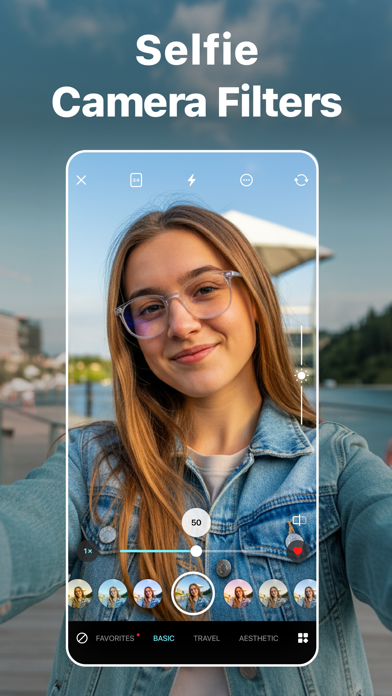
Add cool filter effects to your photos by seamlessly importing images from the library or using the built-in camera. Have you fallen in love with a particular photo filter? Simply mark it as a favorite for swift access for future use. After editing photos on your iPhone, you also get the option to save and share on socials.
Key Features:
• Browse 150+ free photo filters
• Adjust filter intensity to achieve the perfect look
• Import photos from the library and camera to add picture filters
• Mark any image filters as favourites for quick access
• Quickly save edited photos on your iPhone and share to social media platforms
• Customizable filter categories
AESTHETIC PHOTO FILTERS
You get a wide selection of over 150 carefully designed photo filters spanning categories such as Basic, Aesthetic, B&W, Retro, Vintage, etc. Whether you're looking to enrich the colors of photos or nature scenes or give your portraits a classic touch, there's a perfect filter for every occasion.
CUSTOMIZE THE INTENSITY
Take control of your artistic vision by effortlessly adjusting the filter intensity with this photo editor app. Never compromise on the perfect look; tailor the best filters to your specifications to create professional photos or add a personal touch.
FILTER MANAGEMENT
Have you fallen in love with a particular photo filter? Using this photo filter app, you can simply mark it as a favorite for accessing future creative projects. You also manage the filter categories by hiding options and arranging them in an order that suits the creative flow.
How to make a photo black and white using the GlamUp - Filters for Pictures app?
If you want to know how to make a picture black and white on an iPhone, go through the following steps.
- First, open the GlamUp app
- Then, choose an image from the Photos app or click one with the Camera
- After choosing one, swipe right to select B&W from different photo filters
- Toggle the bar right below the image to adjust the intensity
- Finally, tap on the top right corner to save or share on social media
How to make a photo look vintage using the GlamUp app?
Are you searching for the best vintage photo booth for your professional photos? Look no further, as GlamUp has got you covered.
- To start, install and open this photo filter app
- Next, choose your favourite image or click one
- From there on, tap on the Vintage photo filter
- You can also modify the intensity of the filter effects
- To save or share, click the button on the top right corner
Terms of Use:
https://pixeltouch.net/legal/filters-for-pictures/terms.html
Privacy Policy:
https://pixeltouch.net/legal/filters-for-pictures/privacy.html
See this store page in another country
Prices, ranks and reviews are per country. Revenue above is already worldwide.