← Back to charts
Siemens Typer icon
APP STORE

Siemens Typer

Callpod Inc. · Utilities · Brazil store
NOT IN TOP 100 HERE
View on App Store ↗ Instagram card
Revenue a month, worldwide
Too small to estimate
Not enough chart or ratings data
New ratings
Tracking
Daily counts start building from today
Rating
0.0 of 5
0 ratings in this store
Countries it ranks in
0
was 0 on Oct 15, 2026

Revenue

Estimated from the grossing charts of Oct 21, 2026 in the 53 countries we track, and ratings growth on the App Store.

EST. REVENUE / MONTH · WORLDWIDE
Unranked
Not in any grossing chart, and it sells nothing in the store (no in-app purchases, free download). Any revenue comes from ads or payments outside the store, which we can't see.
EST. LIFETIME DOWNLOADS
n/a
Estimated from ratings count
RATINGS
0
AVG RATING
n/a
PRICE
Grátis
AGE
3.2y
LAST UPDATE
756d ago
VERSION
1.0.4
SIZE
1 MB
AGE RATING
+4

Last 29 days

From our daily snapshots of every grossing chart.

DAYS IN A GROSSING CHART
0 / 29
COUNTRIES NOW
0 (was 0)
EST. REVENUE FROM CHARTS, DAILY · APP STORE ONLY EST
Show daily values
Sep 24, 2026not in a grossing chart
Sep 25, 2026not in a grossing chart
Sep 26, 2026not in a grossing chart
Sep 27, 2026not in a grossing chart
Sep 28, 2026not in a grossing chart
Sep 29, 2026not in a grossing chart
Sep 30, 2026not in a grossing chart
Oct 1, 2026not in a grossing chart
Oct 2, 2026not in a grossing chart
Oct 3, 2026not in a grossing chart
Oct 4, 2026not in a grossing chart
Oct 5, 2026not in a grossing chart
Oct 6, 2026not in a grossing chart
Oct 7, 2026not in a grossing chart
Oct 8, 2026not in a grossing chart
Oct 9, 2026not in a grossing chart
Oct 10, 2026not in a grossing chart
Oct 11, 2026not in a grossing chart
Oct 12, 2026not in a grossing chart
Oct 13, 2026not in a grossing chart
Oct 14, 2026not in a grossing chart
Oct 15, 2026not in a grossing chart
Oct 16, 2026not in a grossing chart
Oct 17, 2026not in a grossing chart
Oct 18, 2026not in a grossing chart
Oct 19, 2026not in a grossing chart
Oct 20, 2026not in a grossing chart
Oct 21, 2026not in a grossing chart
Oct 22, 2026not in a grossing chart
Best rank Sep 24, 2026: not ranked. Now: not ranked. Days at zero are days outside every grossing chart.

Money and momentum

Measured from the store, not estimated.

WHAT IT CHARGES
No in-app purchases
Earns from its upfront price, ads or payments outside the store.
REVIEW MOMENTUM
Too few reviews
Fewer than 3 recent written reviews in this country.
RELEASE CADENCE
0 updates in 90 days
  • Typical gap between releases407 days
From the last 2 versions listed on the App Store.

Store screenshots

ScreenshotScreenshotScreenshotScreenshotScreenshot

App Store ads

Apple Search Ads this app ran in the last 90 days, from Apple's public ad repository.

No App Store ads in the EU
None in the last 90 days.

Apple only publishes ads shown in the EU (EU Digital Services Act), with a 7 day delay. An app that advertises only outside the EU shows nothing here.

Growth research

Where this app is buying and earning its users. Each link opens pre filtered.

ASO keywords

Most repeated terms in the listing. Highlighted ones also appear in the title.

typer10device6keeper4send4keeper password3password manager3menu item3share typer3send text3transmit3text3siemens2usb2ble2used2password2manager2via2menu2item2share2fields2peripheral2

What's new in 1.0.4

Bug fixes and Enhancements.

Released Aug 16, 2023. Current version shipped Sep 26, 2024.

Store description

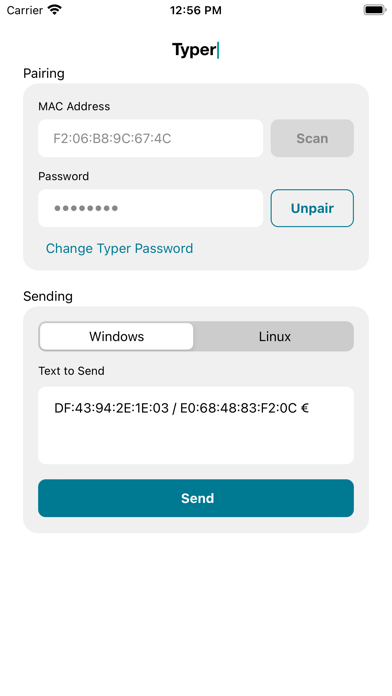
The Typer app provides the ability to transmit data to the the Siemens Typer USB device over Bluetooth Low Energy (BLE) protocol. Typer can be used as a standalone app, or it can be used with Keeper Password Manager to transmit information with one click. When the Typer device is plugged into the USB port of a computer, it behaves as a keyboard device. Pairing can be completed by performing a QR code scan via the camera of the device, or by manual entry of the device MAC address. When Typer is installed on the same device as Keeper Password Manager, a new menu item is displayed in the Keeper record called "Share to Typer". Tap on the "Share to Typer" menu item, then select which field to send. After the user selects the fields they want to send, Keeper will open the Typer app and transmit those fields via its "Text to Send" text editor. The Typer app will then pair to the Siemens BLE Typer peripheral and send the text to the peripheral.

See this store page in another country

Prices, ranks and reviews are per country. Revenue above is already worldwide.

More from Callpod Inc.

Keeper Gerenciador de senhas
Productivity
2.5K ratingsAnalyze →
Keeper Password Manager
Productivity
0 ratingsAnalyze →
KeeperChat
Social Networking
5 ratingsAnalyze →
Keeper para Safari
Productivity
0 ratingsAnalyze →
KeeperChat
Social Networking
0 ratingsAnalyze →