← Back to charts
Transcriptionist icon
APP STORE

Transcriptionist

Wooji Juice Ltd · Productivity · United States store
NOT IN TOP 100 HERE
View on App Store ↗ Instagram card
Revenue a month, worldwide EST
$318
Likely $106 to $953
New ratings
Tracking
Daily counts start building from today
Rating
4.4 of 5
18 ratings in this store
Countries it ranks in
0
was 0 on Oct 19, 2026

Revenue

Estimated from the grossing charts of Oct 26, 2026 in the 53 countries we track, and ratings growth on the App Store.

EST. REVENUE / YEAR · WORLDWIDE
$3.8K
0.7 new ratings a month on average since launch
EST. LIFETIME DOWNLOADS
630 to 1.8K
Estimated from ratings count
WHERE ITS USERS ARE · SHARE OF RATINGS
  • United States 18 ratings67%
  • United Kingdom 4 ratings15%
  • Canada 2 ratings7%
  • Netherlands 1 ratings4%
  • India 1 ratings4%
  • Turkey 1 ratings4%
HOW SURE ARE WE
Not in any grossing chart, so this comes from ratings growth (0.7 new ratings a month on average since launch): revenue grows with new ratings, more slowly for apps that collect ratings fast. Tested on 418 apps with verified revenue: typically off by about 2 times, and big earners tend to come out low. Countries we don't track (and Google Play in China, which doesn't exist) aren't included, and neither are ads or web payments. Gross revenue before store fees.
RATINGS
18
AVG RATING
4.44
PRICE
Free
AGE
3.1y
LAST UPDATE
39d ago
VERSION
1.17
SIZE
108 MB
AGE RATING
4+

Last 30 days

From our daily snapshots of every grossing chart.

DAYS IN A GROSSING CHART
0 / 30
COUNTRIES NOW
0 (was 0)
EST. REVENUE FROM CHARTS, DAILY · APP STORE ONLY EST
Show daily values
Sep 27, 2026not in a grossing chart
Sep 28, 2026not in a grossing chart
Sep 29, 2026not in a grossing chart
Sep 30, 2026not in a grossing chart
Oct 1, 2026not in a grossing chart
Oct 2, 2026not in a grossing chart
Oct 3, 2026not in a grossing chart
Oct 4, 2026not in a grossing chart
Oct 5, 2026not in a grossing chart
Oct 6, 2026not in a grossing chart
Oct 7, 2026not in a grossing chart
Oct 8, 2026not in a grossing chart
Oct 9, 2026not in a grossing chart
Oct 10, 2026not in a grossing chart
Oct 11, 2026not in a grossing chart
Oct 12, 2026not in a grossing chart
Oct 13, 2026not in a grossing chart
Oct 14, 2026not in a grossing chart
Oct 15, 2026not in a grossing chart
Oct 16, 2026not in a grossing chart
Oct 17, 2026not in a grossing chart
Oct 18, 2026not in a grossing chart
Oct 19, 2026not in a grossing chart
Oct 20, 2026not in a grossing chart
Oct 21, 2026not in a grossing chart
Oct 22, 2026not in a grossing chart
Oct 23, 2026not in a grossing chart
Oct 24, 2026not in a grossing chart
Oct 25, 2026not in a grossing chart
Oct 26, 2026not in a grossing chart
Best rank Sep 27, 2026: not ranked. Now: not ranked. Days at zero are days outside every grossing chart.

Money and momentum

Measured from the store, not estimated.

WHAT IT CHARGES
2 purchases listed
  • Transcriptionist (Yearly)$19.99
  • Transcriptionist (Monthly)$3.49
Top in-app purchases as listed on the App Store, in local prices.
REVIEW MOMENTUM
0.0 reviews / week
  • Recent reviews average3.9 stars
  • Recent 1 and 2 star share13%
From the latest 8 written reviews, covering 1130 days.
RELEASE CADENCE
2 updates in 90 days
  • Typical gap between releases43 days
From the last 19 versions listed on the App Store.
RATING BREAKDOWN
18 ratings
5★67%
4★17%
3★11%
2★6%
1★0%

What users say

Latest reviews, United States App Store.

★★★★★May 14, 2026
Best Mac App for Transciptions

I use Transcriptionist daily, to transcribe podcasts, YouTube videos, and any audio content. I love being able to choose from various “brains” to balance speed and accuracy, export formats include everything you could need, and it’s on iPhone and iPad as well!

★★★★★Nov 19, 2025
Unclear how to export

My goal is transcribe audio from meetings with clients into text, then to export said text to private AI to create a summary of the meeting. I love that transcription is handled privately on device, but for the life of me, I cannot figure out how to export the text. The user guide provides instructions to use the “Export” option in the file menu, which does not seem to exist, nor can I find the option anywhere else. I’ll probably reach out to the developer for support, but it shouldn’t be this hard. Using on an M5 iPad Pro.

★★★★★Sep 9, 2025
Not Understanding the High Ratings

Just downloaded and subscribed to this app and right away it repeatedly crashes every time I use the search and replace feature. And why am I having to use the search and replace feature? Because in practically every other sentence there are words that were transcribed incorrectly. The errors are so bad it’s difficult figuring out what was actually said to correct in the transcription. Does it do more than the transcribe feature in Apple Notes and Voice Memos apps? Yes. It will combine multiple separately-recorded audio tracks (say, from a Zoom recording), and include time stamps, allow you to edit/correct it’s errors, change the names it assigns to participants of the audio, etc. - which are all things I need - but with the errors and search/replace (for those errors) crashes make me question whether even the relatively low subscription fee is worth it.

★★★★★Mar 21, 2025
Seeing good progress

Wow, what a few months makes and I'm happy to see some UX improvements. So I'm back to evaluating this application. I would like to see better integration from Ferrite to Transcriptionist. It's also confused why I cannot use large brain on my iPad Pro when I have more than enough on device space. Why tease it and then say I cannot have it? Looking to bump to 4 or 5 star in the future.

★★★★★Jul 24, 2024
Very nice transcription but minor improvement better

Accuracy of transcription is acceptable though sometimes words are missing. It saves a lot of work to clearly understand the speaker. One improvement I am looking forward to is to collate the transcripted text in a clip with Ferrite so that some words may be positioned in the waveform to facilitate editing the corresponding clip. I mean it would be better to integrate the Transcriptionist Into Ferrite, or vice versa. It is a really good audio editor app!

★★★★★Feb 13, 2024
Works very well for me

I’ve been running this on my MacBook Pro with the largest model and it’s been great. Very happy with the app.

Store screenshots

ScreenshotScreenshotScreenshotScreenshotScreenshotScreenshotScreenshotScreenshotScreenshotScreenshot

App Store ads

Apple Search Ads this app ran in the last 90 days, from Apple's public ad repository.

No App Store ads in the EU
None in the last 90 days.

Apple only publishes ads shown in the EU (EU Digital Services Act), with a 7 day delay. An app that advertises only outside the EU shows nothing here.

Growth research

Where this app is buying and earning its users. Each link opens pre filtered.

ASO keywords

Most repeated terms in the listing. Highlighted ones also appear in the title.

audio5transcriptionist4text4recording4formats4formats suitable3said3ferrite3writing2transcripts2subtitles2quotes2article2entire2track2export2transcript2suitable2per2

What's new in 1.17

Compatibility updates. Also, a slightly more crisp-looking icon.

Released Sep 18, 2023. Current version shipped Sep 17, 2026.

Store description

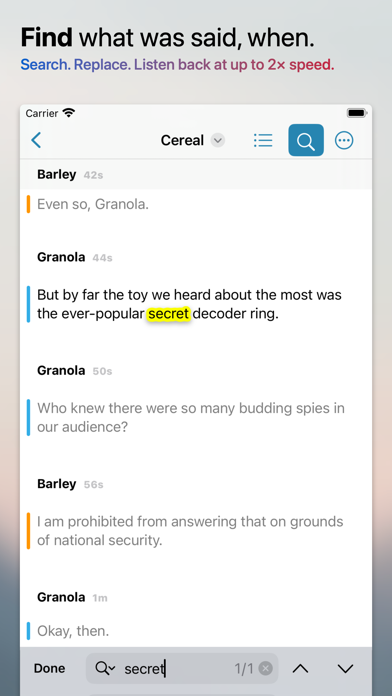
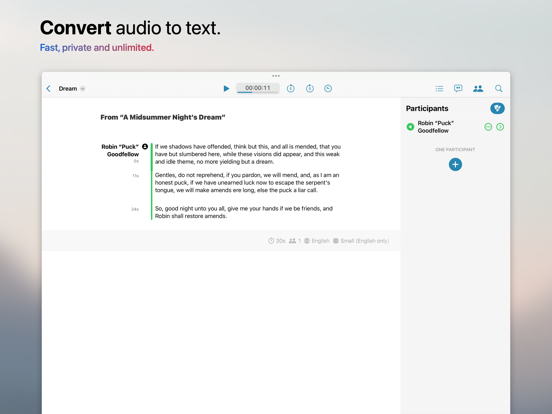
Transcriptionist quickly and privately converts speech from audio recordings — and video soundtracks — into text. Writing up notes for a meeting? Creating transcripts or subtitles for a podcast? Looking for just the right clip to cut out of a long recording? Or quotes for a news article? Need to remember what happened on game night? Or just want to remind yourself of what was said, without listening to the entire recording? Transcriptionist can help — in nearly 100 languages. Import the audio into the app, tap the transcribe button, and it will start to fill in the text that was spoken. Each piece is shown with a timestamp, and you can jump straight to the matching point in the recording to listen back to the original audio — at up to 2x speed. If each speaker was recorded with their own microphone, Transcriptionist will track who said what, when — and you can solo individual voices to pick out what someone said, even if another person talked over them. Copy and paste quotes into an article you're writing, or export the entire transcript in a range of formats, including PDF, HTML (web page), Markdown (blog post), SRT and VTT (subtitles), as well as formats suitable for importing into other apps — you can even create your own custom text-based formats with the built-in easy-to-use visual editor. If you edit podcasts with our popular Ferrite Recording Studio, you can send your finished Ferrite projects direct to Transcriptionist — along with chapter markers — and each track will be kept separate so you can identify who's speaking. You can also select paragraphs and export their audio in a choice of formats, suitable for editing in Ferrite or other apps — perfect for when you find the quote or highlight you needed. Transcription takes place on your device, not on our servers, so no audio or text is sent to us, and subscribers can make as many transcripts as they like — we don't charge per-minute or per-transcript. Terms of Service: https://www.apple.com/legal/internet-services/itunes/dev/stdeula/ Privacy Policy: https://www.wooji-juice.com/privacy

See this store page in another country

Prices, ranks and reviews are per country. Revenue above is already worldwide.