← Back to charts
PDF Tools: Sign & Edit PDF icon
APP STORE

PDF Tools: Sign & Edit PDF

SVG Apps · Business · United States store
NOT IN TOP 100 HERE
View on App Store ↗ Instagram card
Revenue a month, worldwide EST
$320
Likely $107 to $959
New ratings
Tracking
Daily counts start building from today
Rating
5.0 of 5
11 ratings in this store
Countries it ranks in
0
was 0 on Oct 18, 2026

Revenue

Estimated from the grossing charts of Oct 25, 2026 in the 53 countries we track, and ratings growth on the App Store.

EST. REVENUE / YEAR · WORLDWIDE
$3.8K
0.7 new ratings a month on average since launch
EST. LIFETIME DOWNLOADS
385 to 1.1K
Estimated from ratings count
WHERE ITS USERS ARE · SHARE OF RATINGS
  • United States 11 ratings34%
  • United Kingdom 4 ratings13%
  • Australia 2 ratings6%
  • Brazil 2 ratings6%
  • Saudi Arabia 2 ratings6%
  • Japan 2 ratings6%
  • Philippines 2 ratings6%
  • Germany 1 ratings3%
HOW SURE ARE WE
Not in any grossing chart, so this comes from ratings growth (0.7 new ratings a month on average since launch): revenue grows with new ratings, more slowly for apps that collect ratings fast. Tested on 418 apps with verified revenue: typically off by about 2 times, and big earners tend to come out low. Countries we don't track (and Google Play in China, which doesn't exist) aren't included, and neither are ads or web payments. Gross revenue before store fees.
RATINGS
11
AVG RATING
5.00
PRICE
Free
AGE
3.6y
LAST UPDATE
171d ago
VERSION
1.3
SIZE
66 MB
AGE RATING
4+

Last 30 days

From our daily snapshots of every grossing chart.

DAYS IN A GROSSING CHART
0 / 30
COUNTRIES NOW
0 (was 0)
EST. REVENUE FROM CHARTS, DAILY · APP STORE ONLY EST
Show daily values
Sep 26, 2026not in a grossing chart
Sep 27, 2026not in a grossing chart
Sep 28, 2026not in a grossing chart
Sep 29, 2026not in a grossing chart
Sep 30, 2026not in a grossing chart
Oct 1, 2026not in a grossing chart
Oct 2, 2026not in a grossing chart
Oct 3, 2026not in a grossing chart
Oct 4, 2026not in a grossing chart
Oct 5, 2026not in a grossing chart
Oct 6, 2026not in a grossing chart
Oct 7, 2026not in a grossing chart
Oct 8, 2026not in a grossing chart
Oct 9, 2026not in a grossing chart
Oct 10, 2026not in a grossing chart
Oct 11, 2026not in a grossing chart
Oct 12, 2026not in a grossing chart
Oct 13, 2026not in a grossing chart
Oct 14, 2026not in a grossing chart
Oct 15, 2026not in a grossing chart
Oct 16, 2026not in a grossing chart
Oct 17, 2026not in a grossing chart
Oct 18, 2026not in a grossing chart
Oct 19, 2026not in a grossing chart
Oct 20, 2026not in a grossing chart
Oct 21, 2026not in a grossing chart
Oct 22, 2026not in a grossing chart
Oct 23, 2026not in a grossing chart
Oct 24, 2026not in a grossing chart
Oct 25, 2026not in a grossing chart
Best rank Sep 26, 2026: not ranked. Now: not ranked. Days at zero are days outside every grossing chart.

Money and momentum

Measured from the store, not estimated.

WHAT IT CHARGES
2 purchases listed
  • Monthly Subscription$1.99
  • Annual Subscription$19.99
Top in-app purchases as listed on the App Store, in local prices.
REVIEW MOMENTUM
Too few reviews
Fewer than 3 recent written reviews in this country.
RELEASE CADENCE
0 updates in 90 days
  • Typical gap between releases490 days
From the last 4 versions listed on the App Store.
RATING BREAKDOWN
11 ratings
5★100%
4★0%
3★0%
2★0%
1★0%

What users say

Latest reviews, United States App Store.

★★★★★Sep 9, 2024
o único que funcionou

e de graça!

Store screenshots

ScreenshotScreenshotScreenshotScreenshotScreenshotScreenshotScreenshotScreenshotScreenshotScreenshot

App Store ads

Apple Search Ads this app ran in the last 90 days, from Apple's public ad repository.

Apple's ad repository couldn't be reached right now. Try again later.

Growth research

Where this app is buying and earning its users. Each link opens pre filtered.

ASO keywords

Most repeated terms in the listing. Highlighted ones also appear in the title.

pdf17pdf document13document9password8documents5pdf file5import4page4add password3password pdf3print copy3copy restrictions3password unlock3remove password3pdf documents3document split3turned off3sign3add3restrictions3file3user3pages3allows3

What's new in 1.3

- Support for iOS 26. - Minor bug fixes and performance improvements.

Released Apr 6, 2023. Current version shipped May 7, 2026.

Store description

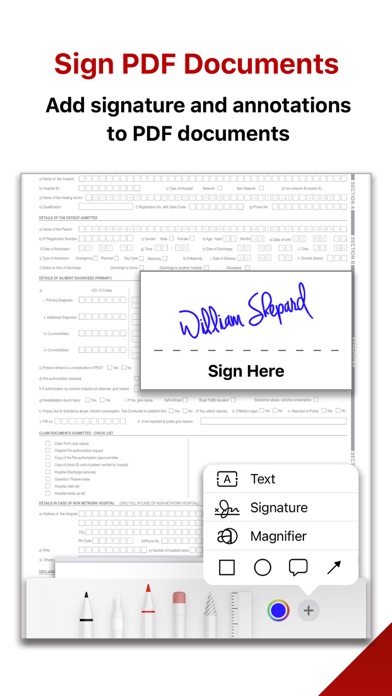
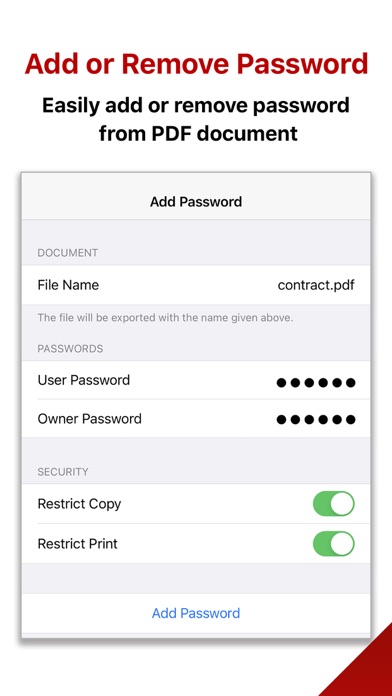
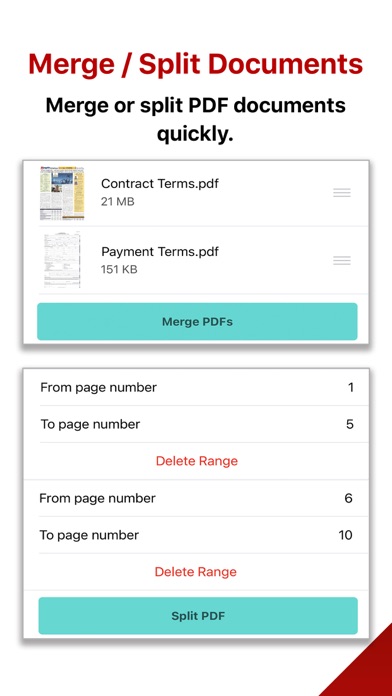
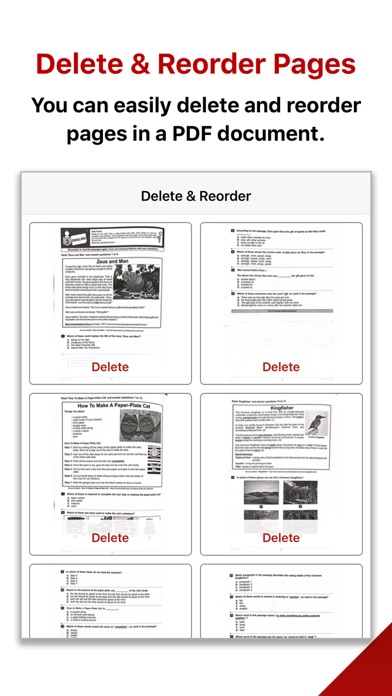
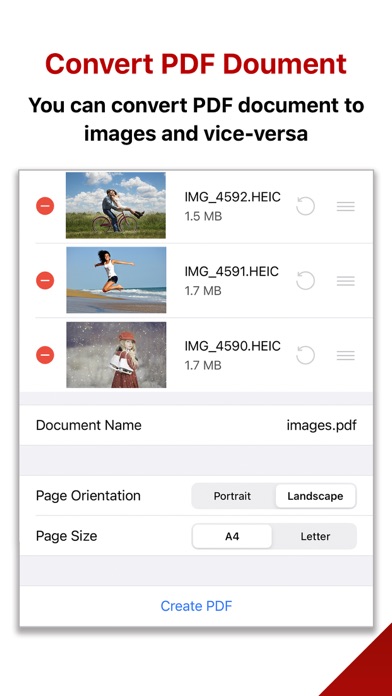
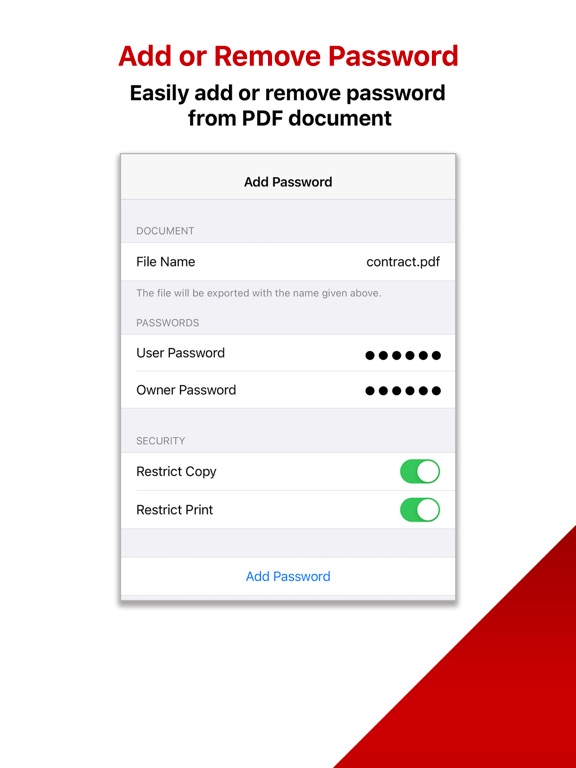
PDF Tools: Sign & Edit PDF app helps you organize your documents easily and quickly. You can sign and annotate your PDF document and share it with anyone in seconds. The app offers all the editing features that you might be looking for. It simplifies your day-to-day tasks and boosts your productivity. Add Password: You can add a password to your PDF document. You can also apply print and copy restrictions to it. There are two types of passwords you can use to protect the PDF file. 1) User Password: It will lock the PDF file. So the content can only be viewed after supplying a valid password to unlock it. 2) Admin Password: It will allow you to put print and copy restrictions. Remove Password: You can remove the password from any PDF file. Please note that you must supply the existing password to unlock it. Reorder & Delete Pages: The app allows you to reorder the pages via drag and drop using thumbnails. You can also delete unwanted pages. Image to PDF: You can import multiple images and convert them to a PDF document with desired page size (i.e. A4 or Letter) and orientation (i.e. Portrait or Landscape). PDF to Images: Each page of your PDF document can be exported to an image and saved to Photo Library on your device. Signature and Annotations: You can sign a PDF document and send it straight away for review to the group. The app also allows you to add annotations and markups to any page. Merge PDFs: Multiple PDF documents can be merged easily. All you need to do is import and select the documents you want to merge. Split PDF Document: You can also split a single PDF document into multiple documents. Just specify the page range and your document will be split accordingly. Import: The app allows you to import PDF documents from your device, email, WhatsApp, or any app that supports PDFs. Export: Once you're done with editing, you can export or share the PDF document to Google Drive, Dropbox, Microsoft OneDrive, Email, SMS, or any other compatible app installed on your device. Upgrade to the premium version and use all the features without any restrictions. The premium version subscription terms are specified below: - You can purchase a monthly subscription ($1.99/month) or an annual subscription ($19.99/year). - Payment will be charged to iTunes Account at confirmation of purchase. - Subscription automatically renews unless auto-renew is turned off at least 24 hours before the end of the current period. - Account will be charged for renewal within 24 hours before the end of the current period. - Subscriptions may be managed by the user and auto-renewal may be turned off by going to the user's Account Settings after purchase - For more information on how to cancel a subscription, please review - https://support.apple.com/en-us/HT202039 - Privacy policy: http://www.svgapps.com/privacy-policy - Terms of use: http://www.svgapps.com/terms

See this store page in another country

Prices, ranks and reviews are per country. Revenue above is already worldwide.
More from SVG Apps

Receipt Maker - Sign & Send
Business
8.1K ratingsAnalyze →
Invoice & Estimate Maker
Business
12.2K ratingsAnalyze →
Wifi Password Gen - WEP Keys
Utilities
12 ratingsAnalyze →
Porn Shield - Block Adult Web
Utilities
14 ratingsAnalyze →
Paystub Builder: PDF Payslips
Business
224 ratingsAnalyze →
Timetable & Homework Planner
Education
139 ratingsAnalyze →
Invoice App for Small Business
Business
583 ratingsAnalyze →
Hours and Pay Tracker: TimeLog
Business
178 ratingsAnalyze →
Porn Shield - Block Adult Web
Utilities
0 ratingsAnalyze →