← Back to charts
HomeBudget with Sync icon
APP STORE

HomeBudget with Sync

Anishu, Inc. · Finance · United States store
NOT IN TOP 100 HERE
View on App Store ↗ Instagram card Google Play version →
Revenue a month, worldwide
Too small to estimate
Not enough chart or ratings data
New ratings
Tracking
Daily counts start building from today
Rating
0.0 of 5
0 ratings in this store
Countries it ranks in
0
was 0 on Oct 16, 2026

Revenue

Estimated from the grossing charts of Oct 23, 2026 in the 53 countries we track, and ratings growth on the App Store.

EST. REVENUE / MONTH · WORLDWIDE
Unranked
Not in any grossing chart, and too few ratings (0) to read its growth. Most apps at this stage earn little or nothing.
EST. LIFETIME DOWNLOADS
n/a
Estimated from ratings count
RATINGS
0
AVG RATING
n/a
PRICE
$19.99
AGE
13.9y
LAST UPDATE
79d ago
VERSION
3.3.3
SIZE
75 MB
AGE RATING
4+
Last 30 days

From our daily snapshots of every grossing chart.

DAYS IN A GROSSING CHART
0 / 30
COUNTRIES NOW
0 (was 0)
EST. REVENUE FROM CHARTS, DAILY · BOTH STORES ONLY EST
Show daily values
Sep 24, 2026not in a grossing chart
Sep 25, 2026not in a grossing chart
Sep 26, 2026not in a grossing chart
Sep 27, 2026not in a grossing chart
Sep 28, 2026not in a grossing chart
Sep 29, 2026not in a grossing chart
Sep 30, 2026not in a grossing chart
Oct 1, 2026not in a grossing chart
Oct 2, 2026not in a grossing chart
Oct 3, 2026not in a grossing chart
Oct 4, 2026not in a grossing chart
Oct 5, 2026not in a grossing chart
Oct 6, 2026not in a grossing chart
Oct 7, 2026not in a grossing chart
Oct 8, 2026not in a grossing chart
Oct 9, 2026not in a grossing chart
Oct 10, 2026not in a grossing chart
Oct 11, 2026not in a grossing chart
Oct 12, 2026not in a grossing chart
Oct 13, 2026not in a grossing chart
Oct 14, 2026not in a grossing chart
Oct 15, 2026not in a grossing chart
Oct 16, 2026not in a grossing chart
Oct 17, 2026not in a grossing chart
Oct 18, 2026not in a grossing chart
Oct 19, 2026not in a grossing chart
Oct 20, 2026not in a grossing chart
Oct 21, 2026not in a grossing chart
Oct 22, 2026not in a grossing chart
Oct 23, 2026not in a grossing chart
Best rank Sep 24, 2026: not ranked. Now: not ranked. Days at zero are days outside every grossing chart.

Money and momentum

Measured from the store, not estimated.

WHAT IT CHARGES
No in-app purchases
Earns from its upfront price, ads or payments outside the store.
REVIEW MOMENTUM
0.1 reviews / week
  • Trendfalling
  • Recent reviews average2.8 stars
  • Recent 1 and 2 star share46%
From the latest 70 written reviews, covering 5069 days.
RELEASE CADENCE
1 update in 90 days
  • Typical gap between releases41 days
From the last 25 versions listed on the App Store.

What users want

From the latest 70 reviews on the United States App Store, Dec 6, 2012 to Aug 11, 2026: 46% are 1 or 2 stars. Open a theme to read what people wrote.

WHAT THEY COMPLAIN ABOUT · SHARE OF BAD REVIEWS
Price and subscription31%

10 of the 1 and 2 star reviews.

★★★★★ With the price i paid i should be able to have access to it on all devices.
★★★★★ It would not allow me to connect to my bank, and when I tried to enter income manually, it wouldn't allow me to type in the amount. How can I possibly use it if I can't make entries? Horrible!
★★★★★ I've asked for my money back several times with no response, and spent over $30 to get the app installed across all our devices.
Lost data, sync, backup22%

7 of the 1 and 2 star reviews.

★★★★★ I cant synch it to any accounts.
★★★★★ finances is something to be very carefully, this app have a terrible sync, always miss one than more records from the iPhone where I keep first my expenses… I will stop using it, isn't worth it.
★★★★★ However, data is not syncing consistently across the mobile devices.
Worse after an update22%

7 of the 1 and 2 star reviews.

★★★★★ If data, such as bills or expenses, are updated from the primary device, this should be reflected across mobile devices utilizing the Family Sync group when apps open again on their device.
★★★★★ It was a great app, but after last software update, it is not even opening anymore!!!
★★★★★ Current version does not update
No customer support22%

7 of the 1 and 2 star reviews.

★★★★★ However, this app constantly has bugs and apparently zero support from the developer to address the bugs and answer customers.
★★★★★ When they aren't, I have to contact other family members to notify them that we need to resend and accept initial data - which must happen literally within a 60 second timeframe.
★★★★★ No forecast to have this problem solved according to support and no option to do the downgrad.
Login and account problems19%

6 of the 1 and 2 star reviews.

★★★★★ So I have go enter all items from my account, my husbands and cards or payments.
★★★★★ I can't import the data either by downloading it from my account or by importing a cvs file.
★★★★★ It doesnt keep track of expense from my back account.
Bugs, things not working16%

5 of the 1 and 2 star reviews.

★★★★★ Now I dowloaded the new desktop version, precicelly for the download capabilities and it does not work.
★★★★★ However, this app constantly has bugs and apparently zero support from the developer to address the bugs and answer customers.
★★★★★ It was a great app, but after last software update, it is not even opening anymore!!! No forecast to have this problem solved according to support and no option to do the downgrad. Realy disappointed!!!
Crashes and freezes6%

2 of the 1 and 2 star reviews.

★★★★★ When I reinstalled HomeBudget and tried to launch it crashed.
★★★★★ It doesn't matter which file type you use it won't open it.
Wrong or poor results6%

2 of the 1 and 2 star reviews.

★★★★★ I liked the phone app but thought it would be easier to use on the laptop.....Wrong!
★★★★★ Customer Service is worse than useless as they sent an automated message saying they had problems with the new apple update and would contact me the next day……… 5 days ago…… still nothing!
WHAT THEY ASK FOR
  • I should have reserched this more before wasting $20. 1★, Aug 12, 2018
  • The interface needs a little rearranging but is not a show stopper. 4★, Jan 29, 2018
  • Needs more options for printing. 4★, Jan 29, 2018
  • The only problem I have with this app is the fact you cannot seem to edit the names or add a name to the categories. 3★, Jun 29, 2016
  • It lets you choose an icon, but it doesn't let you add a name for title or edit the existing ones. 3★, Jun 29, 2016
  • Please, please, please add a screen where the user can view the Annual Budget its entirety in one screen (Income and Expenses) so the user can see each category and subcategory by month and easily compare each against… 4★, Feb 15, 2016
  • If the user knows that he/she will be going out of town either for long weekends or the classic family vacation multiple times a year, it would be nice to have a category for “Vacation”, several subcatgories… 4★, Feb 15, 2016
  • Please add the ability to alphabetize the categories and subcategories. 4★, Feb 15, 2016
WORDS THAT KEEP COMING UP IN BAD REVIEWS

Nothing stands out.

WHAT THEY LOVE · SHARE OF GOOD REVIEWS
Easy to use39%

11 of the 4 and 5 star reviews.

★★★★★ HomeBudget provides those features with a simple interface for entering expenses.
★★★★★ It offers a simple and flexibe approach for managing a household budget.
★★★★★ Homebudget was intuitive to use, but they also have a very helpful user manual that provides strategies for using the app to its fullest potential.
Looks great25%

7 of the 4 and 5 star reviews.

★★★★★ HomeBudget provides those features with a simple interface for entering expenses.
★★★★★ The interface needs a little rearranging but is not a show stopper.
★★★★★ The app does its job but its design feels outdated and seriously behind the iOS version which is somewhat frustrating.
Useful, it helps14%

4 of the 4 and 5 star reviews.

★★★★★ When processing imported OFX transactions one-by-one, I think that adding a selection to reconcile what HomeBudget proposes as an already existing expense would be very helpful.
★★★★★ This app is so great and has been so helpful.
★★★★★ Homebudget was intuitive to use, but they also have a very helpful user manual that provides strategies for using the app to its fullest potential.
Worth the money14%

4 of the 4 and 5 star reviews.

★★★★★ I downloaded the free version the other night and then I just had to get the full version.
★★★★★ i tried alot of lite versions and free versions of budgeting apps this is the only one i would spend money on.
★★★★★ Worth every penny- and star!
Accurate, great results11%

3 of the 4 and 5 star reviews.

★★★★★ My wife and I have been using HomeBudget with Sync for 6 weeks now and are very pleased. it keeps track of our expenses, it allows both of us to make separate entries on various devices (iPhone, iPad, and laptop) and…
★★★★★ and the sync function works perfectly to keep the database updated across all your devices.
★★★★★ I've been using this app for two years now and it does exactly what I want. I'm able to track expenses, income, set up a budget, organize my accounts, and download data from my bank and credit cards. I love that I am…

Found by matching words and phrases in the reviews, not read by a person. A review can count toward more than one theme.

What users say

Latest reviews, United States App Store.

★★★★★Aug 11, 2026
Everything I needed; thank you for Apple silicon update

Thank you for the Apple silicon update. I did not want to switch applications with the release of MacOS 28 because of Intel-only binary. The font legibility also improved. Preserving my review from 10 years ago, but with an update retracting my manual reconciliation criticism. After twelve years of marriage, I was finally thinking that perhaps I now could replace my paper ledgers for my checking and savings accounts. With HomeBudget, I found for a way to have both of us to enter expenses on my Mac or our iPhones or iPads and have them synchronize. For security reasons, I did not want the mobile devices connected to the bank accounts, so I wanted to import OFX files and any other transactions manually. HomeBudget provides those features with a simple interface for entering expenses. If you do not want to enter your expenses manually, then you can import an OFX file and convert them into an expenses. Also, since you need to assign a budget category for each expense, you can see where your money is being spent. Reconciliation still requires manually checking for incorrectly entered expenses, forgotten expenses, and expenses not yet cleared. HomeBudget allows an easy entry of a detected forgotten transaction, but the other steps still seem to be manual. I manually compare unreconciled expenses on my iPad against the latest OFX import on my Mac. When processing imported OFX transactions one-by-one, I think that adding a selection to reconcile what HomeBudget proposes as an already existing expense would be very helpful. UPDATE The original title of review from was “Everything I needed except a more automated reconciliation process.” I recently started to use sophisticated online accounting software tool written by a large non-profit. Its audience manage tens of thousands of individual bank accounts. That software also requires manual reconciliation. Why should I demand more of HomeBudget? Raised my review from 4 to 5 stars.

★★★★★Aug 15, 2022
Fantastic App for Years - No Updates in 3 years

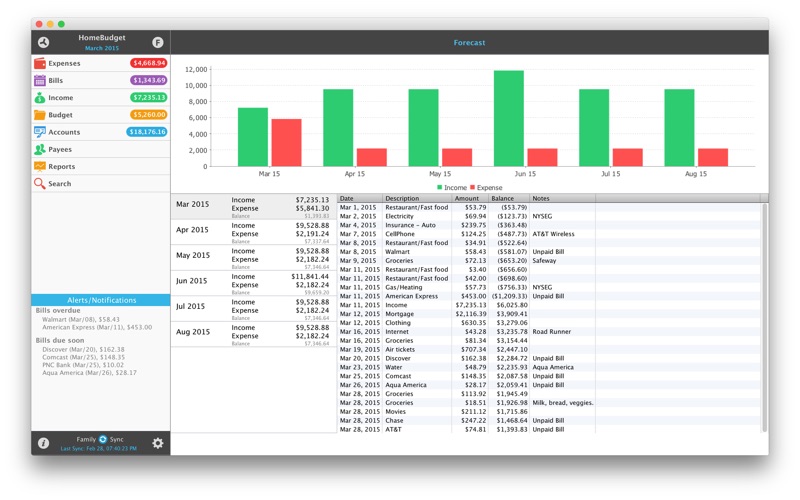
My wife and I have used this app for 8 years now (our entire marriage). It's wonderful to share our checkbook with this app. We use the forecast by putting all of our expected Bills and Income in for the next 2 years, and then viewing the forecast to see where we my need to be conservative, or where we can pay things off early or go on a vacation. It's wonderful, and we have had 0, that is zero, overdraft fees since we started using this app to manage our money. The only problem is, they have not made a bug fix or feature enhancement in the last 3 years. As a result, you might want to go with another app where the developer is maintaining their software. We'll see. Hopefully Anishu will start updating thier software again, and we'll be happy campers for another decade.

★★★★★Jan 8, 2022
I really like this app, but....

I really do like the design of this app. It's fairly straight forward to set up and fairly easy to import in transactions from your bank with a little tweaking in excel. It's a good app if you're only tracking expenses from a single account. I would DEFINITELY recommend it. However - it's got a pretty major flaw if you're tracking flow between Checking and Credit Accounts. In order to track all of your accounts, you have to consider paying on a Credit Account as a transfer out of your checking Account to the Credit Account. Because of this, it removes the Payee as an expense and makes it a transfer. If you want to see your payment to a credit account under your expenses, you would have to double-dip, doing the transfer out from checking to credit account and then also put it in as an expense.

★★★★★Nov 21, 2021
HomeBudget with Sync

I have been using this app on Mac and Ipad for at least 8 years when I switched from Quicken. It offers a simple and flexibe approach for managing a household budget. Never had any issues with performance. Sync works as advertized. I have always recieved prompt support and answers to my questions. Retired systems analyst.

★★★★★Jun 7, 2021
Very practical app

I have been using this app on the mac for several years, it is exactly what I want to manage my finances. Just found the mobile app with sync and am ecstatic to be able to make entries while away from the computer.

★★★★★Jan 23, 2021
Great financial app

Love love love this app! I need to manually enter transations in order to keep track of my money. I chose this app based on a recommendation and I have been very happy with it. I've been using it since July 17. I had an issue with changing dates on recurring bills and messaged them about it and they fixed it right away. I love that my financial picture is all in one place but I don't have to include all my accounts to make it work. Thanks for making a great product that is helping to make me financially healthy.

Store screenshots

ScreenshotScreenshotScreenshotScreenshotScreenshot

App Store ads

Apple Search Ads this app ran in the last 90 days, from Apple's public ad repository.

Apple's ad repository couldn't be reached right now. Try again later.

Growth research

Where this app is buying and earning its users. Each link opens pre filtered.

ASO keywords

Most repeated terms in the listing. Highlighted ones also appear in the title.

income12expense11family sync10sync9expenses9bills7create edit6edit delete6homebudget6family6budget6category5support5features5accounts5homebudget integrated5expenses income5expense income5including4track4within4devices4create4edit4

What's new in 3.3.3

- Apple silicon support - Update to latest Java

Released Dec 8, 2012. Current version shipped Aug 6, 2026.

Store description

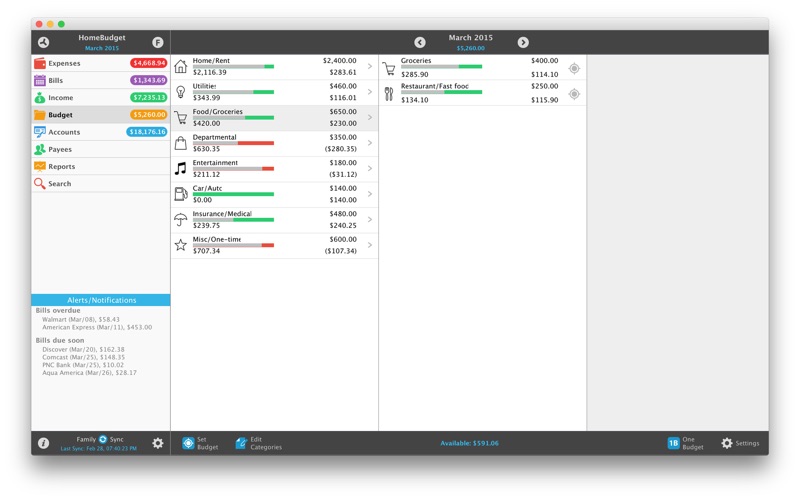
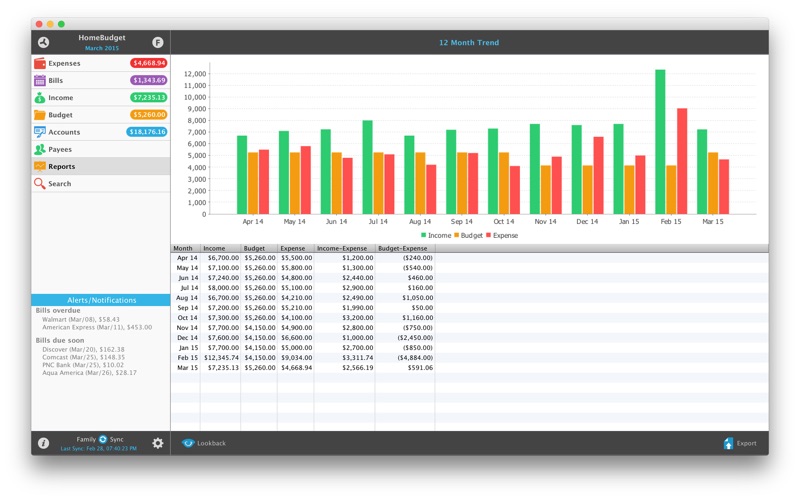
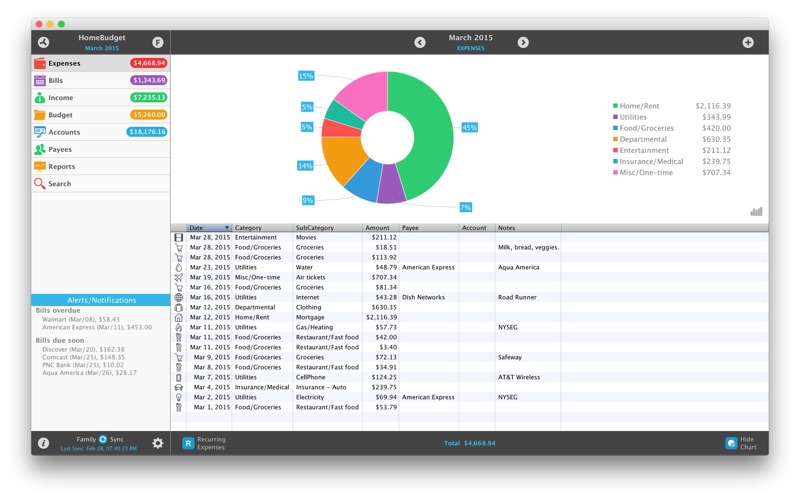
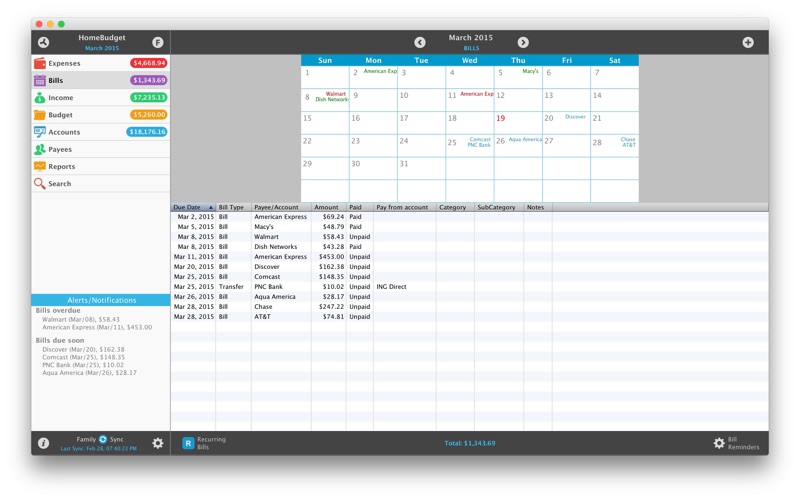
Now available in mobile [iPhone/iPad] and desktop versions [Mac OS], including instant data sync between mobile/desktop versions. (Separate purchase required for each OS platform). A lite version of HomeBudget is available under the free applications category. Give it a try. Contact support@anishu.com, if you need help. We have no way of contacting you if you post an issue as a review. -- HomeBudget is an integrated expense tracker designed to help you track your expenses, income, bills-due and account balances. It offers support for budgeting, and allows analysis of your expenses and income, including charts and graphs. Two key differentiating features of HomeBudget are: 1. Integrated set of features. The features within HomeBudget are well integrated such that a bill can become an expense (when you pay for it) and also adjust the account balance at the same time. 2. Family sync. HomeBudget includes Family Sync, an advanced feature that allows a group of devices/computers (Mac, iPhone, iPad, iTouch) within the household to exchange expense and income information, and work together within a single budget. Once setup, the devices/computers sync with each other automatically over the air. Family Sync works across all features including Bills and Accounts. Please refer to the Family Sync Quick Start guide at http://www.anishu.com for information on configuring Family Sync. KEY FEATURES: Expenses: - Create/Edit/Delete expenses and recurring expenses - Browse expense entries by month, by category/date with the ability to drill-down - Optionally associate an account and payee with an expense - Attach photo images of receipts - Support for multiple currencies and automatic exchange rate conversion - Search expense entries Income: - Create/Edit/Delete income and recurring income - Optionally associate an account with the income Bills - Create/Edit/Delete bills and recurring bills - Support for Payees, and track payments by Payee. - Make payment on bills either an as expense or as a transfer (to avoid double accounting your expenses) - Calendar and list view of Bills - Bill reminders Categories and Budget - Create/Edit/Delete expense categories and sub-categories - Set a budget, and track expenses at the category/sub-category level. - Associate icons with the categories - Budget rollover - Classify expenses into fixed, variable and discretionary and compute your disposable income Accounts - Support for Accounts such as Checking, Savings, Credit, Debit, Cash, etc. - Associate your expense and income entries with your accounts and accurately track account balances. - View transactions, and do transfer between accounts. - Ability to choose a different base currency for each account Reports - Trend chart for Expense, Budget and Income for the last 12 months - Pie/Bar charts for expense/income break-down (Available in the Expenses/Income screen). - Export data/reports as PDF or CSV Family Sync - Automatically sync multiple computers/devices (Mac, iPhone, iPad, iTouch) in the household and see the same numbers on all devices over 3G and WiFi - Work within the same budget with other members of the household Other - Backup/Restore complete application data, including all receipts - Ability to upload your own list of category icons - HomeBudget follows the locale/region setting on your device and shows date and currency symbols appropriate for your region Visit http://www.anishu.com to see more screenshots, and to download the user guide (PDF, 42 pages).

See this store page in another country

Prices, ranks and reviews are per country. Revenue above is already worldwide.

More from Anishu, Inc.

HomeBudget Lite (w/ Sync)
Finance
27 ratingsAnalyze →
HomeBudget with Sync
Finance
1.3K ratingsAnalyze →
HomeBudget Lite (w/ Sync)
Finance
0 ratingsAnalyze →
BA II Plus - Professional
Finance
13 ratingsAnalyze →
10bII+
Finance
9 ratingsAnalyze →
BizExpenseLite
Finance
1 ratingsAnalyze →
12C - Modern
Finance
10 ratingsAnalyze →
Debt Strategy Lite
Finance
2 ratingsAnalyze →
Finances
Finance
7 ratingsAnalyze →