← Back to charts
Textastic icon
APP STORE

Textastic

Alexander Blach · Developer Tools · United States store
NOT IN TOP 100 HERE
View on App Store ↗ Instagram card
Revenue a month, worldwide
Too small to estimate
Not enough chart or ratings data
New ratings
Tracking
Daily counts start building from today
Rating
0.0 of 5
0 ratings in this store
Countries it ranks in
0
was 0 on Oct 18, 2026

Revenue

Estimated from the grossing charts of Oct 25, 2026 in the 53 countries we track, and ratings growth on the App Store.

EST. REVENUE / MONTH · WORLDWIDE
Unranked
Not in any grossing chart, and too few ratings (0) to read its growth. Most apps at this stage earn little or nothing.
EST. LIFETIME DOWNLOADS
n/a
Estimated from ratings count
RATINGS
0
AVG RATING
n/a
PRICE
$9.99
AGE
13.6y
LAST UPDATE
267d ago
VERSION
7.0
SIZE
3 MB
AGE RATING
4+

Last 30 days

From our daily snapshots of every grossing chart.

DAYS IN A GROSSING CHART
0 / 30
COUNTRIES NOW
0 (was 0)
EST. REVENUE FROM CHARTS, DAILY · APP STORE ONLY EST
Show daily values
Sep 26, 2026not in a grossing chart
Sep 27, 2026not in a grossing chart
Sep 28, 2026not in a grossing chart
Sep 29, 2026not in a grossing chart
Sep 30, 2026not in a grossing chart
Oct 1, 2026not in a grossing chart
Oct 2, 2026not in a grossing chart
Oct 3, 2026not in a grossing chart
Oct 4, 2026not in a grossing chart
Oct 5, 2026not in a grossing chart
Oct 6, 2026not in a grossing chart
Oct 7, 2026not in a grossing chart
Oct 8, 2026not in a grossing chart
Oct 9, 2026not in a grossing chart
Oct 10, 2026not in a grossing chart
Oct 11, 2026not in a grossing chart
Oct 12, 2026not in a grossing chart
Oct 13, 2026not in a grossing chart
Oct 14, 2026not in a grossing chart
Oct 15, 2026not in a grossing chart
Oct 16, 2026not in a grossing chart
Oct 17, 2026not in a grossing chart
Oct 18, 2026not in a grossing chart
Oct 19, 2026not in a grossing chart
Oct 20, 2026not in a grossing chart
Oct 21, 2026not in a grossing chart
Oct 22, 2026not in a grossing chart
Oct 23, 2026not in a grossing chart
Oct 24, 2026not in a grossing chart
Oct 25, 2026not in a grossing chart
Best rank Sep 26, 2026: not ranked. Now: not ranked. Days at zero are days outside every grossing chart.

Money and momentum

Measured from the store, not estimated.

WHAT IT CHARGES
No in-app purchases
Earns from its upfront price, ads or payments outside the store.
REVIEW MOMENTUM
0.1 reviews / week
  • Trendfalling
  • Recent reviews average3.5 stars
  • Recent 1 and 2 star share29%
From the latest 105 written reviews, covering 4964 days.
RELEASE CADENCE
0 updates in 90 days
  • Typical gap between releases178 days
From the last 18 versions listed on the App Store.

What users want

From the latest 105 reviews on the United States App Store, Mar 23, 2013 to Oct 12, 2025: 29% are 1 or 2 stars. Open a theme to read what people wrote.

WHAT THEY COMPLAIN ABOUT · SHARE OF BAD REVIEWS
No customer support23%

7 of the 1 and 2 star reviews.

★★★★★ Also logging a negative star review of Apple app management for disabling a perfectly functioning Atom app on my computer merely because it's support/dev team had sunsetted the app.
★★★★★ I have both the ios app (iPhone and iPad) and desktop version, yet the desktop lacks the much needed sftp/ftp/webdav support.
★★★★★ This version has a long way to go before it is ready for serious developers, doesn't even support FTP.
Missing features20%

6 of the 1 and 2 star reviews.

★★★★★ This app lacks features present in the iOS app.
★★★★★ I have both the ios app (iPhone and iPad) and desktop version, yet the desktop lacks the much needed sftp/ftp/webdav support.
★★★★★ Good app just has no way to upload via FTP to server.
Bugs, things not working13%

4 of the 1 and 2 star reviews.

★★★★★ Aggravating bug is the Edit=>Find menu is disabled much of the time.
★★★★★ Latest update crashes on launch. This is massive, please fix NOW, not today.
★★★★★ After you use it long enough to learn it thoroughly, it forces you to sign into the App Store with a phony error message (app was not purchased on this computer).
Worse after an update7%

2 of the 1 and 2 star reviews.

★★★★★ Latest update crashes on launch.
★★★★★ When do you plan to update Textastick for Mac.
WHAT THEY ASK FOR
  • Please make it happen :) 4★, Nov 6, 2019
  • I only wish it was available on more platforms. 5★, Sep 28, 2018
  • seems like a generally good text completion / editor, but really needs a preview / live-preview type of helper ala the oft missed taco-edit. 3★, Apr 13, 2018
  • It's super light-weight, knows dozens of languages, and the developer has an open forum where he responds to bugs and feature requests. 5★, Apr 4, 2015
  • Some things that would be nice to have are: 4★, Feb 27, 2015
  • * ability to click click a folder in the navigation pane and have an option to create a new file * ability to right click a file in the navigation pane and have options to copy, delete, etc… * a console and terminal… 4★, Feb 27, 2015
  • Once I downloaded and installed it I was at a loss on how to add a connection. 2★, Jan 24, 2015
  • Please add highlights to the closing of tags when opening is selected. 4★, Dec 2, 2014
WORDS THAT KEEP COMING UP IN BAD REVIEWS
ios version6mac version3
WHAT THEY LOVE · SHARE OF GOOD REVIEWS
Easy to use16%

9 of the 4 and 5 star reviews.

★★★★★ It's simple, and just does what it does, without a lot of fuss.
★★★★★ Thanks for a wonderfully simple code editor!
★★★★★ It works well, nice and simple.
Great support12%

7 of the 4 and 5 star reviews.

★★★★★ No support for jsx files.
★★★★★ Thank you to the developer Alexander for his support in very quickly identifying the concern.
★★★★★ The description in the advertisement said “iCloud support” and it truly supports me!
Fast10%

6 of the 4 and 5 star reviews.

★★★★★ Great load time Handles large files No bloat Probably my goto when my laptop is lagging and I have to open some massive log files
★★★★★ So, I needed something fast & reliable.
★★★★★ It's fast and stable, and gets the job done.
Looks great9%

5 of the 4 and 5 star reviews.

★★★★★ Plenty of features, plenty of customization, great UI, has been in development for years by a responsive developer.
★★★★★ This is a great text editor witha clean interface and syntax coloring.
★★★★★ I need to write in HTML, CSS, and Javascript as I do web design, so this, with its - ridiculously - large library of languages seemed perfect.
Useful, it helps7%

4 of the 4 and 5 star reviews.

★★★★★ The code coloring for Swift is very helpful.
★★★★★ The ability to modify files directly from services such as iCloud Drive or Google Drive is also extremely useful.
★★★★★ As a student new to HTML5 and CSS3, this is very helpful.

Found by matching words and phrases in the reviews, not read by a person. A review can count toward more than one theme.

What users say

Latest reviews, United States App Store.

★★★★★Oct 12, 2025
Six stars if I could!

The best text editor for your iPhone or iPad hands down. Plenty of features, plenty of customization, great UI, has been in development for years by a responsive developer. What more can you ask for? Pro is well worth every penny paid.

★★★★★Mar 31, 2024
I really like it, but

It has worked really well for me on both Mac and iPad in the past.After a recent update, it now is very slow to open and close. Frequently hangs and has to be force shutdown. So I have largely quit using it.

★★★★★Oct 14, 2023
No feature additions and less features than on iOS version.

The developer absolutely refuses to improve the Textastic user experience, insisting that it would be "dangerous" to allow uploading multiple files without confirmation. Yet, if it was "dangerous", Textastic would have features that show you exactly what is being replaced, but it doesn't since it's an all-or-nothing confirmation dialogue.

★★★★★Apr 20, 2023
Must have

This is a first-day install for any new Mac or iOS device I buy. Great for hammering out scripts or working on larger projects. Just an all-around stellar product.

★★★★★Apr 1, 2023
No suport for jsx files

No support for jsx files.

★★★★★Mar 7, 2023
Edit=>Find Randomly Disabled

Works for the most part like a text editor. Aggravating bug is the Edit=>Find menu is disabled much of the time. Have to close and restart the app to get these enabled. The Find functionality for coding is mandatory, so this flaw is a major one. Also logging a negative star review of Apple app management for disabling a perfectly functioning Atom app on my computer merely because it's support/dev team had sunsetted the app. This was a reason to sunset my son's Macbook and get a new Linux laptop so he could use Atom. Atom being blocked by led to me buying this less functional and more costly Textastic app.

Store screenshots

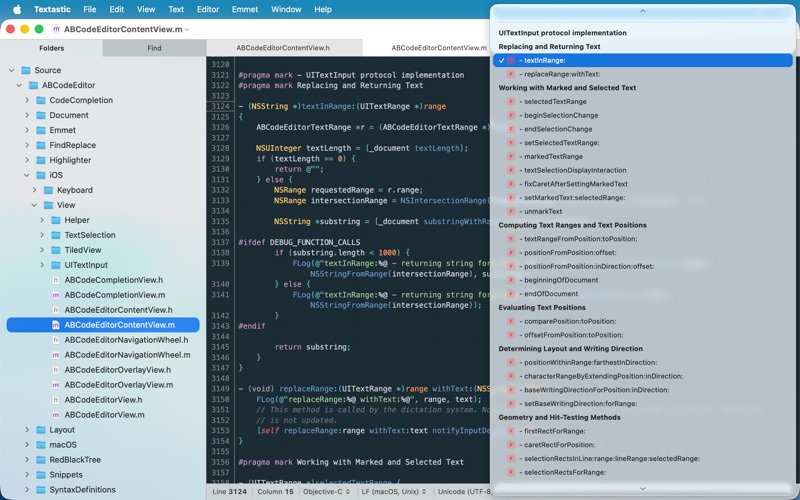
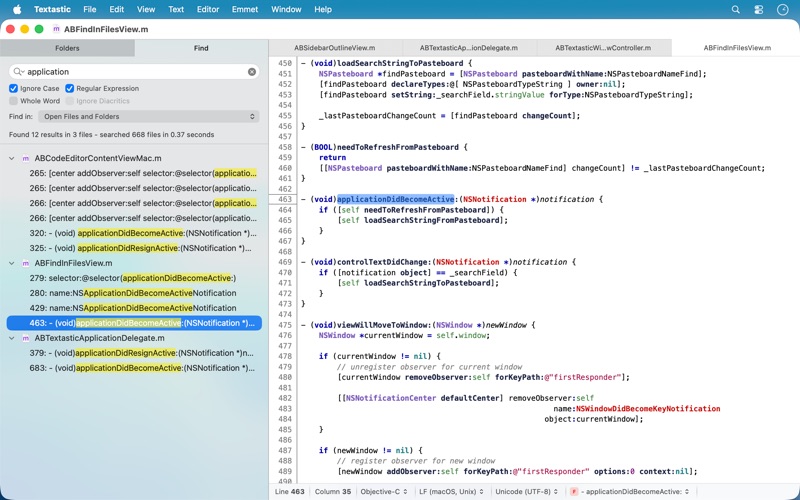
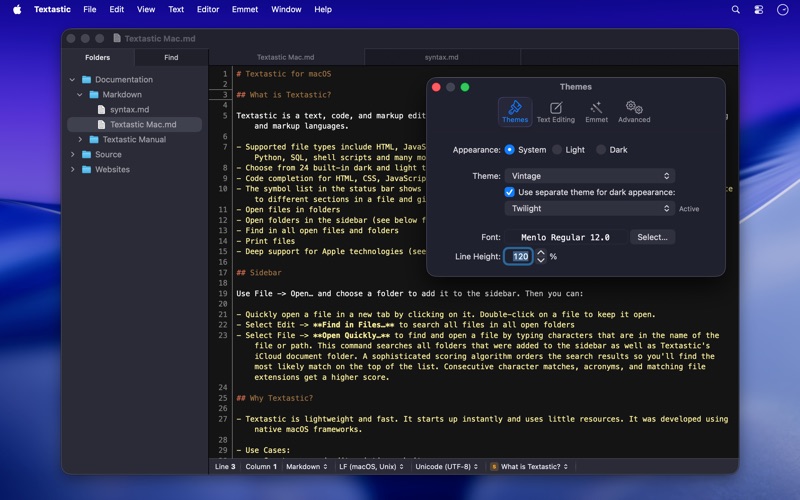
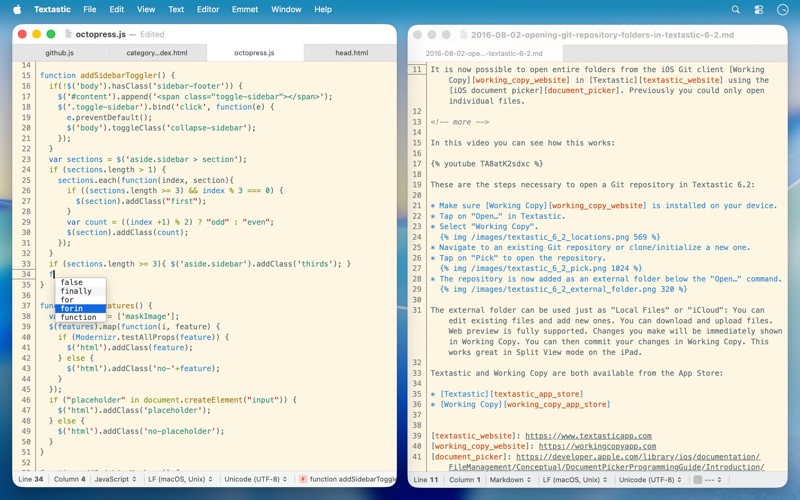
ScreenshotScreenshotScreenshotScreenshotScreenshotScreenshot

App Store ads

Apple Search Ads this app ran in the last 90 days, from Apple's public ad repository.

Apple's ad repository couldn't be reached right now. Try again later.

Growth research

Where this app is buying and earning its users. Each link opens pre filtered.

ASO keywords

Most repeated terms in the listing. Highlighted ones also appear in the title.

files4textastic3text2code2markup2syntax2file2html2javascript2css2objective2php2open2support2versions2icloud2sync2

What's new in 7.0

Textastic 7.0 adds full support for macOS Tahoe 26 and the Liquid Glass design, with a refreshed user interface and an updated app icon. New: - macOS Tahoe: fully updated for compatibility with the latest version of macOS. - Added images to menu items on macOS 26. Fixed: - Updated the HTML5 template and removed outdated HTML 4.01 and XHTML templates. The HTML5 template now matches what Emmet inserts when typing "!" and pressing Tab. - Fixed an issue where closing a window with an edited, untitled file did not prompt the user to save the file. - Fixed an issue where printing sometimes produced an unwanted additional page due to a rounding error. - Improved file and folder name sort order in the sidebar to match Finder's behaviour and improve support for numbers in file and folder names. - Fixed an issue with the cursor and text selection in Dark Mode on macOS 26. - Resolved a bug where internal syntax definitions that were meant to be hidden could be selected if the syntax definition was not yet fully loaded (e.g., "Make Output", "Cargo Build Results", "PHP Source", "Swift Standard Library", etc.). - Improved automatic closing of quotes: quotes are no longer closed after a backslash (e.g., when entering umlauts in LaTeX), and are now properly closed before semicolons and commas in CSS files. - HTML script tag code completion no longer inserts the type and src attributes by default. The src attribute can be added manually or using the "script:src" Emmet abbreviation. - Disabled auto-pairing of single quotes in LaTeX and TeX math environments. - Other minor improvements.

Released Mar 22, 2013. Current version shipped Jan 31, 2026.

Store description

Textastic is a powerful and fast text, code, and markup editor. • Syntax highlighting of more than 80 programming and markup languages • Supported file types include HTML, JavaScript, CSS, XML, Markdown, Objective-C, Swift, C++, PHP, Perl, Python, SQL, shell scripts and many more • Compatible with TextMate 1 and Sublime Text 3 syntax definitions and themes • Code completion for HTML, CSS, JavaScript, PHP, C, and Objective-C • Open files in tabs • Open folders in a sidebar • Find in files • Print files • Symbol list to quickly navigate in a file • Emmet support built-in • Auto Save and Versions • iCloud document sync • Full support for Dark Mode Please note: You can use Textastic for iPad and iPhone to sync files between the Mac, iOS, and iPadOS versions of Textastic using iCloud Drive.

See this store page in another country

Prices, ranks and reviews are per country. Revenue above is already worldwide.