← Back to charts
iDoceo - Planner and gradebook icon
APP STORE

iDoceo - Planner and gradebook

iDoceo Studios Ltd. · Education · United Kingdom store
NOT IN TOP 100 HERE
View on App Store ↗ Instagram card
Revenue a month, worldwide EST
$5.4K
Likely $1.8K to $16.1K
▼ 41.3% in 15 days
New ratings
+0
in 3 days, 42.2K in total
Rating
4.8 of 5
1.3K ratings in this store
Countries it ranks in
0
was 1 on Oct 20, 2026

Revenue

Estimated from the grossing charts of Oct 26, 2026 in the 53 countries we track, and ratings growth on the App Store.

EST. REVENUE / YEAR · WORLDWIDE
$64.3K
235 new ratings a month on average since launch
EST. LIFETIME DOWNLOADS
44.7K to 127.6K
Estimated from ratings count
WHERE ITS USERS ARE · SHARE OF RATINGS
  • Spain 28.3K ratings67%
  • Germany 2.8K ratings7%
  • France 2.6K ratings6%
  • Mexico 2.4K ratings6%
  • Canada 1.5K ratings4%
  • United States 1.4K ratings3%
  • United Kingdom 1.3K ratings3%
  • Australia 1.2K ratings3%
HOW SURE ARE WE
Not in any grossing chart, so this comes from ratings growth (235 new ratings a month on average since launch): revenue grows with new ratings, more slowly for apps that collect ratings fast. Tested on 418 apps with verified revenue: typically off by about 2 times, and big earners tend to come out low. Countries we don't track (and Google Play in China, which doesn't exist) aren't included, and neither are ads or web payments. Gross revenue before store fees.
RATINGS
1.3K
AVG RATING
4.77
PRICE
£19.99
AGE
15.0y
LAST UPDATE
1d ago
VERSION
9.6.0
SIZE
149 MB
AGE RATING
4+

Last 30 days

From our daily snapshots of every grossing chart and daily ratings counts.

DAYS IN A GROSSING CHART
23 / 30
COUNTRIES NOW
0 (was 1)
NEW RATINGS, LAST 3 DAYS
-2
EST. REVENUE A MONTH, DAILY · APP STORE EST
Show daily values
Sep 28, 2026$10.6K a month
Sep 29, 2026$24K a month
Sep 30, 2026$28.6K a month
Oct 1, 2026$18.5K a month
Oct 2, 2026$24.8K a month
Oct 3, 2026$32.4K a month
Oct 4, 2026$9.5K a month
Oct 5, 2026$39.3K a month
Oct 6, 2026$12.2K a month
Oct 7, 2026$8K a month
Oct 8, 2026$12.9K a month
Oct 9, 2026$15.3K a month
Oct 10, 2026$25.1K a month
Oct 11, 2026$17.9K a month
Oct 12, 2026not in a grossing chart
Oct 13, 2026not in a grossing chart
Oct 14, 2026$10.6K a month
Oct 15, 2026$12.4K a month
Oct 16, 2026not in a grossing chart
Oct 17, 2026$38.4K a month
Oct 18, 2026$26.4K a month
Oct 19, 2026not in a grossing chart
Oct 20, 2026$12.8K a month
Oct 21, 2026not in a grossing chart
Oct 22, 2026not in a grossing chart
Oct 23, 2026$9.8K a month
Oct 24, 2026$12.5K a month
Oct 25, 2026$14.7K a month
Oct 26, 2026not in a grossing chart
Oct 27, 2026not in a grossing chart
The same estimate as the headline, saved every day. Best rank Sep 28, 2026: #80 Education · ES. Now: not ranked.
RATINGS IN THE CORE COUNTRIES, DAILY
Show daily values
Oct 23, 202642.2K ratings
Oct 24, 202642.2K ratings
Oct 25, 202642.2K ratings
Oct 26, 202642.2K ratings
42.2K on Oct 23, 2026, 42.2K on Oct 26, 2026. New ratings track new downloads, even outside the charts.

Money and momentum

Measured from the store, not estimated.

WHAT IT CHARGES
No in-app purchases
Earns from its upfront price, ads or payments outside the store.
REVIEW MOMENTUM
0.6 reviews / week
  • Trendfalling
  • Recent reviews average4.6 stars
  • Recent 1 and 2 star share6%
From the latest 427 written reviews, covering 5361 days.
RELEASE CADENCE
3 updates in 90 days
  • Typical gap between releases19 days
From the last 25 versions listed on the App Store.
RATING BREAKDOWN
1.3K ratings
5★82%
4★15%
3★2%
2★0%
1★1%

What users want

From the latest 427 reviews on the United Kingdom App Store, Feb 22, 2012 to Oct 18, 2026: 6% are 1 or 2 stars. Open a theme to read what people wrote.

WHAT THEY COMPLAIN ABOUT · SHARE OF BAD REVIEWS
Price and subscription20%

5 of the 1 and 2 star reviews.

★★★★★ I was shocked at the price, but assumed it would be worth it to save the hassle of juggling and lugging papers, schedules, notes and other things to all my classes.
★★★★★ I feel like I have wasted my hard earned money.
★★★★★ I spent the money on this to find out that it doesn't even have the most basic function of all grade books and the one I needed the most!
No customer support20%

5 of the 1 and 2 star reviews.

★★★★★ I had purchased the iPad with personal funds in order to make my school life easier, but it sat in-used all year because the customer service at iDoceo was horrible!
★★★★★ I have written to support and got advice that didn't work at all.
★★★★★ it has some good points but overall it's way too complicated...sometimes really frustrating to figure out how to use it.and the email customer service is lacking...once told "yes, you can do many things check the…
Lost data, sync, backup16%

4 of the 1 and 2 star reviews.

★★★★★ Sad to say the Sync never worked, missing information and it always seems to shut down on its won.
★★★★★ on a Macbook at home and sync it all to the ipad I take to school.
★★★★★ This app says it synchronizes between iPad and Mac computer but it doesn't I created my classes on my Mac but can't see them on my iPad.
Bugs, things not working12%

3 of the 1 and 2 star reviews.

★★★★★ Always Glitchy, Very iCloud dependent!
★★★★★ This is the biggest glitch and frustrating aspect of this App.
★★★★★ Thought this was going to be what I needed. Nope! Like the tabs for subjects, but what about a summary page for all the averages? I have been making my own grade book with excel for years and I have the tabs for tests…
Worse after an update12%

3 of the 1 and 2 star reviews.

★★★★★ You have to add one in youself AND tell it what to calculate which means if you want a running grade you have to either change it EVERY TIME or update a column EVERY time.
★★★★★ Please update this capability!
★★★★★ Will update review once I figure it out more.
WHAT THEY ASK FOR
  • One of the things I would love to see supported is the ability to freeze a folder category. 4★, Jun 3, 2025
  • The more I use iDoceo, the more I realize it really can meet all my needs as a grade book, a lesson planning notebook, a place to record student data, etc. 5★, Sep 25, 2024
  • It would be great if I could though. 1★, Sep 20, 2024
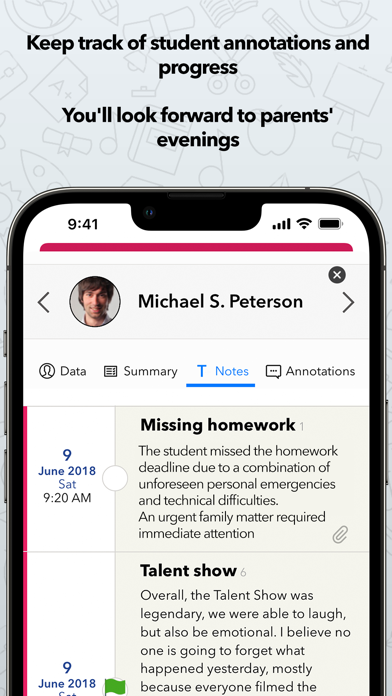
  • Need a highly specific and relevant observation during a parent-teacher conference, just check the notes section for all your annotations about a class or student. 5★, Mar 20, 2024
  • Additionally, I wish there was a way to copy things to the tabs within each class, but without the student names rolling over. 4★, Oct 18, 2023
  • I also wish there were a way to type a numerical value without that value automatically hitting the overall grade. 4★, Oct 18, 2023
  • Will you please add the option to click on a student photo and view it? 5★, Jun 13, 2023
  • Just wish it also included the power law formula. 5★, Sep 5, 2022
WORDS THAT KEEP COMING UP IN BAD REVIEWS
user friendly3
WHAT THEY LOVE · SHARE OF GOOD REVIEWS
Easy to use19%

76 of the 4 and 5 star reviews.

★★★★★ If you are computer literate, the setup of grade books isn't too difficult and is quick and easy.
★★★★★ If you just want simple and straight forward gradekeeping and attendance, it does all of that easily and intuitively.
★★★★★ It is easy to copy the students' information from one class to another.
Useful, it helps19%

75 of the 4 and 5 star reviews.

★★★★★ Similarly, it would be very helpful to filter by students present on the latest attendance date (not just those present today); I do understand that I could filter by column, but that doesn't filter out absences.
★★★★★ When I have had trouble, the developer has always been very prompt and helpful with his replies.
★★★★★ It is often the case that the most useful edtech products are the ones that are the most complex and customizeable, which does make them - and does make this one - a beast to learn to use well.
Great support6%

22 of the 4 and 5 star reviews.

★★★★★ This app has revolutionized how I interact with student data, and it's done a lot to help support my decision making when evaluating student performance.
★★★★★ There is definitely a learning curve to be able to use iDoceo to maximum effect, but there is also an incredible amount of support available.
★★★★★ Further, the support team has been excellent, quickly answering all questions enabling to focus on my work flow.
Worth the money5%

20 of the 4 and 5 star reviews.

★★★★★ It is indispensable for my teaching — and it's completely free, which is a dream come true.
★★★★★ I love iDoceo. It organizes my grade book SO easily and I can use my template across other classes (so I don't have to start over for every class). I highly recommend!
★★★★★ I really appreciate that this app is affordable and that it is not on A subscription basis or website based.
Fast5%

18 of the 4 and 5 star reviews.

★★★★★ If you are computer literate, the setup of grade books isn't too difficult and is quick and easy.
★★★★★ If you have more complex needs (rubrics, complex calculations, icon based calculations, behavior tracking) it can do that with some tweaking, and then it runs just as smooth.
★★★★★ It is smooth, intuitive, flexible, and so helpful.

Found by matching words and phrases in the reviews, not read by a person. A review can count toward more than one theme.

What users say

Latest reviews, United Kingdom App Store.

★★★★★Oct 18, 2026
Calendar not working

With this latest update, my calendar is no longer working on my iPhone and not syncing correctly with my computer app. This is quite frustrating as I use both my computer and iPhone to keep my schedule and lesson plans available to me at all times.

★★★★★Sep 15, 2026
اضافة اللغة العربية

البرنامج رائع وممتع ارجوا اضافة اللغة العربية

★★★★★Sep 14, 2026
A+

I have tried every digital teacher planner on the App Store over the years, and they were all limited in features, outdated, or eventually abandoned. iDoceo made an ideal all-in-one package. Kudos to you guys. I hope you will maintain this product indefinitely. Thank you.

★★★★★Jun 13, 2026
Great Planner

I have used this planner for many years and have never regretted having it. IDoceo is a great planner very customizable and flexible. I would recommend this to anyone looking for a way to stay organized in planning and record keeping.

★★★★★May 28, 2026
Outstanding for Music teachers

I really could be a sales person for this application b/c after 35 years of teaching elementary music (700 students a week) it has given me the ability to truly document my student progress and get to know them (ie: notes and pictures). I have seating charts as well as seating plans for center work. LOVE THIS APP

★★★★★Mar 5, 2026
Easy Setup

If you are computer literate, the setup of grade books isn’t too difficult and is quick and easy. Within half a day, I had set up several classes of information and set up pending assignments. The ease of see all the grades in an organized way has put the burden of grading away!

Apps like this

Same category, earning about as much.

Store screenshots

ScreenshotScreenshotScreenshotScreenshotScreenshotScreenshotScreenshotScreenshotScreenshotScreenshot

App Store ads

Apple Search Ads this app ran in the last 90 days, from Apple's public ad repository.

STATUS
Stopped
FIRST SEEN
Jun 3, 2024
AD VARIATIONS
139
EU COUNTRIES
24
WHERE
Search results in AT, BE, BG, CY, CZ, DE, DK, EE, FI, FR, GR, HR, HU, IE, IT, LU, LV, NL, PL, PT, RO, SE, SI, SK. Formats: Icon + Asset Ad, Icon Ad. Last impression Oct 21, 2026.
AD TEXT
  • Klassenbuch und vieles mehr!
  • All-in-one app for classroom
  • Planner et outils pour le prof
  • Notas, planner tudo-em-um!
  • Planner, cijferlijst en meer!
Ad creativeAd creativeAd creativeAd creativeAd creativeAd creative

Apple only publishes ads shown in the EU (EU Digital Services Act), with a 7 day delay. An app that advertises only outside the EU shows nothing here.

Growth research

Where this app is buying and earning its users. Each link opens pre filtered.

ASO keywords

Most repeated terms in the listing. Highlighted ones also appear in the title.

gradebook8add7handwritten notes6idoceo6students6classroom6files6notes6diary5audio5text5pdf5xls5seating plans5pdf xls5unlimited4full4planner4week4seating4plans4handwritten4configurable4add unlimited3

What's new in 9.6.0

Welcome to iDoceo 9.6! A fresh look, richer classroom insights and exciting new ways to plan, organise and share. This update brings improvements to the tools you use every day, with plenty of new possibilities to explore. • Your week at a glance Bring your timetable to your Home Screen with the new weekly schedule widget. Choose from different sizes and appearances to keep your week within easy reach. • A fresh perspective on your lessons Enjoy redesigned day and week diary views on iPad and Mac, clearer lesson layouts and session numbers in more planning views. Refreshed diary and notes searches help you rediscover your ideas, with recent diary searches and clearer results. • Bring your bulletin boards to your students Share bulletin board content with your linked iDoceo Connect class, where students can access it from their browser. Publish resources, notes and audio recordings, and import new board items from Connect into iDoceo. Discover richer website previews and new coloured note styles, too. • See more in your class Summary Explore redesigned widgets and clearer, interactive charts for attendance, grades and progress. Compare students and assessments, include the class average, explore radar charts and export comparisons as PDFs. Tap attendance statuses to see the students behind the numbers. • Plan in Excel, teach with iDoceo Import lesson plans from a spreadsheet directly into your planner sections. Match your column headings to your section names and bring your prepared content into place. • A smoother gradebook Discover modern tabs with drag-and-drop reordering, fit student row heights to their content and use the refreshed undo and redo history. Select multiple evaluation criteria at once and optionally display associated criteria in column headers. • More possibilities with iDoceo Connect Bring your classroom to life with live activities such as Team Challenge, Debate Arena and Name Roulette. Sign in with a Microsoft account, choose a Connect account independently of your other cloud connections, import tasks by ID and access shared tasks as a co-teacher. Use the integrated web assessment editor and review submission activity directly from iDoceo. • Your teaching library, refreshed Browse, search, preview and transfer resources through the redesigned local Wi-Fi browser interface. Drag files into the library and organise them by class, student or lesson. • Everyday tools with a new feel Enjoy refreshed settings, resource browsing, textDrop, iconDrop, TimeDrop, calculator, audio recording and playback, and the random picker. Timers and the stopwatch preserve their state as you move between screens, with floating controls to keep them close. • Reminders for every class You can now add reminders to each class and manage them easily. The new Summary widget shows pending reminders for that class, keeping what needs doing in sight. Thank you to our beta testers and to every teacher whose ideas help shape iDoceo. We’re excited to bring this update to your classroom!

Released Nov 7, 2011. Current version shipped Oct 26, 2026.

Store description

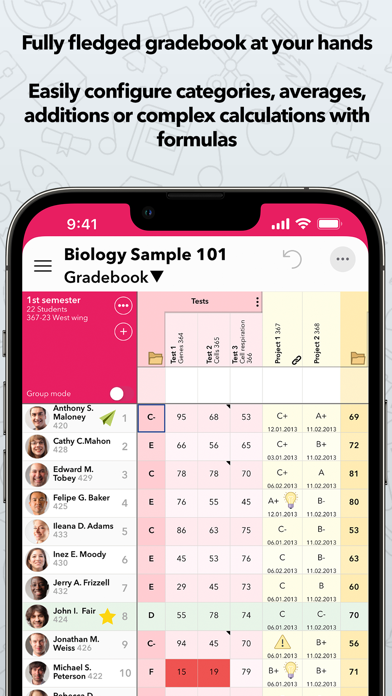
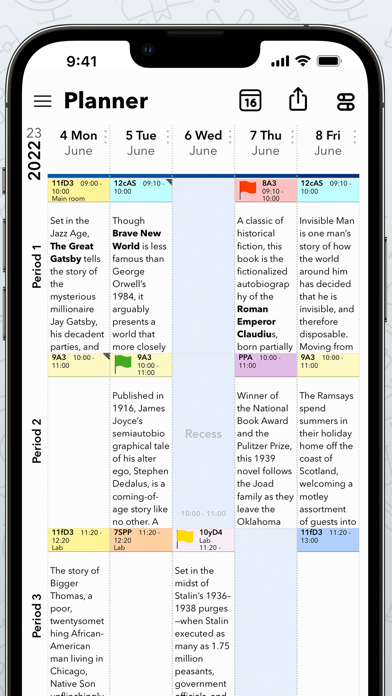
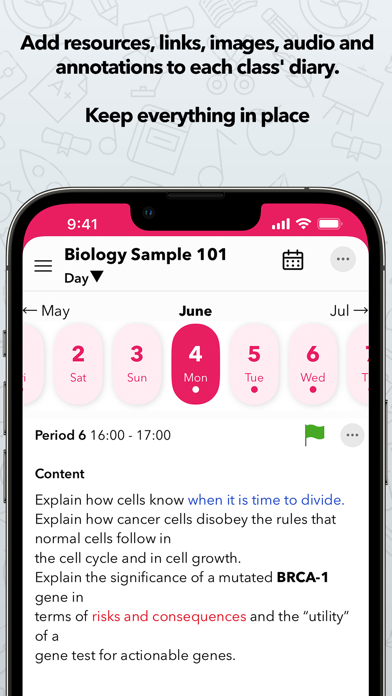
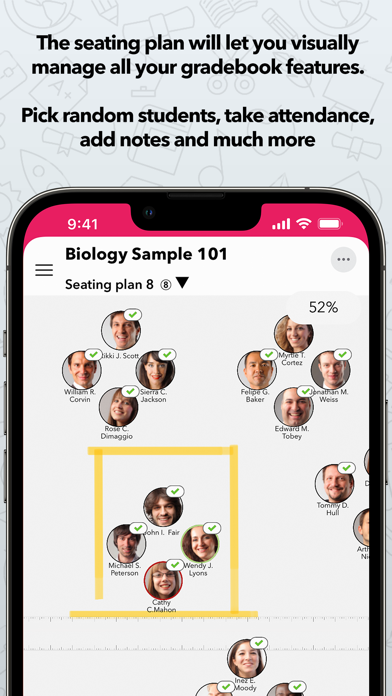
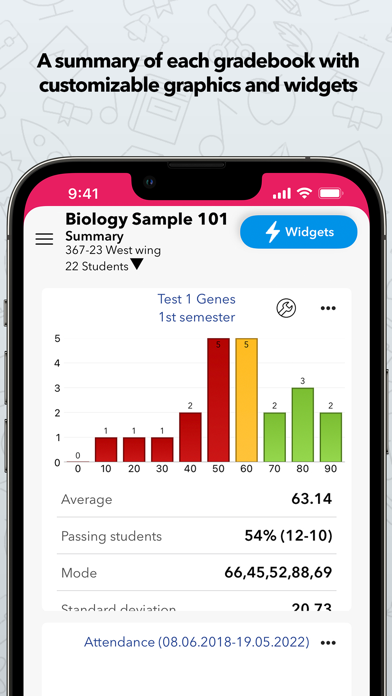
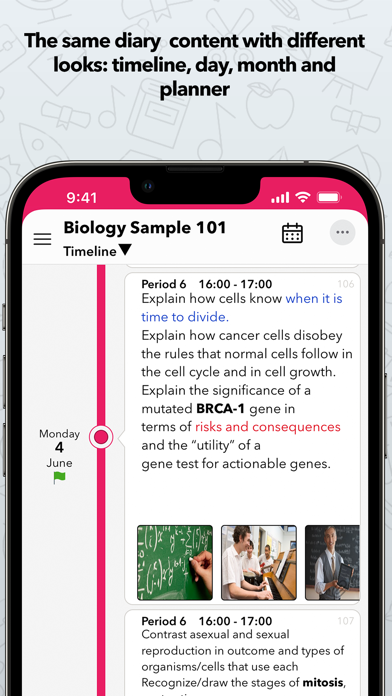
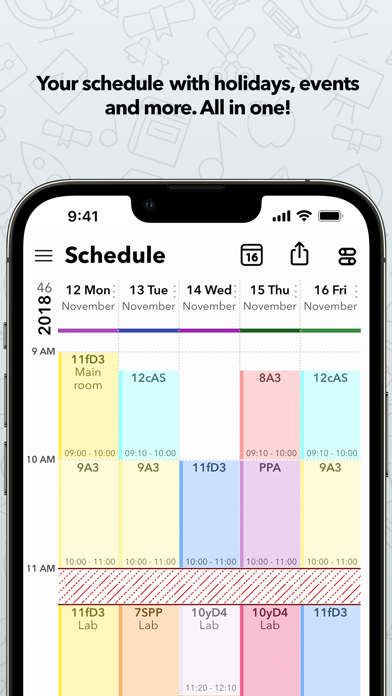
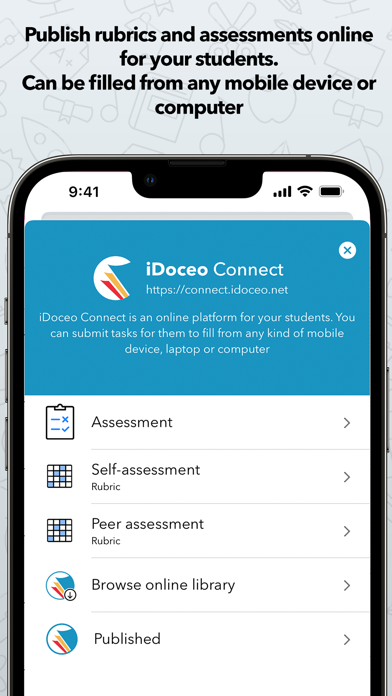
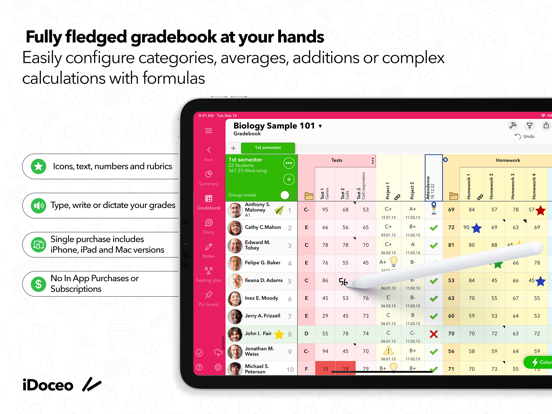
iDoceo is a powerful assistant for teachers. You can add an unlimited number of students and classes. iDoceo is paid only once and you get the full app and its updates. There are no additional subscriptions or in app purchases. iDoceo respects your privacy and confidentiality. Works completely offline. No internet connection required. All your data is stored locally in your iPad, unless you enable the synchronization options. An all-in-one tool for teachers that consists of: - Fully fledged gradebook for teachers, with custom calculations, attendance and can be linked to Google Classroom,Moodle, MSTeams - Lesson planner: Week/Day views - Diary: Day/Week/Month/Timeline views of a single classroom - Teacher Timetable - Seating plans - Resource manager that will help you keep track of PDFs, audio,files,links,images,etc. - Notepads with handwritten notes, drawings and timestamped text - Configurable reports in PDF, XLS and TXT Below the list of its main features. More details at www.idoceo.net • TEACHER PLANNER, DIARY AND SCHEDULE - Configure simple week schedules or complex rotating cycles with holidays. Unlimited combinations for each term - Individual diary for each classroom. Single day view, week, month and timeline. Add&Edit iCal events - Timeline view with all your lessons on sight. Bump, lock and yank lessons. - Add files from any source, video, audio, handwritten notes, links and resources to your lesson plans. - Create PDF/XLS reports of your planner and diary. • TEACHER GRADEBOOK - Use rubrics, categories, icons, colors, text or number based grades. You can configure your own grading system - Evidence tracking features. Take pictures, record video and audio and attach it to any cell and student. - Calculate simple weighted averages, additions or create your own Excel like formulas with conditions and complex functions. - Add unlimited columns, folders, rows and pages to organize your information - Use configurable editors on each column for ultrafast edition and adapt the gradebook to your needs - Send personalized e-mail reports to your students with their grades, annotations or files - Filter information of students or groups on screen - Share your gradebook configurations with other users - Import your current data from any XLS, CSV or iDoceo template file - Import your students photos from a single image with face detection or in bulk with separate files - Export everything to native PDF, XLS or CSV • SEATING PLANS - Add columns and edit your data as if you were in the gradebook. - Up to ten seating plans per classroom with five different modes and backgrounds - Random group generator and picker. • TO-DOs, TEXT AND HANDWRITTEN NOTES - Create unlimited standalone notepads or linked to a classroom. Configurable sheets - Full PDF report of your notepads. - To-dos with alarm events - Timestamped text notes for meetings, linked to a class or a student • RESOURCE MANAGER - Record audio and video, add handwritten notes, signatures, files ,images, links, add text or annotations anywhere: gradebook cells, students, classroom, diary, planner. - Full PDF reader with bookmarks and thumbnails - Play Keynote presentations, view XLS files, audio and videos. • SYSTEM TOOLS - Multiple backup options: Dropbox, Google Drive, iCloud or your own WebDAV server. - Works in landscape, portrait and full screen mode (gradebook) - Password protect your contents - Random picker and spinning wheel on summary,gradebook and seating plan - Class’ summary with configurable widgets. - Bulletin board with resources and notes. - Recycle bin with recently erased students, columns and classes Thanks for all your support and great comments in the App store! Visit our website's forum at www.idoceo.net or send us an e-mail from the app > Help > Support&Suggestions if you have any questions or suggestions for our next updates.

See this store page in another country

Prices, ranks and reviews are per country. Revenue above is already worldwide.

More from iDoceo Studios Ltd.

Classroom Roulette - random picker by iDoceo
Education
18 ratingsAnalyze →
iDoceo Grade Scanner
Education
10 ratingsAnalyze →
Classroom Badge Maker iDoceo
Education
4 ratingsAnalyze →
Classroom Teammates by iDoceo
Education
3 ratingsAnalyze →
Music player by iDoceo
Productivity
4 ratingsAnalyze →