← Back to charts
Motion FX icon
APP STORE

Motion FX

Autodesk Inc. · Entertainment · Brazil store
NOT IN TOP 100 HERE
View on App Store ↗ Instagram card
Revenue a month, worldwide
Too small to estimate
Not enough chart or ratings data
New ratings
Tracking
Daily counts start building from today
Rating
0.0 of 5
0 ratings in this store
Countries it ranks in
0
was 0 on Oct 16, 2026

Revenue

Estimated from the grossing charts of Oct 21, 2026 in the 53 countries we track, and ratings growth on the App Store.

EST. REVENUE / MONTH · WORLDWIDE
Unranked
Not in any grossing chart, and it sells nothing in the store (no in-app purchases, free download). Any revenue comes from ads or payments outside the store, which we can't see.
EST. LIFETIME DOWNLOADS
n/a
Estimated from ratings count
RATINGS
0
AVG RATING
n/a
PRICE
Grátis
AGE
15.2y
LAST UPDATE
4375d ago
VERSION
1.1.4
SIZE
28 MB
AGE RATING
+4

Last 30 days

From our daily snapshots of every grossing chart.

DAYS IN A GROSSING CHART
0 / 30
COUNTRIES NOW
0 (was 0)
EST. REVENUE FROM CHARTS, DAILY · APP STORE ONLY EST
Show daily values
Sep 24, 2026not in a grossing chart
Sep 25, 2026not in a grossing chart
Sep 26, 2026not in a grossing chart
Sep 27, 2026not in a grossing chart
Sep 28, 2026not in a grossing chart
Sep 29, 2026not in a grossing chart
Sep 30, 2026not in a grossing chart
Oct 1, 2026not in a grossing chart
Oct 2, 2026not in a grossing chart
Oct 3, 2026not in a grossing chart
Oct 4, 2026not in a grossing chart
Oct 5, 2026not in a grossing chart
Oct 6, 2026not in a grossing chart
Oct 7, 2026not in a grossing chart
Oct 8, 2026not in a grossing chart
Oct 9, 2026not in a grossing chart
Oct 10, 2026not in a grossing chart
Oct 11, 2026not in a grossing chart
Oct 12, 2026not in a grossing chart
Oct 13, 2026not in a grossing chart
Oct 14, 2026not in a grossing chart
Oct 15, 2026not in a grossing chart
Oct 16, 2026not in a grossing chart
Oct 17, 2026not in a grossing chart
Oct 18, 2026not in a grossing chart
Oct 19, 2026not in a grossing chart
Oct 20, 2026not in a grossing chart
Oct 21, 2026not in a grossing chart
Oct 22, 2026not in a grossing chart
Oct 23, 2026not in a grossing chart
Best rank Sep 24, 2026: not ranked. Now: not ranked. Days at zero are days outside every grossing chart.

Money and momentum

Measured from the store, not estimated.

WHAT IT CHARGES
No in-app purchases
Earns from its upfront price, ads or payments outside the store.
REVIEW MOMENTUM
Too few reviews
Fewer than 3 recent written reviews in this country.
RELEASE CADENCE
0 updates in 90 days
  • Typical gap between releases41 days
From the last 8 versions listed on the App Store.

Store screenshots

ScreenshotScreenshotScreenshotScreenshotScreenshot

App Store ads

Apple Search Ads this app ran in the last 90 days, from Apple's public ad repository.

No App Store ads in the EU
None in the last 90 days.

Apple only publishes ads shown in the EU (EU Digital Services Act), with a 7 day delay. An app that advertises only outside the EU shows nothing here.

Growth research

Where this app is buying and earning its users. Each link opens pre filtered.

ASO keywords

Most repeated terms in the listing. Highlighted ones also appear in the title.

effects9motion8video7computer camera6emit effects6lets6camera6effect6real time5mode lets5live video5mouse trackpad5computer4mode4emit4color4live4trackpad4mouse4support4effect paint3video warp3video mouse3academy award3

What's new in 1.1.4

- OS X 10.10 Yosemite compatibility

Released Aug 24, 2011. Current version shipped Oct 31, 2014.

Store description

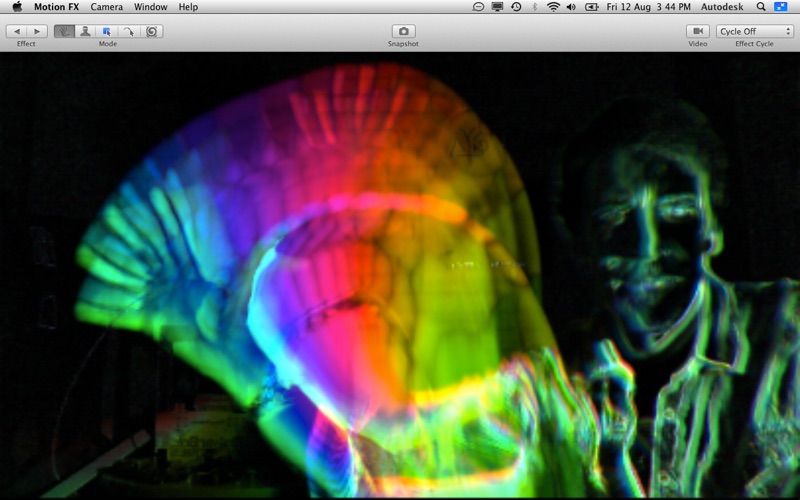
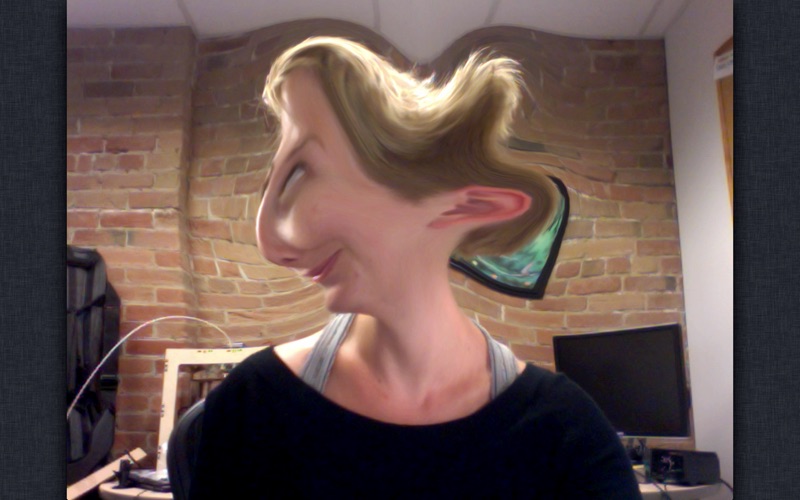
Autodesk® Motion FX lets you create stunning real-time video effects using your computer’s camera. Simply select your favorite preset effect, and create an incredible visual experience by moving in front of your computer’s camera. A preset cycling mode lets you automatically cycle through effects without lifting a finger. You can also use the Face Tracking technology of OS X Lion to emit effects from any faces visible to your camera. If you want more personalization, there are more options you can play with in Motion FX. Color Detection lets you select a color from the live camera feed from which to emit effects, and with Effect Paint you can play with fluids using your trackpad or mouse. Video Warp mode lets you distort live video using your mouse or trackpad. Lose yourself in the swirling dreamscape of Motion FX! Features: • Over 80 presets from Smoke, to Fire, to Rainbow Plasma, react in real-time to your movements • Powered by Academy Award®* winning real-time fluid dynamics technology from Autodesk® Maya® software • Effects can be displayed alone or composited on top of live video from your computer’s camera • Cycle mode lets you dance and play while Motion FX seamlessly transitions from effect to effect, creating an endless swirling masterpiece • 5 Modes: • Motion Detect – Effects are created based on motion detected by your computer’s camera • Face Detect – Emit effects from all visible faces • Color Detect – Choose the color to emit effects from the video feed • Effect Paint – Paint effects using your mouse or trackpad • Video Warp – Warp live video using your mouse or trackpad • Save snapshots to your Pictures folder by tapping the spacebar • Support for Mac OS X Lion Full-Screen mode • Hook up multiple cameras and switch between them • Support for multiple displays lets VJs and performance artists use one display for control and another for projection to an audience • Animated thumbnails allow you to preview each effect If you have questions or comments about Motion FX or for technical support please visit the support link from this page. * Academy Award is a registered trademark of the Academy of Motion Picture Arts and Sciences.

See this store page in another country

Prices, ranks and reviews are per country. Revenue above is already worldwide.

More from Autodesk Inc.

AutoCAD
Productivity
3.5K ratingsAnalyze →
Autodesk Forma
Business
20 ratingsAnalyze →
Autodesk Fusion
Productivity
113 ratingsAnalyze →
BIM 360
Productivity
17 ratingsAnalyze →
Tinkercad
Education
425 ratingsAnalyze →
Autodesk® BIM 360 Glue
Productivity
1 ratingsAnalyze →
FBX Review
Productivity
0 ratingsAnalyze →
BIM 360 Field
Productivity
1 ratingsAnalyze →
BIM 360 Layout
Productivity
0 ratingsAnalyze →