← Back to charts
Speed Tracker. Pro icon
APP STORE

Speed Tracker. Pro

Oxagile LLC · Navigation · India store
NOT IN TOP 100 HERE
View on App Store ↗ Instagram card
Revenue a month, worldwide EST
$1.1K
Likely $360 to $3.2K
▼ 47.1% in 15 days
New ratings
+1
in 4 days, 3.7K in total
Rating
4.6 of 5
23 ratings in this store
Countries it ranks in
2
was 1 on Oct 19, 2026

Revenue

Estimated from the grossing charts of Oct 25, 2026 in the 53 countries we track, and ratings growth on the App Store.

EST. REVENUE / YEAR · WORLDWIDE
$13K
20 new ratings a month on average since launch
EST. LIFETIME DOWNLOADS
805 to 2.3K
Estimated from ratings count
WHERE ITS USERS ARE · SHARE OF RATINGS
  • United States 1.4K ratings36%
  • Australia 514 ratings14%
  • Germany 286 ratings8%
  • Italy 266 ratings7%
  • Mexico 255 ratings7%
  • Brazil 207 ratings6%
  • United Kingdom 191 ratings5%
  • Canada 167 ratings4%
HOW SURE ARE WE
Not in any grossing chart, so this comes from ratings growth (20 new ratings a month on average since launch): revenue grows with new ratings, more slowly for apps that collect ratings fast. Tested on 418 apps with verified revenue: typically off by about 2 times, and big earners tend to come out low. Countries we don't track (and Google Play in China, which doesn't exist) aren't included, and neither are ads or web payments. Gross revenue before store fees.
RATINGS
23
AVG RATING
4.57
PRICE
₹ 1,999
AGE
15.8y
LAST UPDATE
3d ago
VERSION
6.9.8
SIZE
87 MB
AGE RATING
17+

Last 30 days

From our daily snapshots of every grossing chart and daily ratings counts.

DAYS IN A GROSSING CHART
17 / 30
COUNTRIES NOW
2 (was 0)
NEW RATINGS, LAST 4 DAYS
+1
EST. REVENUE A MONTH, DAILY · APP STORE EST
Show daily values
Sep 27, 2026not in a grossing chart
Sep 28, 2026not in a grossing chart
Sep 29, 2026not in a grossing chart
Sep 30, 2026not in a grossing chart
Oct 1, 2026not in a grossing chart
Oct 2, 2026not in a grossing chart
Oct 3, 2026not in a grossing chart
Oct 4, 2026not in a grossing chart
Oct 5, 2026not in a grossing chart
Oct 6, 2026not in a grossing chart
Oct 7, 2026not in a grossing chart
Oct 8, 2026not in a grossing chart
Oct 9, 2026not in a grossing chart
Oct 10, 2026$2K a month
Oct 11, 2026not in a grossing chart
Oct 12, 2026not in a grossing chart
Oct 13, 2026not in a grossing chart
Oct 14, 2026not in a grossing chart
Oct 15, 2026not in a grossing chart
Oct 16, 2026not in a grossing chart
Oct 17, 2026not in a grossing chart
Oct 18, 2026not in a grossing chart
Oct 19, 2026not in a grossing chart
Oct 20, 2026not in a grossing chart
Oct 21, 2026not in a grossing chart
Oct 22, 2026not in a grossing chart
Oct 23, 2026not in a grossing chart
Oct 24, 2026$1.1K a month
Oct 25, 2026$1.1K a month
Oct 26, 2026not in a grossing chart
The same estimate as the headline, saved every day. Best rank Sep 27, 2026: not ranked. Now: #74 Navigation · AR.
RATINGS IN THE CORE COUNTRIES, DAILY
Show daily values
Oct 22, 20263.7K ratings
Oct 23, 20263.7K ratings
Oct 24, 20263.7K ratings
Oct 25, 20263.7K ratings
Oct 26, 20263.7K ratings
3.7K on Oct 22, 2026, 3.7K on Oct 26, 2026. New ratings track new downloads, even outside the charts.

Money and momentum

Measured from the store, not estimated.

WHAT IT CHARGES
No in-app purchases
Earns from its upfront price, ads or payments outside the store.
REVIEW MOMENTUM
0.2 reviews / week
  • Trendfalling
  • Recent reviews average3.5 stars
  • Recent 1 and 2 star share32%
From the latest 133 written reviews, covering 4882 days.
RELEASE CADENCE
1 update in 90 days
  • Typical gap between releases41 days
From the last 25 versions listed on the App Store.
RATING BREAKDOWN
23 ratings
5★74%
4★17%
3★0%
2★9%
1★0%

What users want

From the latest 133 reviews on the India App Store, Jun 14, 2013 to Mar 26, 2026: 32% are 1 or 2 stars. Open a theme to read what people wrote.

WHAT THEY COMPLAIN ABOUT · SHARE OF BAD REVIEWS
Worse after an update19%

8 of the 1 and 2 star reviews.

★★★★★ I went to do an iOS update & got the dreaded Apple message that the 2GB update needs 15.3 GB of space to run & I click to review Storage to see what I can delete.
★★★★★ I updated to the latest version.
★★★★★ No optimization for iPhone X, recently updated and nothing for the new iPhone.
Bugs, things not working9%

4 of the 1 and 2 star reviews.

★★★★★ "Syncing. You'll be able to see the details of this Route when it is downloaded from iCloud. Please wait until this Route is fully synced." I can't access any of my older routes because of this. Even a month after…
★★★★★ Doesn't work with iOS 15, always crash
★★★★★ Really shoddy programming if even this basic stuff doesn't work properly.
Lost data, sync, backup9%

4 of the 1 and 2 star reviews.

★★★★★ This is definitely gonna get deleted but I'm gonna do a forensic extraction at work today & see what's in here for that much space.
★★★★★ leider synchronisieren die Daten nicht über die iCloud zwischen den Geräten seit ich ein Gerät neu eingerichtet habe, sind dafür jetzt auf allen Geräten Alle Aufzeichnungen weg, was eigentlich sehr schade ist.
★★★★★ I have used this app for a long time. While it hasn't worked perfectly it did what I wanted to the point of using it regularly. I updated to the latest version. It would not download my existing routes in fact…
Price and subscription7%

3 of the 1 and 2 star reviews.

★★★★★ Support is non existent for this app They also charged me twice for the same app.
★★★★★ It's not worth for price.
No customer support5%

2 of the 1 and 2 star reviews.

★★★★★ EVERYONE BEWARE THERE IS IN CUSTOMER SERVICE FOR THIS APP.
★★★★★ App shuts down constantly and no response asking for help.
WHAT THEY ASK FOR
  • A couple of requests: the analog scale jumps between 0-120 and 0-240… which is Honda to Bugatti… we really need a 0-180. 5★, May 24, 2022
  • Secondly, just a notes field would be great! 5★, May 24, 2022
  • Would be nice if average speed were presented with a decimal place, i.e. 4★, Nov 18, 2021
  • I would love to see this option come back. 5★, Jul 2, 2021
  • I wish that I could have given him this name. 5★, Aug 24, 2019
  • Please add a scale in between 240 and 360kmh (300 or 280 maybe) 4★, Apr 17, 2017
  • Just one request, Is there a chance to add an easy iPod controller interface. 5★, Jan 29, 2014
  • I know that we should not touch or distract our selves while driving but it would be nice to just have to touch a button to play or pause while waiting at the traffic light isn't it? 5★, Jan 29, 2014
WORDS THAT KEEP COMING UP IN BAD REVIEWS
gibt es4gar nicht3absturz nach3
WHAT THEY LOVE · SHARE OF GOOD REVIEWS
Accurate, great results8%

6 of the 4 and 5 star reviews.

★★★★★ This app does the job and works great.
★★★★★ I recommend this app, it works well.
★★★★★ Works great dead on use this to track the speed of my rc cars
Easy to use7%

5 of the 4 and 5 star reviews.

★★★★★ The best speed track app I've ever had
★★★★★ This app is so easy to use!
★★★★★ It has a very easy to use and understand interface with advanced features when reviewing where you have gone and where to go on your next ride.
Useful, it helps7%

5 of the 4 and 5 star reviews.

★★★★★ Are you doing was certainly helpful very well one day when the speedometer in my 18 wheeler stopped working this helped me maintain my speed
★★★★★ I love useful Apps that have a real purpose.
Looks great3%

2 of the 4 and 5 star reviews.

★★★★★ It has a very easy to use and understand interface with advanced features when reviewing where you have gone and where to go on your next ride.
★★★★★ The simple and clear interface shows you in timely manner about your location, speed and tracking record statics.
Fun, addictive3%

2 of the 4 and 5 star reviews.

★★★★★ Let us enjoy it on the newer devices.

Found by matching words and phrases in the reviews, not read by a person. A review can count toward more than one theme.

What users say

Latest reviews, India App Store.

★★★★★Mar 26, 2026
WTH?!?!??? Over 4GB of data?

I went to do an iOS update & got the dreaded Apple message that the 2GB update needs 15.3 GB of space to run & I click to review Storage to see what I can delete. I was shocked when the third largest app was Speed Tracker. I probably haven’t used this 20 times over the years, honestly forgot it was there, but it’s got 4.59 GB of Documents & Data? This is definitely gonna get deleted but I’m gonna do a forensic extraction at work today & see what’s in here for that much space. Highly avoid!

★★★★★Feb 2, 2026
Good but feeezes up regularly

A few updates ago this app was working top notch. It worked very fast and there was no really lag with the GPS or anything of the sort after these past updates. It has gotten really laggy so that means there’s times where if you speed all the way up and then slow down it won’t get your top speed because of that. And lately it’s been freezing up a lot.

★★★★★Nov 16, 2025
Love it

Are you doing was certainly helpful very well one day when the speedometer in my 18 wheeler stopped working this helped me maintain my speed

★★★★★Oct 5, 2025
He u. Kimono

So Gf(5) ok u u u I know g bughuhhyimelon Oslo I’ll tyyyyhhhhhjhhhjjijjjjjjjjjjjjjjjj Ig justIU t

★★★★★Jun 26, 2025
Easy and Perfect

The best speed track app I’ve ever had

★★★★★Dec 14, 2024
The Apple Watch is working

It works!

Apps like this

Same category, earning about as much.

Store screenshots

ScreenshotScreenshotScreenshotScreenshotScreenshotScreenshotScreenshotScreenshotScreenshotScreenshot

App Store ads

Apple Search Ads this app ran in the last 90 days, from Apple's public ad repository.

No App Store ads in the EU
None in the last 90 days.

Apple only publishes ads shown in the EU (EU Digital Services Act), with a 7 day delay. An app that advertises only outside the EU shows nothing here.

Growth research

Where this app is buying and earning its users. Each link opens pre filtered.

ASO keywords

Most repeated terms in the listing. Highlighted ones also appear in the title.

speed17trip16speed tracker10tracker7time7trip log6application5distance5trips5map5trip computer5speed distance5gps4mode4log4distance covered3much time3tracker help3trip statistics3application enable3average speed3maximum speed3important trip3landscape mode3

What's new in 6.9.8

Minor bug fixes and performance improvements.

Released Jan 13, 2011. Current version shipped Oct 23, 2026.

Store description

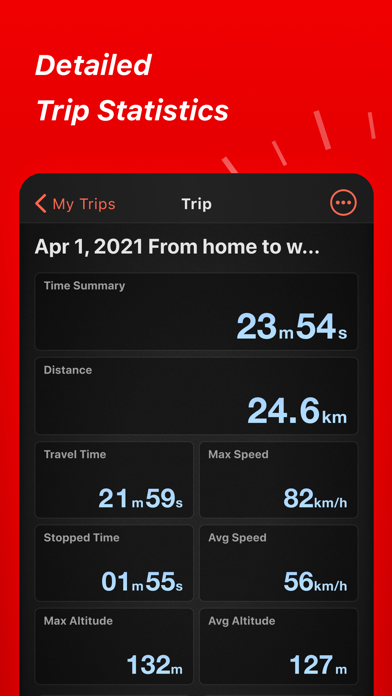
Speed Tracker is the most elegant and unique combination of GPS speedometer and Trip computer in just one application. Speed Tracker is YOUR answer to the eternal questions: What is my speed? What distance have I covered? How much time did I spend from work to home? How to share my trips with friends and relatives? With lot of features built-in, Speed Tracker will help you to gather all the necessary trip statistics. Just start the application and it will let you record your speed, time, distance, heading, elevation and many more. HUD Head-up display – outstanding feature available ONLY in Speed Tracker application. Just enable HUD and put your iPhone or iPad under the windshield. Specially designed HUD interface will display the most accurate speed right on the windshield. Map your trip. Built-in GPS tracker will help you not to get lost. You can always switch to navigation mode and check your current position on the map together with the track you’ve already traveled in Satellite or Hybrid view. Trip Log You don’t remember the trip or how much time does it take to visit your friends or the distance to your office? - Trip Log will help you! Trip Log records and saves the information within the application. You can easily have the access to ALL the trips with just one click. Inside the Trip Log you can check the trip on the map, see the speed, average speed, maximum speed, distance, total time and the detailed speed graph. Don't want to get lost in all the trips you have? Just name them the way you like. Want to share your driving experience or just compare your every day trips? With Trip Computer it’s easy as A, B, C. Export all the trips in available formats (CSV, KML, GPX) or even share with your friends on Facebook, Twitter or via email. Trip Computer Track important trip statistics in real time. Average and Maximum speed, distance covered, moving and stopped time. Dashboard Display Layout Designed exclusively for iPad big screen it shows all the important trip information at a glance on a single screen and supports both portrait and landscape orientation. Full screen GPS Navigator Map mode is also available. Landscape mode allows you to mount your device horizontally on your car dashboard. If you prefer seeing things at wider angle then you find new landscape mode especially useful and practical. Scalable Speedometer Dial Speed Tracker features unique scalable speedometer dial. Select the maximum possible speed for you vehicle and watch your speed with greater precision either your are on a plain, train, car, bike, boat or bicycle Statistics All the aggregated data from the very first trip will be saved in one single place. Automatic Stop Detection Automatically identify either you are moving or standing and calculate your average speed basing on that. Generate trip report showing travel and stoppage time separately. Support for Apple Watch. Start and stop tracking and see your trip data on your wrist. NOTE: Speed Tracker is not compatible with WiFi only iPad or iPod touch. Continued use of GPS running in the background can decrease battery life. Data connection is required to see map. Make sure that you have location services enabled for the application. To enable - Settings> General> Location Services Privacy Policy: http://appannex.com/privacy-policy/ Terms of Use: https://www.apple.com/legal/internet-services/itunes/dev/stdeula/

See this store page in another country

Prices, ranks and reviews are per country. Revenue above is already worldwide.

More from Oxagile LLC

Speed Tracker: GPS Speedometer
Navigation
750 ratingsAnalyze →
Bike Ride Tracker: Cycling GPS
Health & Fitness
1.5K ratingsAnalyze →
Car Camera DVR. HD dash cam
Navigation
2 ratingsAnalyze →
Flashlight 4 in 1
Utilities
20 ratingsAnalyze →
Car Camera DVR. PRO
Navigation
1 ratingsAnalyze →
Bicycle ride tracker PRO
Health & Fitness
2 ratingsAnalyze →