← Back to charts
myTracks icon
APP STORE

myTracks

Dirk Stichling · Travel · Japan store
NOT IN TOP 100 HERE
View on App Store ↗ Instagram card
Revenue a month, worldwide
Too small to estimate
Not enough chart or ratings data
New ratings
Tracking
Daily counts start building from today
Rating
0.0 of 5
0 ratings in this store
Countries it ranks in
0
was 0 on Oct 17, 2026

Revenue

Estimated from the grossing charts of Oct 24, 2026 in the 53 countries we track, and ratings growth on the App Store.

EST. REVENUE / MONTH · WORLDWIDE
Unranked
Not in any grossing chart, and too few ratings (0) to read its growth. Most apps at this stage earn little or nothing.
EST. LIFETIME DOWNLOADS
n/a
Estimated from ratings count
RATINGS
0
AVG RATING
n/a
PRICE
¥3,000
AGE
15.8y
LAST UPDATE
3d ago
VERSION
4.4.9
SIZE
26 MB
AGE RATING
4+

Last 30 days

From our daily snapshots of every grossing chart.

DAYS IN A GROSSING CHART
0 / 30
COUNTRIES NOW
0 (was 0)
EST. REVENUE FROM CHARTS, DAILY · APP STORE ONLY EST
Show daily values
Sep 25, 2026not in a grossing chart
Sep 26, 2026not in a grossing chart
Sep 27, 2026not in a grossing chart
Sep 28, 2026not in a grossing chart
Sep 29, 2026not in a grossing chart
Sep 30, 2026not in a grossing chart
Oct 1, 2026not in a grossing chart
Oct 2, 2026not in a grossing chart
Oct 3, 2026not in a grossing chart
Oct 4, 2026not in a grossing chart
Oct 5, 2026not in a grossing chart
Oct 6, 2026not in a grossing chart
Oct 7, 2026not in a grossing chart
Oct 8, 2026not in a grossing chart
Oct 9, 2026not in a grossing chart
Oct 10, 2026not in a grossing chart
Oct 11, 2026not in a grossing chart
Oct 12, 2026not in a grossing chart
Oct 13, 2026not in a grossing chart
Oct 14, 2026not in a grossing chart
Oct 15, 2026not in a grossing chart
Oct 16, 2026not in a grossing chart
Oct 17, 2026not in a grossing chart
Oct 18, 2026not in a grossing chart
Oct 19, 2026not in a grossing chart
Oct 20, 2026not in a grossing chart
Oct 21, 2026not in a grossing chart
Oct 22, 2026not in a grossing chart
Oct 23, 2026not in a grossing chart
Oct 24, 2026not in a grossing chart
Best rank Sep 25, 2026: not ranked. Now: not ranked. Days at zero are days outside every grossing chart.

Money and momentum

Measured from the store, not estimated.

WHAT IT CHARGES
No in-app purchases
Earns from its upfront price, ads or payments outside the store.
REVIEW MOMENTUM
0.0 reviews / week
  • Recent reviews average3.0 stars
  • Recent 1 and 2 star share47%
From the latest 19 written reviews, covering 5757 days.
RELEASE CADENCE
1 update in 90 days
  • Typical gap between releases44 days
From the last 25 versions listed on the App Store.

What users want

From the latest 19 reviews on the Japan App Store, Jan 20, 2011 to Jan 24, 2024: 47% are 1 or 2 stars. Open a theme to read what people wrote.

WHAT THEY COMPLAIN ABOUT · SHARE OF BAD REVIEWS
Price and subscription33%

3 of the 1 and 2 star reviews.

★★★★★ I prompted him again and finally he came back with a lackluster response saying that the app store wouldnt offer me a refund.
★★★★★ ちなみに、購入後に知ったのですが、myTracksのサポートページにTrial Version(試用版)があるので、興味のある方はまずこちらで試して購入を検討されたほうがいいと思います。
WHAT THEY ASK FOR
  • I would like to add the ability to create transparent maps (PNG) from tracks and routes. 4★, Jan 24, 2024
  • I wish I had this during my previous trips to Europe and California and am looking forward to using it in upcoming travels. 5★, Jan 20, 2011
WORDS THAT KEEP COMING UP IN BAD REVIEWS

Nothing stands out.

WHAT THEY LOVE · SHARE OF GOOD REVIEWS
Easy to use60%

6 of the 4 and 5 star reviews.

★★★★★ By that I mean with more viewing options that are 'softer' on the eyes than a simple grid-list of tracks (see new Photos app or Rubitrack for Mac as examples).
★★★★★ It is easy to use, even for me as a not very skillful user.
★★★★★ myTracks is the solution - super easy to set up and works perfectly.
Useful, it helps20%

2 of the 4 and 5 star reviews.

★★★★★ This is a very useful and powerful application, which definietly made my life easier and saved me a lot of time.
★★★★★ The developer was very helpful and took care of my questions, with immediate email response on a weekend.
Accurate, great results20%

2 of the 4 and 5 star reviews.

★★★★★ myTracks is the solution - super easy to set up and works perfectly.
★★★★★ It works great - the only issue is that the software that came with it is Windows only, and (at least for me) required connection to my bluetooth-less computer via a usb cable.
Worth the money20%

2 of the 4 and 5 star reviews.

★★★★★ This program gives great results at a good price.
★★★★★ For portability, myTracks allows you to sync tracks and photos with an iOS device using the free myTracks app.
Great support20%

2 of the 4 and 5 star reviews.

★★★★★ I hope it continues to receive support.
★★★★★ I bought this app to extract data from a GiSTEQ DPL900 PhotoTrackR mini. I love the GPS unit, but I have not been able to get the software that came with the device to work on a Mac. myTracks is the solution - super…

Found by matching words and phrases in the reviews, not read by a person. A review can count toward more than one theme.

What users say

Latest reviews, Japan App Store.

★★★★★Jan 24, 2024
Request for additional features

I would like to add the ability to create transparent maps (PNG) from tracks and routes.

★★★★★Sep 27, 2022
データが読めない。

長年使ってきましたが、データを読み込めなくなりました。現状OS12.6ですが、対応していないのですかねえ?

★★★★★Apr 15, 2022
現在は「写真」アプリに対応しています

macOS Monterey 以前から、Macの「写真」アプリに取り込んだ写真に、位置情報を書き込む事が可能になっているので、非常に重宝しています。iPhoneなど他のデバイスとの連携もいいですね。

★★★★★Nov 11, 2020
全トラックが消えた

Macbook Air 買い替え後、初回の起動時に Apple ID のパスワードを要求された。そのまま入力すると、起動直後にすべてのトラックを削除するように動作した。全く理由が分からない。数年分のトラックが全て消えてしまった。

★★★★★Feb 7, 2020
Ver 3.5に注意必要?

アップデート後、起動時に異常終了するようになってしまいました。

★★★★★Sep 12, 2019
以前のトラックが全て消えた

appが壊れたと表示されて起動しなくなったため,appを削除して再インストール。以前のトラックは全て消えている。 サポートのページを見たが情報が古いのか該当するようなファイルは見当たらない。
Store screenshots

ScreenshotScreenshotScreenshotScreenshot

App Store ads

Apple Search Ads this app ran in the last 90 days, from Apple's public ad repository.

Apple's ad repository couldn't be reached right now. Try again later.

Growth research

Where this app is buying and earning its users. Each link opens pre filtered.

ASO keywords

Most repeated terms in the listing. Highlighted ones also appear in the title.

gps8tracks8gps tracks8files5photo files5mytracks4photo4drag drop3jpeg raw3gpx kml3photos3formats3macos3organizing2devices2library2drag2drop2geotagging2iphoto2aperture2lightroom2graphicconverter2finder2

What's new in 4.4.9

New in myTracks 4.4.9: - Updated the internal gpsbabel to version 1.10. - Removed support for the following GPS loggers (due to a lack of drivers for Apple Silicon): i-GotU, Wintec WPL 1000 New in myTracks 4.4.8: - Update to the exiftool version used in myTracks - Bug fixes New in myTracks 4.4.7: - Zooming in the map now works with the scroll wheel of non-Apple mice. New in myTracks 4.4.6: - Bugfixes for macOS 26. New in myTracks 4.4.5: - Bugfixes for macOS 26. New in myTracks 4.4.4: - Minor improvements for macOS 26. New in myTracks 4.4.3: - Return to GPSBabel version 1.7.0, as some file formats are no longer supported in new versions of GPSBabel. New in myTracks 4.4.2: - Meta data can be written to HIF files instead of using XMP sidecar files Neu in myTracks 4.4.1: - Optical bug fixed New in myTracks 4.4.0: - After starting myTracks, the progress of the iCloud synchronization is displayed in the status bar. - Colors and symbols can be set when importing POIs. - Bug fixes and small improvements New in myTracks 4.3.6: - Bugfixes New in myTracks 4.3.5: - Bugfixes New in myTracks 4.3.4: - Bugfixes New in myTracks 4.3.3: - Fixes a bug that could cause a long startup time on macOS Sonoma. - Bugfixes and minor improvements New in myTracks 4.3.2: - Bugfix: In some cases the speeds were calculated incorrectly. New in myTracks 4.3.1: - Bugfix for macOS 10.13 New in myTracks 4.3.0: - Colors and symbols for waypoints. New in myTracks 4.2.2: - Bugfixes New in myTracks 4.2.1: - Support for new cameras, e.g. Olympus OM1 New in myTracks 4.2.0: - New icon - Bugfixes New in myTracks 4.1.2: - Bugfixes New in myTracks 4.1.1: - Bugfixes and minor improvements New in myTracks 4.1.0: - The individual track points of the selected track are no longer shown in a view on the right hand side but they are shown as sortable table below the map. This view is similar to the view provided in myTracks 3. However, this new table is much more flexible because you can a) sort the table and b) select multiple track points. E.g. you can sort the table by 'Speed' or 'Elevation' to easily find track points which are outlier. - Bugfixes New in myTracks 4.0.12: - Current coordinates are shown - Bugfixes New in myTracks 4.0.11: - Bugfixes New in myTracks 4.0.10: - Bugfix: waypoints did not always show up correctly New in myTracks 4.0.9: - Bugfix: comments in POIs were not saved. New in myTracks 4.0.8: - Bugfixes New in myTracks 4.0.7: - Bugfix for the classical synchronisation New in myTracks 4.0.6: - Bugfix for the classical synchronisation New in myTracks 4.0.5: - The profile view can be opened in a separate window - The map style (automatic/light/dark) can be configured - You can enter coordinates into the search bar. - Bugfixes New in myTracks 4.0.4: - Add photos directly to selected track point - Bugfixes New in myTracks 4.0.3: - Drag & Drop of GPX files to folders in the library - Zooming using the trackpad - Bugfix for Drag & Drop of tracks - Bugfix for classic synchronization New in myTracks 4.0.2: - Bugfixes for older macOS versions New in myTracks 4.0.1: - Fixed visibility of track library New in myTracks 4.0.0: - Completely redesigned user interface - Time Line: Shows all your tracks hierarchically based on the time - Functionality to rename photo files based on the EXIF timestamp - Support for the Apple M1 processor

Released Jan 5, 2011. Current version shipped Oct 22, 2026.

Store description

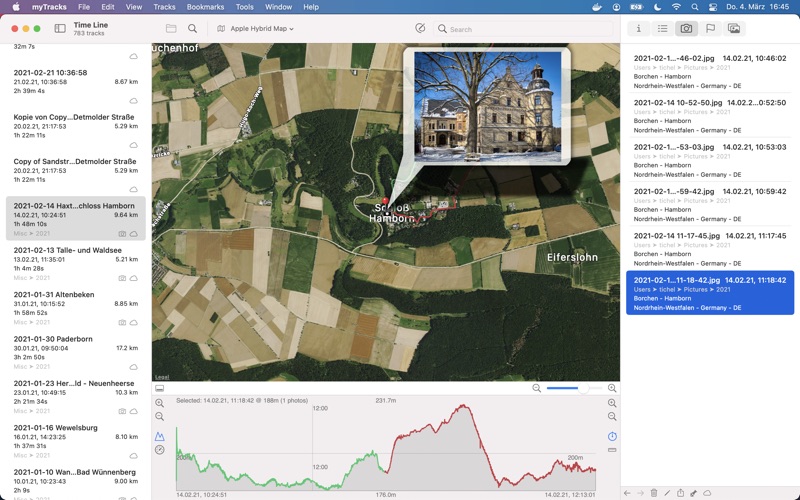
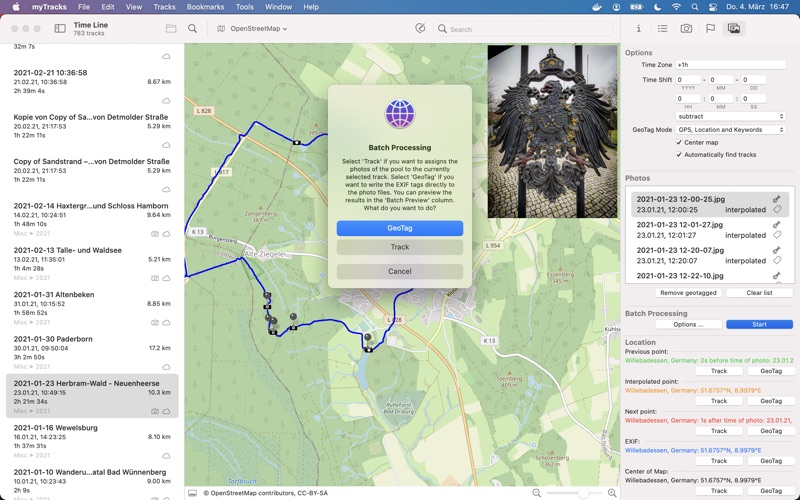
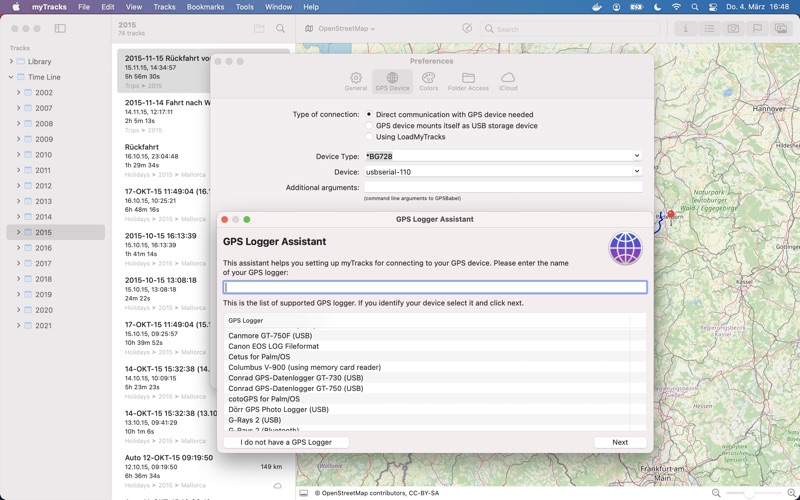
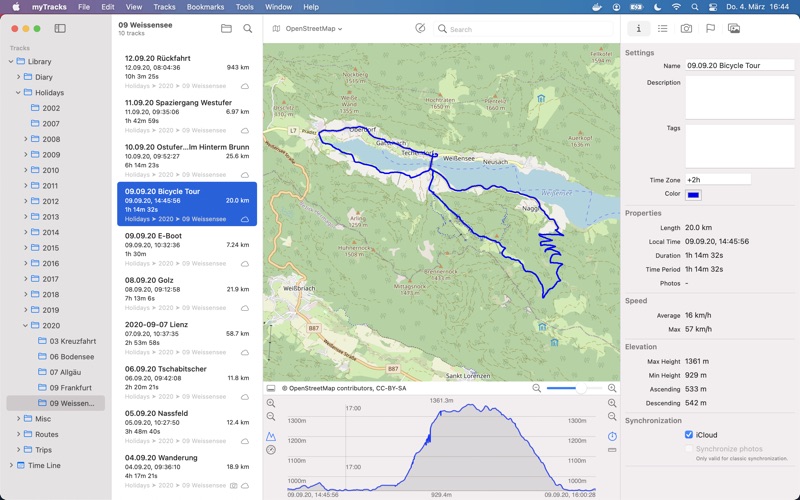
myTracks is the swiss-army knife for organizing your GPS tracks. They can be loaded from a broad range of devices and organized in a library comfortably. Once imported you can drag & drop photo files to myTracks and they will be assigned to the GPS tracks automatically. The GPS information can be written to the EXIF and IPTC tags of the photo files (Geotagging). You can use any photo organizing software such as Photos, iPhoto, Aperture, Lightroom, GraphicConverter or even the Finder. myTracks can handle both JPEG and RAW file formats. GPS tracks can be exported as GPX, KML or KMZ files. You can use the exported files, e.g. with Google Earth. Besides the dedicated GPS loggers a free iPhone App called "myTracks - The GPS logger" is available on the App Store. You can use this App to record GPS tracks. Using iCloud you can easily synchronise all your tracks between all your devices (iOS and macOS). See the supporting website for more screenshots, screencasts and the complete list of supported loggers. Feature Highlights: * Logger Assistant with more than 50 presets for downloading GPS tracks * Search, bookmark, and organize using the Track Library * 1-click, drag & drop geotagging of JPEG and RAW photo files * Display tracks on a wide variety of maps online and offline * Import, export, and edit tracks in GPX and KML formats and export of KMZ formats * Upload photos from within the application to flickr * Compatible with Adobe Lightroom, Apple Photos, Apple Aperture, Apple iPhoto, GraphicConverter or macOS Finder * Free versions for iOS include track recording and sync with macOS application * iCloud support

See this store page in another country

Prices, ranks and reviews are per country. Revenue above is already worldwide.

More from Dirk Stichling

myTracks - The GPS-Logger
Navigation
51 ratingsAnalyze →
Tichel Radio
Music
0 ratingsAnalyze →
myMinigolf Board
Lifestyle
0 ratingsAnalyze →