← Back to charts
Stickyboard icon
APP STORE

Stickyboard

Qrayon, LLC · Productivity · United States store
NOT IN TOP 100 HERE
View on App Store ↗ Instagram card
Revenue a month, worldwide EST
$292
Likely $97 to $875
New ratings
Tracking
Daily counts start building from today
Rating
4.5 of 5
2 ratings in this store
Countries it ranks in
0
was 0 on Oct 20, 2026

Revenue

Estimated from the grossing charts of Oct 26, 2026 in the 53 countries we track, and ratings growth on the App Store.

EST. REVENUE / YEAR · WORLDWIDE
$3.5K
0.4 new ratings a month on average since launch
EST. LIFETIME DOWNLOADS
70 to 200
Estimated from ratings count
WHERE ITS USERS ARE · SHARE OF RATINGS
  • Italy 20 ratings26%
  • Spain 11 ratings14%
  • Mexico 9 ratings12%
  • Germany 7 ratings9%
  • Japan 6 ratings8%
  • UAE 4 ratings5%
  • United Kingdom 3 ratings4%
  • United States 2 ratings3%
HOW SURE ARE WE
Not in any grossing chart, so this comes from ratings growth (0.4 new ratings a month on average since launch): revenue grows with new ratings, more slowly for apps that collect ratings fast. Tested on 418 apps with verified revenue: typically off by about 2 times, and big earners tend to come out low. Countries we don't track (and Google Play in China, which doesn't exist) aren't included, and neither are ads or web payments. Gross revenue before store fees.
RATINGS
2
AVG RATING
4.50
PRICE
Free
AGE
16.5y
LAST UPDATE
3469d ago
VERSION
3.0
SIZE
2 MB
AGE RATING
4+

Last 30 days

From our daily snapshots of every grossing chart.

DAYS IN A GROSSING CHART
0 / 30
COUNTRIES NOW
0 (was 0)
EST. REVENUE FROM CHARTS, DAILY · APP STORE ONLY EST
Show daily values
Sep 28, 2026not in a grossing chart
Sep 29, 2026not in a grossing chart
Sep 30, 2026not in a grossing chart
Oct 1, 2026not in a grossing chart
Oct 2, 2026not in a grossing chart
Oct 3, 2026not in a grossing chart
Oct 4, 2026not in a grossing chart
Oct 5, 2026not in a grossing chart
Oct 6, 2026not in a grossing chart
Oct 7, 2026not in a grossing chart
Oct 8, 2026not in a grossing chart
Oct 9, 2026not in a grossing chart
Oct 10, 2026not in a grossing chart
Oct 11, 2026not in a grossing chart
Oct 12, 2026not in a grossing chart
Oct 13, 2026not in a grossing chart
Oct 14, 2026not in a grossing chart
Oct 15, 2026not in a grossing chart
Oct 16, 2026not in a grossing chart
Oct 17, 2026not in a grossing chart
Oct 18, 2026not in a grossing chart
Oct 19, 2026not in a grossing chart
Oct 20, 2026not in a grossing chart
Oct 21, 2026not in a grossing chart
Oct 22, 2026not in a grossing chart
Oct 23, 2026not in a grossing chart
Oct 24, 2026not in a grossing chart
Oct 25, 2026not in a grossing chart
Oct 26, 2026not in a grossing chart
Oct 27, 2026not in a grossing chart
Best rank Sep 28, 2026: not ranked. Now: not ranked. Days at zero are days outside every grossing chart.

Money and momentum

Measured from the store, not estimated.

WHAT IT CHARGES
1 purchase listed
  • Upgrade to Stickyboard Pro$4.99
Top in-app purchases as listed on the App Store, in local prices.
REVIEW MOMENTUM
0.0 reviews / week
  • Recent reviews average3.1 stars
  • Recent 1 and 2 star share44%
From the latest 16 written reviews, covering 6013 days.
RELEASE CADENCE
0 updates in 90 days
  • Typical gap between releases16 days
From the last 12 versions listed on the App Store.
RATING BREAKDOWN
2 ratings
5★50%
4★50%
3★0%
2★0%
1★0%

What users want

From the latest 16 reviews on the United States App Store, May 11, 2010 to Apr 14, 2015: 44% are 1 or 2 stars. Open a theme to read what people wrote.

WHAT THEY COMPLAIN ABOUT · SHARE OF BAD REVIEWS
Price and subscription29%

2 of the 1 and 2 star reviews.

★★★★★ I never had a problem using the board before now with SB2 out and at a higher price my board does not save any new notes.
★★★★★ It takes a $4.99 in-app purchase to use more than one stickyboard at a time, which makes this "free" app almost twice the price of a much more fully-featured corkboard app such as Corkulous.
WHAT THEY ASK FOR
  • More than one board on ur free version, like everyone else has would be nice. 3★, Jun 13, 2012
  • I would suggest to the developer that they add a Pro version of the app directly to the iTunes store or or find a better way to convey the fact that this "free" download is very limited until a commercial upgrade is… 2★, Jul 9, 2010
WORDS THAT KEEP COMING UP IN BAD REVIEWS

Nothing stands out.

WHAT THEY LOVE · SHARE OF GOOD REVIEWS

Not enough good reviews in English to tell.

Found by matching words and phrases in the reviews, not read by a person. A review can count toward more than one theme.

What users say

Latest reviews, United States App Store.

★★★★★Apr 14, 2015
Can't Use It Horizontally

Can't use it horizontally.

★★★★★Jun 19, 2014
Aggravating

I use my iPad in a case with a keyboard, which can only be used in landscape mode. It was aggravating to download this app and find out that I can't use it with my iPad in the case. I deleted this app. Make a way for it to be used in landscape mode, and I will download it again.

★★★★★Nov 22, 2012
Hard to Navigate, no logo for info

I paid for the premium Inkflow app but this app was just for brainstorming or soundbytes of info that's inter-related. I couldn't figure out how to delete a note I don't want. I couldn't size the note with a crop-like function, only the width by pulling on the arrow in the top-right corner, so only in the right (>) direction, no pushing up from the bottom to reduce the vertical aspect. And there is no i logo or qrayon logo for more info. I'm not going to exit, click on Safari, enter in the website, look for answers, close, Safari, open App, and apply(see? It's aggravating just to READ the steps).

★★★★★Jun 20, 2012
Disappointing

Ok

★★★★★Jun 13, 2012
Could use more boards

As a student, I'm limited in finances. More than one board on ur free version, like everyone else has would be nice. I just don't need the other pro features. It's a good product if use more but can't.

★★★★★Apr 12, 2012
Great for students with difficulty in showing content knowledge!

Very helpful when brainstorming with students regarding a paper they may need to write or even ideas their paper can be about. Also very beneficial to the student who needs to show their content knowledge to one of their teachers... Have them draw out the concepts the multiple choice questions are asking them, email their teacher the copy of it and have a system worked out that the drawings count for part or all of their exam grade. Just some thoughts! I am a high school special education teacher.
Store screenshots

ScreenshotScreenshot

App Store ads

Apple Search Ads this app ran in the last 90 days, from Apple's public ad repository.

Apple's ad repository couldn't be reached right now. Try again later.

Growth research

Where this app is buying and earning its users. Each link opens pre filtered.

ASO keywords

Most repeated terms in the listing. Highlighted ones also appear in the title.

notes11stickyboard9ideas5features5board4pro4please stickyboard3stickyboard instead3sticky notes3easy rearrange3rearrange ideas3discover important3important patterns3pro edition3please3tap3sticky3see3important3around3note3plus3qrayon3edition3

What's new in 3.0

Bug fixes.

Released Apr 28, 2010. Current version shipped Apr 28, 2017.

Store description

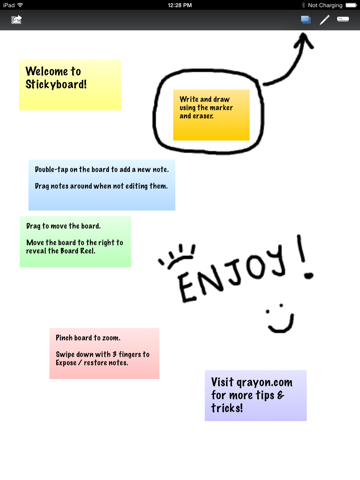
PLEASE DOWNLOAD STICKYBOARD 2 INSTEAD! This is the old version of Stickyboard. Please download Stickyboard 2 instead (it's a lot better!): Tap to the Developer page, or search for "Stickyboard 2". Imagine A Giant Whiteboard With A Never-Ending Stack Of Sticky Notes. LIKE REAL NOTES, ONLY BETTER Nothing beats a whiteboard and sticky-notes for capturing lots of loose information and visualizing their relationships. It's easy to rearrange ideas, see the big picture, and discover important patterns. Stickyboard takes that flexibility and adds the convenience and power of your iPad. Don't worry about losing notes after a meeting. Organizing notes are now a snap. It's much easier to carry around, and a lot friendlier for the environment. Put all your ideas on a single board and easily see everything at once by zooming in and out. Use any color coding system you like. Effortlessly drag and drop your notes - unlike paper sitcky notes, they don't fall off after too may moves. Think in the way that works best for you, and for the problem at hand. --- Features: --- + A clean and uncluttered interface with fast and fluid controls only possible on the iPad. + A large, zoomable board to capture all your ideas. Zoom by pinching, and pan by dragging the board. Tap to add a note. Drag notes around with your finger. + It's easy to rearrange ideas, capture their relationships, and discover important patterns. + Four standard colors (yellow, blue, pink, and green), plus 2 special ones (lavender and sunrise). + Free-form drawing with the marker tool. Write, outline, and sketch around your notes. + Email boards as PDF. Easily share with colleagues or archive changes. + Infinitely flexible. Use all your real-world sticky-note techniques (visit our website for tips and resources). + Note expose: Swipe down with 3 fingers to view all notes arranged in a grid. Swipe again to restore. Don't worry, your layout is always preserved. + Tap the qrayon logo to view help, plus get the latest tips & tricks. The Free Edition of Stickyboard comes with one large board, perfect for a single project. It includes most of the major features of the Pro Edition. Upgrade in-place to the Pro Edition at any time to get all the Pro features: + Multiple boards + Multi-colored markers + Project to an external VGA display (requires VGA connector) plus get future Pro upgrades free and support the continued effort of developing even more awesome features and apps. --- Stickyboard is great for: --- • TODOs and reminders • Scheduling and planning • Meeting notes • Brainstorming and organizing your ideas • Doodling and sketching --- We LOVE to hear from you! --- Productivity apps for the iPad are a new and vast frontier with plenty of possibilities. We are committed to building apps that you will find useful for your work and business. Stickyboard is continuously being improved and updated. Visit www.qrayon.com to let us know what you are looking to do, and what features you would like to see in a future release. We love feedback. Follow us on our blog or at twitter.com/qrayon to hear about the latest work we are doing to make the iPad a truly great productivity device. If you find Stickyboard useful, please help us by rating it. Apps live and die by their ratings, and your feedback is very important to us.

See this store page in another country

Prices, ranks and reviews are per country. Revenue above is already worldwide.

More from Qrayon, LLC

Resume Star: CV Maker, Builder
Productivity
17.5K ratingsAnalyze →
Inkflow Visual Notebook
Productivity
1.9K ratingsAnalyze →
Simple Whiteboard by Qrayon
Productivity
12.3K ratingsAnalyze →
Cardflow: Index & Flash Cards
Business
3K ratingsAnalyze →
Air Sketch Free
Utilities
82 ratingsAnalyze →
Vittle: Screencast Recorder
Education
101 ratingsAnalyze →
Air Projector: Photo Slideshow
Photo & Video
8 ratingsAnalyze →
Smart PDF Editor
Business
108 ratingsAnalyze →
Resume Star: Pro CV Designer
Productivity
0 ratingsAnalyze →