ASO keywords
Most repeated terms in the listing. Highlighted ones also appear in the title.
und20von16mit12die11oder11auf dem8auf7dokumente6dem6das5von creator5creator studio5pages4ist4einer4der4erstelle4ein4hinzu4personen4ansprechende dokumente3dem und3microsoft word3deine dokumente3
What's new in 15.4
Wenn du ein Apple Creator Studio-Abo hast:
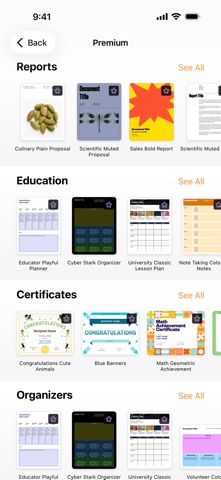
• Lasse deine Arbeiten mit einer neuen Sammlung professionell gestalteter Vorlagen hervorstechen.
Für alle:
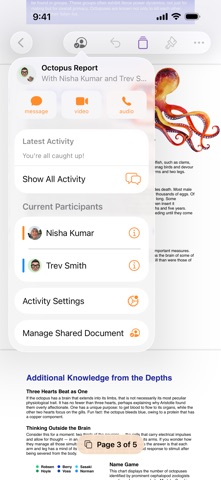
• Fordere Zugriff zur Mitarbeit an geteilten Dokumenten an.
• Stelle Siri Fragen zu Pages und erhalte schnelle Antworten.
• Erhalte Verbesserungen der Stabilität und Fehlerbehebungen.
Released May 26, 2010. Current version shipped Sep 29, 2026.
Store description
Pages ist jetzt Teil von Apple Creator Studio, einer beeindruckenden Sammlung der leistungsstärksten kreativen Apps von Apple, die dir helfen sollen, deine Ideen zum Leben zu erwecken. Die Suite umfasst Final Cut Pro, Logic Pro, Pixelmator Pro, Motion, Compressor und MainStage sowie Premiuminhalte und intelligente Funktionen in Keynote, Pages, Numbers und Freeform, alles in einem einzigen Tarif. Für das Erstellen, Anzeigen und Bearbeiten von Dokumenten in Pages sowie die Zusammenarbeit in Echtzeit ist kein Abo erforderlich.
Erstelle mit Pages ansprechende Dokumente auf dem iPhone, iPad und Mac. Beginne mit einer von Apple gestalteten Vorlage für einen Bericht, Lebenslauf, ein Plakat oder ein digitales Buch. Füge bequem Bilder, Filme, Audio, Tabellen, Diagramme und Formen hinzu. Nutze Kommentare, Änderungsprotokollierung und Hervorhebungen, um Dokumente zu überarbeiten. Auf dem iPhone und iPad vereinfacht die Bildschirmdarstellung das Bearbeiten, indem Inhalte für deinen Bildschirm optimiert werden.
Im Handumdrehen loslegen
• Arbeite mithilfe von iCloud.com mit einem iPhone, iPad, Mac oder auch einem PC.
• Wähle aus vielfältigen von Apple designten Vorlagen.
• Füge Objekte aus einer Mediathek von Formen, Tabellen, Diagrammen mit vordefinierten Stilen hinzu.
• Importiere und bearbeite Textdateien und Dateien von Microsoft Word.
Ansprechende Dokumente erstellen
• Formatiere deine Dokumente mit großartigen Stilen, Schriften und Texturen.
• Gestalte Inhalte mit Audioaufnahmen, Videos und Bildergalerien interessanter.
• Erstelle Seitenvorlagen, um eine einheitliche Gestaltung von Seitenlayoutdokumenten zu erhalten.
• Nutze leistungsfähige Grafikwerkzeuge einschließlich Freistellung und Masken.
• Gestalte interaktive EPUB-Bücher, die mit anderen Personen geteilt oder auf Apple Books veröffentlicht werden können.
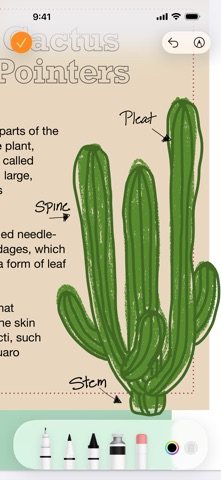
• Zeichne, schreibe oder mache Notizen auf dem iPad mit dem Apple Pencil.
Fortschrittliche Werkzeuge
• Verwende die Ansicht des Inhaltsverzeichnisses, um bequem in deinem Dokument oder Buch zu navigieren.
• Füge Kommentare hinzu und nimm an Konversations-Threads teil.
• Aktiviere die Änderungsprotokollierung, um während der Bearbeitung Markierungen zu Dokumenten hinzuzufügen.
• Erstelle Fuß- und Endnoten und zeige Zeichen-, Wort- und Absatzanzahlen an.
• Füge elegante mathematische Gleichungen mithilfe der Notation von LaTeX oder MathML hinzu.
• Verwende auf dem iPhone oder iPad den Moderatormodus, um automatisch zu scrollen, während du eine Rede hältst.
• Die nahtlose Integration mit EndNote erlaubt auf dem Mac das Einfügen von Zitaten.*
Mit beliebigen Personen teilen
• Teile deine Dokumente öffentlich oder arbeite mit bestimmten Personen über iCloud oder Box zusammen.
• Führe auf verschiedenen Geräten Änderungen durch und zeige in Echtzeit eine List der Änderungen anderer Personen an.
• Exportiere Dokumente als EPUB, für Microsoft Word oder in den Formaten RTF, TXT oder PDF.
Apple Intelligence
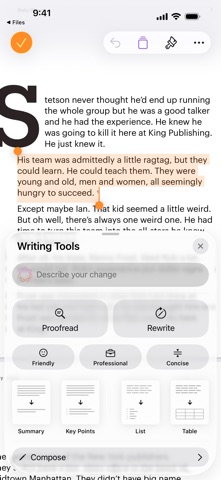
• Nutze „Schreibtools“ zum Korrekturlesen, Überarbeiten, Zusammenfassen und Verfassen von Text.
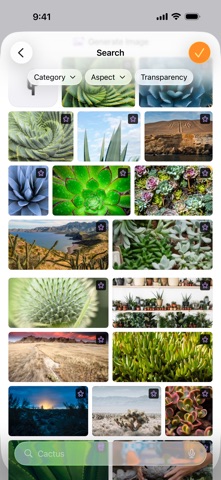
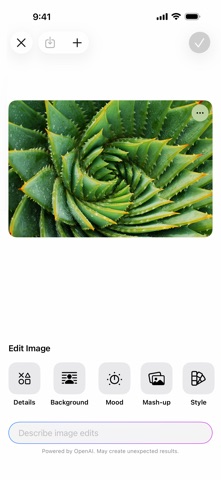
• Erstelle eigene lustige Bilder mit Image Playground anhand einer Beschreibung.
Einige Funktionen von Apple Creator Studio erfordern ein Gerät, das Apple Intelligence unterstützt. Die vollständigen Systemanforderungen und Nutzungsbeschränkungen für die intelligenten Funktionen von Apple Creator Studio erfährst du im Apple-Support-Artikel 125029.
* Separater Erwerb von EndNote ist erforderlich. Die Integration von EndNote erfordert ein Plug-in, das über Apple Support erhältlich ist.
See this store page in another country
Prices, ranks and reviews are per country. Revenue above is already worldwide.