← Back to charts
Keynote: Präsentationen icon
APP STORE

Keynote: Präsentationen

Apple · Productivity · Germany store
NOT IN TOP 100 HERE
View on App Store ↗
Revenue a month, worldwide
Too small to estimate
Not enough chart or ratings data
New ratings
Tracking
Daily counts start building from today
Rating
4.4 of 5
48.4K ratings in this store
Countries it ranks in
0
was 0 on Oct 14, 2026

Revenue

Estimated from the grossing charts of Oct 21, 2026 in the 53 countries we track, and ratings growth on the App Store.

EST. REVENUE / MONTH · WORLDWIDE
Unranked
Not in any grossing chart, and it sells nothing in the store (no in-app purchases, free download). Any revenue comes from ads or payments outside the store, which we can't see.
EST. LIFETIME DOWNLOADS
1.7M to 4.8M
Estimated from ratings count
RATINGS
48.4K
AVG RATING
4.45
PRICE
Gratis
AGE
16.4y
LAST UPDATE
22d ago
VERSION
15.4
SIZE
662 MB
AGE RATING
4+

Last 28 days

From our daily snapshots of every grossing chart.

DAYS IN A GROSSING CHART
0 / 28
COUNTRIES NOW
0 (was 0)
EST. REVENUE FROM CHARTS, DAILY · APP STORE ONLY EST
Show daily values
Sep 24, 2026not in a grossing chart
Sep 25, 2026not in a grossing chart
Sep 26, 2026not in a grossing chart
Sep 27, 2026not in a grossing chart
Sep 28, 2026not in a grossing chart
Sep 29, 2026not in a grossing chart
Sep 30, 2026not in a grossing chart
Oct 1, 2026not in a grossing chart
Oct 2, 2026not in a grossing chart
Oct 3, 2026not in a grossing chart
Oct 4, 2026not in a grossing chart
Oct 5, 2026not in a grossing chart
Oct 6, 2026not in a grossing chart
Oct 7, 2026not in a grossing chart
Oct 8, 2026not in a grossing chart
Oct 9, 2026not in a grossing chart
Oct 10, 2026not in a grossing chart
Oct 11, 2026not in a grossing chart
Oct 12, 2026not in a grossing chart
Oct 13, 2026not in a grossing chart
Oct 14, 2026not in a grossing chart
Oct 15, 2026not in a grossing chart
Oct 16, 2026not in a grossing chart
Oct 17, 2026not in a grossing chart
Oct 18, 2026not in a grossing chart
Oct 19, 2026not in a grossing chart
Oct 20, 2026not in a grossing chart
Oct 21, 2026not in a grossing chart
Best rank Sep 24, 2026: not ranked. Now: not ranked. Days at zero are days outside every grossing chart.

Money and momentum

Measured from the store, not estimated.

WHAT IT CHARGES
No in-app purchases
Earns from its upfront price, ads or payments outside the store.
REVIEW MOMENTUM
3.9 reviews / week
  • Trendrising
  • Recent reviews average3.3 stars
  • Recent 1 and 2 star share38%
From the latest 500 written reviews, covering 891 days. The store only returns this many, so this is the most recent slice.
RELEASE CADENCE
1 update in 90 days
  • Typical gap between releases86 days
From the last 25 versions listed on the App Store.
RATING BREAKDOWN
48.4K ratings
5★73%
4★14%
3★5%
2★2%
1★7%

What users say

Latest reviews, Germany App Store.

★★★★★Oct 20, 2026
Tolle App

Die App ist gut für Präsentationen und bietet tolle Möglichkeiten. Wenn man aber verschieden Foliendesigns auswählen möchte, muss man auf die Pro Version umsteigen. Doch im Großen und Ganzen finde ich die App gut zum Einstieg.

★★★★★Oct 19, 2026
Leider nicht so cool wie PowerPoint

Die app ist zwar kostenlos aber mir persönlich verholen die coolen Funktionen von Power Point zum Beispiel man kann leider keine Animationen einsetzen und Bilder in der app kosten etwas

★★★★★Oct 18, 2026
Bedienung manchmal unklar

Manche Befehle sind nicht sofort auffindbar

★★★★★Oct 18, 2026
Top App!

Es macht Spaß ist zuverlässig und nahezu perfekt auch wenn man nicht bezahlt! 5 Sterne zurecht!

★★★★★Oct 16, 2026
Crab

Deletes Files without reason or questioning. Cannot save documents or changings.

★★★★★Oct 16, 2026
Loved the App, until the „new“ AI Version arrived

I really loved using it and even prefered it over the alternatives - but the way it displays content behind a paywall/lock is really unsettling and not fun at all. Give me a way to hide the purple trash, or make it free after all, or make it one time purchase only cashgrab, I would be down, but that’s just an evolution in a bad, greedy direction. Would not recommend using it anymore.

Store screenshots

ScreenshotScreenshotScreenshotScreenshotScreenshotScreenshotScreenshotScreenshotScreenshotScreenshot

App Store ads

Apple Search Ads this app ran in the last 90 days, from Apple's public ad repository.

Apple's ad repository couldn't be reached right now. Try again later.

Growth research

Where this app is buying and earning its users. Each link opens pre filtered.

ASO keywords

Most repeated terms in the listing. Highlighted ones also appear in the title.

und18mit12von11oder11der9auf7auf dem6pro6einem6sentationen6dem6die5von creator5creator studio5vision pro5mit einem5einer4personen4der vision3von designten3microsoft powerpoint3dem mit3mit dem3dem pencil3

What's new in 15.4

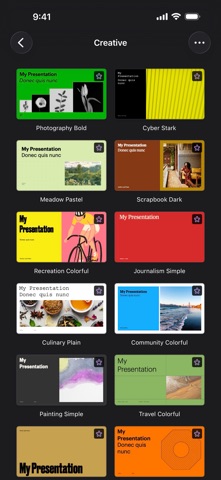
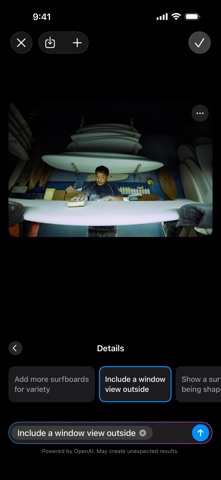
Wenn du ein Apple Creator Studio-Abo hast: • Lasse deine Arbeiten mit einer neuen Sammlung professionell gestalteter Vorlagen hervorstechen. • Erstelle automatisch neue Bilder, die auf deine Präsentation zugeschnitten sind, mit verbesserter intelligenter Foliengenerierung (Beta). Für alle: • Fordere Zugriff zur Mitarbeit an geteilten Präsentationen an. • Stelle Siri Fragen zu Keynote und erhalte schnelle Antworten. • Erhalte Verbesserungen der Stabilität und Fehlerbehebungen.

Released May 26, 2010. Current version shipped Sep 29, 2026.

Store description

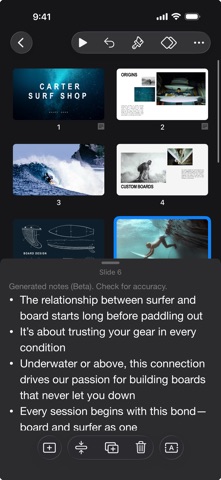
Keynote ist jetzt Teil von Apple Creator Studio, einer beeindruckenden Sammlung der leistungsstärksten kreativen Apps von Apple, die dir helfen sollen, deine Ideen zum Leben zu erwecken. Die Suite umfasst Final Cut Pro, Logic Pro, Pixelmator Pro, Motion, Compressor und MainStage sowie Premiuminhalte und intelligente Funktionen in Keynote, Pages, Numbers und Freeform, alles in einem einzigen Tarif. Für das Erstellen, Anzeigen und Bearbeiten von Präsentationen in Keynote sowie die Zusammenarbeit in Echtzeit ist kein Abo erforderlich. Erstelle auf dem iPhone, iPad, Mac oder der Apple Vision Pro einprägsame Präsentationen. Beginne mit einem von Apple designten Thema und füge Text Bilder, Diagramme und Formen hinzu. Hauche Objekten mit Animationen und Übergängen im Kinostil Leben ein. Präsentiere persönlich oder virtuell, ortsunabhängig und selbstbewusst abwechslungsreiche Präsentationen zusammen mit mehreren Personen. Im Handumdrehen loslegen • Arbeite mithilfe von iCloud.com mit einem iPhone, iPad, Mac, einer Apple Vision Pro oder auch einem PC. • Wähle aus vielfältigen von Apple designten Themen. • Importiere und bearbeite Präsentationen von Microsoft PowerPoint. Beeindruckende Präsentationen erstellen • Ändere bequem Layouts und Hintergründe von Folien. • Füge Audioaufnahmen, Livevideo und Bildergalerien hinzu. • Nutze leistungsfähige Grafikwerkzeuge einschließlich Freistellung und Masken. • Zeichne oder Schreibe auf dem iPad mit dem Apple Pencil. Animationen in Kinoqualität • Nutze ansprechende Folienübergänge und beeindruckende Animationen in Kinoqualität. • Mit „Hervorhebung“ und mit „Zauberei“ kannst du mühelos beeindrucken. • Zeige während der Animation der Folien live im Arbeitsbereich eine Vorschau an. • Zeichne auf dem iPad mit dem Apple Pencil Bewegungspfade. Für das Publikum präsentieren • Teste mit einem Moderatormonitor, der angepasst werden kann. • Probe auf der Apple Vision Pro mithilfe der immersiven Umgebungen „Konferenzraum“ oder „Theater“. • Hebe auf dem iPad mithilfe des Apple Pencil oder deines Fingers Objekte während der Präsentation hervor. • Steuere deine Präsentation auf einem iPhone, iPad oder einer Apple Watch. Mit beliebigen Personen teilen • Teile deine Präsentation öffentlich oder arbeite mit bestimmten Personen über iCloud oder Box zusammen. • Führe auf verschiedenen Geräten Änderungen durch und zeige in Echtzeit eine List der Änderungen anderer Personen an. • Exportiere Präsentationen für Microsoft PowerPoint oder in den Formaten PDF oder HTML sowie als Filme und Bilddateien. Apple Intelligence • Nutze „Schreibtools“ zum Korrekturlesen, Überarbeiten, Zusammenfassen und Verfassen von Text. • Erstelle eigene lustige Bilder mit Image Playground anhand einer Beschreibung. Einige Funktionen von Apple Creator Studio erfordern ein Gerät, das Apple Intelligence unterstützt. Die vollständigen Systemanforderungen und Nutzungsbeschränkungen für die intelligenten Funktionen von Apple Creator Studio erfährst du im Apple-Support-Artikel 125029.

See this store page in another country

Prices, ranks and reviews are per country. Revenue above is already worldwide.

More from Apple

Apple Books
Book
15.5K ratingsAnalyze →
Apple-Podcasts
Entertainment
172.8K ratingsAnalyze →
Meine Freunde suchen
Social Networking
48 ratingsAnalyze →
Shazam
Music
1.6M ratingsAnalyze →
Pages: Erstelle Dokumente
Productivity
144.7K ratingsAnalyze →
GarageBand
Music
15.3K ratingsAnalyze →
Apple Store
Shopping
12.2K ratingsAnalyze →
iMovie
Photo & Video
32.1K ratingsAnalyze →
Numbers: Erstelle Tabellen
Productivity
60.6K ratingsAnalyze →