← Back to charts
iFR Cockpit icon
APP STORE

iFR Cockpit

Drobnik KG · Entertainment · Brazil store
NOT IN TOP 100 HERE
View on App Store ↗ Instagram card
Revenue a month, worldwide EST
$348
Likely $116 to $1K
New ratings
Tracking
Daily counts start building from today
Rating
1.7 of 5
7 ratings in this store
Countries it ranks in
0
was 0 on Oct 18, 2026

Revenue

Estimated from the grossing charts of Oct 25, 2026 in the 53 countries we track, and ratings growth on the App Store.

EST. REVENUE / YEAR · WORLDWIDE
$4.2K
1.1 new ratings a month on average since launch
EST. LIFETIME DOWNLOADS
245 to 700
Estimated from ratings count
WHERE ITS USERS ARE · SHARE OF RATINGS
  • United States 129 ratings52%
  • Germany 46 ratings18%
  • Netherlands 14 ratings6%
  • United Kingdom 12 ratings5%
  • Australia 9 ratings4%
  • France 9 ratings4%
  • Canada 8 ratings3%
  • Brazil 7 ratings3%
HOW SURE ARE WE
Not in any grossing chart, so this comes from ratings growth (1.1 new ratings a month on average since launch): revenue grows with new ratings, more slowly for apps that collect ratings fast. Tested on 418 apps with verified revenue: typically off by about 2 times, and big earners tend to come out low. Countries we don't track (and Google Play in China, which doesn't exist) aren't included, and neither are ads or web payments. Gross revenue before store fees.
RATINGS
7
AVG RATING
1.71
PRICE
R$ 29,90
AGE
18.1y
LAST UPDATE
53d ago
VERSION
2.0.1
SIZE
1 MB
AGE RATING
+4

Last 30 days

From our daily snapshots of every grossing chart.

DAYS IN A GROSSING CHART
0 / 30
COUNTRIES NOW
0 (was 0)
EST. REVENUE FROM CHARTS, DAILY · APP STORE ONLY EST
Show daily values
Sep 26, 2026not in a grossing chart
Sep 27, 2026not in a grossing chart
Sep 28, 2026not in a grossing chart
Sep 29, 2026not in a grossing chart
Sep 30, 2026not in a grossing chart
Oct 1, 2026not in a grossing chart
Oct 2, 2026not in a grossing chart
Oct 3, 2026not in a grossing chart
Oct 4, 2026not in a grossing chart
Oct 5, 2026not in a grossing chart
Oct 6, 2026not in a grossing chart
Oct 7, 2026not in a grossing chart
Oct 8, 2026not in a grossing chart
Oct 9, 2026not in a grossing chart
Oct 10, 2026not in a grossing chart
Oct 11, 2026not in a grossing chart
Oct 12, 2026not in a grossing chart
Oct 13, 2026not in a grossing chart
Oct 14, 2026not in a grossing chart
Oct 15, 2026not in a grossing chart
Oct 16, 2026not in a grossing chart
Oct 17, 2026not in a grossing chart
Oct 18, 2026not in a grossing chart
Oct 19, 2026not in a grossing chart
Oct 20, 2026not in a grossing chart
Oct 21, 2026not in a grossing chart
Oct 22, 2026not in a grossing chart
Oct 23, 2026not in a grossing chart
Oct 24, 2026not in a grossing chart
Oct 25, 2026not in a grossing chart
Best rank Sep 26, 2026: not ranked. Now: not ranked. Days at zero are days outside every grossing chart.

Money and momentum

Measured from the store, not estimated.

WHAT IT CHARGES
No in-app purchases
Earns from its upfront price, ads or payments outside the store.
REVIEW MOMENTUM
0.0 reviews / week
  • Trendfalling
  • Recent reviews average3.1 stars
  • Recent 1 and 2 star share33%
From the latest 27 written reviews, covering 6592 days.
RELEASE CADENCE
2 updates in 90 days
  • Typical gap between releases59 days
From the last 4 versions listed on the App Store.
RATING BREAKDOWN
7 ratings
5★14%
4★0%
3★0%
2★14%
1★71%

What users want

From the latest 27 reviews on the Brazil App Store, Oct 8, 2008 to Feb 16, 2014: 33% are 1 or 2 stars. Open a theme to read what people wrote.

WHAT THEY COMPLAIN ABOUT · SHARE OF BAD REVIEWS

No common theme in the bad reviews, or they aren't in English.

WHAT THEY ASK FOR
  • Its so cool but it would be better if u could control the whole plane like x-plane or control the whole plane and see actual place thx 5★, May 1, 2011
  • I think it needs a stall warning and a overdosed warning. 5★, Feb 3, 2011
  • Pretty cool,but to make it worth a buck, add a something like tap twice to calibrate, so you can put the device the way you want it. 3★, Jan 20, 2011
  • Change the colors to little more realistic and a little g-force meter in the corner would be nice. 3★, Jan 20, 2011
  • The app would be great if the iPhone had attitude reference hardware required to measure actual pitch and bank. 2★, Feb 16, 2009
  • Needs a calibration button please, all else is what I was looking for. 1★, Feb 12, 2009
  • I am very pleased with it (Private Pilot/ASEL/Aircraft Dispatcher), and I would only add that it needs a "cage" mode where you can mount it in the car and reset it (cage). 4★, Jan 6, 2009
  • Just add a "cage" function and it would be just great. 4★, Jan 6, 2009
WORDS THAT KEEP COMING UP IN BAD REVIEWS

Nothing stands out.

WHAT THEY LOVE · SHARE OF GOOD REVIEWS
Fun, addictive40%

4 of the 4 and 5 star reviews.

★★★★★ I you have an iPod Touch, face it, switch to mockup mode and the airspeed, altimeter and vertical speed indicators will work when tilted into any direction, until you own an iPhone that it will work with GPS installed…
★★★★★ very fun app, impressive!!

Found by matching words and phrases in the reviews, not read by a person. A review can count toward more than one theme.

What users say

Latest reviews, Brazil App Store.

★★★★★Feb 16, 2014
nice but:fail

When open, close it inmediately

★★★★★Oct 3, 2013
Crashes all the time

Just downloaded it and it won't stay open. Unusable

★★★★★Aug 18, 2012
Fun

Fun to mess around with

★★★★★Jun 10, 2011
Should have a calibration option.

Mine does not stay horizontal when placed on a level surface.

★★★★★May 1, 2011
Cool but...............

Its so cool but it would be better if u could control the whole plane like x-plane or control the whole plane and see actual place thx

★★★★★Feb 15, 2011
Interesting, but...

Have an option to link the horizon position to the GPS rate of heading change for bank and to vertical speed for pitch. That way it would behave better while moving.

Store screenshots

ScreenshotScreenshotScreenshotScreenshotScreenshotScreenshotScreenshotScreenshotScreenshotScreenshot

App Store ads

Apple Search Ads this app ran in the last 90 days, from Apple's public ad repository.

Apple's ad repository couldn't be reached right now. Try again later.

Growth research

Where this app is buying and earning its users. Each link opens pre filtered.

ASO keywords

Most repeated terms in the listing. Highlighted ones also appear in the title.

turn8speed7gps6indicator6altitude6horizon5attitude indicator5vertical speed5flight4barometer4attitude4altimeter4vertical4level4indicator airspeed3airspeed tape3speed indicator3indicator compass3turn horizon3gps ground3ground speed3gps altitude3steep turn3display3

What's new in 2.0.1

2.0.1 is a tuning release. Everything in it is about the instruments moving continuously rather than a sample at a time. THE COMPASS STRIP TURNS SMOOTHLY On the move the display shows ground track rather than heading, because a magnetometer surrounded by metal is not worth trusting. That track came straight from the GPS course — published once a second, in whole degrees — so the strip stepped a whole second of turning at a time, and the faster you turned the harder it jumped. The track is now carried on the gyroscope between fixes and each course is worked in gradually, so a turn sweeps instead of ticking. THE SPEED TAPE STOPS WHEN YOU DO Coming to a standstill, the tape used to keep counting down for a second or more after the vehicle had actually stopped. It now reaches zero as you stop. SPEED COMES FROM THE ACCELEROMETER Ground speed is now derived almost entirely from the accelerometer, with the satellite fix only trimming it rather than driving it. The reference the acceleration is measured against was rebuilt so that a long brake can no longer wash it out, and the mounting angle is recalibrated automatically every time you come to a standstill — so the tape is at its most accurate exactly where it used to be at its worst, in stop-and-go traffic. DRAWN AT FULL REFRESH RATE Both tapes and the compass strip are now drawn from the current model state at the display's own refresh rate, rather than only when a sensor reading happens to arrive.

Released Oct 5, 2008. Current version shipped Sep 2, 2026.

Store description

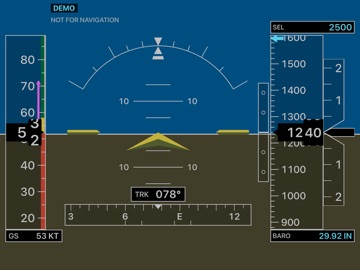
A primary flight display that runs on the device already in your flight bag. IFR Cockpit turns the gyroscope, accelerometer, barometer and GPS in your iPhone or iPad into an attitude indicator, airspeed tape, altimeter, vertical speed indicator and compass, laid out the way a glass cockpit lays them out. Version 2.0 is a complete rewrite of an app first published in 2008. It looks the way it always has. Everything behind it is new. A HORIZON THAT STAYS HONEST IN A TURN An accelerometer cannot tell gravity from centrifugal force. Every phone attitude indicator has to solve that, and most do not: roll into a coordinated turn and the horizon drifts back towards level while you are still banked. Here the attitude comes from the gyroscope, and the acceleration of the turn itself is worked out of the reading using GPS ground speed. Bank into a turn and the horizon shows the bank you are actually flying. Accelerate down the runway and the nose stays where you put it. A REAL ALTIMETER Altitude comes from the barometer with your own altimeter setting applied, not from GPS height. Set it in inches or hectopascals, drop to standard 29.92 with one tap for the climb through the transition altitude, or match it to your GPS altitude. Negative altitudes read correctly, for fields below sea level and for standard pressure on a high day. Devices without a barometer fall back to GPS altitude and say so on screen. VERTICAL SPEED THAT ANSWERS IMMEDIATELY Vertical acceleration is blended with the barometer, so the needle moves in a fraction of a second instead of lagging behind a once-a-second pressure reading, and it still cannot drift. NOTHING TO SET UP Down is simply where gravity points. Hold the device upright and the horizon is level. If your cradle holds it at an angle, fly straight and level and press TRIM once. Landscape and portrait, iPhone and iPad. Turn the device in its holder and the horizon rolls with it without disturbing the pitch. ON THE DISPLAY • Attitude indicator with pitch ladder, bank scale and slip indicator • Airspeed tape with the operating range arcs for your aeroplane • Altimeter with rolling digits, altitude bug and a fine deviation scale • Vertical speed indicator • Compass ribbon with heading bug and rate of turn • Six second trend vectors on speed and altitude • Optional G load • Classic and Glass colour schemes • A live sensor page showing every raw value V-SPEEDS FOR YOUR AEROPLANE Presets for the Cessna 172, Piper PA-28, Diamond DA40, Cirrus SR22 and gliders, or enter your own stall, flap and never-exceed speeds and the arcs follow. DEMO FLIGHT Try everything without leaving the ground. The demo flies a circuit from the runway: take-off roll, climb out, a steep turn, and back down to land. It is a genuine flight model rather than an animation, so the instruments agree with each other. Roll into the steep turn and watch the load factor rise and the airspeed decay with it. BUILT FOR THE COCKPIT The screen stays awake, the refresh rate can be capped to save battery on a long leg, and the whole display scales from an iPhone to a 13-inch iPad. HONEST ABOUT WHAT IT IS This is a training and situational-awareness aid built on consumer sensors, not a certified instrument. The speed tape shows GPS ground speed and is labelled GS, because there is no pitot tube in a phone. Never use this app as a primary reference for aircraft control or navigation.

See this store page in another country

Prices, ranks and reviews are per country. Revenue above is already worldwide.

More from Drobnik KG

SpeakerClock
Business
0 ratingsAnalyze →
Contract Law English
Education
0 ratingsAnalyze →
Summertime
Reference
0 ratingsAnalyze →
GeoCorder
Photo & Video
0 ratingsAnalyze →
Company Law English
Education
0 ratingsAnalyze →
Criminal Law English
Education
0 ratingsAnalyze →
Practical Legal English
Education
0 ratingsAnalyze →