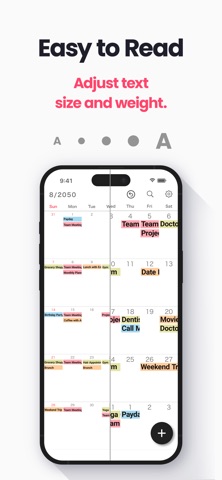
← Back to charts
My Calendar: Planner & Agenda icon
APP STORE

My Calendar: Planner & Agenda

Komorebi Inc. · Productivity · United States store
NOT IN TOP 100 HERE
View on App Store ↗ Instagram card Google Play version →
Revenue a month, worldwide EST
$3.5K
Likely $1.2K to $10.6K
New ratings
Tracking
Daily counts start building from today
Rating
4.7 of 5
391 ratings in this store
Countries it ranks in
0
was 0 on Oct 15, 2026

Revenue

Estimated from the grossing charts of Oct 21, 2026 in the 53 countries we track, and ratings growth on the App Store.

EST. REVENUE / YEAR · WORLDWIDE
$42.2K
131 new ratings a month on average since launch
EST. LIFETIME DOWNLOADS
13.7K to 39.1K
Estimated from ratings count
WHERE ITS USERS ARE · SHARE OF RATINGS
  • Japan 4.9K ratings80%
  • United States 391 ratings6%
  • South Korea 330 ratings5%
  • France 125 ratings2%
  • Brazil 98 ratings2%
  • Spain 76 ratings1%
  • Germany 67 ratings1%
  • Canada 35 ratings1%
HOW SURE ARE WE
Not in any grossing chart, so this comes from ratings growth (131 new ratings a month on average since launch): revenue grows with new ratings, more slowly for apps that collect ratings fast. Tested on 418 apps with verified revenue: typically off by about 2 times, and big earners tend to come out low. Countries we don't track (and Google Play in China, which doesn't exist) aren't included, and neither are ads or web payments. Gross revenue before store fees.
RATINGS
391
AVG RATING
4.68
PRICE
Free
AGE
3.9y
LAST UPDATE
61d ago
VERSION
2.1.0
SIZE
212 MB
AGE RATING
4+

Last 29 days

From our daily snapshots of every grossing chart.

DAYS IN A GROSSING CHART
0 / 29
COUNTRIES NOW
0 (was 0)
EST. REVENUE FROM CHARTS, DAILY · BOTH STORES ONLY EST
Show daily values
Sep 24, 2026not in a grossing chart
Sep 25, 2026not in a grossing chart
Sep 26, 2026not in a grossing chart
Sep 27, 2026not in a grossing chart
Sep 28, 2026not in a grossing chart
Sep 29, 2026not in a grossing chart
Sep 30, 2026not in a grossing chart
Oct 1, 2026not in a grossing chart
Oct 2, 2026not in a grossing chart
Oct 3, 2026not in a grossing chart
Oct 4, 2026not in a grossing chart
Oct 5, 2026not in a grossing chart
Oct 6, 2026not in a grossing chart
Oct 7, 2026not in a grossing chart
Oct 8, 2026not in a grossing chart
Oct 9, 2026not in a grossing chart
Oct 10, 2026not in a grossing chart
Oct 11, 2026not in a grossing chart
Oct 12, 2026not in a grossing chart
Oct 13, 2026not in a grossing chart
Oct 14, 2026not in a grossing chart
Oct 15, 2026not in a grossing chart
Oct 16, 2026not in a grossing chart
Oct 17, 2026not in a grossing chart
Oct 18, 2026not in a grossing chart
Oct 19, 2026not in a grossing chart
Oct 20, 2026not in a grossing chart
Oct 21, 2026not in a grossing chart
Oct 22, 2026not in a grossing chart
Best rank Sep 24, 2026: not ranked. Now: not ranked. Days at zero are days outside every grossing chart.

Money and momentum

Measured from the store, not estimated.

WHAT IT CHARGES
3 purchases listed
  • Premium Service (Annual)$17.99
  • Premium Service (Monthly)$1.99
  • Remove Ads$8.99
Top in-app purchases as listed on the App Store, in local prices.
REVIEW MOMENTUM
0.1 reviews / week
  • Recent reviews average3.3 stars
  • Recent 1 and 2 star share33%
From the latest 18 written reviews, covering 1297 days.
RELEASE CADENCE
1 update in 90 days
  • Typical gap between releases96 days
From the last 15 versions listed on the App Store.
RATING BREAKDOWN
391 ratings
5★84%
4★7%
3★4%
2★2%
1★3%

What users want

From the latest 18 reviews on the United States App Store, Apr 4, 2023 to Jan 27, 2026: 33% are 1 or 2 stars. Open a theme to read what people wrote.

WHAT THEY COMPLAIN ABOUT · SHARE OF BAD REVIEWS

No common theme in the bad reviews, or they aren't in English.

WHAT THEY ASK FOR
  • I can't get off the background to add an activity 2★, Jan 27, 2026
  • Please add the sync and integration of our Gmail accounts??? 2★, Dec 30, 2025
  • It would be nice to have automatic holidays added but I can survive with inputting them manually. 5★, Sep 5, 2024
  • Need to add holidays 5★, Nov 11, 2023
WORDS THAT KEEP COMING UP IN BAD REVIEWS

Nothing stands out.

WHAT THEY LOVE · SHARE OF GOOD REVIEWS
Easy to use43%

3 of the 4 and 5 star reviews.

★★★★★ Very clear and easy to work with.
★★★★★ I also love all the customizations and how easy it is to use
★★★★★ This app is so easy to use, and very legible.

Found by matching words and phrases in the reviews, not read by a person. A review can count toward more than one theme.

What users say

Latest reviews, United States App Store.

★★★★★Jan 27, 2026
Background color

I can’t get off the background to add an activity

★★★★★Dec 30, 2025
Critically missing

I really like my wallpapers but my pretty calendar becomes extremely useless and unusable. My pretty calendar is missing the critical option to sync my gmail account?? Please add the sync and integration of our Gmail accounts??? Please fix as soon as possible. I really like to keep this pretty calendar on this app.

★★★★★Jul 28, 2025
Love it!

I love this app. It is the best and easiest calendar app I’ve ever used! (And I have tried many.) The only change I would suggest is that I would like the name of the month as well as the number because sometimes I have to use my fingers to figure out what month it is.

★★★★★Apr 16, 2025
Неплохо, но

Нельзя посмотреть год на одной странице. При вертикальной прокрутке - нет названия месяцев, просто числа. Нет возможности синхронизировать со встроенным календарем. И было бы здорово добавлять вложения к событиям, здесь этого тоже нет.

★★★★★Jan 17, 2025
Used to be the best … Used to be!

This has been my go to calendar for years! Excellent calendar. BUT, just recently they have made it to where you MUST watch a 15 second commercial WITH sound before it opens. And even That has a glitch that sometimes you can’t open it. Then you have to reload the app. Nope, I’m done! They took an excellent app and ruined it! I’ve removed it. I would advise to look elsewhere for a calendar app! Sad!!!

★★★★★Sep 5, 2024
Great calendar

I have been downloading tons of calendars looking for one that didn’t interact with Google. This was the one. It gives me pretty much most of the features I had with Google plus the ability to name my colors. I’m pretty much on the outs with Google stuff and am looking for alternatives. So, please don’t change this standalone version. It would be nice to have automatic holidays added but I can survive with inputting them manually.
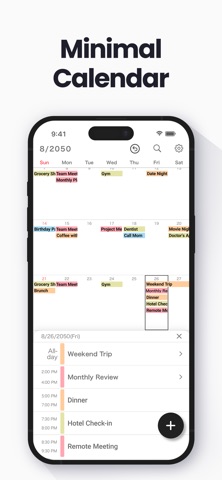
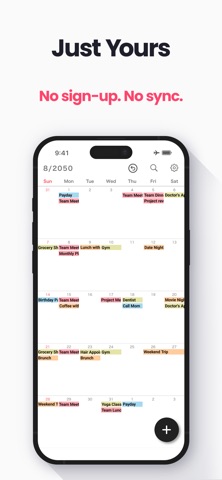
Store screenshots

ScreenshotScreenshotScreenshotScreenshotScreenshotScreenshotScreenshotScreenshotScreenshotScreenshot

App Store ads

Apple Search Ads this app ran in the last 90 days, from Apple's public ad repository.

No App Store ads in the EU
None in the last 90 days.

Apple only publishes ads shown in the EU (EU Digital Services Act), with a 7 day delay. An app that advertises only outside the EU shows nothing here.

Growth research

Where this app is buying and earning its users. Each link opens pre filtered.

ASO keywords

Most repeated terms in the listing. Highlighted ones also appear in the title.

calendar15colors7screen6background5event5events5color5theme colors5simple4favorite4schedule4dates4icloud4add4maps4simple calendar3start right3right away3set favorite3favorite photo3works offline3dark mode3font size3size adjustment3

What's new in 2.1.0

Now supports the latest Liquid Glass design.

Released Dec 2, 2022. Current version shipped Aug 23, 2026.

Store description

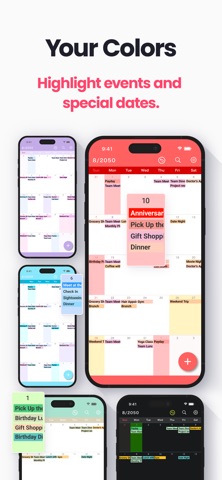
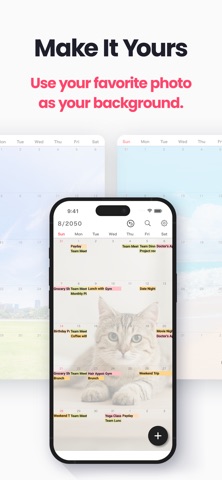
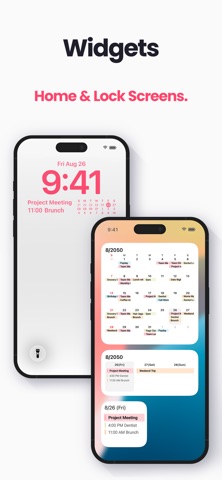
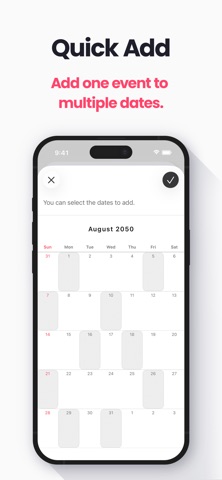
My Calendar is a simple calendar app you can start using right away — no account or sign-in required. Set your favorite photo as the wallpaper, and keep your schedule only on your device, like a private planner. • Extremely easy to use • Easily check your schedule on a large, clutter-free screen • No account required — works offline Simple, yet loaded with useful features such as widgets and dark mode themes. [ Features ] • 50 theme colors • Font size adjustment (10 levels) • Customizable background image • Background colors for dates • Show Saturdays in blue • 5 lock screen and 6 home screen widgets — mini calendar, next event and more • Vertical and horizontal scrolling • Change app icon • Passcode lock with Face ID / Touch ID • Daily summary notifications • iCloud backup and manual CSV backup • Transfer data to a new phone, even on a different OS --- [ Convenient features ] ■ No account required No member registration or iCloud account — start right away, no login needed. It also works offline, so you can check and add events without an internet connection. ■ Make the calendar your own Set your favorite photo as the calendar background: a photo of your family, pet, favorite artist, or favorite scenery. Pick from 50 theme colors and four dark mode schemes, or change the app icon to one you like. ■ Font size adjustment Choose from five font sizes, each in light or bold — 10 combinations in total. White and black text colors are also available. ■ Color coding Pick a color when adding an event to color code your schedule. There are 35 colors, and you can name the ones you use often, such as "part-time job" or "night shift." Separate work, family and school plans by color. You can also give a date itself a background color to highlight paydays or exam days, and show Saturdays in blue. ■ Notifications Set alerts at the scheduled time or ahead of it (such as 5 or 15 minutes in advance). A daily summary can show all of the day's events in a single notification. ■ Add events to multiple dates at once Select several dates when adding an event, and the same event is added to all of them at once — perfect for irregular job shifts. Recurring events are also supported: every Tuesday, the 25th of every month, every 3 weeks, the last day of the month and more. Handy for weekly lessons and habits. ■ Add URLs, maps and memos Add URLs, maps and memos to each event. Tap a URL to open your browser, or tap a location to open Google Maps or Apple Maps. ■ Who it's for - Work schedules and part-time shifts - Classes, study plans and exam dates - Concerts, live shows and fan events - Birthdays and anniversaries - Family plans, childcare and pet records - Weekly lessons and habits - A paper planner or agenda replacement - A private second calendar next to your main one Perfect if feature-heavy calendar or organizer apps feel too complicated, you do not need Google Calendar or iCloud sync, and you want your schedule kept to yourself. No sharing, no cloud sync — simple and private by design. ■ Pricing My Calendar is free to use (with ads). The "Premium Service" subscription removes ads and unlocks all theme colors and fonts, unlimited use of date background colors, and priority support. --- ■ Note Calendar data is stored only within the app — if you delete the app, the data is lost too. Before changing phones, please back up from "Backup" in the settings screen. If you prefer iCloud Calendar or Google Calendar, please try our Simple Calendar app, which manages cloud calendar accounts and works well alongside My Calendar. ■ Help and inquiries Please see "Help / FAQ" in the app's Settings screen. If you still have questions, use the "Contact Us" button at the top right of the Help screen. Terms of Use: https://komorebi-studio.com/tos_en.html Privacy Policy: https://komorebi-studio.com/policyredirect.html

See this store page in another country

Prices, ranks and reviews are per country. Revenue above is already worldwide.