ASO keywords
Most repeated terms in the listing. Highlighted ones also appear in the title.
mixcam8videos5cameras4side4side side3both cameras3sites view3view mixcam3time3video3camera3reaction2picture2window2split2screen2both2cutout2needed2tap2seconds2photos2history2saved2
What's new in 2.2
MixCam has been rebuilt from the ground up!
• All-new design with Home, History and Settings
• Choose your layout: Picture-in-Picture, Split Screen, Side by Side or Cutout
• Cutout: place yourself right inside the scene, no green screen needed
• Pause and continue the same video, without gaps
• History: every video in one place, grouped by date, with rename, delete, share and details
• Folders to keep trips and events organized
• Auto captions, title & hashtag ideas, and Trim Silence for your videos
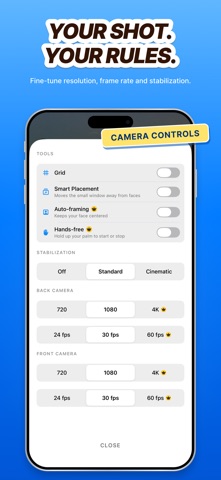
• Auto-framing keeps your face centered in the selfie window
• Hands-free: show your palm to start or stop recording
• Smoother PiP dragging and smart placement away from faces
• Self-timer, 4K and 60 fps recording, and separate files for each camera
• New Lifetime option for MixCam Premium
• Performance improvements and bug fixes
Enjoying MixCam? Your feedback matters most
Questions or ideas? Email contact@nextpixelapps.in
Released May 13, 2022. Current version shipped Oct 22, 2026.
Store description
MixCam records your front and back cameras at the same time, so you capture the moment and your reaction in one video. Perfect for travel vlogs, concerts, sports, reaction videos, tutorials and family moments.
DUAL CAMERA, YOUR WAY
• Picture-in-Picture: drag the selfie window anywhere, or hide it
• Split Screen: one camera on top, the other below
• Side by Side: both cameras next to each other
• Cutout: place yourself right inside the scene, no green screen needed
• Swap cameras with one tap
RECORD WITH EASE
• Pause and continue the same video, without gaps
• Self-timer (3 or 10 seconds)
• Zoom, flash and tap to focus
• Take photos of both cameras at once
• Smart placement moves the PiP window away from faces
YOUR HISTORY
• Every video saved in History, grouped by date
• Organize videos into folders for trips and events
• Rename, delete, share and see size, length and date
• Videos are also saved to your Photos library
MIXCAM PREMIUM
• Split, Side by Side and Cutout layouts
• Auto-framing keeps your face centered
• Hands-free: show your palm to start or stop
• Auto captions and title & hashtag ideas
• 4K, 60 fps and separate files for each camera
• Unlimited recording length (free videos are up to 60 seconds)
• Every frame shape, border and color
PRIVATE BY DESIGN
No account needed. Your videos stay on your iPhone, and MixCam has no ads or tracking.
SUBSCRIPTIONS AND PURCHASES
MixCam is free to download. MixCam Premium is available as a weekly or yearly subscription, or as a one-time Lifetime purchase. The yearly plan includes a 3-day free trial. Current prices are shown in the app before you buy.
• Payment is charged to your Apple Account at confirmation of purchase, or when the free trial ends.
• Subscriptions renew automatically at the same price unless cancelled at least 24 hours before the end of the current period.
• Your account is charged for renewal within 24 hours before the end of the current period.
• You can manage or cancel your subscription at any time in your Apple Account settings after purchase.
• Any unused part of a free trial ends when you purchase a subscription.
Privacy Policy: https://sites.google.com/view/mixcam/projects
Terms of Use: https://sites.google.com/view/mixcam/terms
Questions or feedback? Email us at contact@nextpixelapps.in
Thank you for using MixCam!
See this store page in another country
Prices, ranks and reviews are per country. Revenue above is already worldwide.