← Back to charts
Audio Spleeter icon
APP STORE

Audio Spleeter

龙刚 李 · Utilities · Japan store
NOT IN TOP 100 HERE
View on App Store ↗ Instagram card
Revenue a month, worldwide
Too small to estimate
Not enough chart or ratings data
New ratings
Tracking
Daily counts start building from today
Rating
0.0 of 5
0 ratings in this store
Countries it ranks in
0
was 0 on Oct 18, 2026

Revenue

Estimated from the grossing charts of Oct 25, 2026 in the 53 countries we track, and ratings growth on the App Store.

EST. REVENUE / MONTH · WORLDWIDE
Unranked
Not in any grossing chart, and too few ratings (0) to read its growth. Most apps at this stage earn little or nothing.
EST. LIFETIME DOWNLOADS
n/a
Estimated from ratings count
RATINGS
0
AVG RATING
n/a
PRICE
¥4,000
AGE
4.9y
LAST UPDATE
53d ago
VERSION
2.1.1
SIZE
146 MB
AGE RATING
4+

Last 30 days

From our daily snapshots of every grossing chart.

DAYS IN A GROSSING CHART
0 / 30
COUNTRIES NOW
0 (was 0)
EST. REVENUE FROM CHARTS, DAILY · APP STORE ONLY EST
Show daily values
Sep 26, 2026not in a grossing chart
Sep 27, 2026not in a grossing chart
Sep 28, 2026not in a grossing chart
Sep 29, 2026not in a grossing chart
Sep 30, 2026not in a grossing chart
Oct 1, 2026not in a grossing chart
Oct 2, 2026not in a grossing chart
Oct 3, 2026not in a grossing chart
Oct 4, 2026not in a grossing chart
Oct 5, 2026not in a grossing chart
Oct 6, 2026not in a grossing chart
Oct 7, 2026not in a grossing chart
Oct 8, 2026not in a grossing chart
Oct 9, 2026not in a grossing chart
Oct 10, 2026not in a grossing chart
Oct 11, 2026not in a grossing chart
Oct 12, 2026not in a grossing chart
Oct 13, 2026not in a grossing chart
Oct 14, 2026not in a grossing chart
Oct 15, 2026not in a grossing chart
Oct 16, 2026not in a grossing chart
Oct 17, 2026not in a grossing chart
Oct 18, 2026not in a grossing chart
Oct 19, 2026not in a grossing chart
Oct 20, 2026not in a grossing chart
Oct 21, 2026not in a grossing chart
Oct 22, 2026not in a grossing chart
Oct 23, 2026not in a grossing chart
Oct 24, 2026not in a grossing chart
Oct 25, 2026not in a grossing chart
Best rank Sep 26, 2026: not ranked. Now: not ranked. Days at zero are days outside every grossing chart.

Money and momentum

Measured from the store, not estimated.

WHAT IT CHARGES
No in-app purchases
Earns from its upfront price, ads or payments outside the store.
REVIEW MOMENTUM
Too few reviews
Fewer than 3 recent written reviews in this country.
RELEASE CADENCE
2 updates in 90 days
  • Typical gap between releases93 days
From the last 14 versions listed on the App Store.

What users say

Latest reviews, Japan App Store.

★★★★★May 24, 2025
Nice

Very good

Store screenshots

ScreenshotScreenshotScreenshotScreenshotScreenshotScreenshotScreenshotScreenshotScreenshotScreenshot

App Store ads

Apple Search Ads this app ran in the last 90 days, from Apple's public ad repository.

Apple's ad repository couldn't be reached right now. Try again later.

Growth research

Where this app is buying and earning its users. Each link opens pre filtered.

ASO keywords

Most repeated terms in the listing. Highlighted ones also appear in the title.

audio spleeter3icloud drive3iruomu audiospleeter3audio2spleeter2icloud2drive2iruomu2audiospleeter2html2

What's new in 2.1.1

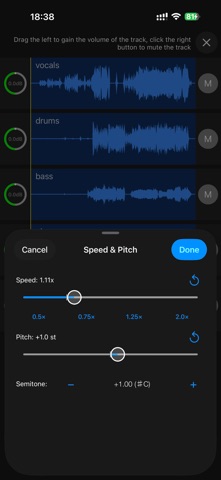
2トラックおよび5トラックのオーディオ分離速度を大幅に向上しました。 5トラック分離時のメモリ使用量を削減し、より多くの旧型デバイスに対応しました。 リミックスに再生速度とピッチの調整機能を追加しました。 オーディオのプレビュー、再生位置の変更、書き出し機能を改善しました。 ポイント、広告、多言語インターフェースを改善しました。 FLACファイルの互換性、再生、安定性に関する問題を修正しました。 不要なリソースと依存関係を削除し、アプリの容量を削減しました。

Released Nov 16, 2021. Current version shipped Sep 2, 2026.

Store description

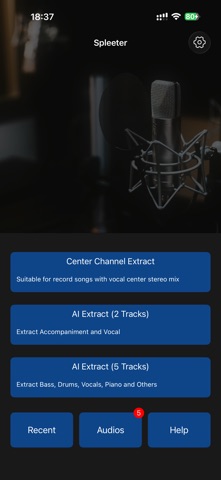
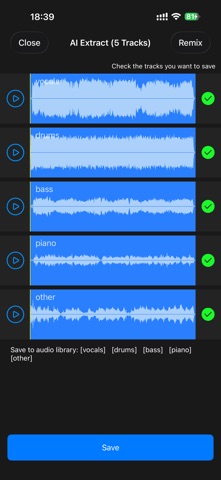
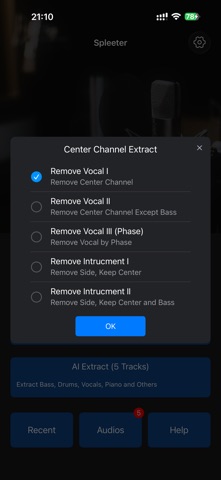
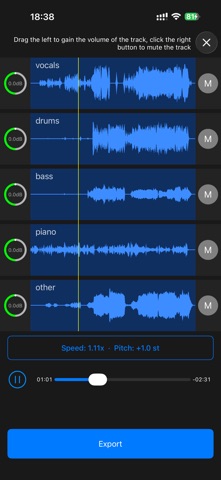
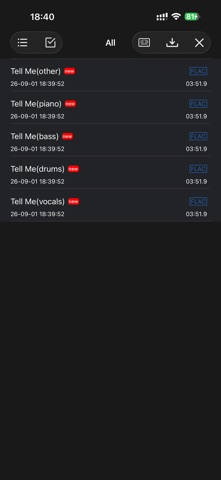
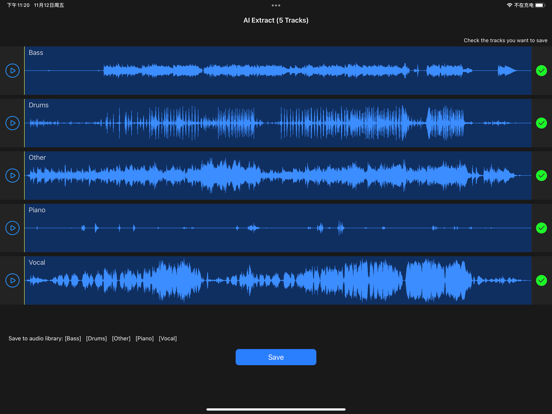
iPhoneやiPadでAIを使って、ボーカル、伴奏、ドラム、ベース、ピアノなどを個別のトラックに分離。音量・再生速度・ピッチを自由に調整して、自分だけのリミックスを作成できます。 Audio Spleeterは、ミュージシャン、シンガー、DJ、ダンサー、カラオケ愛好家、音楽学習者のためのAIボーカルリムーバー、ステム分離、リミックスツールです。オーディオ処理はデバイス上で行われるため、ファイルをサーバーへアップロードする必要はありません。トラックの分離にインターネット接続は不要です。 AIトラック分離 • 2トラック分離 楽曲をボーカルと伴奏に分離します。 • 5トラック分離 ボーカル、ドラム、ベース、ピアノ、その他の楽器に分離します。 • 高速なデバイス内処理 対応デバイスではハードウェアアクセラレーションを使用し、AI分離の処理速度とパフォーマンスを向上させます。 センターチャンネル抽出 5種類のセンターチャンネル抽出モードを搭載。対応するステレオ音源からボーカルを除去したり、中央に配置された音声を抽出したりできます。ボーカルがステレオミックスの中央に配置されている楽曲では、AI分離に代わる高速な処理方法として利用できます。 トラックをリミックス • 各トラックの音量を個別に調整 • ボーカルや楽器を個別にミュート • 再生速度を0.5xから2.0xまで変更 • 速度を変えずに半音単位でピッチを変更 • 編集しながら仕上がりを試聴 • 完成したリミックスをエクスポート 音楽制作、カラオケ、練習に • ボーカルを除去してカラオケ音源や伴奏を作成 • ボーカルを抽出してアカペラや歌唱練習に活用 • ドラム、ベース、ピアノを抽出して演奏を練習 • 難しいフレーズをスロー再生して繰り返し練習 • 自分の声域や楽器に合わせてキーを変更 • リハーサルや演奏用のオリジナルミックスを作成 さまざまな方法でオーディオを読み込み 以下の場所からオーディオを読み込めます。 • 「ファイル」とiCloud Drive • デバイス内のオーディオライブラリ • 動画ファイル • ダウンロード可能なオーディオリンク • 内蔵オーディオレコーダー 多彩なオーディオ書き出し形式 分離したトラックやリミックスを、以下の形式で書き出せます。 • AAC • M4A • MP3 • WAV • FLAC • AIFF かんたん共有 「ファイル」、iCloud Drive、Wi‑Fi転送、その他のインストール済みアプリを使ってオーディオを共有できます。 プライバシーに配慮したデバイス内処理 AIトラック分離はデバイス上で実行されます。元のオーディオファイルをクラウド処理サービスへアップロードする必要はありません。 伴奏の作成、ボーカル抽出、楽器練習、キーや再生速度の変更、オリジナルリミックスの制作まで、Audio Spleeterひとつで必要な機能を利用できます。 Terms of Use (EULA): http://www.iruomu.com/audiospleeter/termofuse.html Privacy: http://www.iruomu.com/audiospleeter/privacy.html

See this store page in another country

Prices, ranks and reviews are per country. Revenue above is already worldwide.

More from 龙刚 李

EZAudioCut - 簡単なオーディオカット(Lite)
Music
7.3K ratingsAnalyze →
EZAudioCut(MT) - 音楽編集アプリ
Music
348 ratingsAnalyze →
au editor - audition
Music
10 ratingsAnalyze →
EZAudioCut - 簡単なオーディオカット
Utilities
39 ratingsAnalyze →
Audio Spleeter Lite(ボーカル伴奏楽器)
Utilities
0 ratingsAnalyze →
EZAudioCut(MT) - オーディオエディタ
Utilities
10 ratingsAnalyze →
メトロノーム&ギターチューナー
Music
0 ratingsAnalyze →
Signal Generator - Wave
Utilities
0 ratingsAnalyze →