← Back to charts
Evermusic icon
APP STORE

Evermusic

EVERAPPZ SL · Music · United States store
NOT IN TOP 100 HERE
View on App Store ↗ Instagram card
Revenue a month, worldwide
Too small to estimate
Not enough chart or ratings data
New ratings
Tracking
Daily counts start building from today
Rating
0.0 of 5
0 ratings in this store
Countries it ranks in
0
was 0 on Oct 17, 2026

Revenue

Estimated from the grossing charts of Oct 23, 2026 in the 53 countries we track, and ratings growth on the App Store.

EST. REVENUE / MONTH · WORLDWIDE
Unranked
Not in any grossing chart, and too few ratings (0) to read its growth. Most apps at this stage earn little or nothing.
EST. LIFETIME DOWNLOADS
n/a
Estimated from ratings count
RATINGS
0
AVG RATING
n/a
PRICE
Free
AGE
5.5y
LAST UPDATE
5d ago
VERSION
9.0
SIZE
59 MB
AGE RATING
4+

Last 30 days

From our daily snapshots of every grossing chart.

DAYS IN A GROSSING CHART
0 / 30
COUNTRIES NOW
0 (was 0)
EST. REVENUE FROM CHARTS, DAILY · APP STORE ONLY EST
Show daily values
Sep 25, 2026not in a grossing chart
Sep 26, 2026not in a grossing chart
Sep 27, 2026not in a grossing chart
Sep 28, 2026not in a grossing chart
Sep 29, 2026not in a grossing chart
Sep 30, 2026not in a grossing chart
Oct 1, 2026not in a grossing chart
Oct 2, 2026not in a grossing chart
Oct 3, 2026not in a grossing chart
Oct 4, 2026not in a grossing chart
Oct 5, 2026not in a grossing chart
Oct 6, 2026not in a grossing chart
Oct 7, 2026not in a grossing chart
Oct 8, 2026not in a grossing chart
Oct 9, 2026not in a grossing chart
Oct 10, 2026not in a grossing chart
Oct 11, 2026not in a grossing chart
Oct 12, 2026not in a grossing chart
Oct 13, 2026not in a grossing chart
Oct 14, 2026not in a grossing chart
Oct 15, 2026not in a grossing chart
Oct 16, 2026not in a grossing chart
Oct 17, 2026not in a grossing chart
Oct 18, 2026not in a grossing chart
Oct 19, 2026not in a grossing chart
Oct 20, 2026not in a grossing chart
Oct 21, 2026not in a grossing chart
Oct 22, 2026not in a grossing chart
Oct 23, 2026not in a grossing chart
Oct 24, 2026not in a grossing chart
Best rank Sep 25, 2026: not ranked. Now: not ranked. Days at zero are days outside every grossing chart.

Money and momentum

Measured from the store, not estimated.

WHAT IT CHARGES
3 purchases listed
  • Evermusic Premium Monthly$1.99
  • Evermusic Premium Lifetime$59.99
  • Evermusic Premium Yearly$12.99
Top in-app purchases as listed on the App Store, in local prices.
REVIEW MOMENTUM
0.1 reviews / week
  • Trendrising
  • Recent reviews average3.1 stars
  • Recent 1 and 2 star share42%
From the latest 33 written reviews, covering 1953 days.
RELEASE CADENCE
3 updates in 90 days
  • Typical gap between releases30 days
From the last 25 versions listed on the App Store.

What users want

From the latest 33 reviews on the United States App Store, Jun 18, 2021 to Jun 29, 2026: 42% are 1 or 2 stars. Open a theme to read what people wrote.

WHAT THEY COMPLAIN ABOUT · SHARE OF BAD REVIEWS
Lost data, sync, backup21%

3 of the 1 and 2 star reviews.

★★★★★ This could a great app but… Playlists don't sync between devices and the developer does not respond to email queries.
★★★★★ This app doesn't sync playlists between the Mac and iPhone!
★★★★★ Also bought the PRO version for my iPhone and cannot "restore" the pro version on my MacBook.
Price and subscription14%

2 of the 1 and 2 star reviews.

★★★★★ costs money to get good use out if it would not recommend.
★★★★★ I canceled my pro subscription.
Wrong or poor results14%

2 of the 1 and 2 star reviews.

★★★★★ Moving from Windows to Mac and trying to find a cloud player for my MusicBee-managed library. Evermusic does not know how to separate multiple genres in “Genre” tag by semi-colon. No community forum and no…
★★★★★ Lack of a useful help system and flaky functionality with a large local music library makes it more useless than Apple's Music app.
WHAT THEY ASK FOR
  • Would be great if we could somehow merge them under one account. 5★, Jun 16, 2025
  • I want an app that I can play MP3s from my hard drive by having it either go down through an album one song after the other, or play songs in multiple albums in a random order. 1★, Jul 20, 2023
  • I would get this app if i were you, its great, easy to use, and its free without adds its better than Tidal and Spotify, altho i kinda wish there was a way to sync all my music from Spotify to this app, it would be… 5★, Sep 15, 2022
WORDS THAT KEEP COMING UP IN BAD REVIEWS

Nothing stands out.

WHAT THEY LOVE · SHARE OF GOOD REVIEWS
Easy to use12%

2 of the 4 and 5 star reviews.

★★★★★ The Evermusic app is simple, poweerful, and reliable.
★★★★★ I would get this app if i were you, its great, easy to use, and its free without adds its better than Tidal and Spotify, altho i kinda wish there was a way to sync all my music from Spotify to this app, it would be…
Looks great12%

2 of the 4 and 5 star reviews.

★★★★★ The new interface feels much faster and cleaner, especially with large music libraries.
★★★★★ Thhe only thing is the interface is not so user firendly!
Fast12%

2 of the 4 and 5 star reviews.

★★★★★ Tut mir fast leid, weil ich das Metier kenne und weiß, wie schwierig es ist, einen Fehler, der sich nicht selbst erklärt, zu fixen.
★★★★★ Alles wunderbar, bis auf das man Pause nicht mit der Leertaste ansteuern kann (wie fast bei allen anderen Playern).

Found by matching words and phrases in the reviews, not read by a person. A review can count toward more than one theme.

What users say

Latest reviews, United States App Store.

★★★★★Jun 29, 2026
Useless for cloud libraries if coming from MusicBee

Moving from Windows to Mac and trying to find a cloud player for my MusicBee-managed library. Evermusic does not know how to separate multiple genres in “Genre” tag by semi-colon. No community forum and no documentation indicating how to separate multiple genres. Tried every delimiter I could think of (slash, double slash, null character) and still does not work. Tested out with a 21 song cloud Music Library, and the app froze every time I tried “Reload metadata” to see if that helped with multi-tag separation. Seems fully featured and looks nice, but if you have a music library whose metadata you edited in MusicBee, look elsewhere.

★★★★★May 9, 2026
Any good?

Who knows, as the utility refuses to allow me to connect to a NAS. I click on the add connection, and it immediately takes me to a webpage with absolutely NO help. All the other utilities like this one, connect with absolutely no problem. Except this one……

★★★★★May 8, 2026
Best Evermusic update so far

I downloaded the latest Evermusic update and honestly Im impressed. The new interface feels much faster and cleaner, especially with large music libraries. What really surprised me was the number of new cloud and server connections added in a single update. I was able to connect my Jellyfin server and Proton Drive without any issues, and streaming from my NAS over SFTP works great. The synced lyrics widget is also such a cool idea.This update makes the app feel much more modern and polished overall. Definitely one of the best offline and cloud music players on Mac right now.

★★★★★Dec 12, 2025
Absturz

Was soll ich mit einer App die wenn ich sie upgrade willen abstürzt. Nicht zu gebrauchen

★★★★★Nov 2, 2025
Pure Garbage

This is one of the most ridiculously terrible user interfaces I’ve ever seen! It’s 2025 and garbage like this is still in the app store?!?!

★★★★★Oct 31, 2025
Sehr Gut

Diese App ist sehr langsam ! aber ist gut.

Store screenshots

ScreenshotScreenshotScreenshotScreenshotScreenshotScreenshotScreenshotScreenshotScreenshotScreenshot

App Store ads

Apple Search Ads this app ran in the last 90 days, from Apple's public ad repository.

Apple's ad repository couldn't be reached right now. Try again later.

Growth research

Where this app is buying and earning its users. Each link opens pre filtered.

ASO keywords

Most repeated terms in the listing. Highlighted ones also appear in the title.

music17audio12cloud10playback9songs8connect7music library6file manager6library6manager6evermusic5offline5player5file5offline music3music player3library cloud3cloud listen3listen offline3audio player3playlist manager3audio formats3many others3others connect3

What's new in 9.0

Hello everyone! This is a big update focused on a customizable layout and smoother playback. Customizable Tab Bar and Sidebar - Reorder and edit your tabs. Choose which items appear in the tab bar and sidebar and arrange them your way. - Add extra items, and collapse or expand sections for Connect, Local Files, Media Library, and Settings. Media Library - External folders can now sync into your Media Library. - Rebuilt metadata sync with a live total and processed counter, so you always see progress. - Many reliability fixes for local and external file syncing. Design and Layout - Updated colors to better match the system light and dark appearance. - Lots of split view and navigation polish. Settings, Reorganized - Cleaner, easier to navigate Settings across User Interface, Personalization, Media Library, File Manager. More - Last.fm album artist scrobbling option. - New and updated translations in many languages. - Numerous smaller fixes and performance improvements throughout. - New search in Cloud Files for quicker access. Thank you for using Evermusic. We read your feedback and keep improving the app in every update. If you enjoy the app, please leave a rating on the App Store. Have feedback or issues? Email us at support@everappz.com. We read every message.

Released Apr 27, 2021. Current version shipped Oct 19, 2026.

Store description

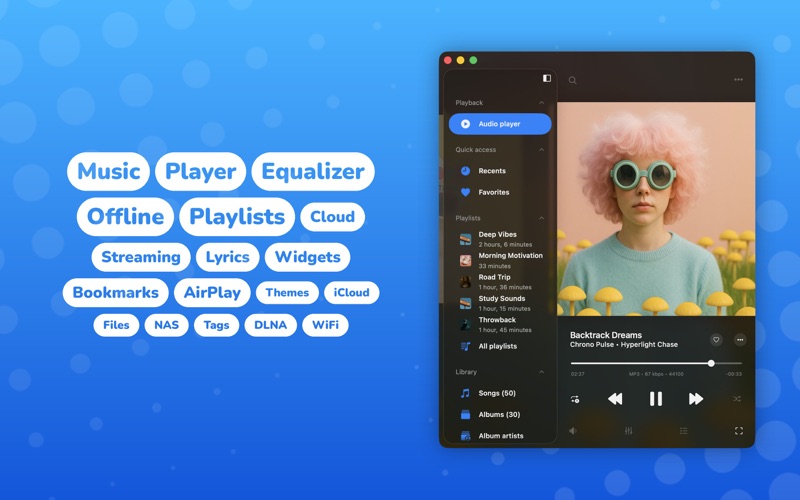
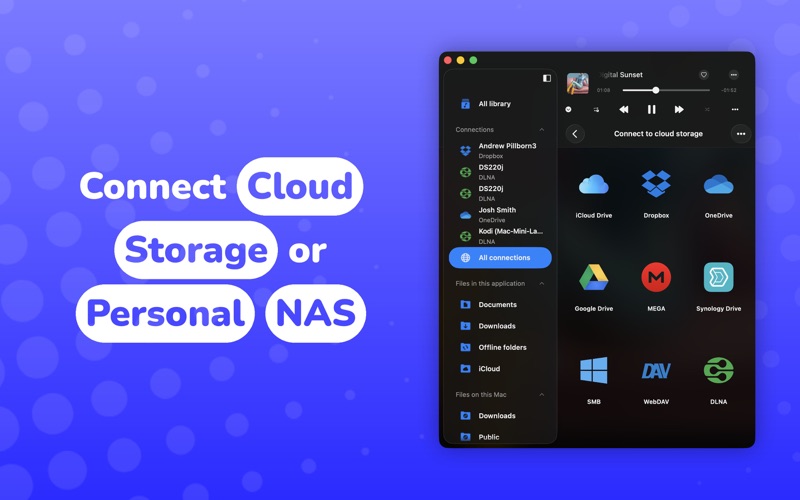
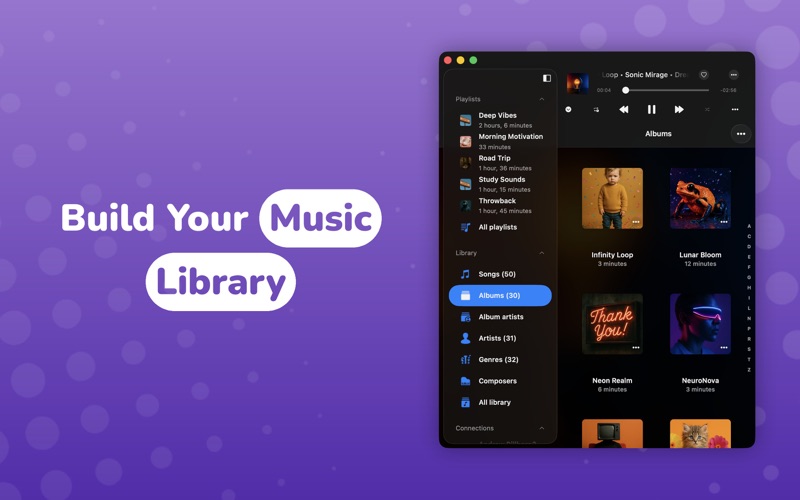
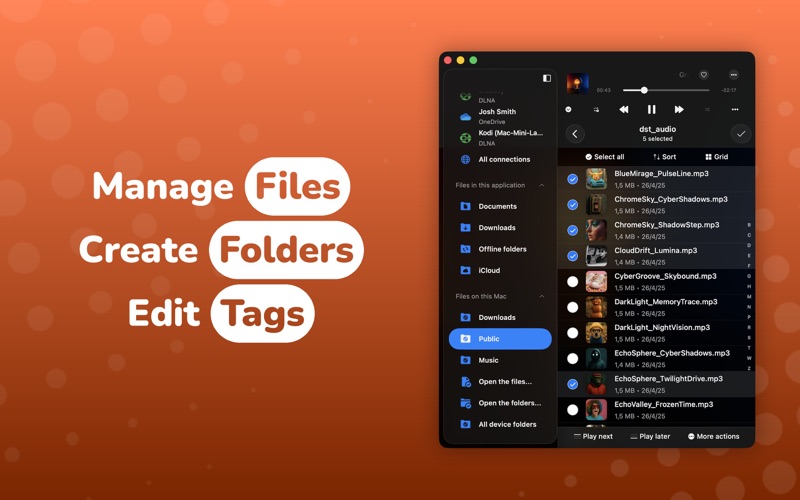
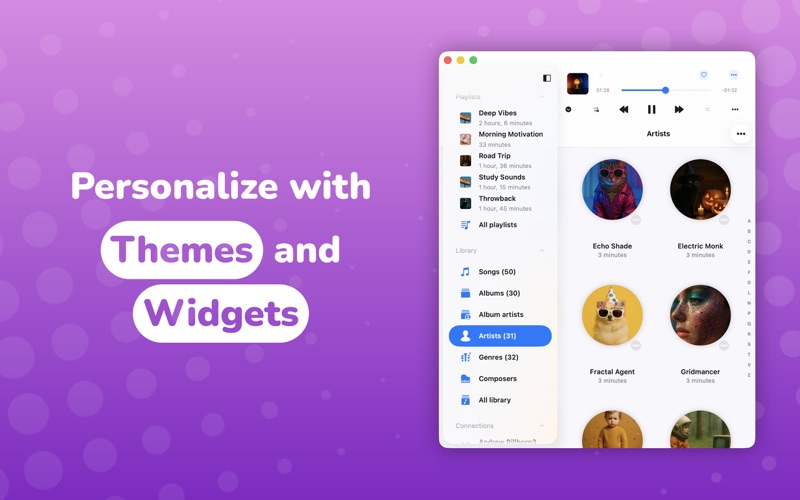
Evermusic – Cloud & Offline Music Player for Mac Stream your entire music library from the cloud, listen offline, and take full control of your sound. Evermusic combines a powerful audio player, equalizer, playlist manager, and file manager in one beautiful app. • Play All Audio Formats Evermusic supports the most popular audio formats: MP3, AAC, M4A, WAV, AIFF, ALAC, M4B, and many others. • Connect Your Cloud Create your own music streaming service by moving your music library to the cloud. Listen to your music directly from the cloud and free up space on your device. Access music from popular cloud services like iCloud, Google Drive, Dropbox, OneDrive, pCloud, and many others. You can also connect privacy-focused cloud services like MEGA, Internxt, and Proton Drive. • Connect Media Servers Easily connect Plex, Subsonic, Navidrome, Jellyfin, and Emby media servers to your library. • Connect Your NAS Connect using SMB, WebDAV, DLNA, FTP, SFTP, and NFS protocols. Advanced buffering technology ensures smooth playback. Connect to personal NAS storage using native APIs for QNAP, WD My Cloud Home, Nextcloud, and Synology Drive. Import audio files from another computer on your local network using Wi-Fi file transfer. • Offline Music Download your favorite songs, albums, and artists to listen offline. Enable audio player cache to automatically download recently played songs. • Audio Equalizer The built-in equalizer offers presets for popular music genres, plus manual settings to customize your sound and amplify your music. • Crossfade Playback Enjoy continuous playback with crossfade, where the next song starts before the current one ends. • Gapless Playback Enjoy smooth playback with no pauses between songs, perfect for concept albums and classical music. • Audio Effects Make your music sound the way you like with built-in audio effects. Turn on volume normalization to keep every track at the same loudness, and adjust playback with reverb, delay, distortion, and spatial audio. • Music Visualizer Watch full-screen animated visuals that react live to your music. Choose from a large library of presets, or let them cycle. • Lyrics and Comments View embedded timed lyrics and comments for your audio tracks. Activate the lyrics widget on the Home Screen for quick access. • Widgets Activate interactive Home Screen widgets for fast access to your playback queue and continue playback from the last saved position. • Automatic Synchronization Your music library automatically syncs between the cloud and your device, grouping songs by artist, album, and genre. • Audiobooks Use Evermusic as an audiobook player with features like audio bookmarks, playback speed control, and saved media position. Read text information from your songs' metadata. • Playlist Manager Create and manage playlists, reorder songs, and make playlists available offline. Sort songs by name, size, track number, and album. • ID3 Tag Editor Edit audio tags to correct corrupted metadata in your files. • File Manager Manage your files with basic operations using the integrated file manager. • Advanced Search The smart search engine helps you find your favorite albums, artists, and songs in your music library. ---------- Evermusic is your all-in-one music player, cloud streamer, downloader, and file manager for Mac. Great for music lovers, bands, producers, audiophiles, students, and audiobook listeners. Privacy Policy: https://www.everappz.com/privacy-policy Terms of Use: https://www.everappz.com/terms-and-conditions

See this store page in another country

Prices, ranks and reviews are per country. Revenue above is already worldwide.

More from EVERAPPZ SL

Evermusic: Cloud Music Player
Music
19.2K ratingsAnalyze →
Flacbox: Hi-Res Music Player
Music
8.6K ratingsAnalyze →
Evertag: Music Tag Editor
Music
5.6K ratingsAnalyze →
Evertag
Music
0 ratingsAnalyze →
Flacbox
Music
0 ratingsAnalyze →
Evermusic Pro: music player
Music
923 ratingsAnalyze →
Evervideo: Player All Format
Photo & Video
53 ratingsAnalyze →
Everdisk: Share Photos & Files
Utilities
1 ratingsAnalyze →
Evervideo
Photo & Video
0 ratingsAnalyze →