ASO keywords
Most repeated terms in the listing. Highlighted ones also appear in the title.
image15side menu14tag13menu11open10slide10tag name10color9side9name9tags8folder8header7command6mac5want5click5left5right5off5list5open image5color tag5left right5
What's new in 1.0
No release notes.
Released Mar 13, 2021. Current version shipped Mar 13, 2021.
Store description
CTag Viewer is a simple and intuitive image viewer.
It's very easy to attach color tags for Mac OS.
It's easy to select images.
This simple viewer is especially recommended for photographers.
[ How to Open the File ]
You can either drop the folder or file you want to see on the icon, or open it from the menu.
[ How to add color tags ]
Open the image and add a color tag from the side menu (or shortcut).
Click on the color again to delete the tag, or select "Remove all tags" at the top.
* If you open an image from the folder view, You can switch to the next image with the left and right keys.
(This will also be reflected in Mac OS finder.)
(If you want to work with Mac OS finder, make sure that tag name is the same as the OS tag name.)
[ Narrow down by color tag ]
Open the folder and select the color tag you want to narrow down from the side menu.
[About Autoslide ]
You can slide automatically in multiple windows.
You can turn it on and off with the side menu (or space key).
Color tagging can also be used during slides (when images are displayed. Not folder.)
*The timing between multiple windows is not synchronized.You can change the slide time in each window.
*It may take some time to display heavy files such as Raw.
----- The following is the detailed explanation.
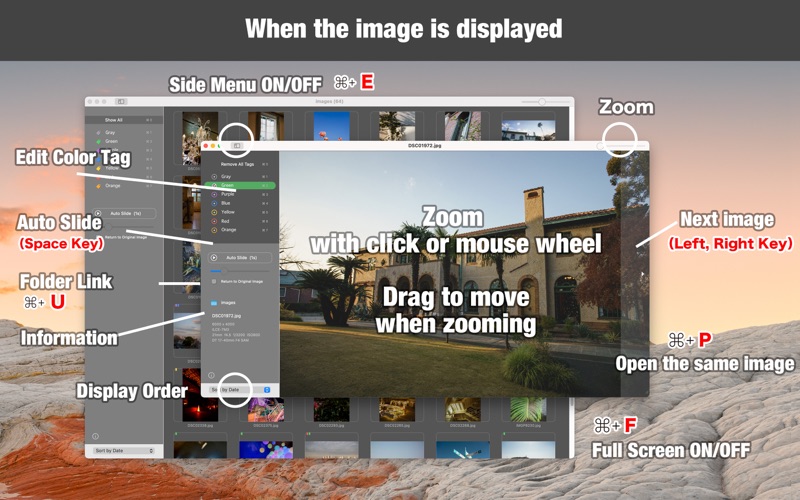
[ When the image is displayed ]
■ Header
Right slide bar of header: Zoom
Left button of header: Side menu ON/OFF
■ Image manipulation
Mouse Whee or Click : Zoom Image
Drag: Move the image
Left and right of image: switch to next image
(You can also switch between the left and right keys.)
* If you want to use this feature, please open it from the folder because of security restrictions on Mac.
■ Side menu
Tags: You can attach tags of each color to the file
Auto slide ON/OFF (shortcuts are space keys)
Set slide time (0.5-30 seconds)
Back to original image when slide stops
(*Due to security restrictions, slides can only be used with images opened from folders)
Folder name containing images: Click to open the folder (command + U)
Image information: Size, camera name, camera setting, lens information
Side menu bottom: display order
( command + P )
Open the same image
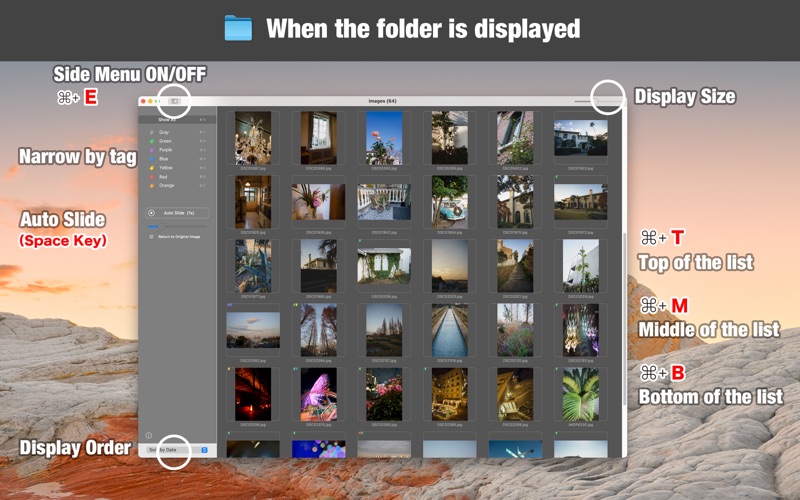
[ When folders are displayed]
■ Header
Right slide bar of header: Display size
Left button of header: Side menu ON/OFF
■ Side menu
Tags: Full View or Narrow by Tags
Auto slide ON/OFF (shortcuts are space keys)
Set slide time (0.5-30 seconds)
Back to original image when slide stops
Side menu bottom: display order
■ List items
Click on a folder or image to open it.
(If you click with the option key, close the window and open the file.)
If you have a lot of list items and have difficulty scrolling, you can use shortcuts.
To the top of the list (command + T)
To the middle of the list (command + M)
To the bottom of the list (command + B)
[ Common ]
Full screen switching (full screen button on header or command + F)
[ About Tag Name Settings ]
You can configure each tag name from the menu.
You can use the original name, but if you want to work with tags in Mac OS finder, make sure that each tag name is the same.
Renaming a tag does not change the tag you previously appended.
Narrowing is handled by tag name, not tag color.
See this store page in another country
Prices, ranks and reviews are per country. Revenue above is already worldwide.