← Back to charts
PDF Edit: Document Editor icon
APP STORE

PDF Edit: Document Editor

Yaroslav Ermolaev · Business · United States store
NOT IN TOP 100 HERE
View on App Store ↗ Instagram card
Revenue a month, worldwide
Too small to estimate
Not enough chart or ratings data
New ratings
+0
in 3 days, 3 in total
Rating
0.0 of 5
0 ratings in this store
Countries it ranks in
0
was 0 on Oct 20, 2026

Revenue

Estimated from the grossing charts of Oct 26, 2026 in the 53 countries we track, and ratings growth on the App Store.

EST. REVENUE / MONTH · WORLDWIDE
Unranked
Not in any grossing chart, and too few ratings (3) to read its growth. Most apps at this stage earn little or nothing.
EST. LIFETIME DOWNLOADS
n/a
Estimated from ratings count
RATINGS
0
AVG RATING
n/a
PRICE
Free
AGE
5.7y
LAST UPDATE
12d ago
VERSION
4.0
SIZE
69 MB
AGE RATING
4+

Last 30 days

From our daily snapshots of every grossing chart and daily ratings counts.

DAYS IN A GROSSING CHART
9 / 30
COUNTRIES NOW
1 (was 0)
NEW RATINGS, LAST 3 DAYS
+0
EST. REVENUE A MONTH, DAILY · APP STORE EST
Show daily values
Sep 28, 2026not in a grossing chart
Sep 29, 2026not in a grossing chart
Sep 30, 2026$3.2K a month
Oct 1, 2026not in a grossing chart
Oct 2, 2026not in a grossing chart
Oct 3, 2026not in a grossing chart
Oct 4, 2026not in a grossing chart
Oct 5, 2026not in a grossing chart
Oct 6, 2026not in a grossing chart
Oct 7, 2026not in a grossing chart
Oct 8, 2026not in a grossing chart
Oct 9, 2026not in a grossing chart
Oct 10, 2026$26.3K a month
Oct 11, 2026$26.3K a month
Oct 12, 2026$1.6K a month
Oct 13, 2026$449 a month
Oct 14, 2026not in a grossing chart
Oct 15, 2026not in a grossing chart
Oct 16, 2026not in a grossing chart
Oct 17, 2026not in a grossing chart
Oct 18, 2026not in a grossing chart
Oct 19, 2026not in a grossing chart
Oct 20, 2026not in a grossing chart
Oct 21, 2026$458 a month
Oct 22, 2026not in a grossing chart
Oct 23, 2026$465 a month
Oct 24, 2026not in a grossing chart
Oct 25, 2026not in a grossing chart
Oct 26, 2026not in a grossing chart
Oct 27, 2026not in a grossing chart
The same estimate as the headline, saved every day. Best rank Sep 28, 2026: not ranked. Now: #71 Business · KZ.
RATINGS IN THE CORE COUNTRIES, DAILY
Show daily values
Oct 22, 20263 ratings
Oct 23, 20263 ratings
Oct 24, 20263 ratings
Oct 25, 20263 ratings
3 on Oct 22, 2026, 3 on Oct 25, 2026. New ratings track new downloads, even outside the charts.

Money and momentum

Measured from the store, not estimated.

WHAT IT CHARGES
4 purchases listed
  • Full access (1 month)$2.99
  • FULL access (1 month)$2.99
  • Full access (1 year)$16.99
  • FULL access (1 year)$22.99
Top in-app purchases as listed on the App Store, in local prices.
REVIEW MOMENTUM
Too few reviews
Fewer than 3 recent written reviews in this country.
RELEASE CADENCE
1 update in 90 days
  • Typical gap between releases34 days
From the last 24 versions listed on the App Store.

Store screenshots

ScreenshotScreenshotScreenshotScreenshotScreenshotScreenshotScreenshotScreenshotScreenshotScreenshot

App Store ads

Apple Search Ads this app ran in the last 90 days, from Apple's public ad repository.

No App Store ads in the EU
None in the last 90 days.

Apple only publishes ads shown in the EU (EU Digital Services Act), with a 7 day delay. An app that advertises only outside the EU shows nothing here.

Growth research

Where this app is buying and earning its users. Each link opens pre filtered.

ASO keywords

Most repeated terms in the listing. Highlighted ones also appear in the title.

text13pdf9documents8edit6files6pdf edit5pdfs4pdf text3fill forms3turn scans3save result3result pdf3text recognition3regpart pdfedit3pdfedit html3fill3forms3add3turn3photos3editable3ready3page3result3

What's new in 4.0

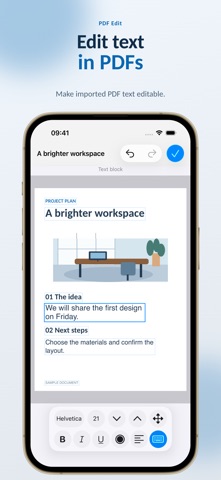
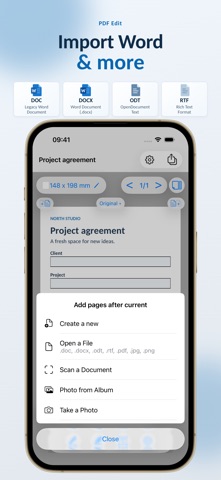
Thank you for using PDF Edit! We've put a lot of work into this update and added a feature you've been waiting for: editing existing text in PDFs! You can now correct text and change its font, size, color and alignment. You can also work with other editable objects: move, rotate, resize and delete images and graphics. You can now open DOC, DOCX, ODT and RTF documents, edit their text and save the result as a PDF.

Released Feb 6, 2021. Current version shipped Oct 15, 2026.

Store description

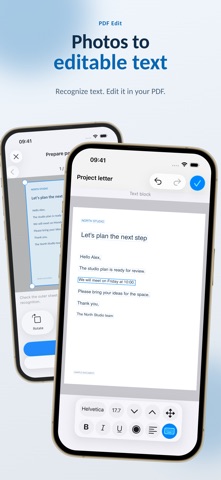
Fix PDF text, fill out forms and add your signature on iPhone and iPad. Turn scans and photos into documents with editable text. PDF Edit helps you get paperwork ready to send from wherever you are: correct details, sign a page, combine documents and save the result as a PDF. EDIT EXISTING PDF CONTENT Change text already in a PDF, as well as adding new text. Open a PDF in editable mode and adjust the font, size, color and alignment. Move, rotate, resize or delete objects available for editing, including text, images and graphics. Switch between the original and editable versions. FILL FORMS AND SIGN Draw a handwritten signature with your finger or Apple Pencil. Fill in PDF text fields or add text to ordinary forms. Insert drawings, images and your own image stamps. Remove unwanted image backgrounds before adding them to a page. TURN SCANS INTO TEXT Scan paper documents with the camera or open existing photos. Recognize text across a whole page or in selected areas, then edit the result. Work with scanned PDFs, too. IMPORT OFFICE DOCUMENTS Open DOC, DOCX, ODT and RTF files, edit their text and save the result as a PDF. Build multipage documents from photos. Import files from Files, email and messaging apps using the Share menu. ORGANIZE YOUR PAGES Merge several PDFs into one document. Add, delete, reorder and rotate pages. Create blank pages in the size you need and choose a background color. Undo and redo changes as you edit. KEEP FILES READY TO SHARE Organize documents and images in folders and mark frequently used items as Favorites. Send finished PDFs to other apps and print with AirPrint. Text recognition and document conversion run on your device, without uploading files to a server for processing. Download PDF Edit and get your documents ready wherever you work. PLEASE NOTE Editing options depend on the document's structure. Converting complex files or recognizing text may change the layout. Text recognition and preparing PDFs for editing require iOS 16 / iPadOS 16 or later. SUBSCRIPTIONS Exporting, sharing and printing documents require a subscription. Monthly and annual plans are available. Prices and trial terms, if a trial is available, are shown before purchase. Subscriptions renew automatically. To avoid the next charge, turn off auto-renewal at least 24 hours before the current period ends, including a free trial period. Manage your subscription in your Apple account settings. Terms of Use: https://regpart.ru/pdfedit_terms.html Privacy Policy: https://regpart.ru/pdfedit_policy.html

See this store page in another country

Prices, ranks and reviews are per country. Revenue above is already worldwide.

More from Yaroslav Ermolaev

WebApp
Business
63 ratingsAnalyze →
StoriesCamera subtitles,camera
Photo & Video
1 ratingsAnalyze →
DepthVision LiDAR
Photo & Video
1 ratingsAnalyze →
Say it - text-to-speech
Photo & Video
2 ratingsAnalyze →
AI Photo Retouch
Photo & Video
3 ratingsAnalyze →
Risola: Paint by Number
Graphics & Design
0 ratingsAnalyze →
Do not miss! - reminders
Lifestyle
0 ratingsAnalyze →
Regpart
Business
0 ratingsAnalyze →
Energuide
Business
0 ratingsAnalyze →