← Back to charts
Typefinity: Tastatur & Zahlen icon
APP STORE

Typefinity: Tastatur & Zahlen

AI Tools Apps SRL · Productivity · Germany store
NOT IN TOP 100 HERE
View on App Store ↗ Instagram card
Revenue a month, worldwide
Too small to estimate
Not enough chart or ratings data
New ratings
Tracking
Daily counts start building from today
Rating
3.8 of 5
53 ratings in this store
Countries it ranks in
0
was 0 on Oct 18, 2026

Revenue

Estimated from the grossing charts of Oct 25, 2026 in the 53 countries we track, and ratings growth on the App Store.

EST. REVENUE / MONTH · WORLDWIDE
Unranked
Not in any grossing chart, and it sells nothing in the store (no in-app purchases, free download). Any revenue comes from ads or payments outside the store, which we can't see.
EST. LIFETIME DOWNLOADS
1.9K to 5.3K
Estimated from ratings count
RATINGS
53
AVG RATING
3.81
PRICE
Gratis
AGE
6.4y
LAST UPDATE
104d ago
VERSION
2.4
SIZE
96 MB
AGE RATING
4+

Last 30 days

From our daily snapshots of every grossing chart.

DAYS IN A GROSSING CHART
0 / 30
COUNTRIES NOW
0 (was 0)
EST. REVENUE FROM CHARTS, DAILY · APP STORE ONLY EST
Show daily values
Sep 26, 2026not in a grossing chart
Sep 27, 2026not in a grossing chart
Sep 28, 2026not in a grossing chart
Sep 29, 2026not in a grossing chart
Sep 30, 2026not in a grossing chart
Oct 1, 2026not in a grossing chart
Oct 2, 2026not in a grossing chart
Oct 3, 2026not in a grossing chart
Oct 4, 2026not in a grossing chart
Oct 5, 2026not in a grossing chart
Oct 6, 2026not in a grossing chart
Oct 7, 2026not in a grossing chart
Oct 8, 2026not in a grossing chart
Oct 9, 2026not in a grossing chart
Oct 10, 2026not in a grossing chart
Oct 11, 2026not in a grossing chart
Oct 12, 2026not in a grossing chart
Oct 13, 2026not in a grossing chart
Oct 14, 2026not in a grossing chart
Oct 15, 2026not in a grossing chart
Oct 16, 2026not in a grossing chart
Oct 17, 2026not in a grossing chart
Oct 18, 2026not in a grossing chart
Oct 19, 2026not in a grossing chart
Oct 20, 2026not in a grossing chart
Oct 21, 2026not in a grossing chart
Oct 22, 2026not in a grossing chart
Oct 23, 2026not in a grossing chart
Oct 24, 2026not in a grossing chart
Oct 25, 2026not in a grossing chart
Best rank Sep 26, 2026: not ranked. Now: not ranked. Days at zero are days outside every grossing chart.

Money and momentum

Measured from the store, not estimated.

WHAT IT CHARGES
No in-app purchases
Earns from its upfront price, ads or payments outside the store.
REVIEW MOMENTUM
0.3 reviews / week
  • Trendrising
  • Recent reviews average3.3 stars
  • Recent 1 and 2 star share32%
From the latest 104 written reviews, covering 2305 days.
RELEASE CADENCE
0 updates in 90 days
  • Typical gap between releases138 days
From the last 15 versions listed on the App Store.
RATING BREAKDOWN
53 ratings
5★55%
4★11%
3★13%
2★2%
1★19%

What users want

From the latest 104 reviews on the Germany App Store, Jul 3, 2020 to Oct 23, 2026: 32% are 1 or 2 stars. Open a theme to read what people wrote.

WHAT THEY COMPLAIN ABOUT · SHARE OF BAD REVIEWS
Price and subscription18%

6 of the 1 and 2 star reviews.

★★★★★ So the developer makes you pay $4.99 but that won't let you use the keyboard, after you've already paid, you then have to subscribe for $19/yr to then wrestle with this keyboard.
★★★★★ They charge you 4.99 to download the app just to then be prompted to sign up for a subscription!
★★★★★ To use it, I now much have a weekly or monthly subscription.
Worse after an update12%

4 of the 1 and 2 star reviews.

★★★★★ If you update tomthe latest version all you get is a nag popup for subscribing.
★★★★★ Since last update nag screen to allow "full access".
★★★★★ Since the last update, typefinity nags for keyboard full access every time it opens.
Bugs, things not working9%

3 of the 1 and 2 star reviews.

★★★★★ destroys the built in cursor function (long press spacr bar). left and right arrow keys do not work. no up and down keys at all. developers need ESC, tild, tab, ctrl, up, dowm, left, right. this is worthless.
★★★★★ Lot of lag and not as I expected. Returning this keyboard.
Slow, laggy, battery9%

3 of the 1 and 2 star reviews.

★★★★★ The flow feature is very slow and doesn't respond to fast typing.
★★★★★ Lot of lag and not as I expected.
Wrong or poor results9%

3 of the 1 and 2 star reviews.

★★★★★ Besides, autocorrection is intrusive and mostly wrong.
★★★★★ Awful glide recognition that gives wrong words or no words 90% of the time.
★★★★★ Swipe to type is useless.
Missing features9%

3 of the 1 and 2 star reviews.

★★★★★ Otherwise I mostly like the keyboard although there are a couple of charatees missing or very hard to find.
★★★★★ I paid five dollars for this app, but now I won't even use it at all because of the lack of dictation function.
★★★★★ Version 1.7: (1 star) I paid to use this app hoping it would be worth it but I [was] highly disappointed due to its (lack of) functionality.
WHAT THEY ASK FOR
  • I love the app but just wish it would ALWAYS be there when I need it which is ALWAYS! 2★, Sep 30, 2026
  • The feature requested is to send your keystrokes to them. 1★, Sep 18, 2026
  • I also wish it could have a more standard layout with backspace above enter and period next to space and a punctuation button left of the space bar. 4★, Dec 21, 2025
  • Please add a easy switch language button and add Persian language. 5★, Dec 7, 2025
  • This keyboard is great but it needs an actual emoji key, and the ability to remove the arrows beside the space bar. 3★, Dec 31, 2023
  • When long pressing, please add the superscript items displayed on the top row. 4★, Sep 25, 2021
  • Wish there had been a demo version before purchase. 3★, Aug 23, 2021
WORDS THAT KEEP COMING UP IN BAD REVIEWS
full access7
WHAT THEY LOVE · SHARE OF GOOD REVIEWS
Easy to use9%

5 of the 4 and 5 star reviews.

★★★★★ Cursor keys are killer and the function as well as symbol library on screen makes easy technical writing of common use text.
★★★★★ And it has so many useful and intuitive features.
★★★★★ Please add a easy switch language button and add Persian language.
Accurate, great results9%

5 of the 4 and 5 star reviews.

★★★★★ My most used feature is the left and right cursor movement and quick switching between languages. I genuinely prefer this keyboard over the native iOS one. The exceptions: it takes up extra real estate that isn't…
★★★★★ Everything works great until IOS 18.2 when auto correct no longer works
★★★★★ This keyboard works great, I love that you can make the numbers larger and I especially love having the calculator on the keyboard!

Found by matching words and phrases in the reviews, not read by a person. A review can count toward more than one theme.

What users say

Latest reviews, Germany App Store.

★★★★★Oct 23, 2026
Arrow keys & Numbers!

Typefinity gives you a real keyboard. One of my biggest frustrations w/iOS is the inability to precisely position the text cursor. Another is having to shift to a second keyset to type numbers. Typefinity fixes both of those problems with L/R arrow keys and always ”on” numbers. Either one would make it worth the price. I have been using it for a couple of years & pretty much love it. The only down side to this app is that they keep bugging me to write a review even though I already have. I am downgrading this app. I paid for it. I gave it a glowing review, and they won't stop asking me to write a review.

★★★★★Oct 18, 2026
Stop asking for reviews

I love the app – but these damn pester-popups asking for a review are about to make me delete it forever. I paod fpr the app, i don't choose to leave a review i am pestered with an intrusive alert 5 or 6 times a day. Unacceptable.

★★★★★Oct 14, 2026
Zwangsbewertung

Wenn ich jeden Tag drei Mal meine Arbeit unterbrechen muss, weil ich zu einer Bewertung aufgefordert werde, gebe ich eben eine Bewertung ab.

★★★★★Oct 14, 2026
Ja aber

Häufig und gerade beim Schnelltippen, kommen falsche Zeichen z. b. für ein e eine 3. Das kann schon ziemlich lästig sein bei längeren Texten. Ansonsten gut für Leute mit schmalen Fingern.

★★★★★Oct 12, 2026
My favorite keyboard

My favorite keyboard. So much easier to use. My only ding: touch, hold and move up on the period and you willnot get a question mark.

★★★★★Oct 10, 2026
Werbung nervt

Einfach die Tasten nutzen lässt man mich nicht. Hast du keine Rezension abgegeben, kommt immer wieder die Aufforderung, dies doch bitte zu tun. Also klickt nab das weg und hofft, dass es weg bleibt. Aber Pustekuchen. Das nervt und man reagiert, so wie ich jetzt.

Store screenshots

ScreenshotScreenshotScreenshotScreenshotScreenshotScreenshotScreenshotScreenshotScreenshotScreenshot

App Store ads

Apple Search Ads this app ran in the last 90 days, from Apple's public ad repository.

No App Store ads in the EU
None in the last 90 days.

Apple only publishes ads shown in the EU (EU Digital Services Act), with a 7 day delay. An app that advertises only outside the EU shows nothing here.

Growth research

Where this app is buying and earning its users. Each link opens pre filtered.

ASO keywords

Most repeated terms in the listing. Highlighted ones also appear in the title.

und21die17typefinity8tippen5auf5dem5ist5den5oder5tasten5schritt5nach5und die5verl ngerung5von4nutzen4das4verl4und typefinity3schritt tippe3mit dem3dem finger3cursor tasten3nach buchstabe3

What's new in 2.4

Bug fixing and improvements

Released May 23, 2020. Current version shipped Jul 14, 2026.

Store description

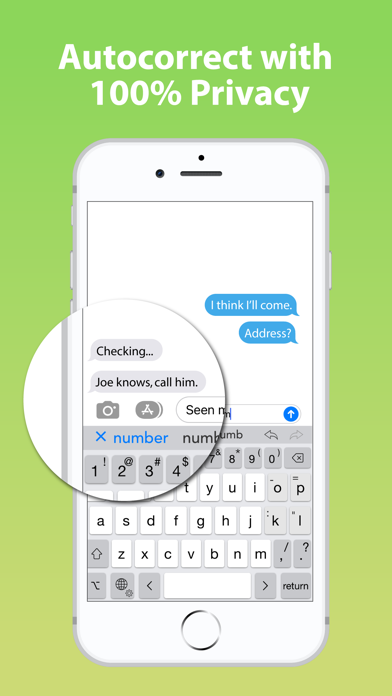
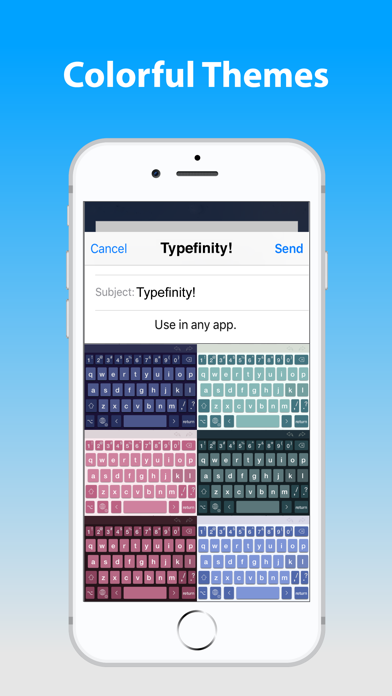
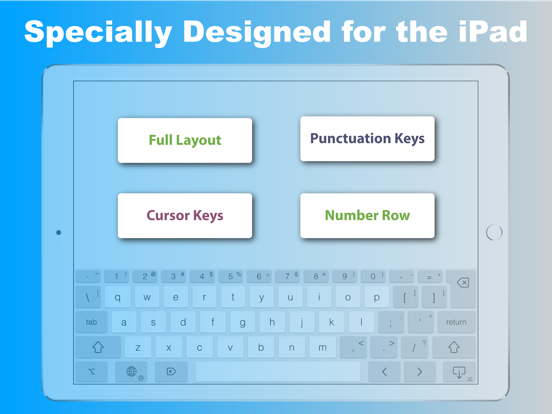
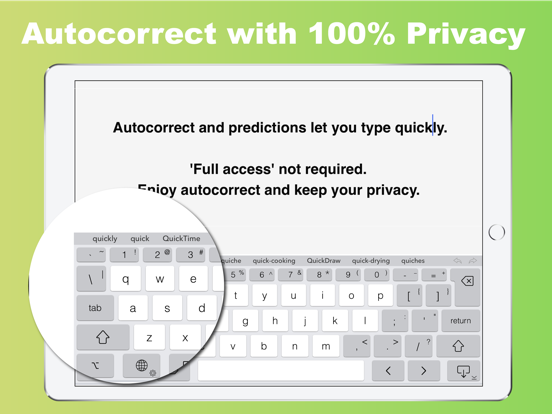
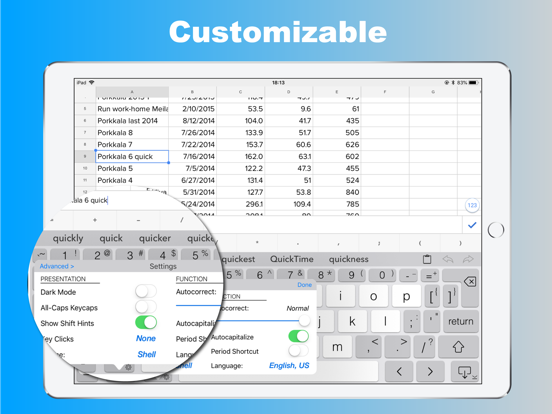
Tippen ohne Grenzen auf iPad und iPhone! Wenn es um Tastaturen auf dem Bildschirm geht, dann IST größer anders, und Typefinity ist dafür gemacht, den Vorteil der großen Bildschirmgröße von Tablets und modernen Telefonen zu nutzen. Bleibe im Fluss, wenn es Zeit ist, eine Nummer oder ein Symbol zu tippen oder du dich umher bewegen musst, denn die notwendigen Tasten sind direkt im Hauptlayout. Und wir nutzen die volle Breite, nicht nur die Mitte, um Wortvorschläge anzuzeigen. Ergonomie blieb auch nicht auf der Strecke. Die Haupttasten sind groß genug, um schnell zu tippen, und die Autokorrektur ist fein darauf abgestimmt, häufige Fehler beim Tippen zu erkennen. Du wirst sehen, Typefinity zu nutzen ist fast wie eine komplette Bluetooth-Tastatur zu nutzen, nur ohne das Gewicht und die Größe! So funktioniert es: - Schritt 1: Installiere Typefinity und öffne die App. - Schritt 2: Öffne in Einstellungen Allgemein, Tastatur, Tastaturen und füge Typefinity hinzu. - Schritt 3: Tippe in jeder App auf die Globus-Taste, um zu Typefinity zu wechseln. - Schritt 4: Tippe schnell mit großen Tasten, und Zahlen, Satzzeichen und Symbole immer im Blick. - Schritt 5: Wische mit dem Finger, um Wörter nachzuzeichnen, und nutze die Cursor-Tasten, um dich nach Buchstabe oder Wort zu bewegen. Das bekommst du: - Zahlen und Satzzeichen in einem Layout, an das sich deine Finger erinnern. - Cursor-Tasten für einfache, präzise Bewegung nach Buchstabe oder Wort. - Spezielle Tasten für die Akzentbuchstaben deiner Sprache. - Eine Options-Taste zum Tippen weiterer Symbole und Akzentbuchstaben. - Vollständige Autokorrektur in allen unterstützten Sprachen, die mehr als drei Wörter anzeigt. - ""Kurzes"" Layout für mehr Bildschirmsichtbarkeit im Querformat. - Wischeingabe (zeichne Wörter mit dem Finger nach) und wische auf Zahlen- und Satzzeichentasten nach oben für die alternativen Versionen. - Numerischer und Taschenrechner-Modus. - Mehrsprachige Unterstützung: Englisch, Tschechisch, Dänisch, Niederländisch, Finnisch, Französisch, Deutsch, Italienisch, Norwegisch, Polnisch, Portugiesisch, Rumänisch, Spanisch und Schwedisch. Hol dir den vollen Zugang zu Typefinity: - Genieße viele Designs, Dunkelmodus und Transparenzoptionen. - Nutze premium anpassbare Tastentöne und Feedback. - Erhalte die Feinabstimmung von Autokorrektur und Satzzeichen. Abonniere den Zugang zu den Premium-Funktionen der App; Abo-Details: - Die Zahlung wird bei Bestätigung des Kaufs von deinem Apple-Account abgebucht. - Das Abo verlängert sich automatisch, sofern die automatische Verlängerung nicht mindestens 24 Stunden vor Ende des aktuellen Zeitraums deaktiviert wird. - Die Verlängerung wird dem Account innerhalb von 24 Stunden vor Ende des aktuellen Zeitraums berechnet. - Abos können vom Nutzer verwaltet und die automatische Verlängerung nach dem Kauf in den Account-Einstellungen deaktiviert werden. - Verfügbare Pläne: wöchentlich oder jährlich. Nutzungsbedingungen: https://magic-cake-e95.notion.site/iOS-Typefinity-Terms-Conditions-38ecf6557a0880958cf9e0fb058d8b34?source=copy_link Datenschutzrichtlinie: https://magic-cake-e95.notion.site/iOS-Typefinity-Privacy-Policy-38ecf6557a08808bbba2c4f7128f1a22?source=copy_link Bei Fragen schreib uns an aitoolssrl@gmail.com

See this store page in another country

Prices, ranks and reviews are per country. Revenue above is already worldwide.