★★★★★Oct 16, 2026
Once it stops working is garbageAfter a few years of use it will stop working and there’s no way of repairing it.

Estimated from the grossing charts of Oct 21, 2026 in the 53 countries we track, and ratings growth on the App Store.
From our daily snapshots of every grossing chart.
| Sep 24, 2026 | not in a grossing chart |
| Sep 25, 2026 | not in a grossing chart |
| Sep 26, 2026 | not in a grossing chart |
| Sep 27, 2026 | not in a grossing chart |
| Sep 28, 2026 | not in a grossing chart |
| Sep 29, 2026 | not in a grossing chart |
| Sep 30, 2026 | not in a grossing chart |
| Oct 1, 2026 | not in a grossing chart |
| Oct 2, 2026 | not in a grossing chart |
| Oct 3, 2026 | not in a grossing chart |
| Oct 4, 2026 | not in a grossing chart |
| Oct 5, 2026 | not in a grossing chart |
| Oct 6, 2026 | not in a grossing chart |
| Oct 7, 2026 | not in a grossing chart |
| Oct 8, 2026 | not in a grossing chart |
| Oct 9, 2026 | not in a grossing chart |
| Oct 10, 2026 | not in a grossing chart |
| Oct 11, 2026 | not in a grossing chart |
| Oct 12, 2026 | not in a grossing chart |
| Oct 13, 2026 | not in a grossing chart |
| Oct 14, 2026 | not in a grossing chart |
| Oct 15, 2026 | not in a grossing chart |
| Oct 16, 2026 | not in a grossing chart |
| Oct 17, 2026 | not in a grossing chart |
| Oct 18, 2026 | not in a grossing chart |
| Oct 19, 2026 | not in a grossing chart |
| Oct 20, 2026 | not in a grossing chart |
| Oct 21, 2026 | not in a grossing chart |
| Oct 22, 2026 | not in a grossing chart |
Measured from the store, not estimated.
From the latest 331 reviews on the United States App Store, Mar 23, 2020 to Oct 16, 2026: 81% are 1 or 2 stars. Open a theme to read what people wrote.
97 of the 1 and 2 star reviews.
★★★★★ The keyboard is not working it says it is up to date.
★★★★★ Awful software with bugs all over the place.
★★★★★ The Master 4 is extremely glitchy and slow on the iPadOS and no its not just bluetooth badness, it's using Bluetooth 6.0.
96 of the 1 and 2 star reviews.
★★★★★ My combo touch stopped working and I suspect that it's a compatibility issue with updated iPadOS but cannot update the firmware with the app and there's no other way to update the firmware.
★★★★★ Since the most recent iOS update my keyboard no longer connects.
★★★★★ Combo touch won't connect to iPad and this app will not connect to combo touch to update firmware.
66 of the 1 and 2 star reviews.
★★★★★ The screen freezes all the time and to fix I have to disconnect the keyboard.
★★★★★ Crashed while updating firmware on Logitech Combo Touch, now trackpad no longer works.
★★★★★ I am stuck on firmware 00.01.
38 of the 1 and 2 star reviews.
★★★★★ Connected MX Master 3S with bolt usb receiver but app doesn't recognize, can't map extra buttons.
★★★★★ But fast app deletion in this case because this app is only for keyboard support and seems really weak.
★★★★★ Hopefully Logitech steps up their support outside of cool features and gets multi-device support rolling.
30 of the 1 and 2 star reviews.
★★★★★ Got the Pebble 2 M350s to go with my ComboTouch and the app won't connect to the Pebble. Frustrating when the box says to connect to the app for additional features and the app says it's not supported. False…
★★★★★ The app doesn't recognize it, and now the keyboard is basically rendered useless.
★★★★★ App doesn't connect to Slim Folio Pro at all! Tried several times, uninstall/reinstall, iPad restart, forget device and complete new connection….NOTHING! Total waste of time!
15 of the 1 and 2 star reviews.
★★★★★ It didn't work when I opened the app my keyboard wouldn't connect to the app I tried disconnecting it and reconnecting it so it would connect to the app but it's didn't work and I'm really mad because my mom paid a lot…
★★★★★ Don't waste your money on the combo touch keyboard.
★★★★★ Very disappointing for the price of this item.
11 of the 1 and 2 star reviews.
★★★★★ And now there is no way to do a firmware update with this restyled app.
★★★★★ My trackpad no longer works and I have no way to fix it.
★★★★★ Without the app working, there is no way to adjust the mouse or use the scroll wheel.
10 of the 1 and 2 star reviews.
★★★★★ I lost all my shortcut functions and backlight functions on my logitech combo touch when I updated to iPad 26 update.
★★★★★ I can't get it to sync with my iPad Pro.
★★★★★ I deleted the app and tried it again and it still isn't working.
6 of the 4 and 5 star reviews.
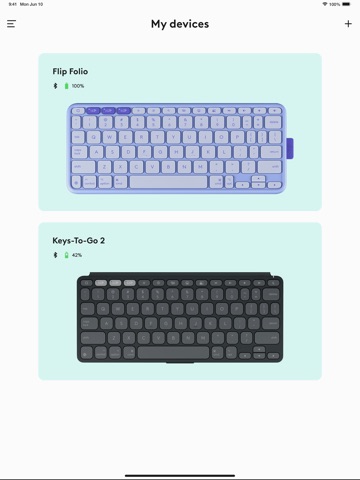
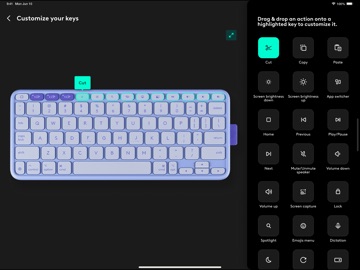
★★★★★ The app works great to customize the buttons on my flip folio.
★★★★★ Works well with iPad 9th gen combo touch
★★★★★ The keyboard is high quality, and I'm glad that they are supporting the product with updates!
4 of the 4 and 5 star reviews.
★★★★★ This keyboard is the best and it is simple to use on iPads, this app may just be something to firmware update the keyboard.
★★★★★ Not wait upmost two months to make a simple fix.
★★★★★ Seems to do exactly what it is suppose to do; check for firmware updates and offers to install them. Will alert you to new updates if you give it permission.
3 of the 4 and 5 star reviews.
★★★★★ It has such amazing features as in, light up keyboard, smooth keys and etc.
★★★★★ Maybe there is a setting that I have missed (I sure hope this is the case!), but I wish there were a setting that would allow me to choose if I could increase how fast text is deleted when using the backspace.
★★★★★ Such a fluid trackpad, great size and very smooth.
2 of the 4 and 5 star reviews.
★★★★★ It is easy to get your iPad out of the case if you need to clean your iPad or don't need the case at all.
★★★★★ In all honesty, I love this case/keyboard and I am very happy with the design and versatility of the case.
Found by matching words and phrases in the reviews, not read by a person. A review can count toward more than one theme.
Latest reviews, United States App Store.
After a few years of use it will stop working and there’s no way of repairing it.
There’s only a few types of devices supported in the app. Pop Keys is popular but not supported.
I purchased the Logi Pop mouse which had instructions on the packaging to download this app to customize buttons on the mouse. I downloaded the app only to discover it has options for keyboards only. I am unable to customize my mouse, leaving me to use it as a standard mouse only.
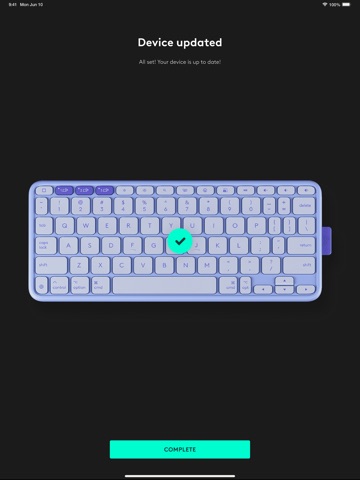
The keyboard is not working it says it is up to date. Does not gives anything helpful
Connected MX Master 3S with bolt usb receiver but app doesn’t recognize, can’t map extra buttons.
Installed expecting to control my LT mouse like I can on MacOS. Maybe Apple doesn’t allow customization for additional mouse button keys. Dunno. But fast app deletion in this case because this app is only for keyboard support and seems really weak. I want to use mute/video off / back button / change desktops with my LT mouse on iPad like I can on desktop.

Apple Search Ads this app ran in the last 90 days, from Apple's public ad repository.
Where this app is buying and earning its users. Each link opens pre filtered.
Most repeated terms in the listing. Highlighted ones also appear in the title.
Released Mar 18, 2020. Current version shipped Oct 21, 2026.
Prices, ranks and reviews are per country. Revenue above is already worldwide.