← Back to charts
Focus - Active app and clock icon
APP STORE

Focus - Active app and clock

Eerko Vissering · Utilities · United States store
NOT IN TOP 100 HERE
View on App Store ↗ Instagram card
Revenue a month, worldwide
Too small to estimate
Not enough chart or ratings data
New ratings
Tracking
Daily counts start building from today
Rating
0.0 of 5
0 ratings in this store
Countries it ranks in
0
was 0 on Oct 20, 2026

Revenue

Estimated from the grossing charts of Oct 26, 2026 in the 53 countries we track, and ratings growth on the App Store.

EST. REVENUE / MONTH · WORLDWIDE
Unranked
Not in any grossing chart, and it sells nothing in the store (no in-app purchases, free download). Any revenue comes from ads or payments outside the store, which we can't see.
EST. LIFETIME DOWNLOADS
n/a
Estimated from ratings count
RATINGS
0
AVG RATING
n/a
PRICE
Free
AGE
7.0y
LAST UPDATE
789d ago
VERSION
2.9.5
SIZE
1 MB
AGE RATING
4+

Last 30 days

From our daily snapshots of every grossing chart.

DAYS IN A GROSSING CHART
0 / 30
COUNTRIES NOW
0 (was 0)
EST. REVENUE FROM CHARTS, DAILY · APP STORE ONLY EST
Show daily values
Sep 28, 2026not in a grossing chart
Sep 29, 2026not in a grossing chart
Sep 30, 2026not in a grossing chart
Oct 1, 2026not in a grossing chart
Oct 2, 2026not in a grossing chart
Oct 3, 2026not in a grossing chart
Oct 4, 2026not in a grossing chart
Oct 5, 2026not in a grossing chart
Oct 6, 2026not in a grossing chart
Oct 7, 2026not in a grossing chart
Oct 8, 2026not in a grossing chart
Oct 9, 2026not in a grossing chart
Oct 10, 2026not in a grossing chart
Oct 11, 2026not in a grossing chart
Oct 12, 2026not in a grossing chart
Oct 13, 2026not in a grossing chart
Oct 14, 2026not in a grossing chart
Oct 15, 2026not in a grossing chart
Oct 16, 2026not in a grossing chart
Oct 17, 2026not in a grossing chart
Oct 18, 2026not in a grossing chart
Oct 19, 2026not in a grossing chart
Oct 20, 2026not in a grossing chart
Oct 21, 2026not in a grossing chart
Oct 22, 2026not in a grossing chart
Oct 23, 2026not in a grossing chart
Oct 24, 2026not in a grossing chart
Oct 25, 2026not in a grossing chart
Oct 26, 2026not in a grossing chart
Oct 27, 2026not in a grossing chart
Best rank Sep 28, 2026: not ranked. Now: not ranked. Days at zero are days outside every grossing chart.

Money and momentum

Measured from the store, not estimated.

WHAT IT CHARGES
No in-app purchases
Earns from its upfront price, ads or payments outside the store.
REVIEW MOMENTUM
Too few reviews
Fewer than 3 recent written reviews in this country.
RELEASE CADENCE
0 updates in 90 days
  • Typical gap between releases15 days
From the last 6 versions listed on the App Store.

Store screenshots

ScreenshotScreenshot

App Store ads

Apple Search Ads this app ran in the last 90 days, from Apple's public ad repository.

No App Store ads in the EU
None in the last 90 days.

Apple only publishes ads shown in the EU (EU Digital Services Act), with a 7 day delay. An app that advertises only outside the EU shows nothing here.

Growth research

Where this app is buying and earning its users. Each link opens pre filtered.

ASO keywords

Most repeated terms in the listing. Highlighted ones also appear in the title.

focus7icon6application5quit4window4frontmost application3preferences window3click big3big icon3icon quit3couple3dock3see3screen3preferences3frontmost2command2closed2look2menu2active2doesn2click2big2

What's new in 2.9.5

Fixed adding apps to the list of exclusions.

Released Oct 18, 2019. Current version shipped Aug 29, 2024.

Store description

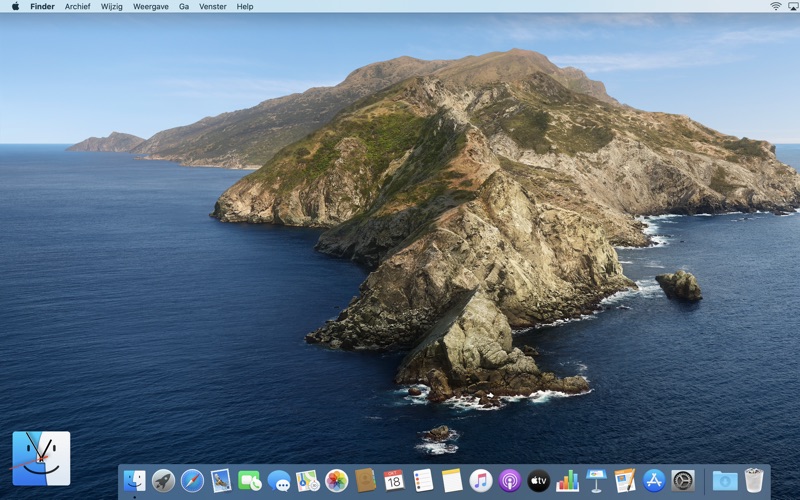
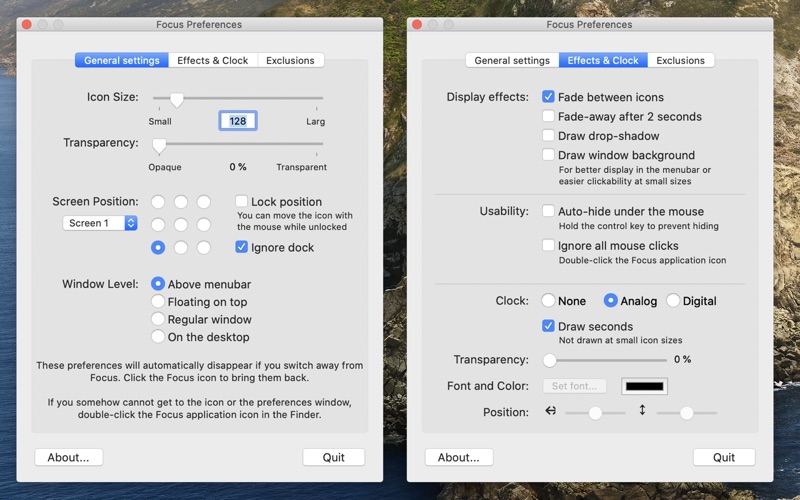
Did you ever wonder what your frontmost application is? You've just quit a couple, switched a couple of times with command-tab, and closed a window and now you're not completely sure if its application was closed as well. You take a look at the Dock, but nothing gives away the frontmost application. You see a couple of them are running, but which one will quit if your itching fingers hit command-Q? You can always look at the menu, of course, but wouldn't it be easier to see an icon instead of only text? What Focus does, is show you the active application's icon. Because its function is that simple, I've thrown in the usual junk of customizability: size, transparency, position on screen and window layering can all be adjusted to your needs. You can have a small icon in the bottom-left of your screen telling you which application is active, or a giant transparent icon on your desktop to make your work environment somewhat more, eh, dynamic. Focus is ideal to put in your Login items in your System preferences. Focus doesn't appear in the dock, and stays clear of it if you change resolutions or move the dock. Apart from nine standard screen positions you can drag Focus anywhere to be just there where you see it but doesn't get in the way. Focus has its own preferences window which is shown as soon as you click on its big icon. You can quit Focus from its contextual menu (control-click on the big icon), or by using the quit button in the preferences window. Did you set Focus to auto-hide under the mouse? Hold control to prevent it from hiding temporarily.

See this store page in another country

Prices, ranks and reviews are per country. Revenue above is already worldwide.

More from Eerko Vissering

Board Game Stats
Lifestyle
457 ratingsAnalyze →
Deep Print Games
Lifestyle
0 ratingsAnalyze →
Watergate: The Board Game
Games
5 ratingsAnalyze →
Suzan's Budgets
Finance
1 ratingsAnalyze →
Applejack Score sheet
Lifestyle
0 ratingsAnalyze →