← Back to charts
Video Saver Offline - Clicha icon
APP STORE

Video Saver Offline - Clicha

Yuichi Matsuoka · Photo & Video · Brazil store
NOT IN TOP 100 HERE
View on App Store ↗ Instagram card
Revenue a month, worldwide
Too small to estimate
Not enough chart or ratings data
New ratings
Tracking
Daily counts start building from today
Rating
0.0 of 5
0 ratings in this store
Countries it ranks in
0
was 0 on Oct 19, 2026

Revenue

Estimated from the grossing charts of Oct 25, 2026 in the 53 countries we track, and ratings growth on the App Store.

EST. REVENUE / MONTH · WORLDWIDE
Unranked
Not in any grossing chart, and it sells nothing in the store (no in-app purchases, free download). Any revenue comes from ads or payments outside the store, which we can't see.
EST. LIFETIME DOWNLOADS
n/a
Estimated from ratings count
RATINGS
0
AVG RATING
n/a
PRICE
Grátis
AGE
6.9y
LAST UPDATE
45d ago
VERSION
2.1.7
SIZE
119 MB
AGE RATING
+4

Last 30 days

From our daily snapshots of every grossing chart.

DAYS IN A GROSSING CHART
0 / 30
COUNTRIES NOW
0 (was 0)
EST. REVENUE FROM CHARTS, DAILY · APP STORE ONLY EST
Show daily values
Sep 27, 2026not in a grossing chart
Sep 28, 2026not in a grossing chart
Sep 29, 2026not in a grossing chart
Sep 30, 2026not in a grossing chart
Oct 1, 2026not in a grossing chart
Oct 2, 2026not in a grossing chart
Oct 3, 2026not in a grossing chart
Oct 4, 2026not in a grossing chart
Oct 5, 2026not in a grossing chart
Oct 6, 2026not in a grossing chart
Oct 7, 2026not in a grossing chart
Oct 8, 2026not in a grossing chart
Oct 9, 2026not in a grossing chart
Oct 10, 2026not in a grossing chart
Oct 11, 2026not in a grossing chart
Oct 12, 2026not in a grossing chart
Oct 13, 2026not in a grossing chart
Oct 14, 2026not in a grossing chart
Oct 15, 2026not in a grossing chart
Oct 16, 2026not in a grossing chart
Oct 17, 2026not in a grossing chart
Oct 18, 2026not in a grossing chart
Oct 19, 2026not in a grossing chart
Oct 20, 2026not in a grossing chart
Oct 21, 2026not in a grossing chart
Oct 22, 2026not in a grossing chart
Oct 23, 2026not in a grossing chart
Oct 24, 2026not in a grossing chart
Oct 25, 2026not in a grossing chart
Oct 26, 2026not in a grossing chart
Best rank Sep 27, 2026: not ranked. Now: not ranked. Days at zero are days outside every grossing chart.

Money and momentum

Measured from the store, not estimated.

WHAT IT CHARGES
No in-app purchases
Earns from its upfront price, ads or payments outside the store.
REVIEW MOMENTUM
1.6 reviews / week
  • Trendrising
  • Recent reviews average2.3 stars
  • Recent 1 and 2 star share61%
From the latest 452 written reviews, covering 1988 days.
RELEASE CADENCE
3 updates in 90 days
  • Typical gap between releases2 days
From the last 25 versions listed on the App Store.

What users want

From the latest 452 reviews on the Brazil App Store, May 17, 2021 to Oct 24, 2026: 61% are 1 or 2 stars. Open a theme to read what people wrote.

WHAT THEY COMPLAIN ABOUT · SHARE OF BAD REVIEWS
Bugs, things not working2%

5 of the 1 and 2 star reviews.

★★★★★ [YTKit] Download failed: Access forbidden 403というエラーで保存できないが広告は見せられる
★★★★★ エラー (403) [YTKit] Download failed: Access forbidden
★★★★★ 動画を保存しようとしたら 広告は、表示されるのに Server errorで、 保存できません 改善をお願いします
WHAT THEY ASK FOR

No feature requests in the latest reviews.

WORDS THAT KEEP COMING UP IN BAD REVIEWS

Nothing stands out.

WHAT THEY LOVE · SHARE OF GOOD REVIEWS

Not enough good reviews in English to tell.

Found by matching words and phrases in the reviews, not read by a person. A review can count toward more than one theme.

What users say

Latest reviews, Brazil App Store.

★★★★★Oct 24, 2026
虚構の時間をなんとかしてくれ

ダウンロードで広告出るのは100歩譲っていいとして、ダウンロードした動画が2倍尺になってその半分が音も何もない虚構が流れるのが意味がわからない。わざわざ動画をカットするのにも広告を流してくる。はっきり言って悪質です。改善してください。

★★★★★Oct 24, 2026
慣れれば便利

少しCMが多すぎるのが難点だが無料だから仕方ないかな

★★★★★Oct 24, 2026
動画が保存できなくなった

何故か日本語で保存できなくなった。再生すると英語で喋ってる。

★★★★★Oct 23, 2026
どうして? 緊急事態

いつも愛用させていただいております。 曲が最近、画面をオフにして聞くことができません。 修正のほどよろしくお願いいたします。

★★★★★Oct 22, 2026
うーん…

ダウンロードすると2倍の時間保存され、途中無音状態が続くことになる…。使い始めよかったのに残念。

★★★★★Oct 20, 2026
機内モードでアプリは開ける

それだけがいい点かもファイルに入れてジャンルごとに分けようとすると他のファイルに入れてた曲がなくなってしまうので二つ以上別のフォルダに一つの曲を入れようとするとまた長い広告を見てダウンロードしないといけない。 最近はもっと酷くてわざと曲の最後に空白の時間を作って編集で空白の時間を消そうとするとまた広告を見ないといけないそれなら最初から広告2つにされる方が断然マシ あまりにも酷いのでアンインストール検討中

Store screenshots

ScreenshotScreenshotScreenshotScreenshotScreenshotScreenshotScreenshotScreenshotScreenshotScreenshot

App Store ads

Apple Search Ads this app ran in the last 90 days, from Apple's public ad repository.

No App Store ads in the EU
None in the last 90 days.

Apple only publishes ads shown in the EU (EU Digital Services Act), with a 7 day delay. An app that advertises only outside the EU shows nothing here.

Growth research

Where this app is buying and earning its users. Each link opens pre filtered.

ASO keywords

Most repeated terms in the listing. Highlighted ones also appear in the title.

videos15watch11save8video7pip7playback7sleep timer6lock screen6background6control6lock6screen6timer5speed control5watch offline5reorder drag5drag drop5icloud drive5floating window5offline4clicha4sleep4speed4without4

What's new in 2.1.7

This update includes minor bug fixes along with performance and stability improvements.

Released Dec 5, 2019. Current version shipped Sep 11, 2026.

Store description

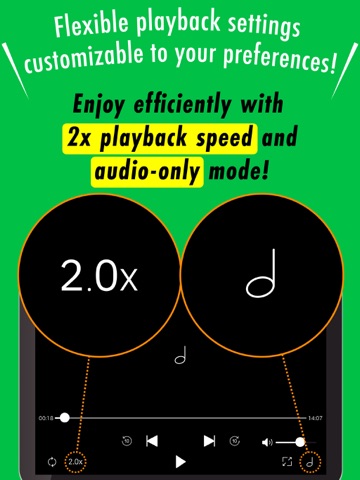
Save videos on Wi-Fi and enjoy them offline — anytime, anywhere. Clicha is the trusted video saver with 1M+ downloads, 45,000+ reviews and 4.4 stars. Background play, PiP, sleep timer, speed control, and more — all in one app. ◆ Save Once, Watch Anytime ◆ Download videos while on Wi-Fi at home, at a café, or at the office. Once saved, watch offline on the train, on a flight, or wherever you go — no internet needed. ◆ Features ◆ • Save videos and watch offline without internet • Play video and audio in the background • Auto-Play with controls from Control Center or Lock Screen • Organize with folders and playlists • Sort and reorder with drag-and-drop • Repeat, shuffle, speed control (0.5x–2.0x) • Import from Photos, iCloud Drive, Files, or other apps • Record from the built-in camera • Protect videos with passcode lock • Sleep timer — playback stops automatically • PiP — watch in a floating window while multitasking • Background playback on iPad when PiP is off • Play from Apple Watch • Home screen widgets for quick access • Stream to TV with AirPlay • Back up to iCloud Drive ◆ Background Play ◆ Keep listening after you lock your screen or switch apps. Control playback from Lock Screen or Control Center — skip, pause, adjust volume. Perfect for lectures, podcasts, or music videos. ◆ Picture-in-Picture (PiP) ◆ Shrink the video into a floating window and keep watching while you browse, message, or take notes. Resize or reposition freely. Great for tutorials and cooking videos. ◆ Sleep Timer ◆ Set a timer and let playback stop on its own. Great for falling asleep to ASMR, ambient sounds, or music without draining your battery. ◆ Speed Control ◆ Watch at 0.5x for detailed tutorials or 2.0x to get through lectures faster. Match playback speed to your pace. ◆ Folders & Playlists ◆ Create folders by topic — recipes, workouts, study material, entertainment. Build playlists for continuous playback. Reorder with drag-and-drop. ◆ Recommended for ◆ • Commuters — save on Wi-Fi, watch offline on the train or bus • Students — download lectures for review anytime • Travelers — load videos before a flight, watch without Wi-Fi • Fitness fans — follow workout videos without buffering • Parents — keep videos ready for car rides and waiting rooms • Music lovers — listen to music videos in the background • Night owls — drift off with the sleep timer • Anyone who wants to save mobile data ◆ FAQ ◆ Q: Is Clicha free? A: Yes. Save and watch for free. Premium unlocks unlimited saves, no ads, PiP, and audio conversion. Q: How do I save a video? A: Open the built-in browser, find the video, and tap save. Q: Can I play in the background? A: Yes. Lock your screen or switch apps — audio keeps playing. Q: What is PiP? A: A floating window that lets you watch while using other apps. Available with Premium. Q: Can I organize videos? A: Yes. Create folders, build playlists, reorder with drag-and-drop. Q: Does it work on Apple Watch? A: Yes. Browse and play saved videos from your wrist. Q: Is my data safe? A: Videos are stored locally. Back up to iCloud Drive. Passcode lock keeps your library private. ◆ How to Organize Videos ◆ 1. Tap "Edit" on the Library screen 2. Select one or more videos 3. Tap "Move to Folder" 4. Create or choose a folder 5. Confirm and finish 6. Open the Folder tab to browse 7. Tap a video to start playback ◆ Premium Subscription ◆ • Unlimited video saving • No ads • Picture-in-Picture (PiP) • Audio conversion • New features added regularly Payment will be charged to your Apple account at confirmation. Subscription renews automatically unless turned off at least 24 hours before the renewal date. Manage your subscription in Settings > Apple ID > Subscriptions. We appreciate your feedback and reviews. Terms of Use https://sites.google.com/view/clicha/terms-of-use Privacy Policy https://sites.google.com/view/clicha/privacy-policy

See this store page in another country

Prices, ranks and reviews are per country. Revenue above is already worldwide.

More from Yuichi Matsuoka

Texter: Audio & Video to Text
Business
5 ratingsAnalyze →
MedTexter
Productivity
0 ratingsAnalyze →