← Back to charts
ZipRar7 - Unzip the file icon
APP STORE

ZipRar7 - Unzip the file

kim juyoung · Utilities · Germany store
NOT IN TOP 100 HERE
View on App Store ↗ Instagram card
Revenue a month, worldwide
Too small to estimate
Not enough chart or ratings data
New ratings
Tracking
Daily counts start building from today
Rating
0.0 of 5
0 ratings in this store
Countries it ranks in
0
was 0 on Oct 20, 2026

Revenue

Estimated from the grossing charts of Oct 26, 2026 in the 53 countries we track, and ratings growth on the App Store.

EST. REVENUE / MONTH · WORLDWIDE
Unranked
Not in any grossing chart, and it sells nothing in the store (no in-app purchases, free download). Any revenue comes from ads or payments outside the store, which we can't see.
EST. LIFETIME DOWNLOADS
n/a
Estimated from ratings count
RATINGS
0
AVG RATING
n/a
PRICE
Gratis
AGE
7.5y
LAST UPDATE
238d ago
VERSION
1.28
SIZE
71 MB
AGE RATING
4+

Last 30 days

From our daily snapshots of every grossing chart.

DAYS IN A GROSSING CHART
0 / 30
COUNTRIES NOW
0 (was 0)
EST. REVENUE FROM CHARTS, DAILY · APP STORE ONLY EST
Show daily values
Sep 28, 2026not in a grossing chart
Sep 29, 2026not in a grossing chart
Sep 30, 2026not in a grossing chart
Oct 1, 2026not in a grossing chart
Oct 2, 2026not in a grossing chart
Oct 3, 2026not in a grossing chart
Oct 4, 2026not in a grossing chart
Oct 5, 2026not in a grossing chart
Oct 6, 2026not in a grossing chart
Oct 7, 2026not in a grossing chart
Oct 8, 2026not in a grossing chart
Oct 9, 2026not in a grossing chart
Oct 10, 2026not in a grossing chart
Oct 11, 2026not in a grossing chart
Oct 12, 2026not in a grossing chart
Oct 13, 2026not in a grossing chart
Oct 14, 2026not in a grossing chart
Oct 15, 2026not in a grossing chart
Oct 16, 2026not in a grossing chart
Oct 17, 2026not in a grossing chart
Oct 18, 2026not in a grossing chart
Oct 19, 2026not in a grossing chart
Oct 20, 2026not in a grossing chart
Oct 21, 2026not in a grossing chart
Oct 22, 2026not in a grossing chart
Oct 23, 2026not in a grossing chart
Oct 24, 2026not in a grossing chart
Oct 25, 2026not in a grossing chart
Oct 26, 2026not in a grossing chart
Oct 27, 2026not in a grossing chart
Best rank Sep 28, 2026: not ranked. Now: not ranked. Days at zero are days outside every grossing chart.

Money and momentum

Measured from the store, not estimated.

WHAT IT CHARGES
No in-app purchases
Earns from its upfront price, ads or payments outside the store.
REVIEW MOMENTUM
Too few reviews
Fewer than 3 recent written reviews in this country.
RELEASE CADENCE
0 updates in 90 days
  • Typical gap between releases26 days
From the last 25 versions listed on the App Store.

Store screenshots

ScreenshotScreenshotScreenshot

App Store ads

Apple Search Ads this app ran in the last 90 days, from Apple's public ad repository.

No App Store ads in the EU
None in the last 90 days.

Apple only publishes ads shown in the EU (EU Digital Services Act), with a 7 day delay. An app that advertises only outside the EU shows nothing here.

Growth research

Where this app is buying and earning its users. Each link opens pre filtered.

ASO keywords

Most repeated terms in the listing. Highlighted ones also appear in the title.

files10file7compression4upload4import4through4file compression3upload support3support ios133import files3through installed3connect wifi3web browser3zip3support3folder3click3simply2features2ios132dropbox2documents2cloud2drive2

What's new in 1.28

- Fixed reported crashes and bugs.

Released May 17, 2019. Current version shipped Mar 2, 2026.

Store description

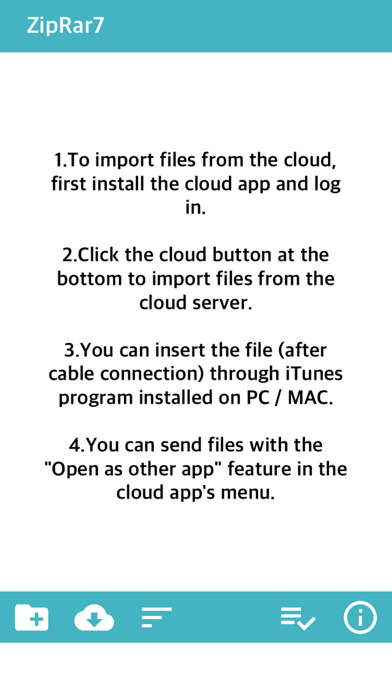
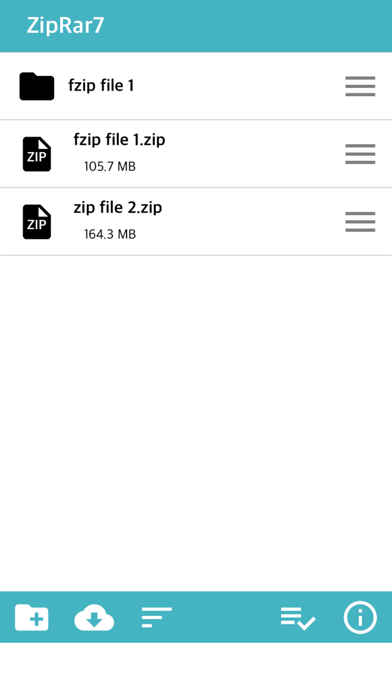
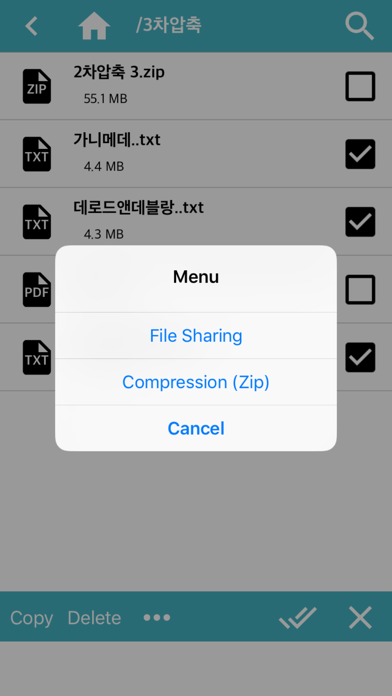
Simply unzip the archive. Zip, Rar, 7z files can be unlocked Support file compression (Zip) * New features (2020.5 ~) * 1. FTP, WebDav, SMB download / upload support (+ iOS13) 2. OneDrive, DropBox direct login and download / upload support (+ iOS13) 3. External documents: You can browse and import files stored in other apps.   * Insert file (iPhone / iPad) * 1. Install the cloud app and log in to import files from the cloud service. (iCloud, Google Drive, One Drive, Mega, Box, Dropbox) 2. Upload files through iTunes installed on PC (Finder for Mac) 3. Connect PC and iPhone to the same WIFI and upload via web browser 4. Import or take photos and videos from photos and save them as files 5. Save the copied text to the clipboard as a txt file * Send file (PC / other apps) * 1. After connecting the iPhone to the PC by cable, you can import the folder through the installed iTunes. (Alternatively, only files) 2. Transfer files to another app through file sharing 3. Connect PC and iPhone to the same WIFI and download through web browser * Compression * 1. Folder compression: Click the menu button on the right side of the folder-click the “Zip” item 2. File Compression: After selecting multiple files, click the “Compress” button at the bottom. * Additional Features * 1. App lock function (Password must be set on the device) 2. Some documents / videos / audio files can be opened simply. 3. If the iPhone's capacity is insufficient, the “Erase All Files” function is supported in Settings. 4. When decompressing, some file names may not be displayed properly due to language encoding problems.

See this store page in another country

Prices, ranks and reviews are per country. Revenue above is already worldwide.

More from kim juyoung

Manga Viewer - CBZ(CBR) Reader
Book
37 ratingsAnalyze →
Text Viewer - txt file viewer
Book
6 ratingsAnalyze →
Offle - MP3 & MP4 Repeat Play
Education
4 ratingsAnalyze →
Txt2PDF - TXT File to PDF
Utilities
0 ratingsAnalyze →
Hangul Study - Basic Korean
Education
0 ratingsAnalyze →
WebToon Reader - WebComic File
Book
6 ratingsAnalyze →
WatchMPlay - Mp3 Music Player
Music
0 ratingsAnalyze →
Photo2PDF - Zip, Photo to PDF
Utilities
0 ratingsAnalyze →
LinkYPlayer - Link Player
Music
0 ratingsAnalyze →