← Back to charts
Core Data Lab icon
APP STORE

Core Data Lab

Ron Elemans · Developer Tools · United States store
NOT IN TOP 100 HERE
View on App Store ↗ Instagram card
Revenue a month, worldwide
Too small to estimate
Not enough chart or ratings data
New ratings
Tracking
Daily counts start building from today
Rating
0.0 of 5
0 ratings in this store
Countries it ranks in
0
was 0 on Oct 20, 2026

Revenue

Estimated from the grossing charts of Oct 27, 2026 in the 53 countries we track, and ratings growth on the App Store.

EST. REVENUE / MONTH · WORLDWIDE
Unranked
Not in any grossing chart, and too few ratings (0) to read its growth. Most apps at this stage earn little or nothing.
EST. LIFETIME DOWNLOADS
n/a
Estimated from ratings count
RATINGS
0
AVG RATING
n/a
PRICE
$19.99
AGE
6.9y
LAST UPDATE
30d ago
VERSION
3.1
SIZE
10 MB
AGE RATING
4+

Last 30 days

From our daily snapshots of every grossing chart.

DAYS IN A GROSSING CHART
0 / 30
COUNTRIES NOW
0 (was 0)
EST. REVENUE FROM CHARTS, DAILY · APP STORE ONLY EST
Show daily values
Sep 28, 2026not in a grossing chart
Sep 29, 2026not in a grossing chart
Sep 30, 2026not in a grossing chart
Oct 1, 2026not in a grossing chart
Oct 2, 2026not in a grossing chart
Oct 3, 2026not in a grossing chart
Oct 4, 2026not in a grossing chart
Oct 5, 2026not in a grossing chart
Oct 6, 2026not in a grossing chart
Oct 7, 2026not in a grossing chart
Oct 8, 2026not in a grossing chart
Oct 9, 2026not in a grossing chart
Oct 10, 2026not in a grossing chart
Oct 11, 2026not in a grossing chart
Oct 12, 2026not in a grossing chart
Oct 13, 2026not in a grossing chart
Oct 14, 2026not in a grossing chart
Oct 15, 2026not in a grossing chart
Oct 16, 2026not in a grossing chart
Oct 17, 2026not in a grossing chart
Oct 18, 2026not in a grossing chart
Oct 19, 2026not in a grossing chart
Oct 20, 2026not in a grossing chart
Oct 21, 2026not in a grossing chart
Oct 22, 2026not in a grossing chart
Oct 23, 2026not in a grossing chart
Oct 24, 2026not in a grossing chart
Oct 25, 2026not in a grossing chart
Oct 26, 2026not in a grossing chart
Oct 27, 2026not in a grossing chart
Best rank Sep 28, 2026: not ranked. Now: not ranked. Days at zero are days outside every grossing chart.

Money and momentum

Measured from the store, not estimated.

WHAT IT CHARGES
No in-app purchases
Earns from its upfront price, ads or payments outside the store.
REVIEW MOMENTUM
0.1 reviews / week
  • Trendsteady
  • Recent reviews average4.7 stars
  • Recent 1 and 2 star share5%
From the latest 21 written reviews, covering 2391 days.
RELEASE CADENCE
1 update in 90 days
  • Typical gap between releases92 days
From the last 25 versions listed on the App Store.

What users want

From the latest 21 reviews on the United States App Store, Apr 10, 2020 to May 28, 2026: 5% are 1 or 2 stars. Open a theme to read what people wrote.

WHAT THEY COMPLAIN ABOUT · SHARE OF BAD REVIEWS

Only 1 of the latest 21 reviews are 1 or 2 stars, too few to find patterns. Users are mostly happy.

WHAT THEY ASK FOR

No feature requests in the latest reviews.

WORDS THAT KEEP COMING UP IN BAD REVIEWS

Nothing stands out.

WHAT THEY LOVE · SHARE OF GOOD REVIEWS
Useful, it helps32%

6 of the 4 and 5 star reviews.

★★★★★ This has been a life saver dealing with developing my application.
★★★★★ So useful when learning or debugging.
★★★★★ If you're a developer building an app with Core Data, this is THE app if you want a GUI to view your sqlite database. It's very well-made and completely indispensible for daily use.
Easy to use11%

2 of the 4 and 5 star reviews.

★★★★★ Old review: Sad that it keeps crashing on a m1 max 64gb using with a simple project running on simulator.
★★★★★ It makes it *so* easy to open up your store and inspect or edit the data.
Great support11%

2 of the 4 and 5 star reviews.

★★★★★ I got prompt and thorough support that helped me to quickly resolve the issue.
★★★★★ I've contacted support a couple times to suggest additional features, and they've always been very responsive.

Found by matching words and phrases in the reviews, not read by a person. A review can count toward more than one theme.

What users say

Latest reviews, United States App Store.

★★★★★May 28, 2026
Great App!

This is app is amazing at its job. Feels like a native Mac App and am super happy to see a refreshed logo and Liquid Glass. Inspired me to leave this review. Thanks for the update!

★★★★★May 12, 2026
The Best Gets Better

My favorite tool for viewing Core Data SQLite files just got better. The answer to my requests finally came in this latest update. Now I am able to open a window from a related record and navigate through its relationships. Awesome feature. Thank you very much!

★★★★★Feb 14, 2025
Excellent tool with outstanding support

I use this tool for the Apps that I created. I use the CSV import feature for importing translated data into simulator databases. I use the simulators to create screen shots for the App Store. I had an issue with the CSV import menu item not being enabled. I got prompt and thorough support that helped me to quickly resolve the issue.

★★★★★Nov 5, 2024
Bug

Bug can’t able/disable Show this window when Core Data Lab launches

★★★★★Jul 10, 2024
Very Valuable Tool

This has been a life saver dealing with developing my application. Out of all the tools I use, this has been the best.

★★★★★Mar 18, 2024
A must have for any Core Data or SwiftData developer

Look into any Core Data store, even for simulators, with ease. So useful when learning or debugging.
Store screenshots

ScreenshotScreenshotScreenshotScreenshotScreenshotScreenshotScreenshotScreenshotScreenshotScreenshot

App Store ads

Apple Search Ads this app ran in the last 90 days, from Apple's public ad repository.

No App Store ads in the EU
None in the last 90 days.

Apple only publishes ads shown in the EU (EU Digital Services Act), with a 7 day delay. An app that advertises only outside the EU shows nothing here.

Growth research

Where this app is buying and earning its users. Each link opens pre filtered.

ASO keywords

Most repeated terms in the listing. Highlighted ones also appear in the title.

data42core data24core15data lab10project8model8database7object model6lab6view6json6relationships5attributes5composite attributes5data object5csv json5including4easy4row4object4viewer4relationship4content4html4

What's new in 3.1

• Improved compatibility with macOS 27 Golden Gate. • Improved display of Transformable attributes. • Improved display of String arrays. • Improved matching of available Core Data Model versions with a selected database. • Removed an unnecessary warning in Project settings dialog when the app doesn’t have a version yet. • New setting: Dock icon.

Released Dec 19, 2019. Current version shipped Sep 27, 2026.

Store description

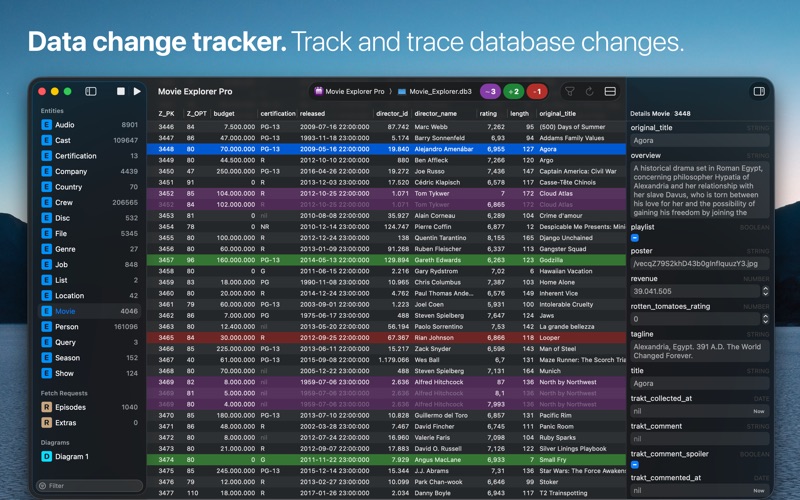
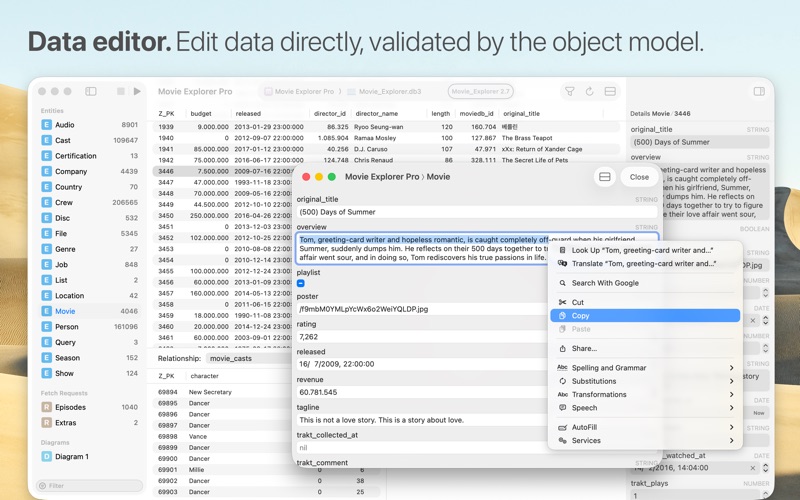
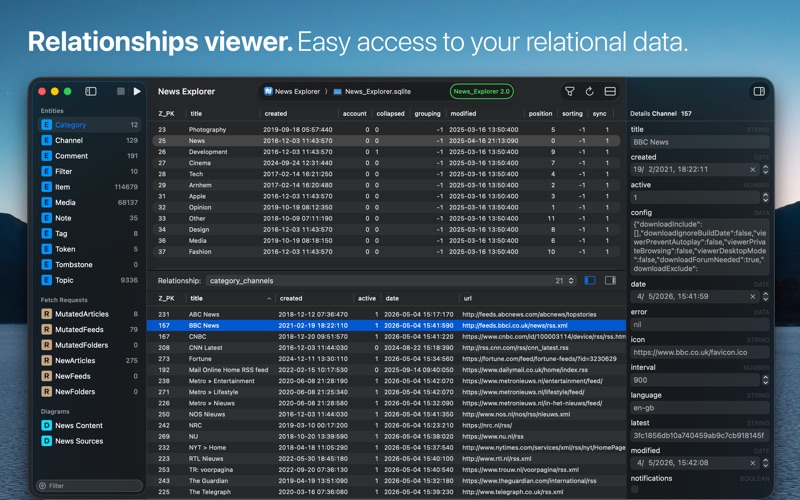
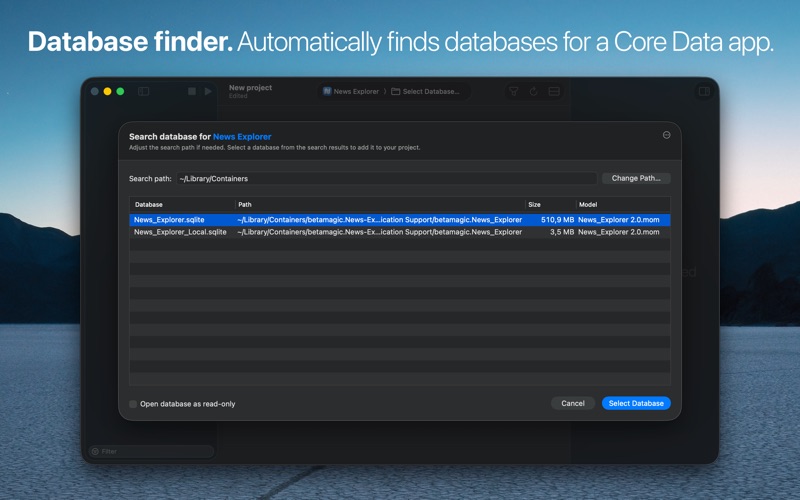
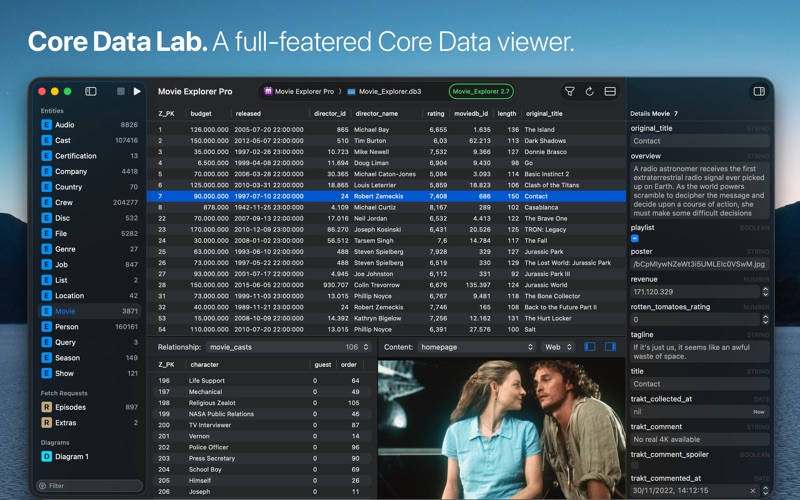
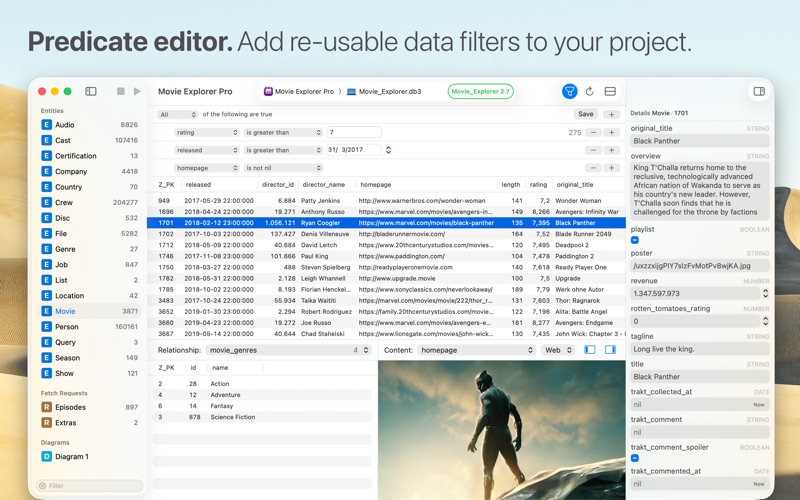
Core Data Lab lets you easily view, edit, and analyse data of SQLite-based Core Data and SwiftData apps. View, track, and explore what’s inside your Core Data database, including all Core Data-specific details like relationships, entity descriptions, fetch request templates, composite attributes, and more. Quick start • Set up a new project in a few easy steps using the project assistant. • Select an app or model file and let Core Data Lab search for a matching database. • Or select a database file and let Core Data Lab search for matching apps. • Or use the simulator browser to select a database and app combination in one go. Data change tracker • Hit the Play button on the toolbar to start tracking database changes. • New, deleted, and changed data rows are displayed with distinct colors. • Each previous row version is displayed individually, including all value changes. • No need to change your project or implement special libraries. • Works with macOS apps and apps running in an iOS, iPadOS, watchOS, tvOS or visionOS simulator. Data filter • Use the built-in easy-to-use predicate editor to filter and query your data. • Save predicates as part of a Core Data Lab project for easy access. • Duplicate predicates to make quick variants of the same filter. Data editor • Edit and create data directly in the inspector panel or detail window. • Delete rows directly in the data grid. • Change, replace, or nullify data with batch updates. • All data mutations are validated by the active Core Data Object model. Relationships viewer • View instantly all relationships and related data of a selected row. • Easily switch to another relationship. • Selecting a row in the relationship panel will show the data in the inspector panel. Simulator browser • Browse local iOS, iPadOS, watchOS, tvOS or visionOS simulators for Core Data apps and databases. • Add app and database combinations with one click to your project. Object model diagrams • Visualize your Core Data model in one or more diagrams, showing all entities, attributes, fetched properties, and relationships. • Inspired by the ‘graph style’ editor of the data model designer tool in Xcode 13 and older. • Exportable to PDF and clipboard. Content viewer • Automatic detection and display of web links, image data, HTML content, PLIST objects, binary content, and more. • Switch to Text view to inspect the HTML, XML, or JSON text content of web links. • Built-in HTML debugger. Entity description viewer • View all details of all attributes of a selected Core Data entity. • Inspect all other details like relationships, indexes, and constraints. Raw data viewer • Open and view SQLite databases without a Core Data object model. • Support for opening SQLite files in the Finder. Data import • Import data using CSV or JSON files. • JSON import supports relationship data and composite attributes. • All data import happens under validation of the active Core Data Object model. Data export • Export a selected row or table to CSV or JSON. • Export data tracking data to CSV or JSON including history data. • JSON export supports relationship data and composite attributes. • CSV data can be viewed and further processed in Excel or Numbers. Project-based • Your database, app, and model references are stored in a Core Data Lab project. • Data filters, selections, sorting settings, and diagrams are also part of the same project. • This makes it easy to stop and continue working with your data, without recreating anything. • Projects are saved as standard NSDocument files, including tabbed windows, auto-save, and more. Support If you encounter problems with this app, then please take a look at the Core Data Lab help page at https://betamagic.nl/support/coredatalab/help.html. If this doesn’t provide the solution you are looking for, or you miss some essential features, just contact us at support@betamagic.nl.

See this store page in another country

Prices, ranks and reviews are per country. Revenue above is already worldwide.

More from Ron Elemans

Movie Explorer
Reference
0 ratingsAnalyze →
News Explorer
News
640 ratingsAnalyze →
News Explorer
News
0 ratingsAnalyze →
Download Buddy
Utilities
0 ratingsAnalyze →
Movie Explorer Pro
Reference
0 ratingsAnalyze →