← Back to charts
Drafts icon
APP STORE

Drafts

Agile Tortoise · Productivity · United States store
NOT IN TOP 100 HERE
View on App Store ↗ Instagram card
Revenue a month, worldwide
Too small to estimate
Not enough chart or ratings data
New ratings
Tracking
Daily counts start building from today
Rating
0.0 of 5
0 ratings in this store
Countries it ranks in
0
was 0 on Oct 19, 2026

Revenue

Estimated from the grossing charts of Oct 26, 2026 in the 53 countries we track, and ratings growth on the App Store.

EST. REVENUE / MONTH · WORLDWIDE
Unranked
Not in any grossing chart, and too few ratings (0) to read its growth. Most apps at this stage earn little or nothing.
EST. LIFETIME DOWNLOADS
n/a
Estimated from ratings count
RATINGS
0
AVG RATING
n/a
PRICE
Free
AGE
7.6y
LAST UPDATE
4d ago
VERSION
54.1.2
SIZE
33 MB
AGE RATING
4+

Last 30 days

From our daily snapshots of every grossing chart.

DAYS IN A GROSSING CHART
0 / 30
COUNTRIES NOW
0 (was 0)
EST. REVENUE FROM CHARTS, DAILY · APP STORE ONLY EST
Show daily values
Sep 27, 2026not in a grossing chart
Sep 28, 2026not in a grossing chart
Sep 29, 2026not in a grossing chart
Sep 30, 2026not in a grossing chart
Oct 1, 2026not in a grossing chart
Oct 2, 2026not in a grossing chart
Oct 3, 2026not in a grossing chart
Oct 4, 2026not in a grossing chart
Oct 5, 2026not in a grossing chart
Oct 6, 2026not in a grossing chart
Oct 7, 2026not in a grossing chart
Oct 8, 2026not in a grossing chart
Oct 9, 2026not in a grossing chart
Oct 10, 2026not in a grossing chart
Oct 11, 2026not in a grossing chart
Oct 12, 2026not in a grossing chart
Oct 13, 2026not in a grossing chart
Oct 14, 2026not in a grossing chart
Oct 15, 2026not in a grossing chart
Oct 16, 2026not in a grossing chart
Oct 17, 2026not in a grossing chart
Oct 18, 2026not in a grossing chart
Oct 19, 2026not in a grossing chart
Oct 20, 2026not in a grossing chart
Oct 21, 2026not in a grossing chart
Oct 22, 2026not in a grossing chart
Oct 23, 2026not in a grossing chart
Oct 24, 2026not in a grossing chart
Oct 25, 2026not in a grossing chart
Oct 26, 2026not in a grossing chart
Best rank Sep 27, 2026: not ranked. Now: not ranked. Days at zero are days outside every grossing chart.

Money and momentum

Measured from the store, not estimated.

WHAT IT CHARGES
3 purchases listed
  • Drafts Pro - Monthly [m]$2.99
  • Drafts Pro - Annual [m]$24.99
  • Drafts Pro - Patron [m]$39.99
Top in-app purchases as listed on the App Store, in local prices.
REVIEW MOMENTUM
0.2 reviews / week
  • Trendfalling
  • Recent reviews average4.3 stars
  • Recent 1 and 2 star share16%
From the latest 73 written reviews, covering 2772 days.
RELEASE CADENCE
9 updates in 90 days
  • Typical gap between releases6 days
From the last 25 versions listed on the App Store.

What users want

From the latest 73 reviews on the United States App Store, Mar 26, 2019 to Sep 27, 2026: 16% are 1 or 2 stars. Open a theme to read what people wrote.

WHAT THEY COMPLAIN ABOUT · SHARE OF BAD REVIEWS
Lost data, sync, backup33%

4 of the 1 and 2 star reviews.

★★★★★ iCloud sync appears to be completely broken, despite multiple attempts to troubleshoot this issue using the instructions on the Drafts website.
★★★★★ I won't be using this, giving it a chance, I just want it gone.
★★★★★ Unfortunately, agile tortoise decided to switch to a subscription pricing model and lost me as a customer :(
Price and subscription25%

3 of the 1 and 2 star reviews.

★★★★★ As a consumer, I want to know the price up-front.
★★★★★ This sounded like a compelling tool, though their subscription model is not alright with me.
★★★★★ Unfortunately, agile tortoise decided to switch to a subscription pricing model and lost me as a customer :(
Missing features25%

3 of the 1 and 2 star reviews.

★★★★★ On the iPhone is is far too easy to accidentally erase chunks of text with absolutely no way to recover them.
★★★★★ I'd consider the $30 Patron option but there is no way to choose it.
★★★★★ Gotta love the total lack of respect for privacy the Software development industry is showing these days.
Bugs, things not working17%

2 of the 1 and 2 star reviews.

★★★★★ iCloud sync appears to be completely broken, despite multiple attempts to troubleshoot this issue using the instructions on the Drafts website.
★★★★★ If you have much medical terminology thrown in there, it will fail to recognize much of it and leave you with a big mess to edit.
Wrong or poor results17%

2 of the 1 and 2 star reviews.

★★★★★ Good concept, but it has a long way to go in terms of accuracy and ironing out bugs.
★★★★★ However, I am uncertain if the reviews were fake or misleading becuase my experience so far with the app has been a constant crashing of the app.
WHAT THEY ASK FOR
  • In Drafts, ⭐WITH THE “Draft List” OPEN ⭐, please allow us to set the WIDTH of the window to a much more NARROW amount (the current width limit is like 50% TOO WIDE; please take the current minimum, and reduce it by 50%). 4★, Sep 27, 2026
  • I would LOVE to have this feature. 5★, Jul 24, 2025
  • And, this is stepping out of the range of the app's nature, character, intentions, idk but to Cmd+V images into the document would be awesome. 5★, Jul 24, 2025
  • I'm a paralegal and student so I need apps that work for me in both areas of my life. 5★, Nov 10, 2022
  • It is a constant improvement and adaptation to changing needs and changes in all the underlying software platform. 5★, Apr 12, 2022
  • One: I wish there was a line of code or instruction that I could use to automatically trigger an event (i.e.: ##email (trigger) would automatically send the note to email) 4★, Apr 12, 2021
  • Two: I wish there was an option to "disable to dock icon from appearing 4★, Apr 12, 2021
  • You can add the other details later. 5★, Mar 29, 2021
WORDS THAT KEEP COMING UP IN BAD REVIEWS

Nothing stands out.

WHAT THEY LOVE · SHARE OF GOOD REVIEWS
Easy to use19%

11 of the 4 and 5 star reviews.

★★★★★ It's rock solid, super easy to use, and is very flexible.
★★★★★ I'm constantly wishing that I could do this or that only to discover that it's already baked in or easy to add with a bit of simple scripting.
★★★★★ Everything makes sense and is easy.
Fast17%

10 of the 4 and 5 star reviews.

★★★★★ Today I learned that ⌘⇧2 opens a Drafts quick-capture window.
★★★★★ If I need to take a quick note it is faster and easier to open the app and immediately have a blank slate to type on.
★★★★★ This is top-tier app that I use multiple times a day. Thanks for keeping the price reasonable and the amazing features coming.
Useful, it helps12%

7 of the 4 and 5 star reviews.

★★★★★ TLDR: I've turned it into a personal knowledge base for everything written. Long-form writing, journaling, D&D, organizing references and info. I use it constantly and use it across the Apple ecosystem. I've tested…
★★★★★ That type of thing is not helpful.
★★★★★ If you deal with ADHD and have fleeting thoughts you want to capture, this is the app. I use it on all my devices, macbook pro, iphone, ipad pro, and watch. When I'm working, I always have fleeting thoughts of other…
Looks great8%

5 of the 4 and 5 star reviews.

★★★★★ That's the kind of tiny, thoughtful design detail that makes an app feel loved into existence.
★★★★★ This is a gorgeous piece of software.
★★★★★ The lightweight UI is great for quick note-taking in cass.
Worth the money7%

4 of the 4 and 5 star reviews.

★★★★★ You have to do a bit of work to really learn how to take full advantage of everything, but that effort is worth it if you work with text formats much — and that is more of us than ever now.
★★★★★ This is a great value for the price.
★★★★★ You can use it for distraction free, you can customize it to exactly what you need.

Found by matching words and phrases in the reviews, not read by a person. A review can count toward more than one theme.

What users say

Latest reviews, United States App Store.

★★★★★Sep 27, 2026
‼️ DEV SEE ME ‼️

In Drafts, ⭐WITH THE “Draft List” OPEN ⭐, please allow us to set the WIDTH of the window to a much more NARROW amount (the current width limit is like 50% TOO WIDE; please take the current minimum, and reduce it by 50%). The MORE NARROW that you allow us to set the window width, the better. I love Drafts, but this limitation is killing me.

★★★★★Sep 24, 2026
One of the best apps out there

This is one of the best apps for the Mac and iPhone/iPad. I’m not kidding. It’s rock solid, super easy to use, and is very flexible.

★★★★★Aug 9, 2026
Surprisingly useful app that handles syncing on apple devices well.

TLDR: I’ve turned it into a personal knowledge base for everything written. Long-form writing, journaling, D&D, organizing references and info. I use it constantly and use it across the Apple ecosystem. I’ve tested with multiple devices open at once and it appears to synchronize reliably. My main use case is jotting down notes on the go, then opening my laptop to edit it later. I haven’t had any problems with that. Mind you, sync conflicts are possible, but you would have to push it. I don’t think it’s designed to let you edit the same document at once from multiple devices. I was skeptical about a couple things. It’s not a WYSIWYG (What You See Is What You Get) editor so I’ve been forcing myself to get in the habit of double spacing and using markdown. I use Vellum for arranging manuscripts and an easier transition between the two programs would make my life a little easier, but I’m making it work. I was worried it would bug me to have no automatic indexing, or that everything I made would get lost, but creating a “Table of Contents” and leaving it in a central place solves that. My personal habit is: every new document gets a link in the TOC. My TOC stays in the Inbox, with a flag, and always visible. This keeps it 1 click away no matter what I’m working on. You can also use workspaces, tags, the different inboxes, or you can just search for your document. I’ve experimented with those a little but my preference is the TOC. I can’t explain why this works more than other apps I’ve tried, but it just does. I have a far easier time organizing with this than I do, say, my Outlook mailbox.

★★★★★May 29, 2026
Screenshots for thoughts

Today I learned that ⌘⇧2 opens a Drafts quick-capture window. Brilliant. ⌘⇧3 captures what I see. ⌘⇧4 captures part of what I see. ⌘⇧2 captures what I was about to forget. That’s the kind of tiny, thoughtful design detail that makes an app feel loved into existence. 😍

★★★★★Mar 15, 2026
Updating to 5 stars

This is a gorgeous piece of software. You have to do a bit of work to really learn how to take full advantage of everything, but that effort is worth it if you work with text formats much — and that is more of us than ever now. Please keep up the great work!

★★★★★Oct 3, 2025
Quite literally my left arm.

This app is my most used app...period. I use it constantly at work. I work in a hazmat petroleum environment and we can't be on our phones, but I can look at my orders on my Apple Watch. I made a desktop app in Swift that takes my orders and OCR's them, imports them into my desired format, and throws them over to Drafts. So, when I'm in the hazmat tech restricted environment, I can easily refer to my orders and other vital information. This is just one example, but I use it for everything imaginable. iPad, Macbook Pro, Mac Pro, and Apple Watch! Everything. Everywhere.

Store screenshots

ScreenshotScreenshotScreenshotScreenshotScreenshotScreenshotScreenshot

App Store ads

Apple Search Ads this app ran in the last 90 days, from Apple's public ad repository.

Apple's ad repository couldn't be reached right now. Try again later.

Growth research

Where this app is buying and earning its users. Each link opens pre filtered.

ASO keywords

Most repeated terms in the listing. Highlighted ones also appear in the title.

drafts22text9capture5actions5support5getdrafts5drafts pro5capture text3drafts opens3ready waiting3dictation drafts3share extension3actions themes3support getdrafts3getdrafts support3quickly3send3ready3words3always3share3themes3pro3almost2

What's new in 54.1.2

Ready for the latest systems, Chat Console, dictation improvements, autonumbered lists, plus bug fixes. For complete details on new features, bug fixes, and related documentation, visit “What's New” in the Help menu, or: https://docs.getdrafts.com/changelog

Released Mar 26, 2019. Current version shipped Oct 22, 2026.

Store description

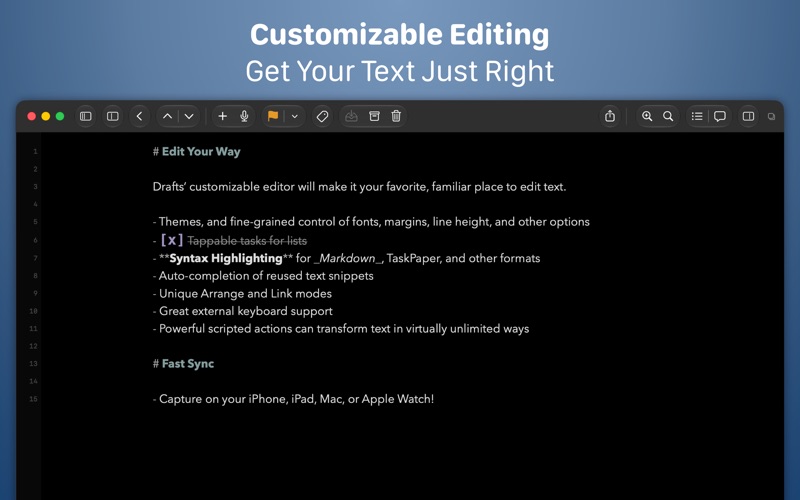
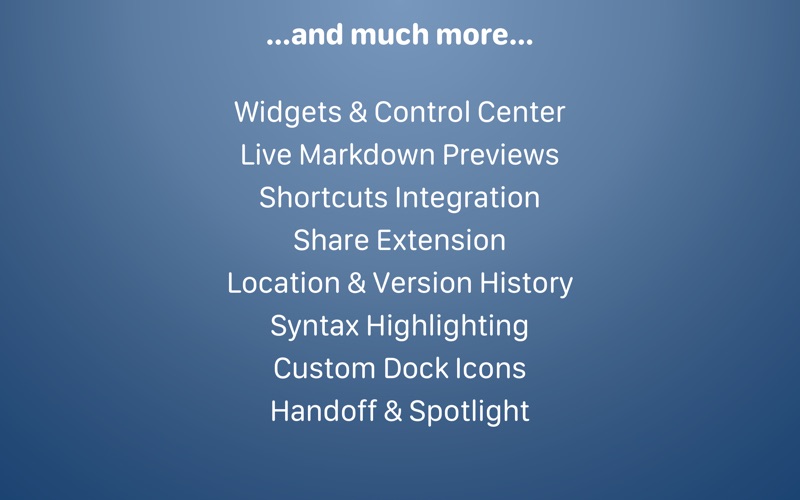
Drafts is where text starts. Quickly capture text and send it almost anywhere! Drafts turns text into action with almost limitless possibilities – it’s a quick notebook, handy editor, and writing automation tool, all in one. Capture all of your text in Drafts and send it to other apps without the extra taps. Just open it and start typing! **Drafts is a multi-award winner!** - App of the Day, TIME Magazine’s Best Apps - MacStories “Lifetime Achievement Award” ## WHY YOU’LL LOVE DRAFTS ## CAPTURE EVERYWHERE: Drafts opens to a new page with the keyboard ready — just waiting for your words. Alternatively, go hands-free with dictation. Drafts helps you write ideas down before you can forget them so and they’ll always be there, ready and waiting. Capture on iPhone, iPad, Mac, and Apple Watch, and Drafts’ fast sync will make your text available everywhere. USE YOUR WORDS: Drafts is a jumping-off point for text — use actions to copy it, share it, or deep-link into other apps and services. Compose a tweet, draft a message, create a file in Dropbox, send a task off to Reminders – Drafts works with tons of your favorite apps and services. REMEMBER IT NOW – OR LATER: New entries go into the Inbox. Once there, you can Tag them for organization, Flag them for importance, or Archive them for long-term storage. TAKE TEXT TO A NEW LEVEL: Customize Drafts to look and work the way you want with tons of interface adjustments — custom fonts and control over spacing, line height, and margins. Use the customizable buttons above the keyboard to convert, manipulate, and transform your writing quickly. Using Drafts as a global inbox for all of your text? Process everything quickly using unique features like Link Mode, Arrange Mode, and text manipulation actions. GETTING WORDS DOWN HAS NEVER BEEN EASIER: Drafts opens lightning fast and with support for capture via Siri, the widget, share extension, file import, and dictation - Drafts is like post-its updated for the smartphone era. ## JOIN THE COMMUNITY ## Check out our Directory (actions.getdrafts.com) for ready-to-use actions and themes. Join the Drafts Community (forums.getdrafts.com) to get help, integration guides, and a regular flow of tips & tricks. ## DRAFTS PRO ## Drafts is always free to use, but you can get more out of Drafts with a Drafts Pro subscription: • Create and Edit Actions • Themes and Icons - suit the experience to your tastes with themes, custom app icons, and more • Workspaces - Apply preferred tag, query, and sort settings for your drafts list with Workspaces • Extra widgets and better share extension options • Enhanced Automation We are always working hard to expand the capabilities of Drafts and keep it up-to-date with the latest technologies. Your support helps keep the app growing – thank you to Drafts Pro subscribers! ## SUBSCRIPTION DETAILS ## • Monthly and annual subscriptions are available • Payment will be charged to your iTunes account at confirmation of purchase • Your subscription will automatically renew unless auto-renew is disabled at least 24 hours before the end of the current subscription period • Automatic renewals will be charged at the same price you were originally charged for the subscription • Subscriptions can be managed or canceled by going to Account Settings on the App Store after purchase Have questions? Contact us on Twitter at @draftsapp or email support@getdrafts.com. Terms: https://getdrafts.com/support/terms Privacy Policy: https://getdrafts.com/support/privacy

See this store page in another country

Prices, ranks and reviews are per country. Revenue above is already worldwide.

More from Agile Tortoise

Drafts
Productivity
10.8K ratingsAnalyze →
Terminology
Reference
1.1K ratingsAnalyze →
Tally • Quick Counter
Utilities
1.8K ratingsAnalyze →
Diced - Puzzle Dice Game
Games
17 ratingsAnalyze →
Simple Scan • Quick Scanner
Productivity
672 ratingsAnalyze →