← Back to charts
Picture Editor+ : Photo Layers icon
APP STORE

Picture Editor+ : Photo Layers

Andor Communications Private Limited · Photo & Video · Japan store
NOT IN TOP 100 HERE
View on App Store ↗ Instagram card
Revenue a month, worldwide
Too small to estimate
Not enough chart or ratings data
New ratings
+0
in 1 days, 6.1K in total
Rating
4.8 of 5
17 ratings in this store
Countries it ranks in
0
was 0 on Oct 18, 2026

Revenue

Estimated from the grossing charts of Oct 24, 2026 in the 53 countries we track, and ratings growth on the App Store.

EST. REVENUE / MONTH · WORLDWIDE
Unranked
Not in any grossing chart, and it sells nothing in the store (no in-app purchases, free download). Any revenue comes from ads or payments outside the store, which we can't see.
EST. LIFETIME DOWNLOADS
595 to 1.7K
Estimated from ratings count
RATINGS
17
AVG RATING
4.82
PRICE
無料
AGE
8.2y
LAST UPDATE
79d ago
VERSION
1.1.7
SIZE
177 MB
AGE RATING
4+

Last 30 days

From our daily snapshots of every grossing chart and daily ratings counts.

DAYS IN A GROSSING CHART
1 / 30
COUNTRIES NOW
0 (was 0)
NEW RATINGS, LAST 1 DAYS
+0
EST. REVENUE FROM CHARTS, DAILY · APP STORE ONLY EST
Show daily values
Sep 26, 2026not in a grossing chart
Sep 27, 2026not in a grossing chart
Sep 28, 2026not in a grossing chart
Sep 29, 2026not in a grossing chart
Sep 30, 2026not in a grossing chart
Oct 1, 2026not in a grossing chart
Oct 2, 2026not in a grossing chart
Oct 3, 2026not in a grossing chart
Oct 4, 2026not in a grossing chart
Oct 5, 2026not in a grossing chart
Oct 6, 2026not in a grossing chart
Oct 7, 2026not in a grossing chart
Oct 8, 2026not in a grossing chart
Oct 9, 2026not in a grossing chart
Oct 10, 2026not in a grossing chart
Oct 11, 2026not in a grossing chart
Oct 12, 2026not in a grossing chart
Oct 13, 2026not in a grossing chart
Oct 14, 2026not in a grossing chart
Oct 15, 2026not in a grossing chart
Oct 16, 2026not in a grossing chart
Oct 17, 2026not in a grossing chart
Oct 18, 2026not in a grossing chart
Oct 19, 2026not in a grossing chart
Oct 20, 2026not in a grossing chart
Oct 21, 2026not in a grossing chart
Oct 22, 2026not in a grossing chart
Oct 23, 2026$8.7K · 1 country
Oct 24, 2026not in a grossing chart
Oct 25, 2026not in a grossing chart
Best rank Sep 26, 2026: not ranked. Now: not ranked. Days at zero are days outside every grossing chart.
RATINGS IN THE CORE COUNTRIES, DAILY
Show daily values
Oct 23, 20266.1K ratings
Oct 24, 20266.1K ratings
6.1K on Oct 23, 2026, 6.1K on Oct 24, 2026. New ratings track new downloads, even outside the charts.

Money and momentum

Measured from the store, not estimated.

WHAT IT CHARGES
No in-app purchases
Earns from its upfront price, ads or payments outside the store.
REVIEW MOMENTUM
0.1 reviews / week
  • Trendfalling
  • Recent reviews average3.0 stars
  • Recent 1 and 2 star share46%
From the latest 39 written reviews, covering 2913 days.
RELEASE CADENCE
1 update in 90 days
  • Typical gap between releases79 days
From the last 18 versions listed on the App Store.
RATING BREAKDOWN
17 ratings
5★82%
4★18%
3★0%
2★0%
1★0%

What users want

From the latest 39 reviews on the Japan App Store, Nov 2, 2018 to Jul 16, 2026: 46% are 1 or 2 stars. Open a theme to read what people wrote.

WHAT THEY COMPLAIN ABOUT · SHARE OF BAD REVIEWS
Price and subscription50%

9 of the 1 and 2 star reviews.

★★★★★ I've only installed the app to try it and signed up for a free trial but for some reason I was charged a year worth of membership.
★★★★★ Great app, but they eventually withhold features and trick you into paying again
★★★★★ Masquerades as free, immediately requires a monthly subscription.
Bugs, things not working11%

2 of the 1 and 2 star reviews.

★★★★★ there's a bug when trying to cut out an image it works for the first time, then if you try to adjust the radius of it, all of a sudden it just doesn't want to work and you have to back out the picture and try to re…
★★★★★ Most of the features it shows you like cutting out pictures or changing backgrounds doesn't work unless you buy a $30 subscription.
Worse after an update11%

2 of the 1 and 2 star reviews.

★★★★★ Why did I buy this … I paid $40 for a photo editor that had amazing functions… the updated version stripped the app of so many features it had… never wasting my money on this developer again
★★★★★ there's a bug when trying to cut out an image it works for the first time, then if you try to adjust the radius of it, all of a sudden it just doesn't want to work and you have to back out the picture and try to re…
WHAT THEY ASK FOR
  • It would be amazing if you could animate photos 4★, Aug 25, 2024
  • The app is amazing and I've already used it and it's better than most editing apps I've downloaded I don't really mind the ads since they don't get in the way too much but to get straight to the point I wish they… 4★, Jan 5, 2019
  • I hope they add a somewhat downgraded version for the free users atleast or put Paid version in their ads 4★, Jan 5, 2019
WORDS THAT KEEP COMING UP IN BAD REVIEWS

Nothing stands out.

WHAT THEY LOVE · SHARE OF GOOD REVIEWS
Easy to use10%

2 of the 4 and 5 star reviews.

★★★★★ It's also very easy to use.💕

Found by matching words and phrases in the reviews, not read by a person. A review can count toward more than one theme.

What users say

Latest reviews, Japan App Store.

★★★★★Jul 16, 2026
Amazing

This app is very good for editing and much more SERIOUSLY

★★★★★Feb 14, 2026
Be very careful with he you download the app

I’ve only installed the app to try it and signed up for a free trial but for some reason I was charged a year worth of membership. Please read and be very careful before you agree to anything. Now I’m stuck with an app I’m not even using .

★★★★★Dec 5, 2025
Scam charges

Great app, but they eventually withhold features and trick you into paying again

★★★★★Oct 15, 2025
Immediately requires a subscription

Masquerades as free, immediately requires a monthly subscription. Waste of a download

★★★★★Aug 25, 2024
It’s great but

It would be amazing if you could animate photos

★★★★★Jul 13, 2024
I only got 1 picture from my gallery at the beginning

And now I can’t add anymore or I don’t see where to add them….
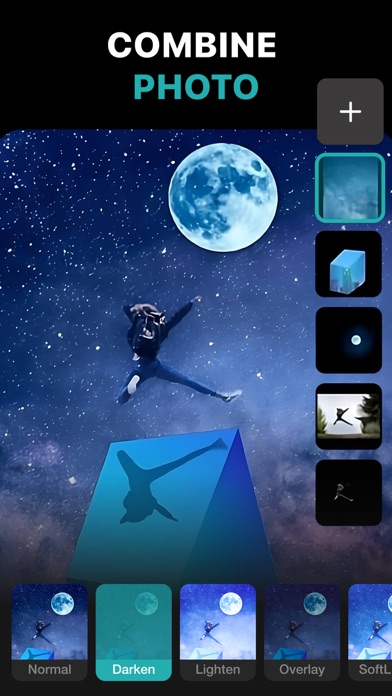
Store screenshots

ScreenshotScreenshotScreenshotScreenshotScreenshotScreenshotScreenshotScreenshotScreenshotScreenshot

App Store ads

Apple Search Ads this app ran in the last 90 days, from Apple's public ad repository.

No App Store ads in the EU
None in the last 90 days.

Apple only publishes ads shown in the EU (EU Digital Services Act), with a 7 day delay. An app that advertises only outside the EU shows nothing here.

Growth research

Where this app is buying and earning its users. Each link opens pre filtered.

ASO keywords

Most repeated terms in the listing. Highlighted ones also appear in the title.

photo14color14photoleaf9create7different7color correction6photo effects6images6blur6mask6photos5image5text5background5effects5photo background5blend4brush4correction4regions4apply4photo editing3images create3mask color3

What's new in 1.1.7

Bug fixes and performance improvements.

Released Sep 2, 2018. Current version shipped Aug 7, 2026.

Store description

PhotoLeaf : Explore creativity by sleight of hand 
PhotoLeaf is a powerful, full-featured, layer-based photo editing app at your fingertips. Photo Leaf and a little imagination can make beautiful photo even more beautiful. PhotoLeaf is a photo editing app for everyone : whether you are novice, a pro user or mobile graphic designer. PhotoLeaf app will easily create amazing multi-layered creative with touch of your fingers. Enjoy All rendering, adjustments, brushes and filters are fully hardware accelerated. Overview: • Blend your photos, combine multiple images using layers • Superimpose photos using complex blending modes. • Remove unwanted objects from your image easily. • Custom overlay supported for more flexibility. • Add text layers, shapes and images to create stylish design creative. • Blur, sharpen, lighten, or darken portion/area of an image • Multiple mask modes can be applied on an area. Brush Mask, Color Mask, radial mask, Luminance mask Color correction Like A Pro: • Adjust the brightness and saturation of a color using Hue, Saturation, Lightness • Single-tap color correction presets with color balance, Temperature, Tint, Vibrance, Saturation. • Control the intensity of the respective color channels in the image with Curves: RGB, blue, red, green channels • Color correction with Levels • Tonal color correction with : Highlight and shadow tone, Tone balancing Light Adjustments: • Light: Exposure, Brightness, Contrast, Highlights, Shadows, Whites, Blacks, • Vignette: Amount, Highlights, Roundness General tools & features: 1. Cutout and Photo Background Changer • Use Lasso tool to recognise similar regions and change photo background • You can superimpose your cutout on any photo background and create new content 2. Color Splash Photo Effects • Selectively apply different color, light and gray photo effects on different regions of photos • Smart lasso tool to automatically select similar color splash regions • Powerful brush to selectively edit images 3. Merge photos • Mix photo to create impressive photo effects • Merge photos using different blend modes like darken blend, lighten blend to create double exposure, multiple exposure photo effects 4. Doodle and drawings • Use different doodle brush options to draw on your images • Change color, thickness and size of your doodle brush 5. Text on photo • Add different text on your images and create text memes as well • Option to change thickness, color, font, opacity of the added text 6. Blur Photo Editor • Apply different blur effects like lens blur, bokeh blur and use mask to blur background. • Apply vignette effect on inner and outer regions. 7. Unlimited social fun • Create your own stickers and cartoonize them • Superimpose stickers on different background images to wow your friends • Instantly share on Facebook,Twitter, WhatsApp, WeChat,Instagram and other social networks 8. Standard Editing • Apply global adjustments to your image by changing lighting, tonality and color of your image PHOTOLEAF PREMIUM SUBSCRIPTION : - You can subscribe PhotoLeaf premium subscription for unlimited access to all features within PhotoLeaf app. - Subscriptions are billed monthly, annually at the rate selected depending on the subscription plan. - Subscriptions auto-renew at the cost of the chosen package, unless cancelled 24-hours in advance prior to the end of the current period.  - The subscription fee is charged to your iTunes account at confirmation of purchase.  - You may manage your subscription and turn off auto-renewal by going to your Account Settings after purchase.  - Per Apple policy, no cancellation of the current subscription is allowed during active subscription period.  - Once purchased, refunds will not be provided for any unused portion of the term. - Terms of use: https://www.photoleaf.app/terms.html - Privacy policy: https://www.photoleaf.app/privacy.html

See this store page in another country

Prices, ranks and reviews are per country. Revenue above is already worldwide.