← Back to charts
Decibel Meter - Sound Meter icon
APP STORE

Decibel Meter - Sound Meter

MYSTIC MOBILE APPS LLC · Utilities · United States store
NOT IN TOP 100 HERE
View on App Store ↗ Instagram card
Revenue a month, worldwide EST
$1.9K
Likely $625 to $5.6K
New ratings
Tracking
Daily counts start building from today
Rating
4.3 of 5
222 ratings in this store
Countries it ranks in
0
was 0 on Oct 18, 2026

Revenue

Estimated from the grossing charts of Oct 25, 2026 in the 53 countries we track, and ratings growth on the App Store.

EST. REVENUE / YEAR · WORLDWIDE
$22.5K
50 new ratings a month on average since launch
EST. LIFETIME DOWNLOADS
7.8K to 22.2K
Estimated from ratings count
WHERE ITS USERS ARE · SHARE OF RATINGS
  • France 1.8K ratings36%
  • Japan 983 ratings19%
  • Italy 601 ratings12%
  • Spain 427 ratings8%
  • Brazil 372 ratings7%
  • Mexico 237 ratings5%
  • United States 222 ratings4%
  • South Korea 152 ratings3%
HOW SURE ARE WE
Not in any grossing chart, so this comes from ratings growth (50 new ratings a month on average since launch): revenue grows with new ratings, more slowly for apps that collect ratings fast. Tested on 418 apps with verified revenue: typically off by about 2 times, and big earners tend to come out low. Countries we don't track (and Google Play in China, which doesn't exist) aren't included, and neither are ads or web payments. Gross revenue before store fees.
RATINGS
222
AVG RATING
4.32
PRICE
Free
AGE
8.4y
LAST UPDATE
116d ago
VERSION
3.52
SIZE
51 MB
AGE RATING
4+

Last 30 days

From our daily snapshots of every grossing chart.

DAYS IN A GROSSING CHART
0 / 30
COUNTRIES NOW
0 (was 0)
EST. REVENUE FROM CHARTS, DAILY · APP STORE ONLY EST
Show daily values
Sep 26, 2026not in a grossing chart
Sep 27, 2026not in a grossing chart
Sep 28, 2026not in a grossing chart
Sep 29, 2026not in a grossing chart
Sep 30, 2026not in a grossing chart
Oct 1, 2026not in a grossing chart
Oct 2, 2026not in a grossing chart
Oct 3, 2026not in a grossing chart
Oct 4, 2026not in a grossing chart
Oct 5, 2026not in a grossing chart
Oct 6, 2026not in a grossing chart
Oct 7, 2026not in a grossing chart
Oct 8, 2026not in a grossing chart
Oct 9, 2026not in a grossing chart
Oct 10, 2026not in a grossing chart
Oct 11, 2026not in a grossing chart
Oct 12, 2026not in a grossing chart
Oct 13, 2026not in a grossing chart
Oct 14, 2026not in a grossing chart
Oct 15, 2026not in a grossing chart
Oct 16, 2026not in a grossing chart
Oct 17, 2026not in a grossing chart
Oct 18, 2026not in a grossing chart
Oct 19, 2026not in a grossing chart
Oct 20, 2026not in a grossing chart
Oct 21, 2026not in a grossing chart
Oct 22, 2026not in a grossing chart
Oct 23, 2026not in a grossing chart
Oct 24, 2026not in a grossing chart
Oct 25, 2026not in a grossing chart
Best rank Sep 26, 2026: not ranked. Now: not ranked. Days at zero are days outside every grossing chart.

Money and momentum

Measured from the store, not estimated.

WHAT IT CHARGES
2 purchases listed
  • Monthly Sound Meter+$0.99
  • Annual Sound Meter+$5.99
Top in-app purchases as listed on the App Store, in local prices.
REVIEW MOMENTUM
0.0 reviews / week
  • Recent reviews average2.4 stars
  • Recent 1 and 2 star share60%
From the latest 15 written reviews, covering 3080 days.
RELEASE CADENCE
0 updates in 90 days
  • Typical gap between releases28 days
From the last 25 versions listed on the App Store.
RATING BREAKDOWN
222 ratings
5★66%
4★18%
3★6%
2★2%
1★8%

What users want

From the latest 15 reviews on the United States App Store, May 21, 2018 to Aug 16, 2023: 60% are 1 or 2 stars. Open a theme to read what people wrote.

WHAT THEY COMPLAIN ABOUT · SHARE OF BAD REVIEWS
Too many ads33%

3 of the 1 and 2 star reviews.

★★★★★ Very inaccurate (+-20db) and ADS on startup.
★★★★★ To Developer: how about letting me “try” the app first before cramming Ads in my eyes...
Wrong or poor results33%

3 of the 1 and 2 star reviews.

★★★★★ Very inaccurate (+-20db) and ADS on startup.
★★★★★ Disinformation is worse than NO information. The dB values shown are WAY off (as in DOZENS of dB lower than actual). This is especially concerning if attempting to use for noise safety/damaging sound levels because…
WHAT THEY ASK FOR
  • NEED A NO ADD OPTION (charge would b ok.) 2★, Oct 24, 2019
WORDS THAT KEEP COMING UP IN BAD REVIEWS

Nothing stands out.

WHAT THEY LOVE · SHARE OF GOOD REVIEWS

Not enough good reviews in English to tell.

Found by matching words and phrases in the reviews, not read by a person. A review can count toward more than one theme.

What users say

Latest reviews, United States App Store.

★★★★★Aug 16, 2023
Leider keine Auswahl des Mikros möglich

Die App ist schön, aber leider kann man nicht auswählen welches Mikro für die Messung genutzt wird, daher leider 2 Sterne Abzug.

★★★★★Apr 7, 2023
Viel Lärm um nichts

Werbung kommt nicht nur als Banner, was kein Problem wäre. Aber zusätzlich im 15sek. Takt popt eine Webevideo auf. Das ist mir deutlich zuviel und das für so eine recht simple gestrickte App, bei der es einige andere gibt. Und gleich gelöscht.

★★★★★Jun 27, 2022
Leider ungenau

Die App ist an sich nicht schlecht. Aber sie ist zu leise eingestellt. Das heißt es fehlen immer ein paar Dezibel. Normale Gesprächslautstärke liegt bei etwa 65dB und die App zeigt lediglich 54dB an. Das ist zu wenig.

★★★★★Oct 3, 2021
Inaccurate and unusable

Very inaccurate (+-20db) and ADS on startup. Unusable

★★★★★Aug 1, 2021
Fluglärm

Der Schallpegelmesser ist sehr sensibel. Leider sitze ich mit Hunden unter der Einflugschneise und messe den Lärm! Dabei ist die App einfach gigantisch. Politiker und zuständige Behörden sollten diese App nutzen um sich klar zu werden das sie die Verantwortung für Lärmbelästigung tragen.

★★★★★Jul 31, 2021
Super App. Und kostenlos.

Danke

Store screenshots

ScreenshotScreenshotScreenshotScreenshotScreenshotScreenshotScreenshotScreenshot

App Store ads

Apple Search Ads this app ran in the last 90 days, from Apple's public ad repository.

Apple's ad repository couldn't be reached right now. Try again later.

Growth research

Where this app is buying and earning its users. Each link opens pre filtered.

ASO keywords

Most repeated terms in the listing. Highlighted ones also appear in the title.

sound10data10watch9time7measurement5measurements5share5keep5device4values4screen4turn smartphone3max values3specific time3sound measurement3real time3sound levels3control measurements3sound measurements3history screen3keep data3data safe3cloud services3log social3

What's new in 3.52

- bug fixes

Released Jun 5, 2018. Current version shipped Jul 2, 2026.

Store description

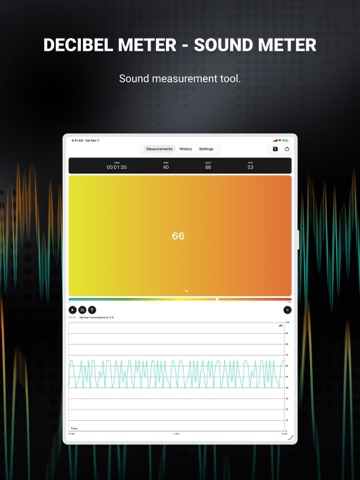
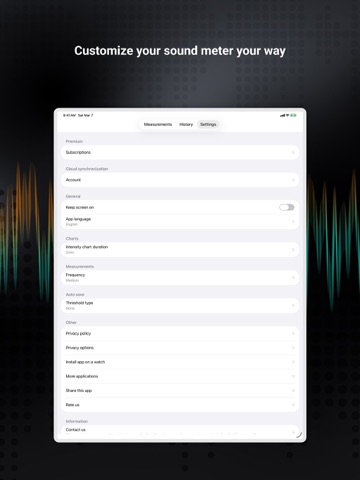
Turn your smartphone into a sound measuring device. Our app uses a built-in microphone to display current decibels level with a corresponding, easily readable text description, and you can start/stop a measurement to get an average as well as min and max values from a specific period of time. - Precision Sound Measurement: Turn your smartphone into a high-accuracy sound meter! Displays real-time decibel levels with clear text descriptions. - Comprehensive Data Analysis: Capture minimum, average, and maximum sound levels. Perfect for analyzing specific time periods and sound environments. - Seamless Watch Integration (Apple Watch): Effortlessly control measurements from your wrist with our Apple Watch app. Hands-free and interference-free! - Customizable Calibration: Manually or automatically adjust decibel input values to fit your needs. Perfect for personalized sound measurement. - Easy Data Sharing: Share sound level readings instantly. Export as CSV or share engaging screenshots with friends or colleagues. - Historical Data Tracking: Revisit your sound measurements with our intuitive history screen. Displays all your past data with detailed statistics. - Cloud Data Security: Keep your data safe and accessible anywhere with our cloud services. Log in with social media or email on any device. - Adaptive Display Settings: Customize your display for short or long-term monitoring. Keep your screen on to always have an eye on your recordings. - Features Exclusive to Apple Watch - Remote Measurement Control: Manage your phone's sound measurements directly from your Apple watch. Simplify your experience! - Real-Time Monitoring on Your Wrist: Monitor current sound levels conveniently on your Apple Watch device. Stay informed effortlessly! Using the calibration option, you can adjust the input decibels values according to your needs. You can also screenshot the whole view and share it with friends. The history screen allows you to see your saved data with the date, time, avg, and max values along with the CSV file from the whole span of measurement, which you can also share as you please. Keep your data safe with our cloud services, which allows you to create accounts and store your data.. Log in using your social media accounts or email to a different device to see and share your data. In settings, you can set up chart length according to your needs, whether you want to see a short period of time or a longer time span. Also, you can change the settings to keep your screen on in order to keep an eye on your recordings at all times. Our app comes with a brand new application for Apple Watch devices. You can easily control your measurements with your watch without having to touch your phone. Controlling the measurements with the watch avoids interference! Privacy policy: https://mysticmobileapps.com/legal/privacy/decibelmeter Terms and conditions: https://mysticmobileapps.com/legal/terms/decibelmeter

See this store page in another country

Prices, ranks and reviews are per country. Revenue above is already worldwide.

More from MYSTIC MOBILE APPS LLC

My GPS Coordinates °
Navigation
2.1K ratingsAnalyze →
My Barometer and Altimeter
Weather
1.1K ratingsAnalyze →
My Altitude and Elevation GPS
Navigation
1.1K ratingsAnalyze →
Vibration meter - Seismometer
Utilities
14 ratingsAnalyze →
My GPS Tape Measure
Navigation
5 ratingsAnalyze →
My GPS Location °
Navigation
53 ratingsAnalyze →
Altimeter Mountain GPS Tracker
Navigation
9 ratingsAnalyze →
Football Schedule & Scores 25
Sports
16 ratingsAnalyze →
SkiPal - Accurate Ski Tracker
Sports
72 ratingsAnalyze →