← Back to charts
Zoho Show icon
APP STORE

Zoho Show

Zoho Corporation · Productivity · Germany store
NOT IN TOP 100 HERE
View on App Store ↗ Instagram card Google Play version →
Revenue a month, worldwide
Too small to estimate
Not enough chart or ratings data
New ratings
Tracking
Daily counts start building from today
Rating
3.6 of 5
28 ratings in this store
Countries it ranks in
0
was 0 on Oct 18, 2026

Revenue

Estimated from the grossing charts of Oct 24, 2026 in the 53 countries we track, and ratings growth on the App Store.

EST. REVENUE / MONTH · WORLDWIDE
Unranked
Not in any grossing chart, and it sells nothing in the store (no in-app purchases, free download). Any revenue comes from ads or payments outside the store, which we can't see.
EST. LIFETIME DOWNLOADS
980 to 2.8K
Estimated from ratings count
RATINGS
28
AVG RATING
3.64
PRICE
Gratis
AGE
8.1y
LAST UPDATE
32d ago
VERSION
2.32.1
SIZE
201 MB
AGE RATING
4+

Last 30 days

From our daily snapshots of every grossing chart.

DAYS IN A GROSSING CHART
0 / 30
COUNTRIES NOW
0 (was 0)
EST. REVENUE FROM CHARTS, DAILY · BOTH STORES ONLY EST
Show daily values
Sep 26, 2026not in a grossing chart
Sep 27, 2026not in a grossing chart
Sep 28, 2026not in a grossing chart
Sep 29, 2026not in a grossing chart
Sep 30, 2026not in a grossing chart
Oct 1, 2026not in a grossing chart
Oct 2, 2026not in a grossing chart
Oct 3, 2026not in a grossing chart
Oct 4, 2026not in a grossing chart
Oct 5, 2026not in a grossing chart
Oct 6, 2026not in a grossing chart
Oct 7, 2026not in a grossing chart
Oct 8, 2026not in a grossing chart
Oct 9, 2026not in a grossing chart
Oct 10, 2026not in a grossing chart
Oct 11, 2026not in a grossing chart
Oct 12, 2026not in a grossing chart
Oct 13, 2026not in a grossing chart
Oct 14, 2026not in a grossing chart
Oct 15, 2026not in a grossing chart
Oct 16, 2026not in a grossing chart
Oct 17, 2026not in a grossing chart
Oct 18, 2026not in a grossing chart
Oct 19, 2026not in a grossing chart
Oct 20, 2026not in a grossing chart
Oct 21, 2026not in a grossing chart
Oct 22, 2026not in a grossing chart
Oct 23, 2026not in a grossing chart
Oct 24, 2026not in a grossing chart
Oct 25, 2026not in a grossing chart
Best rank Sep 26, 2026: not ranked. Now: not ranked. Days at zero are days outside every grossing chart.

Money and momentum

Measured from the store, not estimated.

WHAT IT CHARGES
No in-app purchases
Earns from its upfront price, ads or payments outside the store.
REVIEW MOMENTUM
0.1 reviews / week
  • Trendrising
  • Recent reviews average3.2 stars
  • Recent 1 and 2 star share38%
From the latest 29 written reviews, covering 2877 days.
RELEASE CADENCE
2 updates in 90 days
  • Typical gap between releases27 days
From the last 25 versions listed on the App Store.
RATING BREAKDOWN
28 ratings
5★36%
4★36%
3★4%
2★7%
1★18%

What users want

From the latest 29 reviews on the Germany App Store, Dec 8, 2018 to Jun 19, 2026: 38% are 1 or 2 stars. Open a theme to read what people wrote.

WHAT THEY COMPLAIN ABOUT · SHARE OF BAD REVIEWS
Crashes and freezes27%

3 of the 1 and 2 star reviews.

★★★★★ App kept crashing, then when I finished my presentation I couldn't even save it or open it due to “upload in progress” error which didn't make sense.
★★★★★ I created a full presentation that I can't use because it won't open, it says that it is downloading and it's been an hour now ;(
★★★★★ App force closes when switching into “share”mode.
Bugs, things not working18%

2 of the 1 and 2 star reviews.

★★★★★ App kept crashing, then when I finished my presentation I couldn't even save it or open it due to “upload in progress” error which didn't make sense.
★★★★★ App force closes when switching into “share”mode.
WHAT THEY ASK FOR
  • - More custom themes would be great 4★, Mar 19, 2024
WORDS THAT KEEP COMING UP IN BAD REVIEWS
pr sentation4
WHAT THEY LOVE · SHARE OF GOOD REVIEWS
Easy to use25%

4 of the 4 and 5 star reviews.

★★★★★ I love not having to be able to sign in and that it's free it's super great and easy and quick to make an awesome presentation and there are so many different themes
★★★★★ - Makes building a basic slide deck a breeze, with smooth transitions, easy image/GIF integration, and hassle-free content input.
★★★★★ I'm a 12 year old and I downloaded this app to make a presentation of my college plans for myself and it was very easy to use.
Fast13%

2 of the 4 and 5 star reviews.

★★★★★ I love not having to be able to sign in and that it's free it's super great and easy and quick to make an awesome presentation and there are so many different themes
★★★★★ TLDR: Awesome free tool, with ample feature, for whipping up interactive slide decks fast, though there's room for improvement.
Worth the money13%

2 of the 4 and 5 star reviews.

★★★★★ I love not having to be able to sign in and that it's free it's super great and easy and quick to make an awesome presentation and there are so many different themes
★★★★★ TLDR: Awesome free tool, with ample feature, for whipping up interactive slide decks fast, though there's room for improvement.

Found by matching words and phrases in the reviews, not read by a person. A review can count toward more than one theme.

What users say

Latest reviews, Germany App Store.

★★★★★Jun 19, 2026
It logs me out when I double tap and I have no clue why

.

★★★★★Jun 15, 2026
Review

It’s really glitchy, because every time I edit it kicks me out and when I get in again every 5 minutes it kicks me out!

★★★★★May 23, 2026
Awesome!

I love not having to be able to sign in and that it’s free it’s super great and easy and quick to make an awesome presentation and there are so many different themes

★★★★★Oct 5, 2025
An sich eine top App

Ich finde die App grundsätzlich sehr gut, habe nur viel mit der Formatierung zu kämpfen. Während der Bearbeitung ändert sich das Layout oft von selber und man bekommt es nicht mehr korrigiert. Auch die Handhabung ist verbesserungsfähig

★★★★★May 10, 2025
Ansich eine super App

Sie hat viele verschiedene Tools vorlagen und arten eine Präsentation zu personalisieren. Allerdings ist es seit einigen Wochen bei mir der Fall (IPad 13 pro) das wenn ich die App schließe und dann wieder öffne ich noch angemeldet bin aber alle meine Präsentationen weg sind. Jedes mal muss man sich abmelden und wieder anmelden um seine Präsentationen wieder zu bekommen und das ist extrem nervig das ich kurz davor bin die App zu wechseln wenn das weiterhin so bleibt.

★★★★★May 2, 2025
Huge bug

Whenever I copyed and pasted an image you cannot add any animations? can the devs fix this bug?
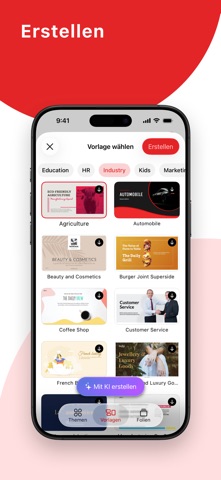
Store screenshots

ScreenshotScreenshotScreenshotScreenshotScreenshotScreenshotScreenshotScreenshotScreenshotScreenshot

App Store ads

Apple Search Ads this app ran in the last 90 days, from Apple's public ad repository.

Apple's ad repository couldn't be reached right now. Try again later.

Growth research

Where this app is buying and earning its users. Each link opens pre filtered.

ASO keywords

Most repeated terms in the listing. Highlighted ones also appear in the title.

sie40mit25und16folien10erg nzen10sie ihre10ihre9hlen sie6sie unter6nzen sie6daten mit6folien mit6ihren6als6oder6erg6nzen6mehr5daten5nnen5ihren folien5mehr als5sie mit5ihre daten5

What's new in 2.32.1

Fehlerkorrekturen und Leistungsverbesserungen.

Released Oct 3, 2018. Current version shipped Sep 23, 2026.

Store description

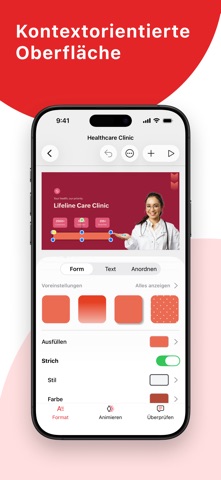
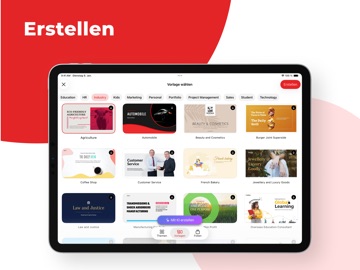
Unterwegs Präsentationen mit iOS-/iPad-OS-Geräten erstellen, teilen und bearbeiten. Importieren Sie PowerPoint-Präsentationen (PPTX-Dateien), arbeiten Sie dort weiter, wo Sie aufgehört haben. Arbeiten Sie offline an Ihren Folien, laden Sie diese als Bilder oder PDF herunter. Fesseln Sie die Aufmerksamkeit Ihres Publikums mit atemberaubenden Vorlagen Setzen Sie Shows facettenreiche Auswahl an Präsentationsvorlagen und Designs zum Beschleunigen Ihrer Folienerstellung ein. Wählen Sie unter Marketing-, Vertriebs- und weiteren Vorlagenoptionen, die das Leben deutlich leichter machen. Profitieren Sie von Hunderten einzelner Folienvorlagen wie Cover- oder Bild-Vorlagen usw. Geben Sie Ihren Ideen den perfekten Rahmen Ergänzen Sie Texte, Bilder, Formen und mehr, passen Sie alles perfekt an. Intelligente Elemente, Silhouetten und mehr hinzufügen Wählen Sie unter mehr als 100 fertigen Formen für Ihre Folien – von allgemeinen Formen bis hin zu Gleichungsformen. Stellen Sie Zahlen mit intelligenten Elementen wie Füllungsindikator und Formindikator visuell ansprechend dar. Daten mit Diagrammen grafisch darstellen Sprechen Sie mit über 15 Diagrammoptionen Ihr Publikum an. Visualisieren Sie Ihre Daten mit Diagrammen wie Linien, Flächen, Torten und anderen für perfekte Verständlichkeit auf einen Blick. Sie können Diagramme auch mit Animationseffekten versehen, so visuell ansprechender machen. Daten mit Tabellen besser organisieren Arrangieren und kategorisieren Sie Ihre Daten mit Tabellen in Ihren Folien. Wählen Sie unter einsatzfertigen Tabellenstilen, passen Sie Ihre Tabellen mit zahlreichen Formatierungsoptionen an. Ergänzen Sie Ihre Tabellen mit Animationseffekten, machen Sie Ihre Daten deutlich ansprechender und interessanter. Folien mit Bildern aufwerten Ergänzen Sie Folien mit Bildern direkt aus Ihrem Telefon. Sie können auch mit der Gerätekamera geschossene Bilder verwenden oder Bilder per Bild-URL einfügen. Folien mit Audio- und Videoelementen ergänzen Fesseln Sie Ihr Publikum mit Audio- und Videoelementen in Ihren Folien. Sie können Folien mit Hintergrundmusik versehen, Ihre Präsentation mit Videos lebendiger gestalten. Atemberaubende Animationen und sanfte Übergänge Sorgen Sie mit auffälligen Animationen und Übergangseffekten für nie nachlassende Aufmerksamkeit. Lassen Sie dank mehr als 20 Animationseffekten Folienelemente auftauchen, einfließen oder an Ort und Stelle rotieren. Wählen Sie unter mehr als 25 Folienüberblendungen wie Jalousie, Spirale und Zoom. Fürs Team freigeben, im Team arbeiten Laden Sie Mitarbeiter ganz einfach durch Ergänzen ihrer E-Mail-Adresse in den Freigabeoptionen ein, sorgen Sie für gute Zusammenarbeit im Handumdrehen. Damit es nicht zu Datenverlusten oder Bearbeitungskollisionen kommt, können Sie mit Show die Zugriffsstufe für jeden Mitarbeiter entsprechend festlegen. Im Team geht alles besser Ergänzen Sie Folienelemente mit Kommentaren, besprechen Sie deren Einsatz im Team. Antworten Sie direkt auf Kommentare, damit alles im Kontext bleibt. Automatische Synchronisierung, damit nichts verloren geht Wiederholtes Speichern ist unnötig: Show speichert Ihren gesamten Fortschritt automatisch. Sie erstellen lediglich ein kostenloses Zoho-Konto und melden sich an – schon werden sämtliche Änderungen direkt mit der Cloud synchronisiert. Ihr Telefon als praktische Fernbedienung Mit Show können Sie Ihr iPhone oder Ihre Apple Watch ganz einfach als Fernbedienung verwenden, wenn Sie per Apple TV präsentieren. Präsentation per Apple TV Geben Sie Ihren Ideen einen großen Rahmen – ganz einfach per Verbindung mit Ihrem Apple TV. Steuern Sie Ihre Folien bequem mit der Apple-TV-Fernbedienung.

See this store page in another country

Prices, ranks and reviews are per country. Revenue above is already worldwide.

More from Zoho Corporation

Notebook – Notizen & To-Do
Productivity
2.5K ratingsAnalyze →
Zoho Mail – E-Mail und Kalende
Productivity
334 ratingsAnalyze →
Authenticator App - OneAuth
Utilities
1.8K ratingsAnalyze →
Zoho CRM Vertrieb Marketing
Business
241 ratingsAnalyze →
Notebook - Notizen, Memo
Productivity
0 ratingsAnalyze →
Zoho Meeting - Meet Virtually
Business
90 ratingsAnalyze →
Customer App - Zoho Assist
Utilities
161 ratingsAnalyze →
Zoho Invoice – Abrechnungsapp
Business
188 ratingsAnalyze →
ManageEngine ADSelfServicePlus
Business
4 ratingsAnalyze →