ASO keywords
Most repeated terms in the listing. Highlighted ones also appear in the title.
calendar10event7plans7tasks countdowns6countdowns6keep6agenda6tasks5see5add5events reminders5widgets keep5next event5quick add5events4reminders4next4widgets4dates4details4side4supported4quick4reminders tasks3
What's new in 3.9.4
• InstaCal is ready for iPhone Duo. Open it and the calendar and agenda sit side by side around the fold, with your choice of split and where the buttons go. Fold or unfold and whatever you were in the middle of stays put.
• Tap a flight number in an event for its live status, with gates and times.
• Quick Add colors the words it understood as you type. Tap one to change just that detail, like the time or the place.
• Start time, then countdown: Live Countdown and widgets show an event's start time, then switch to a countdown a few minutes before. A Begin Countdown notification at the switch starts the Live Countdown, and you can add any event to Countdowns from its editor.
• StandBy and the Smart Stack: Next Event, Now + Next, Countdowns and the Live Activity show a big countdown. And Desk, a quiet full-screen clock with your next event for a phone on a stand, in Settings › Upcoming › Desk.
• Pick a different calendar icon for your Home Screen in Settings › Appearance.
• Fixes: sheets and a half-typed Quick Add stay put when you rotate or resize; Quick Add hands back the field as soon as you press Return; meeting alerts follow your Alert Calendars and fire once for a meeting in two calendars; swiping to delete no longer opens a Join link; events past midnight show their end time on the day they end; countdowns round up; Duplicate opens a copy; Quick Add in French and Catalan keeps "8h30".
Released Jul 13, 2017. Current version shipped Oct 20, 2026.
Store description
Your events, reminders, tasks and countdowns, together. Plan your day on iPhone and iPad, check what is next in interactive widgets and keep important dates close.
ONE PURCHASE. FOUR PLATFORMS.
One purchase includes four native apps:
• Mac: a menu bar calendar and full calendar window.
• iPhone: your agenda, widgets and Live Activities.
• iPad: calendar, agenda and event details side by side.
• Apple Watch: upcoming plans, tasks, countdowns and complications.
No subscription, separate mobile unlock or InstaCal account to create.
BUILT FOR IPHONE AND IPAD
Move between Agenda, Day, Week, Month, Quarter and Year views. On iPad, see your calendar, agenda and event details side by side. Use notification controls to choose which calendars alert you and when.
YOUR PLANS GO WITH YOU
Check your next event, daily agenda, tasks and countdowns on Apple Watch. On your Mac, keep your calendar one click away in the menu bar.
EVENTS, REMINDERS, TASKS AND COUNTDOWNS
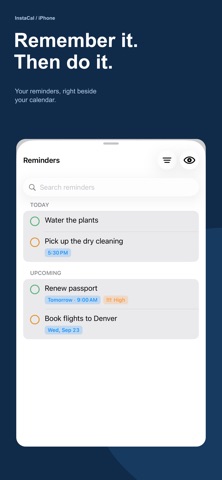
• See calendar events and Apple Reminders together.
• Organize tasks in lists with tags, priorities and checklists.
• Keep trips, birthdays and milestones in view with countdowns.
• Join online meetings and respond to supported invitations.
• See weather and moon phases alongside your plans.
• Get travel-time and leave-by guidance for your next event.
ADD PLANS IN YOUR OWN WORDS
Type "Lunch with Sam tomorrow at noon" to create an event. Quick Add understands dates and times in 31 languages, with processing on your device. Use Quick Edit to move, rename or cancel events, or search from the same field.
WIDGETS THAT KEEP PLANS CLOSE
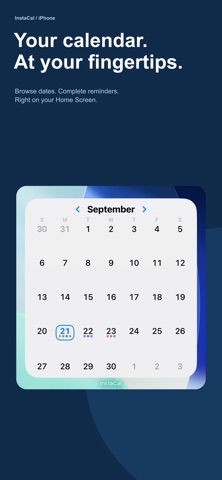
Browse dates and check off reminders in interactive widgets. Keep your agenda, next event and countdowns on your Home Screen, Lock Screen or Mac desktop, with options for supported devices. On supported iPhones, Live Activities keep upcoming plans in view on the Lock Screen and Dynamic Island.
MAKE ROOM FOR YOUR DAY
Switch between calendar views to see the details or the bigger picture. Use calendar sets, choose colors and display a second time zone. Your settings sync through your own iCloud. Add plans with Siri, Shortcuts or the Quick Add control on iPhone and iPad.
WORKS WITH THE CALENDARS YOU USE
Use calendars available through Apple Calendar, or connect Google and Microsoft accounts directly for richer event and invitation support.
IN YOUR LANGUAGE
The interface and natural-language Quick Add support English, German, French, Spanish, Italian, Dutch, Brazilian Portuguese, Russian, Japanese, Korean, and Simplified and Traditional Chinese. Dates, week starts and time formats follow your region.
PRIVACY
No advertising, tracking or usage analytics. Natural-language entry is processed on your device. Calendar connections use the providers you choose. Optional feature-request submissions and image generation send the content you provide to online services; see our privacy policy for details.
WELCOME BACK
InstaCal has been rebuilt for today's devices. Every previous purchaser gets the upgrade at no extra charge, however long ago they bought it. Thank you for giving us another chance.
Questions? Visit instacalapp.com/support/.
Some features require supported devices or services.
See this store page in another country
Prices, ranks and reviews are per country. Revenue above is already worldwide.