← Back to charts
SmartThings icon
APP STORE

SmartThings

Samsung Electronics Co., Ltd. · Lifestyle · United States store
NOT IN TOP 100 HERE
View on App Store ↗ Instagram card Google Play version →
Revenue a month, worldwide
Too small to estimate
Not enough chart or ratings data
New ratings
Tracking
Daily counts start building from today
Rating
4.6 of 5
848.9K ratings in this store
Countries it ranks in
0
was 0 on Oct 16, 2026

Revenue

Estimated from the grossing charts of Oct 21, 2026 in the 53 countries we track, and ratings growth on the App Store.

EST. REVENUE / MONTH · WORLDWIDE
Unranked
Not in any grossing chart, and it sells nothing in the store (no in-app purchases, free download). Any revenue comes from ads or payments outside the store, which we can't see.
EST. LIFETIME DOWNLOADS
29.7M to 84.9M
Estimated from ratings count
RATINGS
848.9K
AVG RATING
4.57
PRICE
Free
AGE
9.3y
LAST UPDATE
9d ago
VERSION
1.7.52
SIZE
887 MB
AGE RATING
12+

Last 30 days

From our daily snapshots of every grossing chart.

DAYS IN A GROSSING CHART
0 / 30
COUNTRIES NOW
0 (was 0)
EST. REVENUE FROM CHARTS, DAILY · BOTH STORES ONLY EST
Show daily values
Sep 24, 2026not in a grossing chart
Sep 25, 2026not in a grossing chart
Sep 26, 2026not in a grossing chart
Sep 27, 2026not in a grossing chart
Sep 28, 2026not in a grossing chart
Sep 29, 2026not in a grossing chart
Sep 30, 2026not in a grossing chart
Oct 1, 2026not in a grossing chart
Oct 2, 2026not in a grossing chart
Oct 3, 2026not in a grossing chart
Oct 4, 2026not in a grossing chart
Oct 5, 2026not in a grossing chart
Oct 6, 2026not in a grossing chart
Oct 7, 2026not in a grossing chart
Oct 8, 2026not in a grossing chart
Oct 9, 2026not in a grossing chart
Oct 10, 2026not in a grossing chart
Oct 11, 2026not in a grossing chart
Oct 12, 2026not in a grossing chart
Oct 13, 2026not in a grossing chart
Oct 14, 2026not in a grossing chart
Oct 15, 2026not in a grossing chart
Oct 16, 2026not in a grossing chart
Oct 17, 2026not in a grossing chart
Oct 18, 2026not in a grossing chart
Oct 19, 2026not in a grossing chart
Oct 20, 2026not in a grossing chart
Oct 21, 2026not in a grossing chart
Oct 22, 2026not in a grossing chart
Oct 23, 2026not in a grossing chart
Best rank Sep 24, 2026: not ranked. Now: not ranked. Days at zero are days outside every grossing chart.

Money and momentum

Measured from the store, not estimated.

WHAT IT CHARGES
No in-app purchases
Earns from its upfront price, ads or payments outside the store.
REVIEW MOMENTUM
73 reviews / week
  • Trendrising
  • Recent reviews average2.2 stars
  • Recent 1 and 2 star share68%
From the latest 500 written reviews, covering 48 days. The store only returns this many, so this is the most recent slice.
RELEASE CADENCE
2 updates in 90 days
  • Typical gap between releases35 days
From the last 25 versions listed on the App Store.
RATING BREAKDOWN
848.9K ratings
5★82%
4★7%
3★3%
2★2%
1★6%

What users want

From the latest 500 reviews on the United States App Store, Sep 5, 2026 to Oct 21, 2026: 68% are 1 or 2 stars. Open a theme to read what people wrote.

WHAT THEY COMPLAIN ABOUT · SHARE OF BAD REVIEWS
Bugs, things not working19%

64 of the 1 and 2 star reviews.

★★★★★ Until power off button stopped working.
★★★★★ Every time there's so many bugs.
★★★★★ Not working on iPhone 18 pro max just spins
Worse after an update15%

51 of the 1 and 2 star reviews.

★★★★★ It doesn't matter if they update the app.
★★★★★ After the latest Tizen update, my TV's calendar is stuck in 2006 and can't even be changed.
★★★★★ The latest update has really taken away from the ease of functionality.
Crashes and freezes9%

31 of the 1 and 2 star reviews.

★★★★★ Crashes constantly whenever I'm trying to add a device.
★★★★★ What a waste of time. New app doesn't work
★★★★★ This app is useless, despite being updated, it never works for me
Slow, laggy, battery9%

30 of the 1 and 2 star reviews.

★★★★★ super slow no matter how many updates you keep up with and no matter if you have high speed wifi.
★★★★★ Both my husband and I get the spinning wheel of death and nothing is loading.
★★★★★ I hope they invest in timely updates to improve how slow it is.
Login and account problems6%

21 of the 1 and 2 star reviews.

★★★★★ Now it won't even let me login.
★★★★★ Why does it ask to click okay to verify on tv if the whole reason I got the app is bc I don't have the remote.
★★★★★ it used to a phone that I never ever used for smartThing verification code and need to wait for 2week to update the phone number that I always use for smartthing.
Lost data, sync, backup6%

21 of the 1 and 2 star reviews.

★★★★★ I lost my physical remote, and now my tv is stuck
★★★★★ Menus are hard to navigate and the app only syncs with the TV half of the time.
★★★★★ I lost my remote months ago and I've been using this for my frame tv.
Wrong or poor results6%

21 of the 1 and 2 star reviews.

★★★★★ Whoever designed this needs to go back to school because this is a useless loop of incompetence
★★★★★ This app is useless, despite being updated, it never works for me
★★★★★ Nothing will load inside of the app, which makes it completely useless.
Price and subscription4%

13 of the 1 and 2 star reviews.

★★★★★ It's difficult to use, especially considering how expensive it was.
★★★★★ App legit won't load and I have an insanely expensive heating and cooling system I am now unable to operate as a result.
★★★★★ I don't understand how this gorgeous, expensive refrigerator, built by a company as reputable as Samsung, can't get a software issue corrected.
WHAT THEY ASK FOR
  • Crashes constantly whenever I'm trying to add a device. 1★, Oct 20, 2026
  • please bring this downloads back. 1★, Oct 18, 2026
  • I only wish you could use it to preheat the oven. 5★, Oct 18, 2026
  • I really wish there was an option that the remote would just automatically load for the last device instead of having to get onto the network. 3★, Oct 9, 2026
  • Incidentally, it would be nice to be able to change all devices inside a routine simultaneously to off or on. 2★, Oct 5, 2026
  • However, with the latest update, please bring back the off-line device indicator on the home page. 5★, Oct 4, 2026
  • Hate that I need an account and location services just to use a damn tv in this timeline 1★, Sep 28, 2026
  • On the latest update, it now asks me every single time I sign in whether I want a review. 1★, Sep 27, 2026
WORDS THAT KEEP COMING UP IN BAD REVIEWS
frame tv7never works7iphone pro6recent update6spinning wheel5please fix5samsung products5home screen5
WHAT THEY LOVE · SHARE OF GOOD REVIEWS
Easy to use9%

11 of the 4 and 5 star reviews.

★★★★★ User Friendly Easy to figure out Great idea for those that lose remotes Almost zero delay device to device Works away from the house as long as WiFi is on.
★★★★★ Controlling our stove and microwave is so easy and practical.
★★★★★ The directions are easy and make the set-up for all your Samsung devices a breeze.
Useful, it helps9%

11 of the 4 and 5 star reviews.

★★★★★ My nephew lost the little solar remote after showing that capability, maybe he tried charging it somewhere. Downloaded the app and it works like a charm! I can turn on and off, volume and the dials are all there.
★★★★★ I don't know but it feels like Samsung is trying to give me a reason to buy a new tv by taking away useful features.
★★★★★ I've been a SmartThings user since about 2015 and find the program to be very user friendly and useful.
Looks great4%

5 of the 4 and 5 star reviews.

★★★★★ I'm never ever bothered enough by an app to normally write a review but seeing as I use this app almost daily the newest update has me a bit more annoyed than usual. Why remove the ability to switch off and on my TV…
★★★★★ It's a good program. It's it runs smoothly and you can control the device. However, you want. It's so smooth. The app is almost better than Apple home. I suggest you you get the Samsung book family hub or the TVs or…
★★★★★ As a kid this app is beautiful and it is so helpful except my phone dies a lot but that's not your fault love the app and how it is the best thing is I can mess with my parents when I'm on the bus lol thanks for the…
Accurate, great results4%

5 of the 4 and 5 star reviews.

★★★★★ No issues setting it up. Everything is great
★★★★★ Works great for the most part, but there is sometimes a little bit of lag between being able to connect to the TV with the remote
★★★★★ Love the app works great for us setting up home layout took some time I just was overwhelmed with how in depth everything goes.
Fast2%

3 of the 4 and 5 star reviews.

★★★★★ Make a quick button for frequently used apps…you have one however it feels like to much to add them, make it automatic.
★★★★★ My patience is thin so this app was usually slow, not very responsive or reliable when needing to change the channel or any fast.

Found by matching words and phrases in the reviews, not read by a person. A review can count toward more than one theme.

What users say

Latest reviews, United States App Store.

★★★★★Oct 21, 2026
Absolutely useless

This has to be the worst technology app I have ever used. My air conditioner went offline from the app, and all the app can tell me is that it’s offline and to go fix it on my own as it gives no instructions or help to do that. The kicker comes when you actually go to help section in the app, but it only works if you have a connected device, so essentially it tells me I have no connected devices, so it can’t help me. Whoever designed this needs to go back to school because this is a useless loop of incompetence

★★★★★Oct 21, 2026
App not working

It's working fine now, I had to unblock some cookies and use edge.

★★★★★Oct 21, 2026
Getting better

ST is the best and most flexible hub out there for open source functionality. Let’s work on broadening the broadcast range of the v3 hub… I have been struggling with sensors on the far side of a brick wall and range extenders are not helping. Thx!

★★★★★Oct 21, 2026
Power off stopped working

Generally app was good. Until power off button stopped working. I lost my physical remote, and now my tv is stuck

★★★★★Oct 21, 2026
super slow

super slow no matter how many updates you keep up with and no matter if you have high speed wifi. my roku tv in my room is fast af. this one is extremely annoying . and i dont like all the unnecesary buttons . they look like theyre all over the place

★★★★★Oct 21, 2026
Lifesaver as a back up remote

My nephew lost the little solar remote after showing that capability, maybe he tried charging it somewhere. Downloaded the app and it works like a charm! I can turn on and off, volume and the dials are all there.

Store screenshots

ScreenshotScreenshotScreenshotScreenshotScreenshotScreenshotScreenshotScreenshotScreenshotScreenshot

App Store ads

Apple Search Ads this app ran in the last 90 days, from Apple's public ad repository.

No App Store ads in the EU
None in the last 90 days.

Apple only publishes ads shown in the EU (EU Digital Services Act), with a 7 day delay. An app that advertises only outside the EU shows nothing here.

Growth research

Where this app is buying and earning its users. Each link opens pre filtered.

ASO keywords

Most repeated terms in the listing. Highlighted ones also appear in the title.

devices18used12smart11smartthings9home8smart home8control6connect5control smart5features4energy4permissions4home devices3samsung smart3smart devices3devices voice3later later3used scan3scan nearby3nearby devices3devices smartthings3smartthings devices3brands3samsung3

What's new in 1.7.52

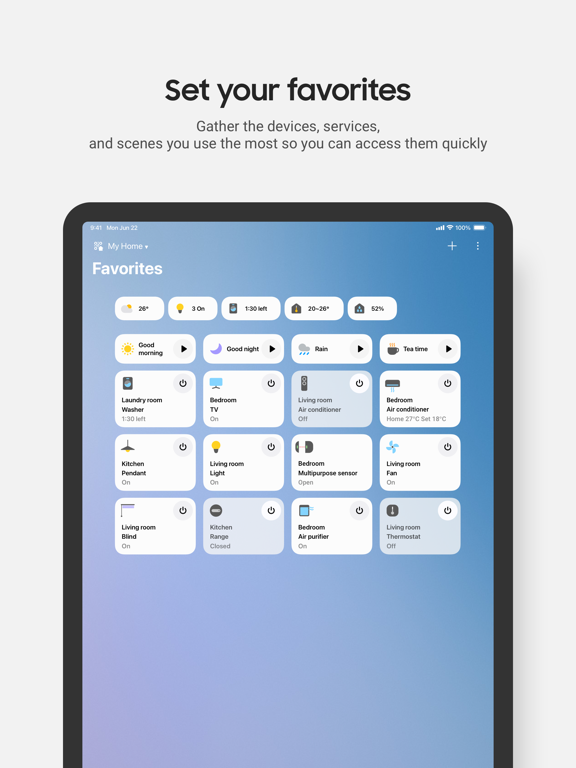
SmartThings is getting even better. - Redesigned Home tab: View and access your frequently used features and essential information right from the Home screen. - Faster control of devices connected to a hub: Control devices connected to your hub more quickly when your phone and hub are on the same Wi-Fi network. - Routine Insights: See your top 3 most frequently used Routines and their recent activity.

Released Jun 20, 2017. Current version shipped Oct 14, 2026.

Store description

Quickly and easily connect and control your smart home devices through SmartThings. SmartThings is compatible with 100s of smart home brands. So, you can control all of your smart home gadgets in one place, including your Samsung Smart TV and smart home appliances. With SmartThings, you can connect, monitor and control multiple smart home devices quicker and easier. Connect your Samsung smart TVs, smart appliances, smart speakers and brands like Ring, Nest and Philips Hue - all from one app. Then control your smart devices using voice assistants including Google Assistant [Key Features] - Control and check in on your home from wherever you are - Connect your smart devices across many different brands to work together by setting ‘scenes’ - Build routines that are set on time, weather, and device status, so your home runs smoothly in the background - Allow shared control by giving access to other users - Receive status updates about your devices with automated notifications - Talk to your devices using Google Assistant - Track, monitor and save money on energy with SmartThings Energy. See how much your home and compatible Samsung devices cost to run, and try various energy saving features, such as AI saving mode, or schedule devices to run during off peak hours. - Receive recipe recommendations by scanning meal kits, wine, and meat. Plan, shop and prep meals with the help of SmartThings Cooking ※ Some features may not be available in all countries. [App requirements] Some mobile devices may not be supported. - iOS 17.0 or later / iPhone XR or later / iPad 6 or later ※ App permissions The following permissions are required for the app service. For optional permissions, the default functionality of the service is turned on, but not allowed. [Optional access permissions] • Apple Health : Used to sync with Apple Health data to give you better Family Care insights • Apple Music : Used to read music album information • Bluetooth : Used to scan for nearby devices using Bluetooth Low Energy (BLE) • Camera: Used to scan QR codes so you can easily add members and devices to SmartThings • Contacts : Used to get phone numbers of your contacts to send text message notifications • Location : Used to locate your devices, create routines based on your location, and scan for nearby devices using Wi-Fi • Local Network : Used to find Wi-Fi connected devices • Microphone: Used to add certain devices to SmartThings using high-frequency sounds • Notification : Used to provide notifications about SmartThings devices and features • NFC : Used to check information about devices that you intend to connect • Photos : Used to play photos and videos on SmartThings devices • Voice recognition : Used to convert voice to text

See this store page in another country

Prices, ranks and reviews are per country. Revenue above is already worldwide.

More from Samsung Electronics Co., Ltd.

Samsung Smart Switch Mobile
Utilities
233 ratingsAnalyze →
Samsung Galaxy Watch (Gear S)
Utilities
15.8K ratingsAnalyze →
Samsung Health
Health & Fitness
35.9K ratingsAnalyze →
Samsung Galaxy Buds
Utilities
6K ratingsAnalyze →
Samsung SMART CAMERA App
Business
435 ratingsAnalyze →
Samsung Smart Washer
Lifestyle
273 ratingsAnalyze →
Samsung Family Hub
Lifestyle
648 ratingsAnalyze →
Samsung Galaxy Fit (Gear Fit)
Utilities
2.5K ratingsAnalyze →
Smart Home
Utilities
944 ratingsAnalyze →