← Back to charts
Trimble-Connect icon
APP STORE

Trimble-Connect

Trimble Inc. · Utilities · United States store
NOT IN TOP 100 HERE
View on App Store ↗ Instagram card Google Play version →
Revenue a month, worldwide
Too small to estimate
Not enough chart or ratings data
New ratings
Tracking
Daily counts start building from today
Rating
3.4 of 5
29 ratings in this store
Countries it ranks in
0
was 0 on Oct 16, 2026

Revenue

Estimated from the grossing charts of Oct 23, 2026 in the 53 countries we track, and ratings growth on the App Store.

EST. REVENUE / MONTH · WORLDWIDE
Unranked
Not in any grossing chart, and it sells nothing in the store (no in-app purchases, free download). Any revenue comes from ads or payments outside the store, which we can't see.
EST. LIFETIME DOWNLOADS
1K to 2.9K
Estimated from ratings count
RATINGS
29
AVG RATING
3.38
PRICE
Free
AGE
10.5y
LAST UPDATE
24d ago
VERSION
4.3.2 (474)
SIZE
176 MB
AGE RATING
4+

Last 30 days

From our daily snapshots of every grossing chart.

DAYS IN A GROSSING CHART
0 / 30
COUNTRIES NOW
0 (was 0)
EST. REVENUE FROM CHARTS, DAILY · BOTH STORES ONLY EST
Show daily values
Sep 24, 2026not in a grossing chart
Sep 25, 2026not in a grossing chart
Sep 26, 2026not in a grossing chart
Sep 27, 2026not in a grossing chart
Sep 28, 2026not in a grossing chart
Sep 29, 2026not in a grossing chart
Sep 30, 2026not in a grossing chart
Oct 1, 2026not in a grossing chart
Oct 2, 2026not in a grossing chart
Oct 3, 2026not in a grossing chart
Oct 4, 2026not in a grossing chart
Oct 5, 2026not in a grossing chart
Oct 6, 2026not in a grossing chart
Oct 7, 2026not in a grossing chart
Oct 8, 2026not in a grossing chart
Oct 9, 2026not in a grossing chart
Oct 10, 2026not in a grossing chart
Oct 11, 2026not in a grossing chart
Oct 12, 2026not in a grossing chart
Oct 13, 2026not in a grossing chart
Oct 14, 2026not in a grossing chart
Oct 15, 2026not in a grossing chart
Oct 16, 2026not in a grossing chart
Oct 17, 2026not in a grossing chart
Oct 18, 2026not in a grossing chart
Oct 19, 2026not in a grossing chart
Oct 20, 2026not in a grossing chart
Oct 21, 2026not in a grossing chart
Oct 22, 2026not in a grossing chart
Oct 23, 2026not in a grossing chart
Best rank Sep 24, 2026: not ranked. Now: not ranked. Days at zero are days outside every grossing chart.

Money and momentum

Measured from the store, not estimated.

WHAT IT CHARGES
No in-app purchases
Earns from its upfront price, ads or payments outside the store.
REVIEW MOMENTUM
0.0 reviews / week
  • Recent reviews average2.3 stars
  • Recent 1 and 2 star share55%
From the latest 11 written reviews, covering 3432 days.
RELEASE CADENCE
2 updates in 90 days
  • Typical gap between releases25 days
From the last 25 versions listed on the App Store.
RATING BREAKDOWN
29 ratings
5★45%
4★10%
3★10%
2★7%
1★28%

What users want

From the latest 11 reviews on the United States App Store, May 31, 2017 to Jul 9, 2025: 55% are 1 or 2 stars. Open a theme to read what people wrote.

WHAT THEY COMPLAIN ABOUT · SHARE OF BAD REVIEWS
Bugs, things not working67%

4 of the 1 and 2 star reviews.

★★★★★ I got a iPad 13 pro m4, already up to date to the last version and it doesn't work, please I need it for work , please again
★★★★★ I cannot find other IFCzip viewer apps, so when this one doesn't work, we can't use it on the job site whatsoever!
★★★★★ There's an issue with the app not being able to upload photos from the 'photos' app on the iOS operating system. Whenever you try to upload from the photo gallery in the “To Do” section, the app crashes. All other form…
Crashes and freezes33%

2 of the 1 and 2 star reviews.

★★★★★ Finally got the May 15 update so we an orbit and zoom. Now whenever you bump/use the screen, the model screen immediately goes black and is unusable. I cannot find other IFCzip viewer apps, so when this one doesn't…
★★★★★ Whenever you try to upload from the photo gallery in the “To Do” section, the app crashes.
Worse after an update33%

2 of the 1 and 2 star reviews.

★★★★★ Finally got the May 15 update so we an orbit and zoom.
★★★★★ This started since Apple updated to have the choice to select what photos an app can use, but even if you allow the App to have full access (“All Photos” option in settings), the app still crashes.
WHAT THEY ASK FOR
  • Some increased server speed syncing would be nice since the thumbnail image I replaced still hasn't shown up since I changed it a few minutes ago. 5★, May 31, 2017
WORDS THAT KEEP COMING UP IN BAD REVIEWS

Nothing stands out.

WHAT THEY LOVE · SHARE OF GOOD REVIEWS

Not enough good reviews in English to tell.

Found by matching words and phrases in the reviews, not read by a person. A review can count toward more than one theme.

What users say

Latest reviews, United States App Store.

★★★★★Jul 9, 2025
Qr code scan

Can not use qr code scan

★★★★★May 22, 2025
Was good for a while

This app was never amazing, syncs pretty slow but pretty useful to pull up anything in the field and upload whatever I needed to await from my computer. Recently the app decided to stop syncing. I can still access everything on the website from my computer, but I cannot sync it to the app. It’s been about a month without being able to update. I checked to make sure the app was updated but still can’t not sync anything, app is basically useless now.

★★★★★Mar 4, 2025
Not working

I got a iPad 13 pro m4, already up to date to the last version and it doesn’t work, please I need it for work , please again

★★★★★Dec 22, 2024
闪退

放大时闪退

★★★★★May 17, 2023
Black screen

I also have a problem when I touch the screen my iPad goes black. The phone version works perfectly. I have used this app for years and it’s helped me a ton

★★★★★May 15, 2023
Black Screen

Finally got the May 15 update so we an orbit and zoom. Now whenever you bump/use the screen, the model screen immediately goes black and is unusable. I cannot find other IFCzip viewer apps, so when this one doesn’t work, we can’t use it on the job site whatsoever! Please fix and make sure it still works with all the models of iPad. Each update excludes a different model (we have old and new ipads).

Store screenshots

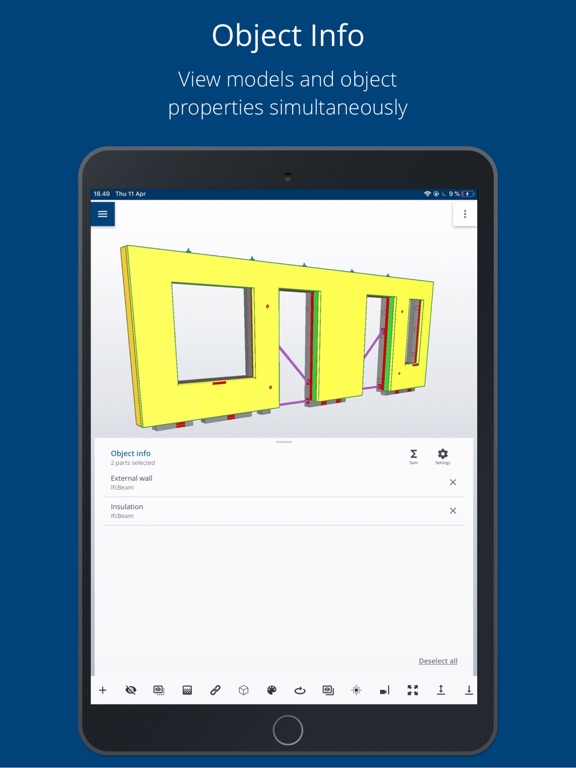
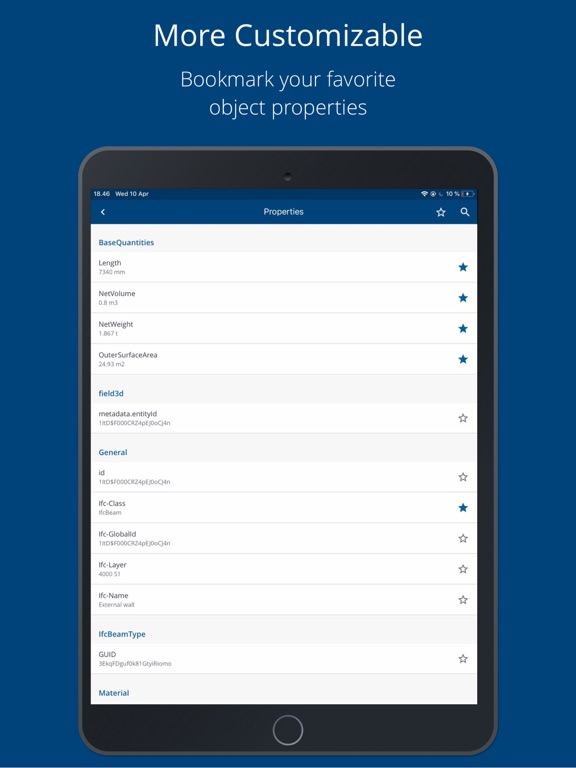
ScreenshotScreenshotScreenshotScreenshotScreenshotScreenshotScreenshotScreenshot

App Store ads

Apple Search Ads this app ran in the last 90 days, from Apple's public ad repository.

No App Store ads in the EU
None in the last 90 days.

Apple only publishes ads shown in the EU (EU Digital Services Act), with a 7 day delay. An app that advertises only outside the EU shows nothing here.

Growth research

Where this app is buying and earning its users. Each link opens pre filtered.

ASO keywords

Most repeated terms in the listing. Highlighted ones also appear in the title.

trimble7trimble connect6project6connect4information4mobile4project information3connect mobile3construction3through3tasks3easily2models2cloud2across2desktop2web2environments2simple2designed2access2offline2internet2created2

What's new in 4.3.2 (474)

- 3D Measurement Tool (iOS): Fixed an issue where measurement values were missing on non-English devices. Distance labels now display correctly across all supported languages. - Cleaner Views List: Removed clutter from internal BCF Topic views. Your Views gallery now shows only user-defined project views for smoother navigation. - Reliable Object Coloring: Fixed a 3D viewer bug where selecting a color from the palette didn't apply to selected objects (such as grid lines). Colors now update instantly. - Shared ToDo Attachments: Fixed a mobile visibility issue—photo attachments on ToDos are now visible to all project members, seamlessly matching Trimble Connect for Web.

Released Apr 10, 2016. Current version shipped Sep 29, 2026.

Store description

Trimble Connect is a project collaboration platform built for construction industry. Project stakeholders can easily share, comment on, and manage the project documents, photos, drawings, and 3D models through the cloud across the design, build, and operate phases of a project. This information can be seamlessly accessed across Desktop, Web, or Mobile environments depending on a stakeholder’s role or tasks. Trimble Connect Mobile App is simple to use and specifically designed for professionals working in remote or field environments such as the construction job site manufacturing facilities, or in project meetings or presentations. It is designed for one click access to the specific information needed to complete tasks that have been organized by the back office using Trimble Connect for Web or Desktop. Project information and files can be stored locally in the mobile application for offline use where internet access isn’t always accessible. Any new Tasks, called ToDos, can be created or modified while offline, then synchronized to the cloud once reconnected to the internet. One key differentiating feature within Trimble Connect Mobile App is its high-performance 3D model viewer. Large complex detailed construction models created by a variety of different Building Information Modeling (BIM) applications in multiple formats (IFC, SKP, RVT, DWG, etc.) can be quickly loaded, overlaid, and easily navigated through in a simple intuitive touch based interface. Users can delete their accounts through https://myprofile.trimble.com/home. Relevant documentation from Trimble is available here - https://help.trimble.com/s/article/How-do-I-delete-my-account.

See this store page in another country

Prices, ranks and reviews are per country. Revenue above is already worldwide.

More from Trimble Inc.

SketchUp - 3D Modeling
Graphics & Design
18K ratingsAnalyze →
Traqspera Timesheets
Business
84 ratingsAnalyze →
Trimble ProjectSight
Business
80 ratingsAnalyze →
Trimble Mobile Manager
Navigation
40 ratingsAnalyze →
Viewpoint Team™
Productivity
45 ratingsAnalyze →
GNSS Status
Navigation
6 ratingsAnalyze →
Terrain Navigator Pro
Productivity
20 ratingsAnalyze →
Visibility Drive
Business
14 ratingsAnalyze →
Trimble Dimensions 2026
Business
2 ratingsAnalyze →