← Back to charts
Norton Family Companion App icon
APP STORE

Norton Family Companion App

Gen Digital Inc. · Utilities · United States store
NOT IN TOP 100 HERE
View on App Store ↗ Instagram card
Revenue a month, worldwide
Too small to estimate
Not enough chart or ratings data
New ratings
Tracking
Daily counts start building from today
Rating
1.4 of 5
799 ratings in this store
Countries it ranks in
0
was 0 on Oct 18, 2026

Revenue

Estimated from the grossing charts of Oct 25, 2026 in the 53 countries we track, and ratings growth on the App Store.

EST. REVENUE / MONTH · WORLDWIDE
Unranked
Not in any grossing chart, and it sells nothing in the store (no in-app purchases, free download). Any revenue comes from ads or payments outside the store, which we can't see.
EST. LIFETIME DOWNLOADS
28K to 79.9K
Estimated from ratings count
RATINGS
799
AVG RATING
1.38
PRICE
Free
AGE
10.9y
LAST UPDATE
24d ago
VERSION
1.18.0
SIZE
33 MB
AGE RATING
4+

Last 30 days

From our daily snapshots of every grossing chart.

DAYS IN A GROSSING CHART
0 / 30
COUNTRIES NOW
0 (was 0)
EST. REVENUE FROM CHARTS, DAILY · APP STORE ONLY EST
Show daily values
Sep 26, 2026not in a grossing chart
Sep 27, 2026not in a grossing chart
Sep 28, 2026not in a grossing chart
Sep 29, 2026not in a grossing chart
Sep 30, 2026not in a grossing chart
Oct 1, 2026not in a grossing chart
Oct 2, 2026not in a grossing chart
Oct 3, 2026not in a grossing chart
Oct 4, 2026not in a grossing chart
Oct 5, 2026not in a grossing chart
Oct 6, 2026not in a grossing chart
Oct 7, 2026not in a grossing chart
Oct 8, 2026not in a grossing chart
Oct 9, 2026not in a grossing chart
Oct 10, 2026not in a grossing chart
Oct 11, 2026not in a grossing chart
Oct 12, 2026not in a grossing chart
Oct 13, 2026not in a grossing chart
Oct 14, 2026not in a grossing chart
Oct 15, 2026not in a grossing chart
Oct 16, 2026not in a grossing chart
Oct 17, 2026not in a grossing chart
Oct 18, 2026not in a grossing chart
Oct 19, 2026not in a grossing chart
Oct 20, 2026not in a grossing chart
Oct 21, 2026not in a grossing chart
Oct 22, 2026not in a grossing chart
Oct 23, 2026not in a grossing chart
Oct 24, 2026not in a grossing chart
Oct 25, 2026not in a grossing chart
Best rank Sep 26, 2026: not ranked. Now: not ranked. Days at zero are days outside every grossing chart.

Money and momentum

Measured from the store, not estimated.

WHAT IT CHARGES
No in-app purchases
Earns from its upfront price, ads or payments outside the store.
REVIEW MOMENTUM
0.4 reviews / week
  • Trendfalling
  • Recent reviews average1.3 stars
  • Recent 1 and 2 star share91%
From the latest 200 written reviews, covering 3380 days. The store only returns this many, so this is the most recent slice.
RELEASE CADENCE
1 update in 90 days
  • Typical gap between releases54 days
From the last 25 versions listed on the App Store.
RATING BREAKDOWN
799 ratings
5★6%
4★3%
3★2%
2★3%
1★87%

What users want

From the latest 200 reviews on the United States App Store, Jul 24, 2017 to Sep 20, 2026: 91% are 1 or 2 stars. Open a theme to read what people wrote.

WHAT THEY COMPLAIN ABOUT · SHARE OF BAD REVIEWS
Bugs, things not working19%

35 of the 1 and 2 star reviews.

★★★★★ Randomly blocked google and would not stop beeping. It has done this many times now and I feel it isn't worth the time it takes to set up. 1 star
★★★★★ Straight up it doesn't work correctly if you want audit your children's websites without getting in their way.
★★★★★ My son updated to iOS 26 and now my favorite feature the instant lock doesn't work.
Lost data, sync, backup12%

21 of the 1 and 2 star reviews.

★★★★★ MY MOM THOUGHT IT WOULD BE HILARIOUS HAVING TO FIGURE OUT HOW TO USE THIS FOR AN HOUR, THEN SHE COULDNT EVEN FIND MY LOCATION LIKE THE APP PROMISED, IT DELETED MY APPS AND MY MOM DIDNT EVEN DO ANYTHING, AND I WONT WISH…
★★★★★ this is terrible and deletes all my apps i tried to delete the app and all my apps disappeared and it keeps glitching my phone and wont let me into anything
★★★★★ This app deleted all of my apps!
No customer support9%

17 of the 1 and 2 star reviews.

★★★★★ This is absolutely ridiculous about the things and needs big support.
★★★★★ The app deleted HIS apps when he would customize them for his Home Screen it would restart and delete all his work blocked him off everything on safari took away his camera after the screen time management I asked…
★★★★★ Just if you could do some thing to her account it would make me a lab feel a lot better because I cannot use of my apps and I cannot use nothing and she would contact me and legally I did not give her permission to put…
Price and subscription9%

16 of the 1 and 2 star reviews.

★★★★★ We all tried to change the settings of what to block but IT'S ALL JUST A STUPID FRIGID SCAM!!!
★★★★★ And I am paying a subscription for this?
★★★★★ But it is literally just a waste of money because you can just go into history on mobile or pc and just check it there.
Limits, credits, locked features9%

16 of the 1 and 2 star reviews.

★★★★★ First they need to give reminders about the LIMIT for the app.
★★★★★ Go to settings, VPN, and simply shut it off.
★★★★★ My parents downloaded it thinking it would simply limit my screen time, but now I can't do anything.
Login and account problems6%

11 of the 1 and 2 star reviews.

★★★★★ On my iPad they never came back on so we had to wipe the entire thing and sign into and create an entire new Apple ID account.
★★★★★ Just if you could do some thing to her account it would make me a lab feel a lot better because I cannot use of my apps and I cannot use nothing and she would contact me and legally I did not give her permission to put…
★★★★★ It's a pain to have to login to Norton to unblock IXL.
Wrong or poor results4%

8 of the 1 and 2 star reviews.

★★★★★ It's just been useless junk to me!
★★★★★ I got this app for my son for screen time management and to make sure he is not looking at inappropriate things but instead it did all these things on his phone I didn't ask for. The app deleted HIS apps when he would…
★★★★★ It is not easy to uninstall, messes everything up if you search for pictures you can't see them even on social platforms, if you have an iPhone you have to log into your Apple ID every time your parents turn off your…
Crashes and freezes2%

4 of the 1 and 2 star reviews.

★★★★★ Now I can't get this off my phone and It is stuck on here.
★★★★★ DO NOT GET THIS APP it crashes my phone and when I talked to customer service I was on hold for 3 hours .
★★★★★ When the app is being used it turns on vpn and in the middle of browsing any website it makes my entire iPhone 8 Plus freeze and the touchscreen completely doesn't work and I have to hold the power button and restart…
WHAT THEY ASK FOR
  • They don't allow ticktock and I have a profile EVEN I can't access and I need access to IT 1★, Apr 4, 2025
  • I prefer just a normal screen time app because if you need more time and apps, you can ask your parents for permission and you will still be able to use them throughout the day! 1★, Mar 27, 2025
  • It works just need a little more shaping. 4★, Dec 29, 2024
  • Despite the daylight and night time hours i selected, it would remain locked anywhere from minutes to a few hours after she should have been able to use it. 1★, Jan 19, 2023
  • It's an absolute privacy violator, like I know ya parents wanna monitor what your child is doing on the internet and checking what apps they have, but people need to have privacy on their devices. 1★, Jan 15, 2022
  • Even if they have no bad apps on it people still need to have phone privacy. 1★, Jan 15, 2022
  • Could you add a setting where you can select a app (for example: YouTube) but not have other apps like: TikTok, Snapchat, Facebook etc. 2★, Jan 4, 2022
  • Lately it has been for school and he needs access right away. 1★, May 4, 2020
WORDS THAT KEEP COMING UP IN BAD REVIEWS

Nothing stands out.

WHAT THEY LOVE · SHARE OF GOOD REVIEWS
Accurate, great results31%

4 of the 4 and 5 star reviews.

★★★★★ The kids app works great.
★★★★★ Got Norton a few months ago after my kids complained about Mobicip (and they were right). So far so good. The profiles were easy to put together, the kids are able to view what they want to view, I have guardrails up…
★★★★★ Overall, it works well enough to be perfectly acceptable.

Found by matching words and phrases in the reviews, not read by a person. A review can count toward more than one theme.

What users say

Latest reviews, United States App Store.

★★★★★Sep 20, 2026
DO NOT GET THIS APP!!!

If I could there would be no stars. Once I got this app for my phone all sort of problems started. It wouldn’t let me send or view photos, the parental controls were sooo stupid and I would ALWAYS get notifications saying a website I went to was blocked even though I wasn’t one the app at all that day. It also blocked me having Safari altogether. Overall, this is a very bad app please do yourself a favor and don’t get it!

★★★★★Jul 15, 2026
THIS APP IS MY VILLAIN ARC

MY MOM THOUGHT IT WOULD BE HILARIOUS HAVING TO FIGURE OUT HOW TO USE THIS FOR AN HOUR, THEN SHE COULDNT EVEN FIND MY LOCATION LIKE THE APP PROMISED, IT DELETED MY APPS AND MY MOM DIDNT EVEN DO ANYTHING, AND I WONT WISH THIS FRICKIN APP ON UR WORST ENEMY, IT BLOCKED ITSELF, ITS THE WORST THING EVERY, THE APPS STORES GRANDKIDS ARE GONNA FEEL THIS, THIS MAY BE THE WORST THING TO HAPPEN TO ANYONE OR ANYTHING, IT GOT FALSE NOTIFICATIONS, MY DATA MAY BE GONE FOREVER, MADE MY SISTER FREAK OUT ON MY MOM, ITS FALSE ADVERTISING , CONFUSING, GIVES U LACK OF PRIVACY, MAKES YOU WANNA JUMP OFF THIS FLAF EARTH

★★★★★Jun 13, 2026
Doesn’t Work

Randomly blocked google and would not stop beeping. It has done this many times now and I feel it isn’t worth the time it takes to set up. 1 star

★★★★★Apr 5, 2026
quality of product is great!

overall. solid app. works well. blocks bad sites. only thing is it has one small weakness. if a child were to disiable cellular data for the app and turn their wifi off. the app doesnt work but the phone is still usable. a bug fix would be to warn if a child accesses the settings app. overall great work and keep going! -norton user

★★★★★Jan 19, 2026
Doesn’t work on iOS 26

Straight up it doesn’t work correctly if you want audit your children’s websites without getting in their way. There are three levels: block, warn and monitor. Even if you choose monitor, if will both block and warn. Even if you specifically allow the website and all associated categories, it will still block and warn. Yes, I resynced the app multiple times. I had the same issue across multiple children on multiple devices. I’m done trying to fix it and uninstalling it.

★★★★★Jan 16, 2026
It’s works

This app is really great at blocking apps but the feeling that your parents can see everything you do is just, you know.

Store screenshots

ScreenshotScreenshotScreenshotScreenshotScreenshotScreenshotScreenshotScreenshotScreenshotScreenshot

App Store ads

Apple Search Ads this app ran in the last 90 days, from Apple's public ad repository.

No App Store ads in the EU
None in the last 90 days.

Apple only publishes ads shown in the EU (EU Digital Services Act), with a 7 day delay. An app that advertises only outside the EU shows nothing here.

Growth research

Where this app is buying and earning its users. Each link opens pre filtered.

ASO keywords

Most repeated terms in the listing. Highlighted ones also appear in the title.

kids15norton family13family11norton10child8time7online6device5manage5email5devices5parents5help5supervision5child device5remote learning5helps4school4internet4see4installed child3kids online3online activities3manage child3

What's new in 1.18.0

Enhancements and minor bug fixes

Released Nov 23, 2015. Current version shipped Oct 1, 2026.

Store description

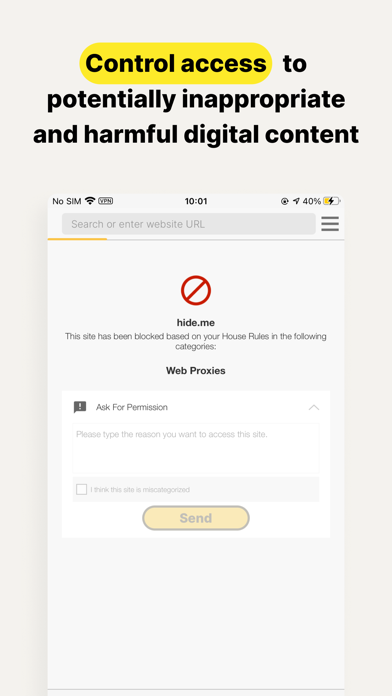
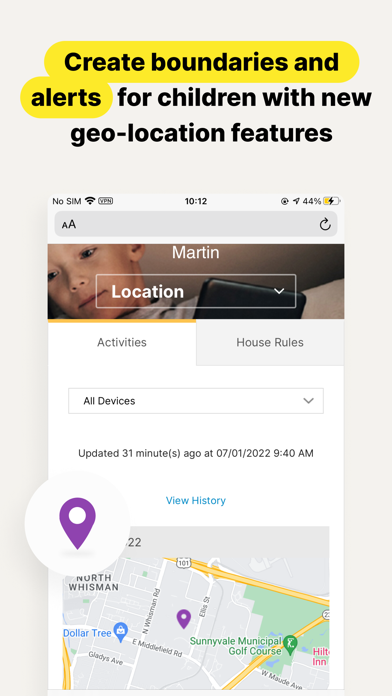
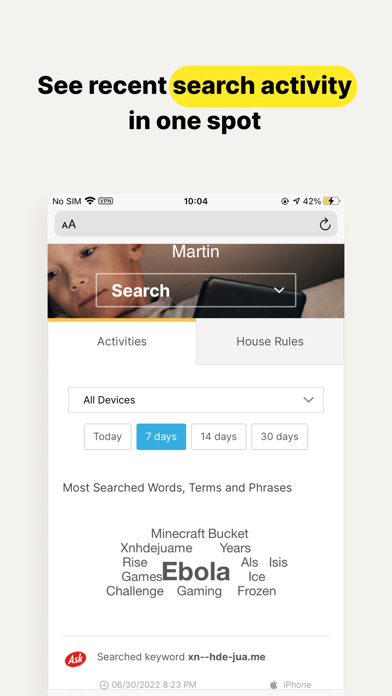
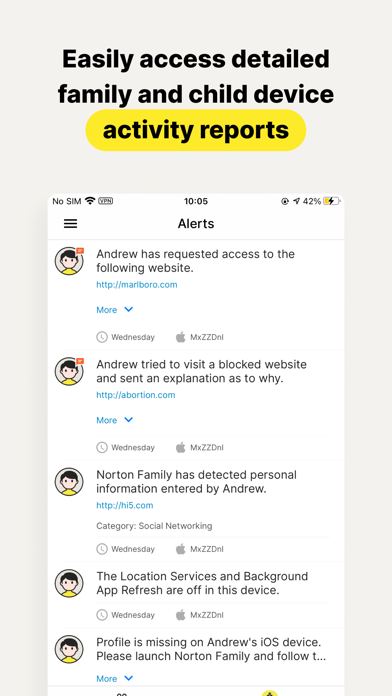
This app should be installed on the child’s iOS device(s). Keeping your kids safer online requires more than managing screen time. Norton Family helps you supervise and manage your kids’ online activities. • Helps you manage your child’s remote learning environment, so you can keep your child focused on schoolwork during the school day. • It helps block unsuitable sites while your kids are surfing the Internet • Let’s you see what websites they’re visiting • Let’s you see what they’re searching for, and so much more… And while Norton Family lets you set online time limits, it also helps you start open and ongoing conversations about how to build safe and smart online habits. As a parent, it’s important to have insight into what your kids are doing. Our helpful tools allow you to monitor kids’ online activities at a glance or be notified by email alerts, so you know when it’s time to talk. IMPORTANT NOTICE: To use the features of Norton Family on your family’s iOS devices, this Norton Family app should first be installed on your child’s iOS device. Parents can configure household policies, manage alerts and reports from family.norton.com. To do this on iOS devices, please download the Norton Family for Parents app. Help your kids explore, learn, and enjoy their connected world more safely with the following features: School Time: Remote learning requires the internet, so pausing the internet on your child’s device is not an option. Norton Family School Time is a feature to help parents manage their child’s remote learning environment, so you can keep your child focused on schoolwork and avoid other internet distractions during the school day. Web Supervision: Let your kids explore the Web freely, with tools that help you block unsuitable websites while keeping you in the know about which sites they’re visiting. Time Supervision: Stay on top of how much time your kids spend on their devices. Search Supervision: See words, terms, and phrases your kids are searching for to gain insights into their interests and help protect them from inappropriate content. Video Supervision*: See a list of the YouTube videos your kids watch on their PCs or iOS devices and even view a snippet of each video, so you know when you need to talk. Instant Lock: Parents can help kids take a break by locking the device so they can re-focus, or join the family at dinner. Individual devices can be unlocked with a PIN. Parents and children can still contact each other while the device is in lock mode. Email Alerts: Receive an email when your kids attempt to visit a blocked site so that you can start a conversation about appropriate content. Access Request: Open the lines of communication by enabling your kids to send you a note from within Norton Family if they disagree with a blocked site or a house rule. Monthly/Weekly Reports: Opt to receive detailed reports of what your kids are doing online, right in your email in-box. Any questions? Send us an email nortonfamily.support@gendigital.com *Video Supervision monitors videos that your kids view on YouTube.com. It does not monitor or track YouTube videos that have been embedded in other websites or blogs. Mobile app must be downloaded separately. An account is required to use the Norton Family app. To set up, review, manage and customize your House Rules and Settings for each child you’ve added, sign in to your account at my.norton.com using the credentials you created.

See this store page in another country

Prices, ranks and reviews are per country. Revenue above is already worldwide.

More from Gen Digital Inc.

Norton VPN – Fast & Secure
Productivity
120.9K ratingsAnalyze →
Norton 360 Security & VPN
Utilities
182.9K ratingsAnalyze →
LifeLock Identity
Finance
196.4K ratingsAnalyze →
Norton Password Manager
Utilities
41.6K ratingsAnalyze →
Norton Safe Web Plus
Utilities
0 ratingsAnalyze →
Norton Private Browser
Utilities
162 ratingsAnalyze →
Norton AntiTrack
Utilities
51 ratingsAnalyze →
Norton Cleaner: Phone Cleanup
Utilities
2.4K ratingsAnalyze →
Norton Family Parental Control
Utilities
1.3K ratingsAnalyze →