← Back to charts
QuickBend: Conduit Bending icon
APP STORE

QuickBend: Conduit Bending

Bret Hardman · Productivity · United States store
NOT IN TOP 100 HERE
View on App Store ↗ Instagram card Google Play version →
Revenue a month, worldwide EST
$1.4K
Likely $468 to $4.2K
New ratings
Tracking
Daily counts start building from today
Rating
4.8 of 5
4K ratings in this store
Countries it ranks in
0
was 0 on Oct 15, 2026

Revenue

Estimated from the grossing charts of Oct 21, 2026 in the 53 countries we track, and ratings growth on the App Store.

EST. REVENUE / YEAR · WORLDWIDE
$16.8K
31 new ratings a month on average since launch
EST. LIFETIME DOWNLOADS
140.4K to 401.1K
Estimated from ratings count
WHERE ITS USERS ARE · SHARE OF RATINGS
  • United States 4K ratings95%
  • Canada 204 ratings5%
  • Mexico 7 ratings0%
  • United Kingdom 1 ratings0%
  • Netherlands 1 ratings0%
  • Saudi Arabia 1 ratings0%
  • South Korea 1 ratings0%
HOW SURE ARE WE
Not in any grossing chart, so this comes from ratings growth (31 new ratings a month on average since launch): revenue grows with new ratings, more slowly for apps that collect ratings fast. Tested on 418 apps with verified revenue: typically off by about 2 times, and big earners tend to come out low. Countries we don't track (and Google Play in China, which doesn't exist) aren't included, and neither are ads or web payments. Gross revenue before store fees.
RATINGS
4K
AVG RATING
4.82
PRICE
$6.99
AGE
11.2y
LAST UPDATE
39d ago
VERSION
4.2.2
SIZE
22 MB
AGE RATING
4+

Last 29 days

From our daily snapshots of every grossing chart.

DAYS IN A GROSSING CHART
0 / 29
COUNTRIES NOW
0 (was 0)
EST. REVENUE FROM CHARTS, DAILY · BOTH STORES ONLY EST
Show daily values
Sep 24, 2026not in a grossing chart
Sep 25, 2026not in a grossing chart
Sep 26, 2026not in a grossing chart
Sep 27, 2026not in a grossing chart
Sep 28, 2026not in a grossing chart
Sep 29, 2026not in a grossing chart
Sep 30, 2026not in a grossing chart
Oct 1, 2026not in a grossing chart
Oct 2, 2026not in a grossing chart
Oct 3, 2026not in a grossing chart
Oct 4, 2026not in a grossing chart
Oct 5, 2026not in a grossing chart
Oct 6, 2026not in a grossing chart
Oct 7, 2026not in a grossing chart
Oct 8, 2026not in a grossing chart
Oct 9, 2026not in a grossing chart
Oct 10, 2026not in a grossing chart
Oct 11, 2026not in a grossing chart
Oct 12, 2026not in a grossing chart
Oct 13, 2026not in a grossing chart
Oct 14, 2026not in a grossing chart
Oct 15, 2026not in a grossing chart
Oct 16, 2026not in a grossing chart
Oct 17, 2026not in a grossing chart
Oct 18, 2026not in a grossing chart
Oct 19, 2026not in a grossing chart
Oct 20, 2026not in a grossing chart
Oct 21, 2026not in a grossing chart
Oct 22, 2026not in a grossing chart
Best rank Sep 24, 2026: not ranked. Now: not ranked. Days at zero are days outside every grossing chart.

Money and momentum

Measured from the store, not estimated.

WHAT IT CHARGES
No in-app purchases
Earns from its upfront price, ads or payments outside the store.
REVIEW MOMENTUM
0.1 reviews / week
  • Trendrising
  • Recent reviews average4.3 stars
  • Recent 1 and 2 star share13%
From the latest 64 written reviews, covering 3981 days.
RELEASE CADENCE
3 updates in 90 days
  • Typical gap between releases42 days
From the last 25 versions listed on the App Store.
RATING BREAKDOWN
4K ratings
5★90%
4★6%
3★2%
2★0%
1★2%

What users want

From the latest 64 reviews on the United States App Store, Nov 28, 2015 to Aug 30, 2026: 13% are 1 or 2 stars. Open a theme to read what people wrote.

WHAT THEY COMPLAIN ABOUT · SHARE OF BAD REVIEWS

No common theme in the bad reviews, or they aren't in English.

WHAT THEY ASK FOR
  • App is honestly perfect you guys should have an instructional video option for each bend that'll make it a 10/10 app 4★, Aug 30, 2026
  • Does an excellent job wish there was a couple more different variations for some things running in parallels like when running a rack. 5★, Mar 26, 2026
  • Just wish there was options to include different size conduits in the same parallel offset run 4★, Nov 9, 2025
  • This app has provided me with everything I need to know about conduit and more, I wish they could add the common things that connect to conduit, 3D examples as-well would be cool too. 5★, Jun 16, 2025
  • Could it be possible to add a compound 90 into the “Multiple Bends”? 4★, Feb 26, 2024
  • Could you also add a way to add space between the different bends you load. 4★, Feb 26, 2024
  • It would be nice to be able to add that into the list of “bends” rather than having to make that adjustment manually. 4★, Feb 26, 2024
  • My only gripe is I wish they would add diagrams to the bender specs as each manufacturer uses a slightly different set of marks and design. 5★, Oct 6, 2023
WORDS THAT KEEP COMING UP IN BAD REVIEWS

Nothing stands out.

WHAT THEY LOVE · SHARE OF GOOD REVIEWS
Easy to use21%

11 of the 4 and 5 star reviews.

★★★★★ The app is easy to use for any experience level.
★★★★★ Intuitive display and clear navigation throughout the app
★★★★★ You choose your bender (even down to the brand) hand bender, electric, Chicago bender whatever, type of conduit, size of conduit, your bend and all the info and numbers are displayed on an easy to read diagram.
Useful, it helps15%

8 of the 4 and 5 star reviews.

★★★★★ Helps me save a lot of time.
★★★★★ This one of the best app i ever had. Intuitive display and clear navigation throughout the app
★★★★★ This is by far the best and most useful app I have found for anything this takes all the math and equations out and just lets plug in your numbers and degrees and you can run with it.
Accurate, great results13%

7 of the 4 and 5 star reviews.

★★★★★ Nice clean interface and accurate measurements.
★★★★★ One of the most accurate bend thanks for the whole information
★★★★★ Makes bending pipe so much easier and gives me much more accurate results than the standard “multiplier” method.
Looks great9%

5 of the 4 and 5 star reviews.

★★★★★ I love the multiple bends feature also how easy and intuitive the interface of the app is.
★★★★★ Well designed, minimal learning curve; a no-frustration bend assistant. The fraction entry is clever… perhaps on the edge of too clever… but once you spot the denominator mode switch, it becomes memorable.
★★★★★ My only gripe is I wish they would add diagrams to the bender specs as each manufacturer uses a slightly different set of marks and design.
Fast8%

4 of the 4 and 5 star reviews.

★★★★★ Simply irreplaceable for quick field bending
★★★★★ Also it's fast for those who are experienced at it!
★★★★★ Why does the Android version have the quick kick option show the marks starting at the arrow or other reference point on the bender while iOS has it on center leaving us to do some calculations to find the start point?

Found by matching words and phrases in the reviews, not read by a person. A review can count toward more than one theme.

What users say

Latest reviews, United States App Store.

★★★★★Aug 30, 2026
4.5/5

App is honestly perfect you guys should have an instructional video option for each bend that’ll make it a 10/10 app

★★★★★Jun 13, 2026
Makes my job easier

Helps me save a lot of time. The app is easy to use for any experience level.

★★★★★May 20, 2026
Uso profesional

Es de gran utilidad para cuando estás sacando los cálculos a la medida más perfecta

★★★★★Apr 24, 2026
Electrical friend

Great app …. Resourceful and accurate

★★★★★Apr 16, 2026
Great helpful tool

This one of the best app i ever had. Intuitive display and clear navigation throughout the app

★★★★★Mar 26, 2026
Love QuickBend

This is by far the best and most useful app I have found for anything this takes all the math and equations out and just lets plug in your numbers and degrees and you can run with it. Does an excellent job wish there was a couple more different variations for some things running in parallels like when running a rack. Overall I LOVE IT

Store screenshots

ScreenshotScreenshotScreenshotScreenshotScreenshotScreenshotScreenshotScreenshotScreenshotScreenshot

App Store ads

Apple Search Ads this app ran in the last 90 days, from Apple's public ad repository.

No App Store ads in the EU
None in the last 90 days.

Apple only publishes ads shown in the EU (EU Digital Services Act), with a 7 day delay. An app that advertises only outside the EU shows nothing here.

Growth research

Where this app is buying and earning its users. Each link opens pre filtered.

ASO keywords

Most repeated terms in the listing. Highlighted ones also appear in the title.

bend9conduit8quickbend6bends6between5offset5kick5benders5radius4bender4matching4conduit bending3bending calculator3conduit type3centerline radius3between different3input styles3different types3bends offset3offset matching3point saddle3bend kick3kick matching3kick parallel3

What's new in 4.2.2

• Updated screens to provide more room for displaying measurements. • Fixed numerous performance issues. • Added a button to InputViews for quickly switching between the number pad and the `Press & Slide` slider. • Measurements now automatically adjust to the available visible area while editing. • Screens can now scroll while editing, making it easier to view important measurements as you adjust them.

Released Jul 28, 2015. Current version shipped Sep 13, 2026.

Store description

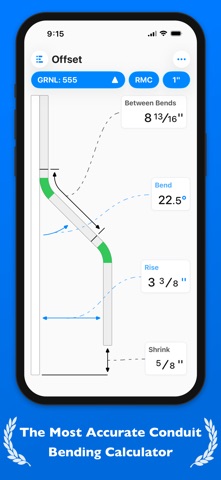
QuickBend is the fastest and most precise conduit bending calculator app. Designed to be innovative and intuitive while remaining visually appealing. This advanced conduit bending calculator offers the most accurate measurements by taking into account the radius of the shoe and bender, plus the conduit type and size diameter. All measurements are generated using the centerline radius algorithm, and have all been rigorously processed and field tested. Even the bends displayed within QuickBend are generated using the same engine. Built for electricians by an electrician. QuickBend can be used by anyone working with conduit or tubing whether you are a seasoned professional, a novice cub, or even a DIY enthusiast. Made to avoid simple mistakes, and to save time and money. In addition to providing fast and precise calculations, there is plenty of information and documentation provided for individual bends. Explanations on how to use specific features, and step by step process to bending conduit. Offering the most intuitive method to input data. Whether you want to get straight to the point, or comb through the possibilities of a bend. You can switch back and forth between different input styles such as a number pad, or a slider bar (Press & Slide). Both having their unique advantages. QuickBend allows you, the user to toggle between three different types of measurements; inches, foot + inches, and centimeters. With QuickCheck built into QuickBend, there's a subtle change in text colors when a bend is impossible (red), or whether the bend may be unlikely to work (orange). This app for convenience, and we want it to benefit you. So much so that we added it into the input styles for bends, so you can see if a bend is possible before even tapping on the bend amount. Supporting the following bends! • Offset • Rolling Offset • Matching Bends Offset • Matching Centers Offset • Parallel Offset • Three-Point Saddle • Four-Point Saddle • 90° Bend • Kick with 90° • Matching Bend Kick • Matching Center Kick • Parallel Kick • Parallel Kick: Forward • Compound 90° - Circle Obstruction • Compound 90° - Rectangle Obstruction • Compound 90° - Square Obstruction • Segmented 90° Plus you have the ability to layout multiple bends on a single conduit, and get each measurement for a mark on the conduit. With the option to easily flip an individual or set of marks per bend. There's no limit to QuickBend. Easily, select between different types of benders and choose the size of the shoe and conduit type all within the same screen that you are working on. No need for complex navigations. In addition, you can pin benders you use the most, so you can select and switch between them quickly without consistently scrolling. All benders are spec'd out using the information provided by the manufacturers, and worst case scenario if one of the many benders available don't match the one you are using you can now add in your own bender. There's also an option to not select a bender and to use the multiplier method. Edit and view all of your benders' specifications. Detailed information on the centerline radius, deduct, gain, setback. Plus the ability to view the travel, and radius adjustment for any degree bend between up-to 90°. All of this is visualized and edited within the 'Bender Specs'.

See this store page in another country

Prices, ranks and reviews are per country. Revenue above is already worldwide.