← Back to charts
PDF Scanner: OCR PDF Converter icon
GOOGLE PLAY

PDF Scanner: OCR PDF Converter

SoulApps Studio · Productivity · Japan store
NOT IN TOP 100 HERE
View on Google Play ↗
Revenue a month, worldwide
Too small to estimate
Not enough chart or ratings data
New ratings
Tracking
Daily counts start building from today
Rating
5.0 of 5
14.4K ratings in this store
Countries it ranks in
0
was 0 on Oct 15, 2026

Revenue

Estimated from the grossing charts of Oct 21, 2026 in the 53 countries we track.

EST. REVENUE / MONTH · WORLDWIDE
Unranked
Not in a grossing chart in any country we track, so there is no rank to estimate from. Most unranked apps earn far less than charted ones, often close to nothing.
LIFETIME INSTALLS (GOOGLE)
2.1M
About 33.1K per month on average since launch
RATINGS
14.4K
AVG RATING
5.00
PRICE
Free
IN APP PURCHASES
¥880 - ¥5,300 per item
CONTAINS ADS
Yes
LAST UPDATE
36d ago
RELEASED
Jun 9, 2021
CONTENT RATING
Rated for 3+

Last 29 days

From our daily snapshots of every grossing chart.

DAYS IN A GROSSING CHART
0 / 29
COUNTRIES NOW
0 (was 0)
EST. REVENUE FROM CHARTS, DAILY · GOOGLE PLAY ONLY EST
Show daily values
Sep 24, 2026not in a grossing chart
Sep 25, 2026not in a grossing chart
Sep 26, 2026not in a grossing chart
Sep 27, 2026not in a grossing chart
Sep 28, 2026not in a grossing chart
Sep 29, 2026not in a grossing chart
Sep 30, 2026not in a grossing chart
Oct 1, 2026not in a grossing chart
Oct 2, 2026not in a grossing chart
Oct 3, 2026not in a grossing chart
Oct 4, 2026not in a grossing chart
Oct 5, 2026not in a grossing chart
Oct 6, 2026not in a grossing chart
Oct 7, 2026not in a grossing chart
Oct 8, 2026not in a grossing chart
Oct 9, 2026not in a grossing chart
Oct 10, 2026not in a grossing chart
Oct 11, 2026not in a grossing chart
Oct 12, 2026not in a grossing chart
Oct 13, 2026not in a grossing chart
Oct 14, 2026not in a grossing chart
Oct 15, 2026not in a grossing chart
Oct 16, 2026not in a grossing chart
Oct 17, 2026not in a grossing chart
Oct 18, 2026not in a grossing chart
Oct 19, 2026not in a grossing chart
Oct 20, 2026not in a grossing chart
Oct 21, 2026not in a grossing chart
Oct 22, 2026not in a grossing chart
Best rank Sep 24, 2026: not ranked. Now: not ranked. Days at zero are days outside every grossing chart.

Money and momentum

Measured from the store, not estimated.

WHAT IT CHARGES
¥880 - ¥5,300 per item
Google Play only shows the price range per item.
REVIEW MOMENTUM
1.2 reviews / week
  • Trendfalling
  • Recent reviews average4.4 stars
  • Recent 1 and 2 star share10%
From the latest 325 written reviews, covering 1957 days.
RATING BREAKDOWN
14.4K ratings
5★100%
4★0%
3★0%
2★0%
1★0%

What users say

Latest reviews, Japan Google Play.

★★★★★May 12, 2026

Didn't like the app. On my device on some screens of the app the buttons on the top are too high, appearing behind the status bar of Android (can't tap on those buttons because of that). Couldn't find OCR feature. Like many other reviewers. Overall impression of a low-effort wrapper over old version of the open-source product (iText). Also, many positive reviews looks faked: from countries where salaries are low, without any actual feedback besides one-word approval.

★★★★★Apr 23, 2026

Good

★★★★★Apr 15, 2026

excited

★★★★★Dec 4, 2024

Nice

★★★★★Jul 19, 2024

This is app is for no use, please remove this from Play Store

★★★★★Jul 4, 2024

Nice

Store screenshots

ScreenshotScreenshotScreenshotScreenshotScreenshotScreenshotScreenshotScreenshot

Growth research

Where this app is buying and earning its users. Each link opens pre filtered.

ASO keywords

Most repeated terms in the listing. Highlighted ones also appear in the title or short description.

pdf17scanner10pdf scanner6pdf converter5files4share4try pdf3scanner ocr3ocr pdf3pdf files3pdf jpeg3ocr3converter3image3scanned3document3try2camera2open2photo2gallery2convert2file2click2

What's new in 2.2.1

This update improves the subscription experience and enhances compatibility with newer Android versions

Store description

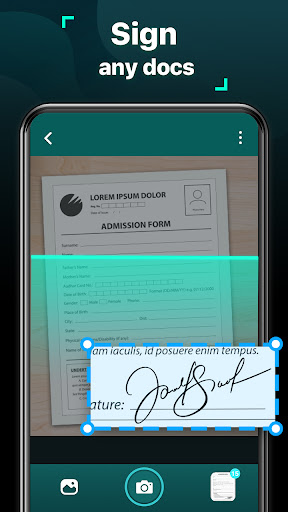
Looking for a free scanner app, which can turn your cell phone into a portal scanner? Try our PDF Scanner: OCR PDF Converter. Trust by one million users around the world, scanning paper materials into PDF files has never be such an enjoyable experience with our PDF Scanner App. ID Card, receipt, contract, certificate, forms, image, passport, even your book collection, all can be perfectly scanned and digitized with this PDF Maker. Features: Camera Scanner Open your photo gallery and convert any image to PDF file with this photo scanner in just one click. Ultra-convenient and quick Scan Quality Optimization Every file you scanned via this document scanner will be enhanced. Text and graphic would be as sharp and clear as the real ones, not a single detail will be missed Optical Character Recognition (OCR) Extract text of any length from your books, papers and files, save them for later review or share Encryption Do you wanna protect your important PDF files? Set a password with this PDF App Share PDF/JPEG Share your scanned files with everyone you want in PDF or JPEG format, via social media, mail etc... How to use this free portable PDF Creator: 1. Open this portable scanner app 2. Choose the camera or pick images from the gallery 3. Drag the anchor point to adjust the size and position of the crop box 4. Click "Edge detection", auto-detect document’s edge and correct perspective 5. Enhance the quality of an image by applying filters 6. Export to JPG or PDF format and share to your contacts if needed 7. Enjoy our PDF Converter to scan any document anywhere and anytime If you have something to convert to PDF, just try this free PDF Scanner App. PDF Scanner: OCR PDF Converter available for free download!

See this store page in another country

Prices, ranks and reviews are per country. Revenue above is already worldwide.

More from SoulApps Studio

Clap to Find Phone & Whistle
Analyze →
Kid's app by Famify
Analyze →
Famify - Parental Control App
Analyze →
KidSafe24-Parental Control App
Analyze →
Bobby by KidSafe24
Analyze →
Remote Control for TV&AC
Analyze →
Smart TV remote control APP
3.1 ★
Analyze →
GPS Camera: Add Timestamp
Analyze →
All Document Reader & Opener
Analyze →