← Back to charts
EX Kernel Manager icon
GOOGLE PLAY

EX Kernel Manager

flar2 · Tools · United Kingdom store
NOT IN TOP 100 HERE
View on Google Play ↗
Revenue a month, worldwide
Too small to estimate
Not enough chart or ratings data
New ratings
Tracking
Daily counts start building from today
Rating
4.6 of 5
5.4K ratings in this store
Countries it ranks in
0
was 0 on Oct 15, 2026

Revenue

Estimated from the grossing charts of Oct 21, 2026 in the 53 countries we track.

EST. REVENUE / MONTH · WORLDWIDE
Unranked
Not in a grossing chart in any country we track, so there is no rank to estimate from. Most unranked apps earn far less than charted ones, often close to nothing.
LIFETIME INSTALLS (GOOGLE)
104.1K
About 757 per month on average since launch
RATINGS
5.4K
AVG RATING
4.59
PRICE
£1.79
IN APP PURCHASES
No
CONTAINS ADS
No
LAST UPDATE
787d ago
RELEASED
May 13, 2015
CONTENT RATING
PEGI 3

Last 29 days

From our daily snapshots of every grossing chart.

DAYS IN A GROSSING CHART
0 / 29
COUNTRIES NOW
0 (was 0)
EST. REVENUE FROM CHARTS, DAILY · GOOGLE PLAY ONLY EST
Show daily values
Sep 24, 2026not in a grossing chart
Sep 25, 2026not in a grossing chart
Sep 26, 2026not in a grossing chart
Sep 27, 2026not in a grossing chart
Sep 28, 2026not in a grossing chart
Sep 29, 2026not in a grossing chart
Sep 30, 2026not in a grossing chart
Oct 1, 2026not in a grossing chart
Oct 2, 2026not in a grossing chart
Oct 3, 2026not in a grossing chart
Oct 4, 2026not in a grossing chart
Oct 5, 2026not in a grossing chart
Oct 6, 2026not in a grossing chart
Oct 7, 2026not in a grossing chart
Oct 8, 2026not in a grossing chart
Oct 9, 2026not in a grossing chart
Oct 10, 2026not in a grossing chart
Oct 11, 2026not in a grossing chart
Oct 12, 2026not in a grossing chart
Oct 13, 2026not in a grossing chart
Oct 14, 2026not in a grossing chart
Oct 15, 2026not in a grossing chart
Oct 16, 2026not in a grossing chart
Oct 17, 2026not in a grossing chart
Oct 18, 2026not in a grossing chart
Oct 19, 2026not in a grossing chart
Oct 20, 2026not in a grossing chart
Oct 21, 2026not in a grossing chart
Oct 22, 2026not in a grossing chart
Best rank Sep 24, 2026: not ranked. Now: not ranked. Days at zero are days outside every grossing chart.

Money and momentum

Measured from the store, not estimated.

WHAT IT CHARGES
No in-app purchases
Earns from its upfront price, ads or payments outside the store.
REVIEW MOMENTUM
1.1 reviews / week
  • Trendfalling
  • Recent reviews average4.4 stars
  • Recent 1 and 2 star share10%
From the latest 500 written reviews, covering 3295 days. The store only returns this many, so this is the most recent slice.
RATING BREAKDOWN
5.4K ratings
5★76%
4★15%
3★4%
2★2%
1★2%

What users say

Latest reviews, United Kingdom Google Play.

★★★★★Jun 3, 2026

Great experience.

★★★★★May 5, 2026

Worked perfect until the latest update. Now the app crashes any time I select 'ElementalX' or 'Flash Centre' in the menu. Nexus 7 2013 Flo, Lineage OS 14.1 Official, rooted. May 2026: Same issue on stock firmware 3 months later. Giving up.

★★★★★Apr 16, 2026

very poor speed on IQOO13 origin os 6 android 16 😰 🤯 😱 😰 🤯 Very poor speed Network???😰😱👎do not use high speed internet?

★★★★★Jan 21, 2026

Great

★★★★★Jan 9, 2026

buggy app. not working on android 16 properly. user tunable disappear when i reopen.

★★★★★Dec 25, 2025

The app works amazingly well! The only issue I find is that the GPU option to always_on does not apply after rebooting, but that's okay, keep up the good work!

Store screenshots

ScreenshotScreenshotScreenshotScreenshotScreenshotScreenshotScreenshotScreenshot

Growth research

Where this app is buying and earning its users. Each link opens pre filtered.

ASO keywords

Most repeated terms in the listing. Highlighted ones also appear in the title or short description.

kernel14battery10pixel pixel8nexus nexus8cpu7pixel7control6custom6nexus6oneplus6elementalx5frequency5sound control5custom kernel5battery monitor5battery life5requires kernel5kernel support5exkm4sound4memory4easily4share4requires4

What's new in 6.04

6.04: -support new hardware -init_boot backup -more s2s options -update translations 6.03: -update for Android 14 -minor bug fixes and improvements -update translations 5.98: -support themed icon 5.90: -update for Android 13 5.86: -new Flash Center, import and create custom kernel JSON configs -new Storage screen -improve Temperature sensors -bug fixes and optimizations 5.83: -improve vendor_dlkm backup/restore -fix block wakelocks on newer devices 5.81: -backup and restore vendor_dlkm

Store description

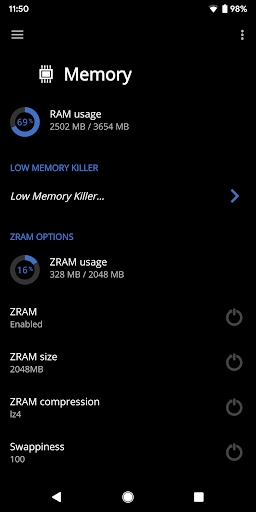
EX Kernel Manager (EXKM) is the ultimate root tool for backup and flashing kernels, tweaking color, sound, gestures and other kernel settings. EXKM gives you total control over your hardware with premium features and a simple and modern user interface. ** Your device must be ROOTED to fully use this app ** This app works with ALL devices and kernels. ElementalX is not required. ** Some advanced features such as wake gestures, color and sound control require a compatible custom kernel Dashboard: your homepage within the app, Dashboard summarizes your current settings and shows real-time CPU and GPU frequencies, temperatures, memory usage, uptime, deep sleep, battery level and temperature, governors, and i/o settings. Battery Monitor: the most accurate way to measure battery life. EXKM's Battery Monitor is designed to show battery statistics that you can use to optimize battery life scientifically. EXKM Battery Monitor measures % battery use per hour and gives separate statistics for screen off (idle drain) and screen on (active drain). It automatically measures only when the battery is discharging so you never have to remember to reset the stats or create markers. Script Manager: easily create, share , edit, execute and test shell scripts (requires SuperSU or Magisk) Flash and Backup: save and restore kernel and recovery backups, flash any boot.img, recovery zip, Magisk module or AnyKernel zip. Import custom kernel JSON configs CPU Settings: easily create, share and load CPU governor profiles for maximum battery life. Adjust max frequency, min frequency, CPU governor, CPU boost, hotplugging, thermals and voltage (if supported by kernel/hardware) Graphics Settings: Max frequency, min frequency, GPU governor and more. Advanced Color Control: RGB controls, saturation, value, contrast, hue and K-Lapse. Save, load and share custom profiles. (requires kernel support) Wake Gestures: sweep2wake, doubletap2wake, sweep2sleep, haptic feedback, camera gesture, wake timeout and more (requires kernel support). Custom User Settings: This feature allows you to add any kernel setting you want. Kernel settings are located in the /proc and /sys directories. Navigate to the desired path and quickly and easily add the setting to the app where it can be changed on the fly or applied at boot. Plus you can easily import/export your custom settings and share with other users. Memory Settings: adjust zRAM, KSM, lowmemorykiller, and virtual memory settings Sound Control: adjust speaker, headphone and mic gain. Supports elementalx, fauxsound, franco sound control, and others (requires kernel support). CPU Times: Show CPU frequency usage and deep sleep, and optionally sort by most used frequencies. Update or Install ElementalX: Get notified and quickly download and install the ElementalX Kernel on supported devices. Many other settings: i/o scheduler, readahead kb, fsync, zRAM, KSM, USB fastcharge, TCP congestion algorithm, last kernel log, magnetic cover control, memory settings, entropy settings, Vox Populi and much more! ElementalX custom kernel is available for the Samsung Galaxy S9/9+, Google Pixel 4a, Pixel 4/4XL, Pixel 3/3 XL, Pixel 3a/3a XL,Pixel 2/2 XL, Pixel/Pixel XL, Nexus 5, Nexus 6, Nexus 5X, Nexus 6P, Nexus 7 (2013), Nexus 9, OnePlus Nord, OnePlus 8 Pro, OnePlus 7 Pro, OnePlus 6/6T, OnePlus 5/5T, OnePlus 3/3T, Essential PH-1, HTC One m7/m8/m9, HTC 10, HTC U11, Moto G4/G4 Plus, Moto G5 Plus, Moto Z, and Xiaomi Redmi Note 3.

See this store page in another country

Prices, ranks and reviews are per country. Revenue above is already worldwide.

More from flar2

DevCheck Device & System Info
4.7 ★
Analyze →
Button Mapper: Remap your keys
3.3 ★
Analyze →
AppDash: App Manager & Backup
Analyze →
High Brightness Mode
2.7 ★
Analyze →