← Back to charts
Split Screen - Dual Window icon
GOOGLE PLAY

Split Screen - Dual Window

GeniusTools Labs · Tools · India store
NOT IN TOP 100 HERE
View on Google Play ↗
Revenue a month, worldwide
Too small to estimate
Not enough chart or ratings data
New ratings
Tracking
Daily counts start building from today
Rating
4.2 of 5
19.2K ratings in this store
Countries it ranks in
0
was 0 on Oct 15, 2026

Revenue

Estimated from the grossing charts of Oct 21, 2026 in the 53 countries we track.

EST. REVENUE / MONTH · WORLDWIDE
Unranked
Not in a grossing chart in any country we track, so there is no rank to estimate from. Most unranked apps earn far less than charted ones, often close to nothing.
LIFETIME INSTALLS (GOOGLE)
6.8M
About 83.6K per month on average since launch
RATINGS
19.2K
AVG RATING
4.15
PRICE
Free
IN APP PURCHASES
₹90.00 - ₹9,000.00 per item
CONTAINS ADS
Yes
LAST UPDATE
357d ago
RELEASED
Jan 25, 2020
CONTENT RATING
Rated for 3+

Last 29 days

From our daily snapshots of every grossing chart.

DAYS IN A GROSSING CHART
0 / 29
COUNTRIES NOW
0 (was 0)
EST. REVENUE FROM CHARTS, DAILY · GOOGLE PLAY ONLY EST
Show daily values
Sep 24, 2026not in a grossing chart
Sep 25, 2026not in a grossing chart
Sep 26, 2026not in a grossing chart
Sep 27, 2026not in a grossing chart
Sep 28, 2026not in a grossing chart
Sep 29, 2026not in a grossing chart
Sep 30, 2026not in a grossing chart
Oct 1, 2026not in a grossing chart
Oct 2, 2026not in a grossing chart
Oct 3, 2026not in a grossing chart
Oct 4, 2026not in a grossing chart
Oct 5, 2026not in a grossing chart
Oct 6, 2026not in a grossing chart
Oct 7, 2026not in a grossing chart
Oct 8, 2026not in a grossing chart
Oct 9, 2026not in a grossing chart
Oct 10, 2026not in a grossing chart
Oct 11, 2026not in a grossing chart
Oct 12, 2026not in a grossing chart
Oct 13, 2026not in a grossing chart
Oct 14, 2026not in a grossing chart
Oct 15, 2026not in a grossing chart
Oct 16, 2026not in a grossing chart
Oct 17, 2026not in a grossing chart
Oct 18, 2026not in a grossing chart
Oct 19, 2026not in a grossing chart
Oct 20, 2026not in a grossing chart
Oct 21, 2026not in a grossing chart
Oct 22, 2026not in a grossing chart
Best rank Sep 24, 2026: not ranked. Now: not ranked. Days at zero are days outside every grossing chart.

Money and momentum

Measured from the store, not estimated.

WHAT IT CHARGES
₹90.00 - ₹9,000.00 per item
Google Play only shows the price range per item.
REVIEW MOMENTUM
6.5 reviews / week
  • Trendfalling
  • Recent reviews average3.7 stars
  • Recent 1 and 2 star share30%
From the latest 500 written reviews, covering 538 days. The store only returns this many, so this is the most recent slice.
RATING BREAKDOWN
19.1K ratings
5★70%
4★7%
3★4%
2★3%
1★15%

What users say

Latest reviews, India Google Play.

★★★★★Oct 20, 2026

ok

★★★★★Oct 19, 2026

ONLY FOR NEGATION BUTTON USERS NOT FOR FULL SCREEN GESTURES.

★★★★★Oct 18, 2026

all apps allowed pls

★★★★★Oct 17, 2026

Hello. Bhai.

★★★★★Oct 17, 2026

didn't work at all

★★★★★Oct 16, 2026

Excellent👍

Store screenshots

ScreenshotScreenshotScreenshotScreenshotScreenshotScreenshotScreenshotScreenshotScreenshotScreenshot

Growth research

Where this app is buying and earning its users. Each link opens pre filtered.

ASO keywords

Most repeated terms in the listing. Highlighted ones also appear in the title or short description.

screen22split screen18multitasking12split11screen shortcut10multi screen8screen splitter8screen dual6dual window6shortcut6dual6splitter6picture6device5multiple5user5multi5experience5user friendly5friendly interface5picture picture5picture multiple5multiple screen5window4

What's new in 5.0.2

No release notes.

Store description

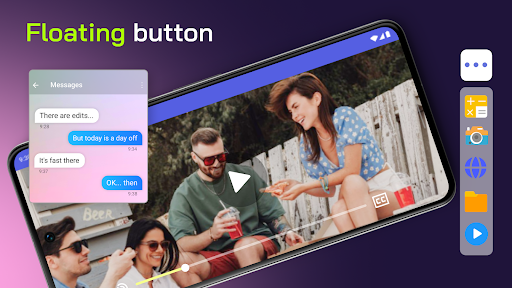
Split Screen Shortcut: Revolutionize Your Device!Have trouble using two apps at once? Say hello to the all-new Split Screen Shortcut – your ultimate mobile multitasking hack. Now, with our revolutionary mobile app, you can easily access and use many apps. Welcome to the future of device interaction with the Split Screen Dual Window! Here's why it's a game-changer! 📄 Key Features of Split Screen Dual Window: 📄 📊Dual Mode: A single Android screen runs and manages multiple tasks simultaneously; 🔘Floating Button: Access the Multitasking Screen with a need and requirement-powered option at a quick; 🌈Customizable Button: One can change the button's color to get it synchronized with the device's theme; 📳Vibration Alert: A vibration alert for every transition; 🌐User-Friendly Interface: The user interface is easy to operate and reach for every user; 🌐Offline Accessibility: It can work on Multitasking Screen features without an internet connection; Multi Screen Splitter - Unleash the Power!The Multitasking app will let you easily manage and run multiple apps simultaneously. Designed for those who need dual display that keeps up with their fast-paced life, the multiscreen splitter feature divides your display for effective multitasking. Experience Multitasking Like Never Before: 📲 Split Screen Dual Window is an excellent way to provide a fast process when using our app to view videos, type text messages, or work on documents. It assures users of a fluid experience in multitasking. This powerful tool is especially beneficial for professionals, students, and all those who want to maximize their productivity. Customize Your Experience With The Multi Screen Splitter: 🎨 Our Picture In Picture: Multiple Screen App can be tailored to your needs, from a color adjustment of the floating button to set up vibration alerts, all the way to the accommodation of any feature for your good. Anywhere, Staying Productive: 🌐 It means that you will remain productive no matter where you are because it provides offline accessibility of Split Screen Shortcut. No Internet? No Problem! You can continue using multi-screen splitter functionality with no hassle. 🌐 User-Friendly Interface: Seamless navigation! Enjoy a user-friendly interface that makes multitasking view intuitive and accessible for all users. Stay connected seamlessly! Set up vibration alerts for actions, ensuring you know every transition. Start Using Split Screen Dual Window Today: Get Split Screen Shortcut to make a difference in your device's use. Our Multi Screen Splitter app offers the best solution for multitasking screens for work or leisure. Step into the future of multitasking with our innovative app. Embrace the convenience and efficiency of Picture In Picture: Multiple Screen App. Start Using Split Screen Shortcut Now!Get access to the ultimate in multitasking. Download Split Screen Shortcut today and experience how easy multitasking and split-screen viewing can make your device an efficient productivity powerhouse. Experience the future with our multi-screen splitter and Picture In Picture: Multiple Screen App.

See this store page in another country

Prices, ranks and reviews are per country. Revenue above is already worldwide.

More from GeniusTools Labs

AR Drawing : Trace Anything
4.5 ★
Analyze →
Sweet Editor Camera Lite
4.3 ★
Analyze →
Metal Detector - Metal Finder
4.2 ★
Analyze →
Screen On/Off With Double Tap
4.4 ★
Analyze →
DJ Music Mixer - Virtual DJ
4.3 ★
Analyze →
Background Video Recorder
4.7 ★
Analyze →
Volume Control - Volume Slider
4.4 ★
Analyze →
Multiple Photo Double Exposure
4.0 ★
Analyze →
Speaker Cleaner: Remove Water
4.5 ★
Analyze →